kigner/audio.cpp-webui: a Windows-first WebUI over the audio.cpp C++ inference engine
audio.cpp with a full-task WebUI - pure C++ audio-model inference engine powered by ggml. TTS, ASR/STT, VAD, voice conversion, speaker diarization, music generation. No Python dependency.
At a glance
- What is it?
- This downstream fork wraps the ggml-based audio.cpp runtime in a Gradio WebUI and Windows launcher scripts, keeping the upstream C++ core while adding one-click model installs. It is a packaging layer, not a new engine, and the Windows portable bundle is where the maintenance effort sits.
- Who is it for?
- Adopt this downstream if you are on Windows and want the audio.cpp model surface reachable without assembling a Python environment: the portable releases carry a pre-installed venv and an updater, and the local Gradio WebUI is described as the primary Windows workflow.
- Can I use it commercially?
- Check first. The repository uses a licence we do not classify automatically, so read its LICENSE file before any commercial use.
- Is it still maintained?
- Yes. The repository last received commits 10 days ago.
- What is it written in?
- Mainly C++, according to GitHub's language statistics.
Answers come from the project's GitHub data, last synced on November 15, 2026, and from our analysis. They are not legal advice.
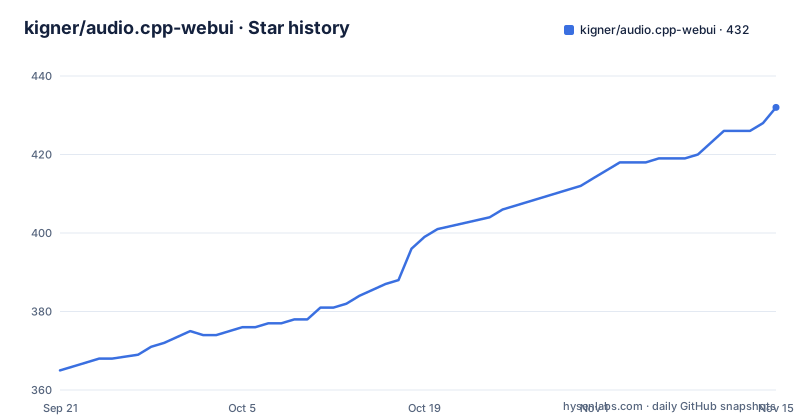
Star history
- kigner/audio.cpp-webui432 ★ · +67
| Repository | 2026-09-21 | 2026-11-15 |
|---|---|---|
| kigner/audio.cpp-webui | 365 | 432 |
67 Stars in the last 55 days, measured from the daily GitHub snapshot. Compare with other projects
Editorial analysis
What kigner/audio.cpp-webui actually adds to audio.cpp
The repository describes itself as a downstream distribution of 0xShug0/audio.cpp, which it credits as Apache-2.0 under ShugoAI LLC. The core inference framework is upstream. What this fork adds is a full-task WebUI, Windows-friendly local launcher scripts, and periodic merges from upstream. That distinction matters when you are deciding what you are adopting: you are adopting a packaging and interface layer around a C++ engine, not a separate engine.
The engine underneath is built on ggml and covers TTS, ASR/STT, VAD, voice conversion, speaker diarization and music generation, with CUDA, HIP/ROCm, Vulkan, Metal and CPU backends behind shared CLI and server entry points. The README frames the motivation as escaping the Conda-and-hundreds-of-packages routine for trying audio models. If your problem is that each audio model family arrives with its own Python environment, this fork's answer is a shared native runtime plus a browser UI on top.
Who it is for, in the project's own terms: Windows users who want the model surface reachable locally. The release notes are explicit that this downstream keeps its local Python/Gradio WebUI as the primary Windows workflow and ships the upstream native WebUI beside it as an independent entry point. Two UIs, one engine, one portable bundle.
Two WebUIs, one ggml runtime: the architecture you are installing
The repository layout tells most of the story. There is a webui/ directory for the Gradio interface, an app/ directory, src/ and include/ for the C++ side, external/ for vendored dependencies, model_specs/ and model_specs_v1/ for model definitions, and a set of .bat launchers at the top level: run_webui.bat, run_native_webui.bat, run_cli_tts.bat, run_server.bat, run_server_asr.bat, run_server_asr_stream.bat, run_realtime.bat and run_speaktype.bat. Each launcher maps to a different entry point rather than a different build.
The Python side is deliberately thin. requirements.txt describes one environment covering every Python layer: webui/ for the Gradio UI and realtime pipeline (gradio, numpy, requests, torch for silero VAD), SpeakType/ for the voice dictation demo (sounddevice, pywebview, pywin32, pyperclip), and tools/ for model_manager and friends (requests, huggingface-hub, safetensors, tqdm). The file is frozen from the project venv and the portable bundle ships that same environment pre-installed as audiocpp-portable\venv.
So the data flow is: browser UI or CLI launcher, Python glue for UI and model management, then the native C++ inference path with ggml doing the tensor work on whichever backend you built. The README notes experimental JSON pipeline support for multi-step workflows, which sits above the individual model calls.
Installing the Windows portable build and running a first task
The documented path is the Windows portable release. The most recent is tagged v0.6.0-windows-prebuilt, published on 2026-08-14, and earlier portable tags exist for v0.5.1 and v0.5.0. The release notes say the portable bundle ships the Python environment pre-installed, so you do not create a venv yourself.
Once extracted, the top-level .bat files are the entry points. To open the local Gradio WebUI, which the release notes call the primary Windows workflow:
run_webui.batThe launcher starts the local UI and the model-loading path. After the backend is ready, the v0.5.1 notes state that model loading returns to the WebUI immediately instead of waiting for Hugging Face update checks; package-update information stays visible in the download status area. If you want the upstream native WebUI instead, use the separate launcher:
run_native_webui.batFor a server-style ASR deployment rather than the browser UI, the repository provides dedicated launchers:
run_server_asr.bat
run_server_asr_stream.bat
Model installation is handled inside the WebUI. The v0.5.0 notes describe one-click model installation, resilient resumable downloads, in-WebUI GGUF conversion and cleanup, and automatic 16 kHz mono preparation for Parakeet streaming ASR. That last point is the kind of detail worth knowing before you feed it arbitrary audio: the preparation step is described as automatic for that streaming path.
Upgrades are handled by update.bat and the updater/ directory. The v0.5.0 and v0.5.1 notes state that updater-enabled portable installs can upgrade directly from v0.2.0 through v0.5.0. The README does not document rollback.
Where this fork is the wrong tool
The clearest limitation is stated by the project itself: the core inference framework belongs to upstream, and this repository is a downstream distribution that is periodically merged. If your interest is the engine's internals, GPU kernels or model ports, the contribution guidance points you upstream, and new model PRs are directed to the community models surface rather than this fork. Forking here to change inference behaviour means carrying a merge burden.
The second limitation is operational. Rollback is not documented. The release notes describe forward upgrades between specific portable versions, but nothing in the README describes downgrading a portable install or recovering a partially applied update. For a desktop tool that is an inconvenience; for anything you treat as infrastructure it is a real gap.
Third, the licence. The repository's LICENSE file is present, but the host classifies the project as NOASSERTION rather than naming a licence. The README attributes the upstream core to 0xShug0/audio.cpp under Apache-2.0, and this fork adds WebUI and launcher code whose terms are not spelled out in the available files. Treat the licence as something to read in the file itself before you ship anything built on it.
Finally, the performance headline numbers in the README (1.8x to 8x faster than Python reference paths, 45%-85% latency cuts, VibeVoice generating a 93.9-minute podcast in 18.2 minutes) come from the project's own reports, mostly on CUDA. They are not a promise about your hardware, and the README itself says the stack is optimized for CUDA. On CPU-only machines the same page quotes 6x+ real-time for Supertonic 3, a very different figure.
How it differs from llama.cpp-style single-runtime tools
The related searches around this project mix it with Llama cpp and ggml, which is understandable given the shared foundation, but the comparison is worth making concrete. llama.cpp is a text-generation runtime: one model family shape, one primary task, with the ecosystem building chat interfaces and servers around it. audio.cpp is a multi-task audio runtime. The README lists TTS, voice cloning, voice conversion, ASR, diarization, VAD, source separation, alignment and codec-style models running through a common framework surface, with 49 model families and 70+ variants as of the 0.6 release.
That breadth changes what the WebUI has to do. A text runtime's UI picks a model and a prompt. This one has to route between task types, manage per-family model downloads, and in this fork handle GGUF conversion and cleanup inside the browser. The v0.6 release added five families (DotTTS, NeuTTS, MuScriptor, MiniMax-H3, SenseVoice) in one version, which gives a sense of how fast the model table moves and why the one-click install path exists.
The practical difference for a reader choosing between them: if you only need speech recognition or only need synthesis, a narrower tool will have fewer moving parts. This project's value is having those tasks share one native runtime and one UI, which is a real benefit only if you actually use more than one of them.
Maintenance, release cadence and upgrade cost
The default branch is v0.6.0 and the last push was on 2026-08-14. The repository is not archived. Three portable Windows releases landed in August 2026: v0.5.0 on 2026-08-08, v0.5.1 on 2026-08-09, and v0.6.0-windows-prebuilt on 2026-08-14, the same day as the 0.6 release note. That is a fast cadence for a packaging fork, and it implies a matching upgrade cost if you follow it.
The upgrade mechanism is update.bat plus the updater/ directory, and version.json at the top level appears to track the installed version. The release notes confirm direct upgrades across a defined version range rather than requiring stepwise installs. What they do not describe is how the updater handles a failed download or a partially replaced bundle, and the README does not document rollback. If you pin a portable install for a team, budget for the possibility that recovering means re-extracting a known-good release rather than running a downgrade command.
On licence implications, the available files support only this much: the upstream core is attributed as Apache-2.0, and this repository's own licence is not identified by the host. Apache-2.0 carries notice and attribution obligations, and this fork's README asks users to credit and contribute upstream. Whether the WebUI and launcher additions are under the same terms is not stated in the README, so read LICENSE before redistributing a portable bundle inside an organisation. This is not legal advice.
Editorial conclusion
Adopt this downstream if you are on Windows and want the audio.cpp model surface reachable without assembling a Python environment: the portable releases carry a pre-installed venv and an updater, and the local Gradio WebUI is described as the primary Windows workflow. Do not adopt it if you need a documented rollback path, a permissive licence you have already cleared, or a server-first deployment; the README does not document rollback, the LICENSE file is unclassified by the host, and the contribution focus is the UI and API server rather than production operations. Before relying on it, verify the licence terms yourself, confirm the model you need appears in the supported model table, and check whether the updater in your portable install can move between the versions you care about.
Frequently asked questions
What is kigner/audio.cpp-webui?
It is a downstream distribution of 0xShug0/audio.cpp, the ggml-based C++ audio inference framework, extended with a full-task WebUI and Windows-friendly local launcher scripts. The README states that the core inference framework comes from upstream and that this fork is periodically merged with it.
How do I download and install the audio.cpp WebUI on Windows?
Use the Windows portable release, most recently tagged v0.6.0-windows-prebuilt on 2026-08-14. The release notes say the portable bundle ships the Python environment pre-installed as audiocpp-portable\venv, so you do not build one yourself, and you start the local UI with run_webui.bat.
Does audio.cpp-webui require Python?
The upstream engine is a pure C++ inference framework built on ggml, and the repository ships a native WebUI entry point alongside the local one. The local Gradio WebUI and the model manager do use Python, and the portable bundle includes that environment pre-installed.
How is audio.cpp-webui related to llama.cpp and ggml?
It shares the ggml foundation that llama.cpp is built on, but the task surface is different: this project covers TTS, ASR/STT, VAD, voice conversion, speaker diarization and music generation through a common runtime, rather than text generation.
Official sources
Add this badge to your README
If you maintain this project, the badge below links readers to this analysis and shows its maintenance status from the daily GitHub snapshot. Paste the markdown into your README; add ?metric=license or ?metric=stars to the image URL for a different field.

[](https://hysenlabs.com/projects/kigner-audio-cpp-webui)Star history chart for your README
[](https://hysenlabs.com/projects/kigner-audio-cpp-webui)Was this useful?