Xplorer: a file manager rewrite that ships a marketplace and a warning
Xplorer, a customizable, modern file manager
At a glance
- What is it?
- The next branch replaces an Electron file manager with Tauri 2, Rust and React, adds AI search and Git, and tells you plainly in its own README that it is not production ready.
- Who is it for?
- Xplorer is a better answer to what could a file manager do that none of them do than it is currently a file manager to depend on. The AI layer with full file context, Git staged inside the file browser, and an extension marketplace with a public SDK are all real and all documented.
- Can I use it commercially?
- Yes, with strict conditions. AGPL-3.0 is a network copyleft licence: if people use a modified version over a network, for example as a hosted service, you must offer them its source code under the same licence.
- Is it still maintained?
- Yes. The repository last received commits 120 days ago.
- What is it written in?
- Mainly TypeScript, according to GitHub's language statistics.
Answers come from the project's GitHub data, last synced on October 23, 2026, and from our analysis. They are not legal advice.
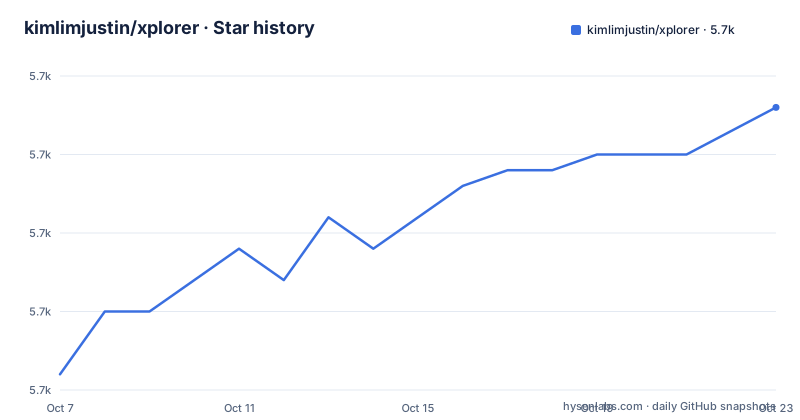
Star history
- kimlimjustin/xplorer5,693 ★ · +17
| Repository | 2026-10-07 | 2026-10-23 |
|---|---|---|
| kimlimjustin/xplorer | 5.7k | 5.7k |
17 Stars in the last 16 days, measured from the daily GitHub snapshot. Compare with other projects
Editorial analysis
A rewrite that tells you it is a rewrite
The README carries a note that more projects should carry: this is the `next` branch, a full rewrite using Tauri 2, React 18 and a new extension system, not yet production-ready, but actively developed, with feedback welcome.
That note exists because the repository's history spans two entirely different applications. The releases show the gap clearly. There is a v1.0.0-alpha.1 from 2026-04-04, and then v0.3.1 from 2022-01-11 and v0.3.0 from 2022-01-02, which are from the previous Electron-era application. A four-year gap between the last old release and the first new one means the star count of 5,674 spans two different programs, and anyone evaluating the project should account for that.
The alpha release notes are more careful than the version number suggests. The first alpha release is described as fully functional while stating it is not production ready, with an explicit instruction to use it at your own risk and back up important files before using Xplorer for file operations.
For a file manager, that warning is not boilerplate. Unlike most desktop software, this one has direct write access to everything on your disk, which is why a Rust backend with a narrow command surface is a defensible architecture rather than an arbitrary one. The project is AGPL-3.0 licensed, has 379 forks and 49 open issues, and was last pushed on 2026-06-25.
What a file manager can do when it stops being just a file manager
The feature list is organised into four columns: File Management, AI Integration, Developer Tools and Extensibility.
File management covers the expected ground plus some choices worth noting: six view modes, cross-platform support for Windows, macOS and Linux, multi-tab browsing with split panes and session persistence, archives in ZIP, TAR, GZ, BZ2 and XZ with password protection, and file operations described as hardware-accelerated using memory-mapped I/O and parallel chunked transfers.
The developer column is where it stops being a file manager. Full Git integration covers branches, staging, commits, diffs, blame and stash. There is an integrated terminal with SSH remote browsing, a rich preview for code with syntax highlighting plus Markdown, PDF, Word, spreadsheets, audio and video, a command palette and configurable keyboard shortcuts.
The use cases section spells out who each of these is for, which is unusually direct writing. For developers: split-pane browsing with Git status, terminal and code editor, staging commits and viewing diffs without leaving the file manager. For researchers and students: asking questions about documents and getting summaries from AI chat that understands your files. For power users: command palette, vim keybindings, per-folder view settings and bulk operations.
Three audiences in three paragraphs, each with its own feature set, is a better specification than a single undifferentiated list.
The AI layer is optional and provider-agnostic
AI integration is listed as connecting any provider through an API, naming OpenAI, Anthropic, Google, DeepSeek, Mistral and Ollama. On top of that sit natural language, fuzzy and semantic file search, AI chat with full file context awareness, and agentic file operations with smart categorisation.
Semantic search over filenames is the feature with the clearest everyday value. Everything else in that column depends on a model you supply, and the model changes what the feature is worth.
The optionality is documented rather than implied. `.env.example` leads with a comment stating these features work without the keys: `CLAUDE_API_KEY` and `OPENAI_API_KEY` for AI, `OLLAMA_BASE_URL` defaulting to localhost:11434 for a local model, and `VITE_MARKETPLACE_URL` defaulting to the hosted marketplace at xplorer.space. So a local-only setup with Ollama is a documented configuration, not a workaround, and the rest of the app functions with no AI configuration at all.
One more detail in that file is worth reading carefully: extension signing. `EXTENSION_SIGNING_KEY` is a 64-character hex string, 32 bytes, described as an Ed25519 private key, with a cargo test command to generate a keypair and a line reading NEVER commit this key. Store in .env only. Extensions are signed, and the signing key handling is written down.
A monorepo with a marketplace and a public extension SDK
The architecture diagram in the README is the most informative part of the document, because it shows this is four applications and four packages rather than one app.
apps/
  client/
  src-tauri/
  web/
packages/
  sdk/
  extension-sdk/
  create-extension/
  extensions/
e2e/
infra/
scripts/
`apps/client` is the React 18, TypeScript and Vite frontend. `apps/src-tauri` is the Rust backend on Tauri 2 with Tokio and Rayon, which is where the file operations and the parallel chunked transfers actually run. `apps/web` is the Next.js marketplace running Prisma and Stripe, which is a payment processor embedded in a desktop file manager project. `infra/` is a Docker Compose file for PostgreSQL, backing the marketplace.
Under `packages/`, `@xplorer/sdk` is the internal service layer, `@xplorer/extension-sdk` is the public extension API, `@xplorer/create-extension` is a CLI scaffolder, and `extensions/` holds the built-in packages.
The built-in extension list is a good indicator of what the project thinks a file manager should do: Git UI, SSH manager, Docker, Google Drive, code editor, image editor and file hasher. Themes named Tokyo Night, Dracula, Nord, Cyberpunk and Ocean Deep ship too.
The test story is in `package.json` rather than the README. Scripts cover frontend unit tests through Vitest, Rust backend tests through `cargo test`, Playwright end-to-end tests, a combined `test:all`, and a `ci:local` script that chains TypeScript checking, lint and both test suites. Husky handles git hooks.
Building it and reading the scripts
Development needs Node.js 20 or newer, pnpm 10 or newer, and Rust from rustup. The `next` branch is what you clone:
git clone https://github.com/kimlimjustin/xplorer.git -b next
cd xplorer
pnpm install
pnpm dev:app
`pnpm dev:app` starts the React frontend and the Tauri backend together, and the app window opens on its own. To run the whole stack including the marketplace web server, `pnpm dev` adds that, and it needs a local PostgreSQL started through `pnpm run marketplace:db`. That separation is worth noting: the desktop app does not require the marketplace to be running locally, only the full-stack dev mode does.
The build and test commands are short enough to list:
pnpm build              # Production build
pnpm test               # Frontend unit tests (Vitest)
pnpm run test:tauri      # Rust backend tests
Binary releases are published per platform: `.msi` and `.exe` for Windows, `.dmg` for macOS, and `.deb` and `.AppImage` for Linux. The manifest version is 1.0.0-alpha.1, matching the alpha tag rather than the 0.3.x line.
What is not documented in the repository is the extension API itself. The public SDK exists at `packages/extension-sdk/`, there is a scaffolder CLI, and `scripts/` holds extension signing utilities including build, sign and watch modes, but the API reference lives on the documentation site at xplorer.space/docs. If you are writing an extension rather than running the app, that site is where the actual contract is.
Editorial conclusion
Xplorer is a better answer to what could a file manager do that none of them do than it is currently a file manager to depend on. The AI layer with full file context, Git staged inside the file browser, and an extension marketplace with a public SDK are all real and all documented. The blocker is the alpha: version 1.0.0-alpha.1, a warning to back up files before file operations, and a default branch named `next`. Install a release if you want to evaluate it, read `packages/extension-sdk/` if you want to write for it, and treat the marketplace as the part most likely to move.
Frequently asked questions
What is Xplorer used for?
It is a cross-platform file manager built on Tauri 2 with a Rust backend, adding Git integration, an integrated terminal with SSH, rich previews, a command palette and an extension marketplace on top of normal file browsing. It also offers AI-assisted search and chat when you configure a provider.
Is Xplorer ready to use for daily file management?
Not yet according to its own README, which states the next branch is not production-ready but actively developed. The first alpha release notes say to use it at your own risk and back up important files before file operations. Install a release if you want to evaluate it.
Does Xplorer need an API key to work?
No. The .env.example file marks the AI keys as optional and notes that features work without them. You can point it at a local Ollama instance, which defaults to localhost:11434, or skip AI configuration entirely and use it as a file browser.
How do I write an extension for Xplorer?
There is a public extension SDK at packages/extension-sdk, a scaffolder CLI at packages/create-extension, and signing utilities under scripts. The API reference itself lives on the documentation site rather than in the repository, and extensions are signed with an Ed25519 key held in EXTENSION_SIGNING_KEY.
Official sources
Add this badge to your README
If you maintain this project, the badge below links readers to this analysis and shows its maintenance status from the daily GitHub snapshot. Paste the markdown into your README; add ?metric=license or ?metric=stars to the image URL for a different field.

[](https://hysenlabs.com/projects/kimlimjustin-xplorer)Star history chart for your README
[](https://hysenlabs.com/projects/kimlimjustin-xplorer)Was this useful?