Spirit of Kiro: a Vue game built as a live demonstration of AI coding
Spirit of Kiro is built with and powered by generative AI. Play the game, or help build it!
At a glance
- What is it?
- Spirit of Kiro is an infinite crafting workshop game whose own repository claims more than 95 percent of its code was written by prompting Kiro. It is at once a playable demo, a reference architecture with its own WebSocket message documentation, and a worked example of how to structure an AI assisted project, and it is not a production game.
- Who is it for?
- Spirit of Kiro earns a place in a team that is learning how to structure an AI assisted project, because the repository ships architecture notes, WebSocket message contracts, a security overview and a branch with known bugs to work on. It does not earn a place as a game you ship, and it is the wrong starting point for a codebase that needs a stable API, because the message formats are documented but the project publishes no releases and the last push was on 2026-07-16.
- Can I use it commercially?
- Yes. MIT-0 is a permissive licence: you can use, modify and sell software built on it, as long as you keep its copyright and licence notices.
- Is it still maintained?
- Yes. The repository last received commits 115 days ago.
- What is it written in?
- Mainly Vue, according to GitHub's language statistics.
Answers come from the project's GitHub data, last synced on November 7, 2026, and from our analysis. They are not legal advice.
Star history
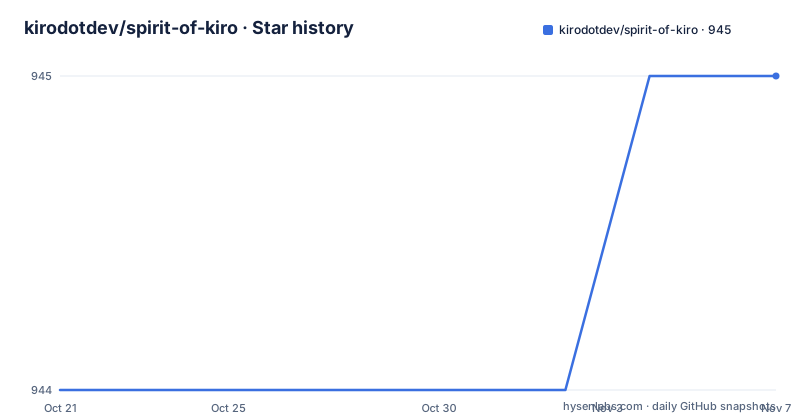
- kirodotdev/spirit-of-kiro945 ★ · +1
| Repository | 2026-10-21 | 2026-11-07 |
|---|---|---|
| kirodotdev/spirit-of-kiro | 944 | 945 |
1 Stars in the last 17 days, measured from the daily GitHub snapshot. Compare with other projects
Editorial analysis
A demo repository that documents itself
Spirit of Kiro is an infinite crafting workshop game, and the project description says it is built with and powered by generative AI. The unusual part is the framing. The README states that more than 95 percent of the code has been written by prompting Kiro, and that the project is designed to show best practices for Kiro and for AI engineering in general.
That reframes what the repository is for. It is not a game studio project that happens to use an assistant. It is a reference implementation whose readers are other engineers, and the documentation is written for that audience. The Developer Resources section is a reading list rather than a manual: architecture.md for how the pieces tie together, server-messages.md for every WebSocket message type and its format, client-events.md for the client side events, appsec-overview.md for the inbound and outbound connection security, and guiding-principles.md for the rules the project follows.
There is also a learning path baked into the repository. CHALLENGE.md describes a sample branch that is deliberately left unfinished with a few bugs, and the point is to use Kiro to work on those tasks. ROADMAP.md collects feature ideas that could still be built into the game.
The stack underneath is a modern one. The repository's primary language is Vue, with a client directory and a server directory, a launcher at the root in launch.ts, and a bun.lock alongside a package-lock.json. The homepage points to the Kiro documentation page for learning by playing.
The crafting loop and the verbs that drive it
The game design is simple to describe and hard to exhaust, which is the point of an infinite crafting workshop.
Items are generated, and every generated item is unique. The README describes the range as running from mundane pieces of garbage to celestial remnants of epic value, and states that each item carries its own unique description, damage and quirks. So the generator is producing objects with a name, a text description, a combat or usefulness statistic, and at least one behavioural modifier.
Items are not static. Adding an item to the workbench lets you apply its quirks to other items, and the verb list is deliberately open ended: cut, smash and break items down into components; glue, weld or install items together into complex configurations; paint, cook or enchant items to change appearance and effects. The README makes a joke of it, saying that if there is a verb for it you can probably do it in this game, which is both the design philosophy and the obvious limit of the system, since the surface of the verb set is where generation and interaction meet.
The third stage is selling. The appraiser analyses an item and sells it for the player, taking a cut of what it was worth. That gives the loop its economic pressure: items are not just trophies, they have a market value that is computed rather than fixed, and selling frees inventory space.
For a reader evaluating the project, the interesting question is where the generative model sits. The documentation set listed in the README describes the message contract and the architecture, and the item-images directory at the repository root suggests that item appearance has a visual component as well.
A documented WebSocket contract instead of guesswork
The architecture of the project is client and server, and the two halves talk over WebSocket. What makes this repository useful as an engineering example is that the contract between them is written down.
Two documents cover it. server-messages.md documents all WebSocket message types and their formats used for client and server communication. client-events.md documents all client side events and their payloads used for internal game communication. The distinction between the two is telling. The WebSocket messages are the wire format between the browser and the backend. The client events are the internal vocabulary of the front end, the events the Vue application dispatches and handles inside itself, which is a separation of concerns a client developer would want and which many hobby projects skip entirely.
The docs directory also carries an appsec-overview.md, described as a companion to the architecture overview but focused on inbound and outbound connection security. In a project where a browser client talks to a server that holds game state in DynamoDB, that is the right thing to document, and the fact that it exists at all is a signal of intent about how the project expects to be read.
The consequence for a reader is that you can understand the system without reading all the code. The message catalogue tells you what the server can be asked, the client events tell you what the front end does with the answers, and the architecture document tells you where the pieces sit between them.
DynamoDB Local and a fake ECS credentials service
Local development is served by Docker Compose, and the compose file is more interesting than the usual web app setup because it reproduces two AWS behaviours locally.
The game state lives in DynamoDB. The compose file runs the local DynamoDB container with a specific command line:
  # Storage for game data
  dynamodb-local:
    command: "-jar DynamoDBLocal.jar -sharedDb -dbPath ./data"
    image: "amazon/dynamodb-local:latest"
    container_name: dynamodb-local
    ports:
      - "8000:8000"
The shared database flag and the local data path are the two details that matter, since the data path is what lets a developer keep data between restarts of the compose stack.
The second container is more unusual. It runs the Amazon ECS local container endpoints image, which vends credentials to the other containers so the AWS SDK finds a working endpoint and region without a real account:
  ecs-local-endpoints:
    image: amazon/amazon-ecs-local-container-endpoints
    volumes:
      - $HOME/.aws/:/home/.aws/
    environment:
      AWS_PROFILE: "default"
The whole arrangement hangs off a dedicated bridge network with a fixed subnet, so that the local metadata service can bind the address that ECS uses in production:
credentials_network:
    driver: bridge
    ipam:
      config:
        - subnet: "169.254.170.0/24"
          gateway: 169.254.170.1
The comment in the compose file says exactly that. The server itself is built from the server directory and published on port 8080, and it waits for the database container to start before it comes up.
Running the game on Bun
The package manifest is small, and the entry point is a script rather than a framework command. The root package.json describes the project as an AI powered game with client and server components, and the scripts section has a single entry:
{
  "name": "spirit-of-kiro",
  "version": "1.0.0",
  "description": "AI-powered game with client and server components",
  "scripts": {
    "dev": "bun launch.ts"
  }
}
So the development command is bun launch.ts, and launch.ts sits at the root of the repository. The manifest also lists the runtime dependencies, which describe the server side of the project: the AWS SDK DynamoDB client, uuid for identifiers, yaml for configuration, eslint, and bun itself as a dependency rather than only as a runtime requirement.
The local deployment path is the one in docs/local-setup.md, which the README describes as instructions for deploying a local version of the game for fun or for development. The compose stack brings up DynamoDB Local, the credential endpoints container and the server, and the server publishes port 8080 for the WebSocket traffic. The client side is the Vue application in the client directory.
One thing to keep in mind when you follow the setup notes: the compose file publishes a fixed IP for the credentials container, and the credential service expects a particular subnet. If your Docker network configuration conflicts with that reserved range, the symptom will be the AWS SDK failing to find credentials rather than an obvious port conflict, which is an awkward thing to debug on a first run.
The unfinished branch is a teaching artifact
The most unusual idea in the repository is a branch that is intentionally broken. CHALLENGE.md describes a sample branch that is deliberately left unfinished, with a few bugs, and invites you to read it to learn how the tasks are meant to be approached, using Kiro to work on them.
This is the clearest example of what the project is actually for. A demo that only shows finished code demonstrates nothing about process. A branch with known defects and a written task list demonstrates the loop: an agent reads the issue, changes code, and the result is reviewed against the stated intent. The .kiro directory at the repository root is the tool's own configuration, which means the prompts and settings that drive the agent are part of the repository and can be inspected.
The ROADMAP.md plays a related role for the other direction of work. It collects features that could still be built into the game, and the README notes that although the core loop is complete, there is a lot more depth that could be added. The core loop being complete is a useful fact, because it means the game as shipped does run end to end: generate an item, work it on the bench, sell it to the appraiser.
For a team evaluating AI assisted development, this pair of documents is the part worth studying. The bug branch shows how work is handed to an agent, and the roadmap shows how new work is scoped.
Local Compose stack or the documented AWS deployment
The project documents two deployment paths, and choosing between them is a real decision rather than a preference.
The local path is the compose file described above, with DynamoDB Local standing in for the managed service and the ECS endpoints container faking the credentials and the metadata address. It requires no AWS account, but it also means the local data lives in a container volume and that the credential setup is an imitation of a production environment rather than the real thing.
The remote path is described in docs/remote-deploy.md, which the README summarises as instructions for deploying the game as a publicly hosted service on AWS infrastructure. The dependency on @aws-sdk/client-dynamodb in the manifest, and the elaborate local credentials dance in the compose file, exist because the server code was written against a real AWS environment. The local stack is the approximation, not the other way round.
A third option exists for anyone who does not want containers at all: point the server at a real DynamoDB endpoint, since the code path is the same, and run the client and server directly. The compose file is a convenience for reproducing the production network conditions, not a requirement of the server.
Whichever path you pick, the deciding factor is whether the point is to develop the game or to demonstrate the deployment. The remote path is the one the local setup was built to imitate.
MIT-0, no releases, and a project that is not a product
The licence field says MIT-0, and the README states the project is licensed under the MIT-0 License with the text in the LICENSE file. MIT-0 is the permissive variant with no attribution requirement, which is a short distance from public domain, and it places no conditions on use in a proprietary product. That is a licensing observation rather than legal advice.
On maintenance, the repository is not archived and the last push was on 2026-07-16. It publishes no GitHub releases, so there is no tagged version to pin and no changelog to read. The package manifest sits at version 1.0.0, which in a project with no tags is best read as a label rather than a distribution contract.
There are clearer reasons not to treat this as production software. The README says the core game loop is complete while simultaneously pointing at a roadmap of unfinished ideas and a branch of deliberate bugs, which is a coherent way to run a demo and an incoherent way to run a service. The documentation set is a reading list for learners, with no operational guidance about backups, migrations, scaling or monitoring for the DynamoDB tables.
So the value of the repository is pedagogical. As a sample of how to structure an AI assisted project, with its configuration directory, its documented protocol, its challenge branch and its security overview, it is unusually complete. As software to depend on, it is a demo with a permissive licence and a quiet commit history.
Editorial conclusion
Spirit of Kiro earns a place in a team that is learning how to structure an AI assisted project, because the repository ships architecture notes, WebSocket message contracts, a security overview and a branch with known bugs to work on. It does not earn a place as a game you ship, and it is the wrong starting point for a codebase that needs a stable API, because the message formats are documented but the project publishes no releases and the last push was on 2026-07-16. Before adopting any of its patterns, read docs/architecture.md and docs/server-messages.md, then decide whether you want the compose stack with DynamoDB Local or the AWS deployment described in docs/remote-deploy.md, since those two paths assume different credentials and different persistence.
Frequently asked questions
How do I run Spirit of Kiro locally?
The README points to docs/local-setup.md for a local deployment, and the root package.json defines the development command as bun launch.ts. The local stack runs through docker-compose.yml, which starts DynamoDB Local, an ECS local endpoints container for credentials and the server on port 8080.
Was Spirit of Kiro written by an AI coding assistant?
The README states that more than 95 percent of the code has been written by prompting Kiro, and that the project is a demo for best practices in Kiro and AI engineering. The repository also ships a .kiro directory with the tool configuration and a branch documented in CHALLENGE.md that is deliberately left unfinished with a few bugs.
What database does Spirit of Kiro use?
The compose file runs amazon/dynamodb-local:latest with the command -jar DynamoDBLocal.jar -sharedDb -dbPath ./data on port 8000, and the server manifest depends on @aws-sdk/client-dynamodb. The remote deployment path described in docs/remote-deploy.md targets AWS infrastructure.
How do the client and server communicate in Spirit of Kiro?
Over WebSocket. The repository documents all message types and their formats in docs/server-messages.md, and the client side events and payloads in docs/client-events.md, with docs/architecture.md explaining how the pieces fit together.
What licence is Spirit of Kiro released under?
The licence field says MIT-0, and the README states the project is licensed under the MIT-0 License with the full text in the LICENSE file.
Official sources
Add this badge to your README
If you maintain this project, the badge below links readers to this analysis and shows its maintenance status from the daily GitHub snapshot. Paste the markdown into your README; add ?metric=license or ?metric=stars to the image URL for a different field.

[](https://hysenlabs.com/projects/kirodotdev-spirit-of-kiro)Star history chart for your README
[](https://hysenlabs.com/projects/kirodotdev-spirit-of-kiro)Was this useful?