Huobao Drama: a self-hosted TypeScript pipeline that turns one sentence into a short drama
Huobao Drama is an AI-powered end-to-end short drama generator: one sentence to a complete drama, fully automated from script to final video.
At a glance
- What is it?
- Huobao Drama chains four Mastra agents, image and video providers, and FFmpeg into a single local workflow. It is aimed at teams who want the whole script-to-episode path on their own machine, and AI keys, base URLs and model parameters are configured in its Settings page.
- Who is it for?
- Adopt Huobao Drama if you want the entire short-drama pipeline on your own hardware, you are comfortable with Node 20+ and npm 9+, and you accept that AI keys, base URLs and model parameters are configured in the Settings page rather than in config files. Do not adopt it if you need a permissive commercial licence, since the README badge points to CC BY-NC-SA 4.0, or if you want a hosted service with no local install.
- Can I use it commercially?
- Check first. The repository uses a licence we do not classify automatically, so read its LICENSE file before any commercial use.
- Is it still maintained?
- Yes. The repository received new commits within the last day.
- What is it written in?
- Mainly Vue, according to GitHub's language statistics.
Answers come from the project's GitHub data, last synced on November 15, 2026, and from our analysis. They are not legal advice.
Star history
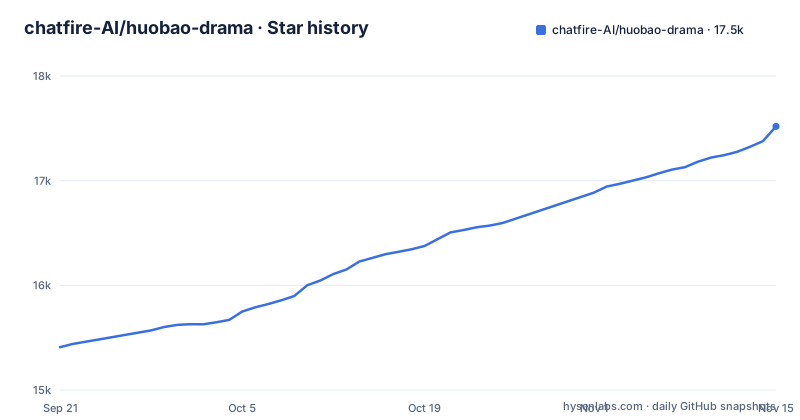
- chatfire-AI/huobao-drama17,518 ★ · +2,109
| Repository | 2026-09-21 | 2026-11-15 |
|---|---|---|
| chatfire-AI/huobao-drama | 15.4k | 17.5k |
2,109 Stars in the last 55 days, measured from the daily GitHub snapshot. Compare with other projects
Editorial analysis
The gap Huobao Drama fills between a script and a finished episode
Producing a short drama by hand means four separate jobs: writing the script, designing characters and scenes, breaking the script into shots, and generating and stitching video. Each step usually lives in a different tool, and the handoff between them is where projects stall. Huobao Drama's stated goal is to collapse that chain into one application. The README describes it as an end-to-end pipeline covering script generation, character design, storyboard breakdown and video compositing, and the repository layout backs that claim: a frontend, a backend, a desktop shell, and a data directory that holds both generated assets and the SQLite database.
The intended user is not a solo hobbyist experimenting with a single prompt. The project ships a Dockerfile, a docker-compose.yml with Watchtower for in-app updates, and an Electron desktop build. That combination suggests a small studio or an internal team that wants the pipeline running on hardware it controls, with the option to package it as a desktop app for non-technical operators. The repository's own description, "one sentence to a complete drama, fully automated from script to final video", sets the expectation high, and the architecture is what you should judge it on rather than the tagline.
Four Mastra agents, SQLite, and where the AI calls actually go
The backend is Hono with Drizzle ORM, Mastra AI agents and better-sqlite3. Four agents are defined, each with a narrow job: script_rewriter converts a novel into a formatted script, extractor pulls out and deduplicates characters, scenes and props, storyboard_breaker turns the script into a storyboard sequence, and prompt_generator writes image prompts for characters, scenes and props plus video prompts for each storyboard shot. Agent definitions live in backend/workspace/skills/ as SKILL.md files, and the README states these are editable in the UI. That is the most interesting design decision in the project: the prompts are not compiled into the application, so an operator can adjust how the extractor deduplicates a character without touching TypeScript.
The data flow is linear. A script enters the rewriter, the extractor produces structured entities, the storyboard breaker produces shots, and the prompt generator produces the text that image and video models consume. Generated files land in STORAGE_PATH, which defaults to <repo>/data/static, while state lives in SQLite at data/huobao.sqlite3.
Provider support is where the architecture becomes opinionated. Text can come from OpenAI-compatible APIs or Gemini. Images can come from OpenAI, Gemini or Volcano Engine. Video can come from Volcano Engine Seedance 2.0 in Standard, Fast and Mini variants, MiniMax H3, or Alibaba Bailian Wan 3.0 in Prime and Standard tiers. The README also points to api.firemux.cn for a Huobao API key, described as unlocking text, image and video capabilities with one key and writing three recommended configs through a Settings entry called Huobao Quick Setup.
Installing Huobao Drama and running your first generation
The requirements are Node.js 20 or newer and npm 9 or newer. There is no database server to install: SQLite ships as a single file, and the README notes that FFmpeg binaries arrive through the ffmpeg-static and ffprobe-static npm packages, so no separate FFmpeg installation is needed. Start by cloning and installing both halves of the application.
git clone https://github.com/chatfire-AI/huobao-drama.git
cd huobao-drama

# Install backend dependencies
cd backend && npm install

# Install frontend dependencies
cd ../frontend && npm install
The README recommends development mode, which runs the two services separately with hot reload. Open two terminals and start the backend in one and the frontend in the other.
# Terminal 1: backend
cd backend
npm run dev

# Terminal 2: frontend
cd frontend
npm run dev
After both start, the frontend is at http://localhost:3013 and the backend listens on port 5679 by default.
Configuration is deliberately minimal. Every environment variable has a default, and the README states local development needs zero configuration. The ones you are most likely to touch are the port, the database file and the storage directory: PORT defaults to 5679, SQLITE_PATH defaults to <repo>/data/huobao.sqlite3, and STORAGE_PATH defaults to <repo>/data/static. What you will not find in that list is an API key. The README is explicit that AI service keys, base URLs and model parameters are configured in the web UI Settings page and stored in the database, never in config files or environment variables. So the first real task after the app boots is configuring AI services in Settings; the README offers Huobao Quick Setup, where pasting a Huobao API key writes three recommended configs in one click. For server deployments, PUBLIC_BASE_URL matters because the README notes Seedance needs a public URL to reference local assets.
The licence badge, the vendor gateway, and the MySQL migration path
Two constraints deserve attention before you commit. The first is licensing. The repository's LICENSE file is not classified by the host, and the README badge points to CC BY-NC-SA 4.0. That is a non-commercial licence with a share-alike condition. If your short dramas are monetised, the badge is a signal to read the actual LICENSE file and get your own legal reading rather than assuming the code is free for commercial use.
The second is the provider gateway. Although the model table lists OpenAI, Gemini, Volcano Engine, MiniMax and Alibaba Bailian, the README's quick-setup path promotes a Huobao API key from api.firemux.cn. If you have existing provider contracts, check in the Settings page which providers you can configure directly.
How Huobao Drama differs from a hosted AI short-drama service
The closest alternative is a hosted AI short-drama studio: a browser service where you upload a script and the vendor handles models, storage and rendering. The difference is not the feature list, it is where the state lives. A hosted studio keeps your characters, storyboards and rendered clips on its infrastructure and bills per generation. Huobao Drama keeps them in a SQLite file and a static directory on your machine, or in the huobao-data named volume in the Docker deployment, and you supply the model access yourself.
That trade is concrete. You gain the ability to edit agent behaviour, because SKILL.md files under backend/workspace/skills/ are plain files the README says are editable in the UI. You gain control over FFmpeg behaviour, since FFMPEG_BIN and FFPROBE_BIN can point at custom executables instead of the bundled npm binaries. You also gain an update path you own: the docker-compose.yml pairs the app with Watchtower, and the Settings page exposes an update check that can trigger a container rebuild when HUOBAO_WATCHTOWER_URL and HUOBAO_WATCHTOWER_TOKEN are set. Remove those two variables and the compose file says the update button degrades to a manual prompt.
What you lose is the operational simplicity. There is no managed queue, no CDN for generated assets, and no support contract. If a video generation job fails, you are reading backend logs on your own machine. For a team with an existing media pipeline and a preference for local data, that is a reasonable exchange. For someone who wants to type a sentence and receive a finished episode with no infrastructure, it is not.
Deployment, updates, and what a version bump costs you
The project is not archived and the last push was on 2026-11-01, with v4.0.10 released the same day. That release cadence matters for upgrade planning, because the Docker path bakes the version into the image at build time through the HUOBAO_VERSION build argument. The Dockerfile defaults it to dev, and the docker-compose.yml passes ${HUOBAO_VERSION:-dev}, so a locally built image without that argument carries no meaningful version. The compose comments tell you to specify it when publishing, for example HUOBAO_VERSION=1.2.0.
Updates are handled two ways. Watchtower runs with --label-enable, so only containers carrying the com.centurylinklabs.watchtower.enable label are touched, and the interval is set to 86400 seconds. The app container has that label. The alternative is the in-app update button, which requires HUOBAO_WATCHTOWER_URL and a matching HUOBAO_WATCHTOWER_TOKEN on both sides; the .env.example ships please-change-me as the default and warns that production must change it. Leaving the default token in place is the most obvious way to expose an update endpoint on a reachable host.
Data survives container replacement because SQLite, generated images and videos, and the editable workspace/skills directory all live in the huobao-data named volume mounted at /app/data. The cost of a version bump is therefore mostly the image rebuild.
Where Huobao Drama is the wrong tool
The project assumes a working local Node environment and a willingness to run a backend. If you need a single binary with no runtime, the Electron desktop build is the closest fit.
A second boundary is scale. SQLite and a single backend process is a sensible choice for one team on one machine or one server. If you need to render many episodes concurrently across machines, the architecture as described does not provide that, and the storage layer is a local directory rather than object storage.
A third is the language of the interface relative to your team. The UI ships in Chinese, English, Japanese and Korean, and there is a separate global setting for the language of AI-generated content. If your scripts are in a language where the underlying models perform poorly, the platform will faithfully pass that weakness through, because it delegates generation to the configured providers rather than hosting its own models.
Editorial conclusion
Adopt Huobao Drama if you want the entire short-drama pipeline on your own hardware, you are comfortable with Node 20+ and npm 9+, and you accept that AI keys, base URLs and model parameters are configured in the Settings page rather than in config files. Do not adopt it if you need a permissive commercial licence, since the README badge points to CC BY-NC-SA 4.0, or if you want a hosted service with no local install. Before committing, verify three things: which providers the Settings page actually accepts for your region, whether the bundled ffmpeg-static and ffprobe-static binaries satisfy your compositing needs, and how the SQLite file at data/huobao.sqlite3 behaves under your backup routine.
Frequently asked questions
What are the requirements to run Huobao Drama?
The README lists Node.js 20 or newer and npm 9 or newer. No database server is needed because SQLite is bundled, and no FFmpeg installation is needed because the binaries ship through the ffmpeg-static and ffprobe-static npm packages.
Where do I put my AI API key in Huobao Drama?
The README states that AI service API keys, base URLs and model parameters are configured in the web UI Settings page and stored in the database, not in config files or environment variables. After deploying, you can paste a Huobao API key under Settings, Huobao Quick Setup, which writes three recommended configs in one click.
What port does Huobao Drama use by default?
The backend listens on port 5679, set by the PORT environment variable. In development mode the frontend runs separately on http://localhost:3013.
Does Huobao Drama need MySQL or a separate database?
No. It uses bundled SQLite through better-sqlite3, a single file in the project data directory, so no database server is required.
How does the Docker deployment update Huobao Drama?
The docker-compose.yml runs the app alongside Watchtower with --label-enable and a 86400 second interval, and the app container carries the watchtower enable label. Setting HUOBAO_WATCHTOWER_URL and a matching HUOBAO_WATCHTOWER_TOKEN also enables an update button in the Settings page.
Official sources
Add this badge to your README
If you maintain this project, the badge below links readers to this analysis and shows its maintenance status from the daily GitHub snapshot. Paste the markdown into your README; add ?metric=license or ?metric=stars to the image URL for a different field.

[](https://hysenlabs.com/projects/chatfire-ai-huobao-drama)Star history chart for your README
[](https://hysenlabs.com/projects/chatfire-ai-huobao-drama)Was this useful?