AhabAssistantLimbusCompany: automating Limbus Company dailies and Mirror Dungeon on Windows
AALC, a PC-side assistant for Limbus Company.
At a glance
- What is it?
- AhabAssistantLimbusCompany (AALC) is a Windows-only Python GUI tool that automates daily missions, experience farming and Mirror Dungeon runs in Limbus Company using image recognition and OCR. Pre-built packages target x86_64 Windows; ARM and non-Windows platforms must use the source path.
- Who is it for?
- AhabAssistantLimbusCompany fits Limbus Company players on x86_64 Windows who want to automate daily rewards, EGO gift management and Mirror Dungeon sessions without staying at the keyboard. Reliable OCR depends on four specific in-game settings: render scale and texture quality on high, FPS at 60, and post-processing disabled.
- Can I use it commercially?
- Yes, with strict conditions. AGPL-3.0 is a network copyleft licence: if people use a modified version over a network, for example as a hosted service, you must offer them its source code under the same licence.
- Is it still maintained?
- Yes. The repository last received commits 4 days ago.
- What is it written in?
- Mainly Python, according to GitHub's language statistics.
Answers come from the project's GitHub data, last synced on October 23, 2026, and from our analysis. They are not legal advice.
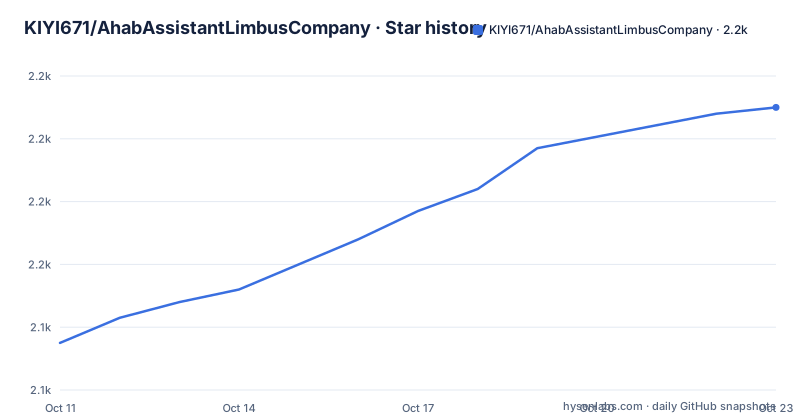
Star history
- KIYI671/AhabAssistantLimbusCompany2,210 ★ · +75
| Repository | 2026-10-11 | 2026-10-23 |
|---|---|---|
| KIYI671/AhabAssistantLimbusCompany | 2.1k | 2.2k |
75 Stars in the last 12 days, measured from the daily GitHub snapshot. Compare with other projects
Editorial analysis
Three automation targets: dailies, EGO gifts and Mirror Dungeon
Limbus Company has daily repetitive sessions: collecting experience rewards, farming currency, receiving daily and weekly bonuses, and picking up mail. AALC handles all of those in one pass. Alongside basic dailies, EGO gift exchange is automated: AALC recognizes current stamina values and synthesizes enkephalin modules when conditions are met.
Mirror Dungeon automation goes further than a simple combat loop. AALC supports multi-team rotation, cycle-based combat, accessory scheme selection per team, and an event-node-first route planning approach. Theme pack selection inside Mirror Dungeon uses a weight system: a configuration file controls which packs get priority when multiple options appear.
LixAssistantLimbusCompany (LALC) is the predecessor credited in the repository. AALC started as a rewrite of LALC as a learning exercise. OCR-based team name recognition and configurable theme pack weights are capabilities AALC adds on top of the foundation established by LALC.
RapidOCR and opencv-headless form the recognition layer under the GUI
Game state detection combines two approaches. Screen regions are matched against reference images using opencv-python-headless at version 4.11.0.86. Text on screen is read by rapidocr at version 3.4.1, backed by onnxruntime at 1.20.1. OCR drives team name selection (reading names such as "TEAM #1" directly from the screen) and Mirror Dungeon theme pack identification.
PySide6 at 6.9.2 provides the main window and widget layer, with pyside6-fluent-widgets 1.9.1 providing the styled components visible in the screenshots. pyuac at 0.0.3 manages the Windows UAC elevation at launch.
Auto-update is built in: AALC checks for updates, downloads the latest build and installs it without manual steps. Excluding that update check and an announcements display, the tool runs offline.
Installing from the pre-built EXE or from source via uv or pip
Download the file named AALC-Vx.x.x from the project's GitHub page, extract it, and run AALC.exe. No Python installation is needed for this path.
Source code execution with uv:
git clone https://github.com/KIYI671/AhabAssistantLimbusCompany
cd AhabAssistantLimbusCompany
uv sync --frozen
uv run main.py
Alternatively, using pip:
git clone https://github.com/KIYI671/AhabAssistantLimbusCompany
cd AhabAssistantLimbusCompany
pip install -r requirements.txt
python main.py
A version discrepancy appears between the pip instructions and the project file. The pip section of the README asks for Python higher than 3.13 with GIL, while pyproject.toml sets requires-python to ">=3.12". Both are in the repository and neither references the other. Developers following the pyproject.toml minimum may run Python 3.12 or 3.13 without meeting the README instruction.
Updating on either source path uses `git pull`.
Four in-game settings control OCR reliability: render scale, texture quality, FPS and post-processing
OCR accuracy depends on Limbus Company rendering text and UI at a sufficient quality level. Before running AALC, the README instructs setting texture quality and render scale to high, setting both normal FPS and battle FPS to 60, and disabling post-processing.
Recommended display resolutions are 1920 x 1080 and 2160 x 1440. Resolutions below 1920 x 1080 are untested and not recommended. Devices unable to achieve the recommended render scale should at minimum set render scale to high; otherwise recognition difficulties are expected.
Aalc forces the game into windowed mode at startup. Switching to full screen and back during a session is listed as expected behavior. Performance overlay tools from Steam or other software should not cover the game window, as covered areas interfere with image capture.
Language support covers English (EN) and simplified Chinese (zh_cn). For Chinese, only the specific localization package and font attributed to the author named in the README are supported. Standard game Chinese text without that localization pack is not listed as supported.
Configuring Mirror Dungeon theme pack weights in theme_pack_list.yaml
On first launch, AALC generates theme_pack_list.yaml in its folder. Editing this file with any text editor adjusts the weight values assigned to each theme pack. Weight values determine which pack is selected when multiple options appear during a Mirror Dungeon run. Custom recognition text for additional packs can also be added to the file.
After editing, a restart of AALC applies the new weights. The workflow the README describes: run AALC.exe once as a new user to create the file, edit it, restart.
ALT+P pauses the running session without stopping it. ALT+R resumes. CTRL+Q terminates the process, though the README warns that a hard stop can cause issues when restarting, which are resolved by restarting AALC again. All three shortcuts are configurable in the settings interface under the shortcut configuration tab.
Windows x86_64 only: ARM, Mac and Linux must use the source path
AALC.exe runs on Windows x86_64 only. ARM architectures (Apple M-series chips, Raspberry Pi), RISC-V, macOS and Linux are explicitly listed as unsupported for the pre-built EXE. Users on those platforms can run from source using the uv or pip instructions above, or follow the build guide at assets/doc/zh/build_guide.md to build from source.
Aalc requires the game window to remain visible during execution. Background operation (screen locked, minimized to tray) is not natively supported. For background use, the README links to an external Bilibili tutorial on local multi-user desktop sessions, but that is not part of AALC itself.
The repository is licensed under AGPL-3.0, with ChineseFont.ttf from Sarasa Gothic separately under the SIL Open Font License.
Admin rights, game window control and limits on concurrent tooling
AALC requests administrator rights at launch through pyuac. Elevated privileges are listed as required for smooth operation; the README does not document what specific operations need them.
Game window management is handled automatically. AALC switches Limbus Company to windowed mode after startup. Full-screen switches that happen mid-session are treated as normal and do not require user intervention.
Running AALC alongside other tools that display overlays on the game window is a documented risk. Steam's performance overlay, or similar software, should not cover any part of the game window. Image capture reads from the window directly, and covered regions produce recognition failures.
OCR operates only on supported game language settings. Changing the game language mid-session from English or the supported Chinese configuration to another language is not listed as a supported workflow, and recognition would fail on text in an unsupported language.
Editorial conclusion
AhabAssistantLimbusCompany fits Limbus Company players on x86_64 Windows who want to automate daily rewards, EGO gift management and Mirror Dungeon sessions without staying at the keyboard. Reliable OCR depends on four specific in-game settings: render scale and texture quality on high, FPS at 60, and post-processing disabled. On ARM hardware, macOS or Linux, building from source is the only supported path. Before running, confirm the game is in English or the specific Chinese localization pack named in the README, since those are the only two language configurations listed as supported.
Frequently asked questions
What does AhabAssistantLimbusCompany do?
AALC automates repetitive tasks in the PC game Limbus Company, including daily reward collection, experience farming, EGO gift management and full Mirror Dungeon runs with team rotation and theme pack selection.
How do I install AhabAssistantLimbusCompany?
Download the pre-built package named AALC-Vx.x.x from the project's GitHub page, extract the archive, and run AALC.exe. Source code installation is available via uv or pip; pyproject.toml sets the Python floor at 3.12.
Does AhabAssistantLimbusCompany work on Mac or Linux?
The pre-built EXE supports Windows x86_64 only. The README lists ARM, RISC-V, macOS and Linux as unsupported for the pre-built package, but the source code can be run or built on other platforms.
How do I configure Mirror Dungeon theme pack weights in AALC?
Run AALC.exe once to generate theme_pack_list.yaml, edit the weight values in any text editor, then restart AALC. Custom recognition text for additional theme packs can also be added to the file.
What game settings does AhabAssistantLimbusCompany require?
The README requires texture quality and render scale both set to high, normal FPS and battle FPS both at 60, and post-processing disabled. Resolutions below 1920 x 1080 are not recommended.
Official sources
Add this badge to your README
If you maintain this project, the badge below links readers to this analysis and shows its maintenance status from the daily GitHub snapshot. Paste the markdown into your README; add ?metric=license or ?metric=stars to the image URL for a different field.

[](https://hysenlabs.com/projects/kiyi671-ahabassistantlimbuscompany)Star history chart for your README
[](https://hysenlabs.com/projects/kiyi671-ahabassistantlimbuscompany)Was this useful?