Metroidvania System for Godot map and progression design
General-purpose framework for creating metroidvania games in Godot.
At a glance
- What is it?
- Metroidvania System is a Godot 4.6 addon for grid-based game maps, room navigation, collectible tracking, persistent objects, and save data. It fits developers who want editor support for interconnected 2D worlds, but it assumes rooms follow a square or rectangular grid.
- Who is it for?
- Adopt Metroidvania System if a Godot 4.6 game needs an editor-backed room map, persistent collectible and switch state, and progression-aware minimaps. Do not adopt it merely because a game is nonlinear, since it expects a square or rectangular room grid and the README does not document support for freeform adjacency.
- Can I use it commercially?
- Yes. MIT is a permissive licence: you can use, modify and sell software built on it, as long as you keep its copyright and licence notices.
- Is it still maintained?
- Yes. The repository last received commits 16 days ago.
- What is it written in?
- Mainly GDScript, according to GitHub's language statistics.
Answers come from the project's GitHub data, last synced on November 7, 2026, and from our analysis. They are not legal advice.
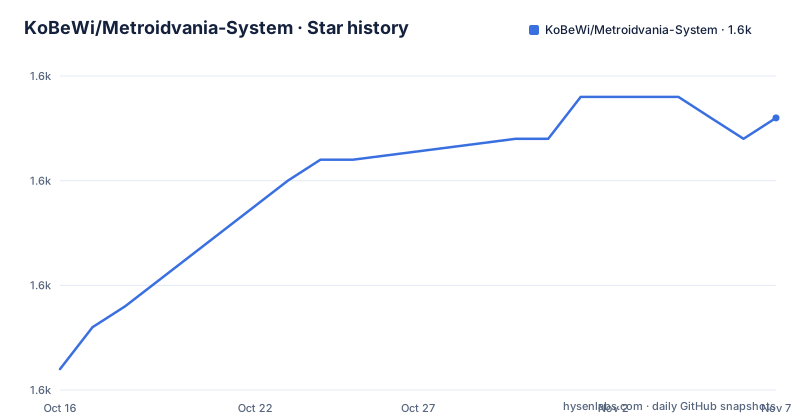
Star history
- KoBeWi/Metroidvania-System1,598 ★ · +12
| Repository | 2026-10-16 | 2026-11-07 |
|---|---|---|
| KoBeWi/Metroidvania-System | 1.6k | 1.6k |
12 Stars in the last 22 days, measured from the daily GitHub snapshot. Compare with other projects
Editorial analysis
Why Metroidvania System targets grid-based Godot games
Metroidvania System, abbreviated as MetSys, addresses the parts of a metroidvania that usually sit between ordinary Godot scenes: a world map, room relationships, progression state, collectible locations, and save data tied to those systems. It is intended for developers making 2D grid-based games, whether their movement is platformer-like or top-down. The distinction matters. The framework is not described as a general-purpose map container for arbitrary 2D levels. Its map assumes that the world is composed of rooms that fit a square or rectangular grid.
That constraint determines where the addon is useful. A project whose major areas are rooms on a coherent grid can represent those rooms in the editor, associate scenes with them, and use that representation for navigation and presentation. A game with rooms that overlap freely, follow irregular geometry, or do not correspond to map cells would have to adapt its world design or handle parts of navigation outside MetSys.
The components can be used independently. A developer does not have to adopt the entire metroidvania workflow to use automatic object IDs or basic save functionality. The README specifically notes that collectibles, switches, breakable walls, and other persistent objects can use generated IDs without hard-coded event lists. This makes the persistent-object subsystem relevant even when the project itself is not marketed as a metroidvania. The map editor and runtime map features are more tightly connected to the grid-oriented game structure.
How the map editor represents rooms and scenes
The central mechanism is a map composed of cells. Developers place or remove those cells and connect them in a grid-based shape. MetSys groups cells into rooms automatically, and each room can have an assigned Godot scene. This creates a separate representation of the world that can be connected to the actual playable scenes without requiring room transitions to be rebuilt manually in every scene.
Map cells carry more than occupancy. They can have colors, symbols, independently colored borders, and border textures. Named layers can separate sub-areas or parallel worlds, while cell groups support runtime operations such as mapping, recoloring, or looking up named locations. The editor also provides custom map elements, which can draw project-specific objects such as elevators or location names.
Rooms support drag-and-drop movement, and a custom scene template can be used when creating a scene from the editor. The map stores its data in a custom text format described as space-efficient and VCS-friendly. JSON export is also available. This matters for teams that edit maps in version control, because the storage decision affects diffs and merge review. However, the README does not document conflict-resolution behavior, so teams with several people editing the same map concurrently would need to assess that themselves.
Validation covers unused symbols and passages that lead nowhere. MapTheme validation can identify possible errors such as mismatched sizes or missing textures. These checks target map integrity, but they do not eliminate the need to test scene links and room transitions in the final game.
Editor previews, discovery, and collectible review
MetSys connects its editor tooling directly to Godot scenes. Room borders appear inside the scene being edited. When an adjacent room has a connected scene, MetSys can show its preview at the corresponding border. Developers can click those previews to navigate, and the inspector provides a room-link property hint for selecting and opening scenes. This reduces the context switching that otherwise occurs when checking whether two room scenes connect correctly.
The Map Viewer uses the same visual map representation as the editor but emphasizes inspection. A room can be opened from the viewer, and the room matching the currently opened scene is highlighted. Developers define a list of collectibles with names and icons, then scan scenes for those collectibles. The resulting locations can be shown on the world map, along with a total count.
Runtime support includes automatically marking discovered and acquired collectibles. Player tracking can discover individual cells or complete rooms, depending on the game's progression model. The runtime can also retrieve world-map coordinates for scene objects, apply cell overrides, and create temporary cells for dynamic maps or random map generators. A helper method supports custom map drawing when the built-in visual model is insufficient.
These features make MetSys more than an authoring canvas. The editor and runtime share concepts such as rooms, cells, collectibles, discovery, and scene assignment. The cost of that integration is a stronger dependence on MetSys data structures than a project would have with a custom one-off minimap.
Persistent object IDs and save-data flow
The persistent-object subsystem addresses a common progression problem: representing whether a collectible has been acquired, a switch has been activated, or a breakable wall has changed state without maintaining a separate hard-coded event list. MetSys generates a unique ID for each object in a scene or outside one. The README says its object-management interface uses two methods whose arguments are optional. Automatically assigned IDs reduce naming work, while manually assigned IDs provide an alternative when stable project-defined identifiers are preferable.
At runtime, objects can be registered and their state stored. Collected items can then be reflected on the map through the shared collectible model. Save data is requested as a `Dictionary` containing discovered rooms, stored object IDs, and customized cells. That dictionary can be loaded back later. The README therefore describes a transportable data format, but it does not specify file I/O, encryption, serialization policy, or conflict handling. Template scripts for save management are listed, yet the README does not establish whether they represent a mandatory persistence design.
Map overrides are part of the same save-oriented model. A cell can receive a different color, border, symbol, or scene at runtime, and custom cells can be generated dynamically. For “modern” maps, MetSys also supports detailed room overviews and per-pixel room discovery. These options allow more precise progression recording, but they also increase the amount of state a save must represent.
A project should verify object IDs across scene refactoring and map changes before relying on them for permanent saves. The README does not explain whether IDs remain stable after objects are renamed, duplicated, moved, or removed.
Installation limits and a first Godot 4.6 use
The repository does not provide a copy-and-paste installation command or an import sequence in the README. It directs users to the project wiki for instructions and links to the Godot Asset Library listing. MetSys supports Godot 4.6 or newer. For older Godot versions, the README points to the `1.6 stable` branch. The repository also includes `SampleProject/`, `addons/`, and `project.godot`, but the README does not explain whether opening the sample project is the recommended installation check or which files must be copied into another project.
A first use should begin in the installation guidance linked by the repository, then use `SampleProject/` as a reference if the project layout and wiki procedure identify it as such.
The documented first workflow is clear at the conceptual level. In Godot, create or edit the map through the addon, place connected map cells, allow those cells to form rooms, assign a playable scene to each room, and define the map visuals in `MapTheme`. Add collectibles to the configured collectible list and scan scenes for them. During play, use the supplied scene-transition, connection-automapping, save-management, and minimap templates as starting points. Player position tracking then discovers cells or rooms and can send scene-change requests.
The README names these templates but does not provide their method signatures, node setup, or autoload requirements. Those details must come from the wiki, sample scenes, or the scripts inside `addons/`. Without them, a written integration example would risk inventing APIs.
MapTheme customization and runtime presentation
Visual configuration is isolated in a custom resource named `MapTheme`. Developers can swap that resource, including at runtime. Separate settings exist for cell centers and borders, default colors, textures, square or rectangular cells, separators within rooms, and empty-cell rendering. Mapped cells can use their own color set and display details, while player location can be customized and marked by cell or by pixel.
This separation is useful when a project needs several map appearances without rebuilding map data. A location label or area overlay can be represented with custom drawing elements. A dynamic event can override a mapped cell or add an ad hoc one. The `Shared Borders` drawing mode also changes how adjacent cells render their edges, which gives teams a choice between separate inner borders and a shared boundary treatment.
The framework can draw a relationship between one grid cell and the corresponding scale of the in-game world. At runtime, developers specify how a map cell relates to world size, and player tracking supplies the position to display. Those choices should be checked against camera movement and room dimensions. The README does not document behavior for maps rendered at different zoom levels, fractional scaling, or projects that change cell size dynamically.
Theme validation can detect potential failures such as mismatched sizes and missing textures. That is editor-facing protection, not a promise that every runtime draw path is covered. A game still needs to inspect the map after changing themes, especially when custom elements or runtime overrides depend on project-specific drawing code.
Maintenance, licensing, and custom Godot tooling
The repository is not archived, and its last push was on 2026-10-15. That indicates recent repository activity, although the project has no GitHub releases and the README does not publish a release schedule or upgrade policy. MetSys targets Godot 4.6 or newer, so adopting an older Godot version requires using the documented `1.6 stable` branch instead. A migration between those lines may involve plugin API changes, but the README does not describe the migration procedure or compatibility guarantees.
The project is distributed under the MIT license through `LICENSE.txt`. That is the license identifier relevant to adoption and redistribution review, but this article does not interpret its legal effect. Teams should account for dependencies in `addons/` and `Extensions/` separately if their licensing or shipping requirements demand that review.
A real alternative is to build map cells, room transitions, collectible IDs, and save data directly in Godot. That approach avoids MetSys's grid-oriented map representation and editor integration when those conveniences are unnecessary. Its trade-off is that the project must define scene links, progression tracking, persistence, minimap drawing, and editor affordances itself. MetSys instead supplies a shared model for those tasks, accepts Godot 4.6 as its minimum supported version, and stores maps in a VCS-oriented text format. The addon is the better fit when those editor and runtime concerns are substantial; custom Godot tooling is more appropriate when the world is irregular or the project wants complete control over its data structures.
Editorial conclusion
Adopt Metroidvania System if a Godot 4.6 game needs an editor-backed room map, persistent collectible and switch state, and progression-aware minimaps. Do not adopt it merely because a game is nonlinear, since it expects a square or rectangular room grid and the README does not document support for freeform adjacency. Before committing, verify Godot 4.6 compatibility in the target project, inspect the wiki installation procedure, test the map validation tools against the planned symbols and passages, and confirm that the text map format suits the team's version control workflow. For a conventional grid-aligned metroidvania with tracked progression and save data, MetSys provides the relevant editor and runtime pieces in one addon.
Frequently asked questions
Which Godot versions does Metroidvania System support?
MetSys supports Godot 4.6 or newer. For older Godot versions, the README directs users to the `1.6 stable` branch.
Does Metroidvania System require the game world to use a grid?
Yes. The framework is mainly designed for 2D grid-based metroidvania games whose rooms fit a square or rectangular grid.
What does Metroidvania System save for a game?
Its runtime save data is represented as a `Dictionary` containing discovered rooms, stored object IDs, and customized cells. The README does not document the file storage mechanism.
Can the components in Metroidvania System be used separately?
Yes. The README says its components can be used independently, including for games that are not metroidvanias.
Official sources
Add this badge to your README
If you maintain this project, the badge below links readers to this analysis and shows its maintenance status from the daily GitHub snapshot. Paste the markdown into your README; add ?metric=license or ?metric=stars to the image URL for a different field.

[](https://hysenlabs.com/projects/kobewi-metroidvania-system)Star history chart for your README
[](https://hysenlabs.com/projects/kobewi-metroidvania-system)Was this useful?