PINCE: a GDB front-end for memory editing and game reversing on Linux
Reverse engineering tool for Linux
At a glance
- What is it?
- PINCE wraps GDB in a PyQt6 interface aimed at game hacking and general reverse engineering, with memory scanning, a scripting engine and Mono/IL2CPP dissection. Here is what it does, how to install it, and where it stops being the right tool.
- Who is it for?
- PINCE suits Linux reverse engineers who already think in GDB terms and want a GUI for memory scanning, breakpoints and managed-runtime inspection, and it is the wrong choice for anyone who needs a stable public scripting API or works outside Linux.
- Can I use it commercially?
- Check first. The repository uses a licence we do not classify automatically, so read its LICENSE file before any commercial use.
- Is it still maintained?
- Yes. The repository last received commits 67 days ago.
- What is it written in?
- Mainly Python, according to GitHub's language statistics.
Answers come from the project's GitHub data, last synced on November 24, 2026, and from our analysis. They are not legal advice.
Star history
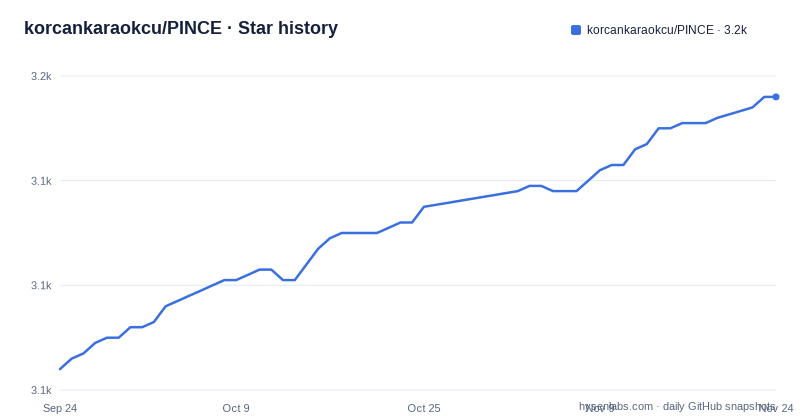
- korcankaraokcu/PINCE3,156 ★ · +52
| Repository | 2026-09-24 | 2026-11-24 |
|---|---|---|
| korcankaraokcu/PINCE | 3.1k | 3.2k |
52 Stars in the last 61 days, measured from the daily GitHub snapshot. Compare with other projects
Editorial analysis
What PINCE is for, and who ends up using it
PINCE is a front-end for the GNU Project Debugger, built with PyQt6 and aimed at games. The name expands to "PINCE is not Cheat Engine", which tells you the reference point: people who want Cheat Engine-style memory work on Linux, where Cheat Engine does not run natively. The README is explicit that games are the focus but that the tool "can be used for any reverse-engineering related stuff".
The audience is narrower than that sentence suggests. You need to be comfortable with GDB concepts, because PINCE drives a real GDB process underneath and exposes GDB expressions in its own syntax. Someone who only wants to freeze a health value in a single-player game will find the interface heavier than a purpose-built trainer. Someone who already writes GDB Python scripts will find the GUI saves them a lot of scaffolding. The repository topics list the intended surface: assembler, disassembler, hex-editor, injection, memory-hacking, tracer, gdb-python-scripts.
How PINCE drives GDB: background execution and the libpince engine
The architectural decision that shapes everything else is background execution. According to the README, PINCE uses it by default, which lets you run GDB commands while the target process is running rather than stopping the world for every command. That is what makes the memory scan and the disassembly view feel interactive instead of batch-like.
Memory scanning is delegated to libmemscan, a separate repository listed as a git submodule in the top-level tree. The README describes it as the component that scans memory efficiently. Value types mirror Cheat Engine and memscan, including extended strings in utf-8, utf-16 and utf-32, plus bitfields of 1 to 64 bits at any bit offset that can be read or written as signed, unsigned or hexadecimal without disturbing neighbouring bits.
On the debugging side, PINCE talks to GDB through pygdbmi, which is pinned in requirements.txt. The scripting layer, called the Libpince Engine, is where advanced work happens: the README lists code injection as an example. Assembling new instructions on the fly uses the keystone engine, and disassembly uses capstone. Sessions are saved as .pct files containing the address table, bookmarks, notes and structures, and the project points to a community PCT-archive for sharing them.
Installing PINCE on Linux and running a first scan
The repository ships install.sh at the top level, and the README directs readers to the project Wiki for how PINCE works. The dependency set is fixed in requirements.txt, so the Python side is reproducible:
pip install -r requirements.txtThat pulls PyQt6 6.11.0, PyQt6-Qt6 6.11.1, pexpect, capstone, keystone-engine, pygdbmi, keyboard and msgpack. Note that libmemscan is a submodule, so a plain clone leaves it empty. The README does not spell out the submodule step, but the repository layout shows .gitmodules and a libmemscan entry:
git clone --recurse-submodules https://github.com/korcankaraokcu/PINCE.git
cd PINCE
./install.sh
After installation, PINCE.sh is the launcher script in the repository root. Once a target process is attached, the README's two entry points for a first real task are Tools -> Dissect Code and Tools -> Search Instructions in the MemoryView window. Dissect Code walks a chosen memory region looking for referenced calls, jumps and strings; the README notes that if you uncheck 'Discard invalid strings' before the search, PINCE will also try to match regular pointers. Search Instructions accepts Python regular expressions, which is a different mental model from Cheat Engine's array-of-bytes scan and worth knowing before you start.
Mono and IL2CPP dissection, and why it is the most opinionated feature
The managed-runtime tools are where PINCE departs most from a plain debugger. Tools -> Dissect Mono/IL2CPP lets you browse classes with their fields and methods, read static and instance field values, and drill into nested types. From there you can use Find Instances to locate live objects of a class in the target process, Invoke Methods to call a method on a chosen instance and inspect the return value, and Export to Structures to turn a dissected class into a reusable PINCE structure.
The README states this works for both Linux native and WINE/Proton processes, which matters because a large share of Unity games on Linux run under Proton. The trade-off is that this is a runtime-specific feature. It tells you nothing about a native C++ binary, and it depends on the target's managed metadata being intact and reachable. If a game ships with stripped or obfuscated IL2CPP metadata, the class browser has less to work with. The README does not document a fallback for that case.
Where PINCE gets in the way
The most concrete limitation is platform. This is a Linux tool. The README and the dependency list assume a Linux environment with GDB and a working X display for the PyQt6 interface; there is no Windows or macOS path described. If your reversing work happens on Windows, PINCE is the wrong tool regardless of how well its features match.
The second limitation is the scripting surface. The Libpince Engine is described as powerful, but the README does not present it as a stable public API with versioning guarantees. Scripts written against internal modules can break between releases, and the release cadence is real: v0.10 in July 2026, v0.10.1 in August, v0.10.2 in September. Anyone building a long-lived toolchain on top of PINCE internals should assume maintenance work at each upgrade.
The third is the dependency pinning itself. PyQt6 and PyQt6-Qt6 are pinned to exact versions, and the keystone-engine pin is 0.9.2. On distributions that ship different Qt builds, resolving those pins is the step most likely to fail, and the README does not document a troubleshooting path for it. The repository also carries a TODO noting that build status badges are commented out until test coverage increases and a GitHub Actions test workflow is added, which is a fair signal about automated verification.
PINCE compared with plain GDB and with Cheat Engine
The honest comparison is with GDB plus a handful of Python scripts. GDB gives you breakpoints, watchpoints, stepping and expression evaluation, and it runs everywhere. PINCE adds a persistent address table, a memory scanner backed by libmemscan, an assembler built on keystone, a disassembly view built on capstone, .pct sessions you can share, and the Mono/IL2CPP browser. If your workflow is "attach, set a watchpoint, read a struct, detach", plain GDB is lighter and has no Qt dependency. If your workflow involves repeatedly scanning for a value, freezing it, tracing what writes to it and saving that state for next session, PINCE is doing work you would otherwise script yourself.
Against Cheat Engine the difference is not features but environment. Cheat Engine is a Windows application; PINCE is a Linux application that borrows the interaction model. The README's own framing, "PINCE is not Cheat Engine", is accurate: the value-type support and bitfield editing are deliberately close, but the engine underneath is GDB, and the scripting language is Python rather than Lua. That last point decides a lot of migrations. Existing Cheat Engine Lua scripts do not port.
Maintenance, licensing and upgrade cost
The last push to the repository was on 2026-09-18, and v0.10.2 was released the same day, so the project is being worked on. The README links a CONTRIBUTING.md roadmap for what is planned, and the commented-out build badge in the README header tells you the project itself considers test coverage incomplete. Releases arrive roughly monthly, which sets the upgrade rhythm: expect to re-check your scripts and the pinned Qt versions each time.
On licensing, the GitHub API reports the licence as NOASSERTION, which means no standard SPDX identifier was detected. The repository does contain COPYING and COPYING.CC-BY at the top level, so there are at least two licence files with different scopes, and the README does not explain which parts of the tree each covers. That is a question for your own counsel, not for a review. If you plan to redistribute PINCE or bundle it into a product, read both files before you build anything on top of it.
Editorial conclusion
PINCE suits Linux reverse engineers who already think in GDB terms and want a GUI for memory scanning, breakpoints and managed-runtime inspection, and it is the wrong choice for anyone who needs a stable public scripting API or works outside Linux. Before adopting it, read the Wiki and CONTRIBUTING roadmap, check the licence files (COPYING and COPYING.CC-BY) with your own counsel, and confirm that the libmemscan submodule and the pinned PyQt6/Qt versions in requirements.txt resolve on your distribution.
Frequently asked questions
How do I install PINCE on Linux?
Clone the repository with its submodules, install the pinned dependencies from requirements.txt, then run install.sh from the repository root and launch with PINCE.sh. The README points to the project Wiki for further detail on how PINCE works.
How do I use PINCE on Linux?
Attach PINCE to a target process and work from the MemoryView window, where Tools -> Dissect Code finds referenced calls, jumps and strings and Tools -> Search Instructions accepts Python regular expressions. The README also documents Tools -> Dissect Mono/IL2CPP for managed Unity games.
What are alternatives to PINCE for memory editing on Linux?
Plain GDB with Python scripts covers breakpoints, watchpoints and expression evaluation without the Qt interface. The README frames PINCE against Cheat Engine, but Cheat Engine is a Windows application, so the real Linux alternative is scripting GDB directly.
Official sources
Add this badge to your README
If you maintain this project, the badge below links readers to this analysis and shows its maintenance status from the daily GitHub snapshot. Paste the markdown into your README; add ?metric=license or ?metric=stars to the image URL for a different field.

[](https://hysenlabs.com/projects/korcankaraokcu-pince)Star history chart for your README
[](https://hysenlabs.com/projects/korcankaraokcu-pince)Was this useful?