TSMessages: A dated iOS notification library that still works, but has a clear successor
GitHub describes it as 💌 Easy to use and customizable messages/notifications for iOS à la Tweetbot. The repository metadata lists Objective-C as its primary language. The metadata lists the MIT license. This article stays within the project description and details documented in the GitHub repository README.
At a glance
- What is it?
- TSMessages is a MIT-licensed Objective-C library for showing Tweetbot-style notifications at the top of the screen. It is no longer maintained, and its own README points to RMessage and SwiftMessages as replacements.
- Who is it for?
- Adopt TSMessages only if you are maintaining an existing Objective-C project that already uses it and you need a quick fix. Do not start a new project with it: the README itself states it is no longer maintained.
- Can I use it commercially?
- Yes. MIT is a permissive licence: you can use, modify and sell software built on it, as long as you keep its copyright and licence notices.
- Is it still maintained?
- Probably not. The repository last received commits 41 months ago, on June 1, 2023.
- What is it written in?
- Mainly Objective-C, according to GitHub's language statistics.
Answers come from the project's GitHub data, last synced on October 23, 2026, and from our analysis. They are not legal advice.
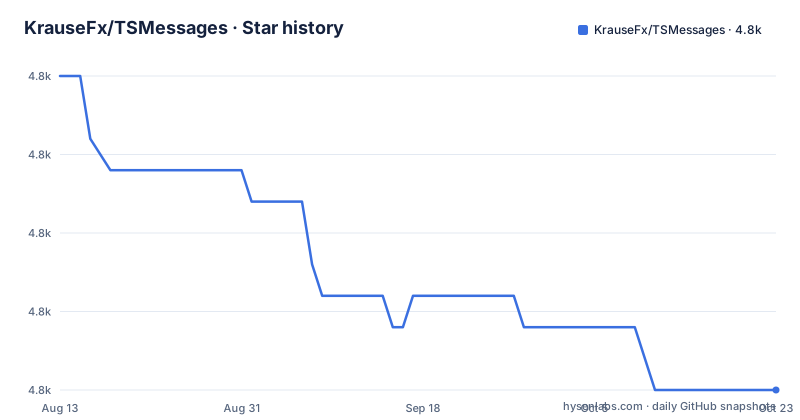
Star history
- KrauseFx/TSMessages4,835 ★ · -10
| Repository | 2026-08-13 | 2026-10-23 |
|---|---|---|
| KrauseFx/TSMessages | 4.8k | 4.8k |
-10 Stars in the last 71 days, measured from the daily GitHub snapshot. Compare with other projects
Editorial analysis
What TSMessages actually solves
TSMessages solves a small but recurring problem: showing a transient notification at the top of an iOS screen, underneath the navigation bar, in the style of Tweetbot. The library provides four predefined types: Success, Error, Warning, and Message. It is aimed at app developers who want a quick way to surface status updates without building a custom view from scratch. The target audience is Objective-C developers working on iOS apps, primarily from the 2014-2015 era. The library is not a general-purpose notification system; it is specifically for top-of-screen, auto-dismissing messages. It does not handle remote push notifications, local scheduling, or any background delivery. It is a UI component, nothing more.
The mechanism: from show call to swipe dismissal
The core class is TSMessage. You call a class method like showNotificationWithTitle:subtitle:type:, and the library creates a TSMessageView, positions it at the top of the screen, and animates it in. The view stays for a duration that depends on the length of the displayed text, according to the README. The user can dismiss it early by swiping it upward or tapping it. The README describes a delegate protocol that lets you customize the message view right before it is displayed, for example by setting alpha or adding subviews. It also mentions a callback block that executes when the user dismisses the message. The data flow is straightforward: you call a method, the library builds a view, configures it from a JSON design file, and presents it. There is no complex state machine or queueing mechanism described. For a library of this scope, that simplicity is a strength, but it also means no built-in handling for multiple simultaneous messages.
Getting it running: CocoaPods and manual copy
The README gives two installation paths. The first is CocoaPods: add pod "TSMessages" to your Podfile and run pod install. The second is manual: copy TSMessageView and TSMessage source files into your project, plus the TSMessagesDesignDefault.json file. You must open the workspace, not the project file, because the Example project uses CocoaPods. Usage is a single line: [TSMessage showNotificationWithTitle:@"Your Title" subtitle:@"A description" type:TSMessageNotificationTypeError];. You can also specify a view controller, an image, and a callback. To set a default view controller, call [TSMessage setDefaultViewController:myNavController];. Customization is done via a delegate: setDelegate: and implement messageLocationOfMessageView: to change the vertical position, or customizeMessageView: to alter the view before display. The README also shows UIAppearance overrides, like setting titleFont and text colors. These are the actual APIs; they are simple and documented enough to get started quickly.
Customization: JSON design and UIAppearance
The library supports two customization layers. The first is a JSON configuration file, TSMessagesDesignDefault.json, which holds design properties for each notification type. To add a new type, you extend the notificationType enum, add properties to the config file, and set the theme name in TSMessagesView.m inside a switch case. That is a manual, code-level process. The second layer is UIAppearance. The README shows how to override titleFont, titleTextColor, contentFont, contentTextColor, and errorIcon. This is a standard UIKit mechanism, so it works with the library's views. The combination of JSON for per-type design and UIAppearance for global overrides gives decent flexibility, but the JSON approach requires editing a file and recompiling; there is no runtime theme switching described. For a 2014 library, this is reasonable, but it shows its age: no dynamic type support, no dark mode consideration, no Swift-friendly API.
The elephant in the room: it is unmaintained
The most important fact about TSMessages is stated at the top of the README: it is no longer being maintained or updated. The last push was in January 2015, and the latest release is 0.9.12, which is simply a migration to a new GitHub account. This means no bug fixes for modern iOS versions, no support for new screen sizes, no updates for Swift interoperability. If you adopt it today, you are on your own. The library may still compile and run on current iOS, but there is no guarantee. The README explicitly recommends migrating to RMessage, and for Swift projects, SwiftMessages. This is a genuine limitation: the project is not dead in the sense of being deleted, but it is frozen. Any issue you file will likely go unanswered. The maintainer has moved on. For a production app, that is a serious risk, because notification UI is user-facing and any bug is visible.
When TSMessages is the wrong tool
TSMessages is the wrong tool if you need notifications that are not at the top of the screen, or if you need to display more than one message at a time, or if you need full control over animation timing. The README describes only top-of-screen messages with a duration based on text length. There is no mention of bottom messages, center messages, or queuing. If you need a message that persists until user action, you would have to set a long duration and rely on the callback, but that is not a supported pattern. Also, if you are building a Swift app, TSMessages is an Objective-C library, and while it can be used from Swift via bridging, the README points you to SwiftMessages instead. If you need accessibility features like VoiceOver announcements or dynamic type, the README does not mention them, so you should assume they are not built in. For any of these cases, a more modern library or a custom view is better.
Alternatives: RMessage and SwiftMessages
The README names two direct alternatives. RMessage is a drop-in replacement that the maintainer recommends for migration. It is also an Objective-C library, so it fits existing TSMessages codebases. The key difference is that RMessage is actively maintained, so you get bug fixes and modern iOS support. The README says that issues that apply to TSMessages can be filed against RMessage. SwiftMessages is a Swift-based library with the same features. The difference is language: if you are writing Swift, SwiftMessages is a natural fit, and it likely offers a more idiomatic API. Neither alternative is described in detail in the README, but the recommendation is clear. The practical difference for a developer is maintenance status and language. If you are staying in Objective-C, RMessage is the path. If you are moving to Swift, SwiftMessages is the path. TSMessages is only for legacy code.
Maintenance and license implications
The license is MIT, which means you can use, modify, and distribute the library with few restrictions, as long as you include the license file. There is no copyleft obligation. The maintenance cost is effectively zero because there is no maintenance: you take the code as is. The upgrade cost is the real issue. If you use TSMessages and want to move to RMessage, you need to change your imports and possibly your delegate method signatures. The README does not provide a migration guide, so you will have to compare the two APIs yourself. For a small library, that is manageable, but it is still work. Also, because TSMessages is frozen, you will not receive security fixes or compatibility patches. If you keep it, you are responsible for any issues that arise on new iOS versions. The MIT license gives you the freedom to fork and fix it yourself, but that is an additional cost. The release notes for 0.9.12 only mention the account migration, so there is no changelog to guide you on what changed.
Editorial conclusion
Adopt TSMessages only if you are maintaining an existing Objective-C project that already uses it and you need a quick fix. Do not start a new project with it: the README itself states it is no longer maintained. Before using it, verify that your deployment target matches the library's era (iOS 7/8), and check that the UIAppearance customization APIs you rely on still behave correctly on current iOS versions. If you are starting fresh, use RMessage or SwiftMessages as the README recommends.
Frequently asked questions
How do I install TSMessages without CocoaPods?
Copy the source files `TSMessageView` and `TSMessage` into your project, and also copy `TSMessagesDesignDefault.json`. The repo also ships `TSMessages.podspec`, so the CocoaPods path with `pod "TSMessages"` in your Podfile is the packaged route.
Why does the TSMessages example fail to build when I open the project file?
The README says to open the workspace, not the project file, because the Example project uses CocoaPods. The tree confirms both `Example/TSMessages.xcodeproj/` and `Example/TSMessages.xcworkspace/` exist alongside `Example/Pods/`.
Can I add my own notification type to TSMessages?
Yes, with three edits: add the type to the `notificationType` enum, add the design properties to the configuration file, then set the theme name in `TSMessagesView.m` inside the switch case. The same name is used in the config file and in the images.
Official sources
Add this badge to your README
If you maintain this project, the badge below links readers to this analysis and shows its maintenance status from the daily GitHub snapshot. Paste the markdown into your README; add ?metric=license or ?metric=stars to the image URL for a different field.

[](https://hysenlabs.com/projects/krausefx-tsmessages)Star history chart for your README
[](https://hysenlabs.com/projects/krausefx-tsmessages)Was this useful?