kube-green for Kubernetes sleep schedules and resource suspension
A K8s operator to reduce CO2 footprint of your clusters
At a glance
- What is it?
- kube-green is a Go-based Kubernetes operator that puts selected workloads to sleep on schedules. It suits development, preview, and other environments that can safely suspend selected resources overnight or outside working hours.
- Who is it for?
- Adopt kube-green when selected development or preview workloads have predictable idle periods and the team can tolerate scheduled suspension. Do not use it for always-available services or when application-specific lifecycle handling is required but undocumented.
- Can I use it commercially?
- Yes. MIT is a permissive licence: you can use, modify and sell software built on it, as long as you keep its copyright and licence notices.
- Is it still maintained?
- Yes. The repository last received commits 67 days ago.
- What is it written in?
- Mainly Go, according to GitHub's language statistics.
Answers come from the project's GitHub data, last synced on November 6, 2026, and from our analysis. They are not legal advice.
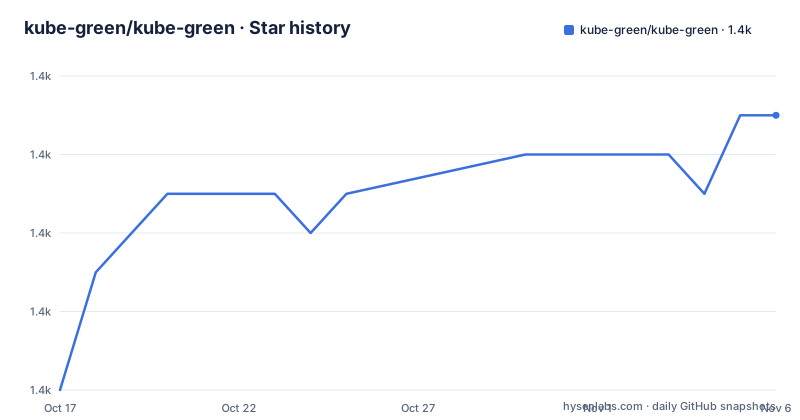
Star history
- kube-green/kube-green1,385 ★ · +7
| Repository | 2026-10-17 | 2026-11-06 |
|---|---|---|
| kube-green/kube-green | 1.4k | 1.4k |
7 Stars in the last 20 days, measured from the daily GitHub snapshot. Compare with other projects
Editorial analysis
kube-green's targeted solution for idle Kubernetes workloads
kube-green addresses a scheduling gap in many Kubernetes environments: development and preview resources can remain active after nobody uses them, while the control plane has no policy that ties their availability to working hours. The operator lets an administrator describe a sleep policy through the `SleepInfo` custom resource. Its stated purpose is narrower than general cluster autoscaling. It does not adjust requests or limits according to live load. Instead, it changes selected Kubernetes resources according to configured times and weekdays.
The primary audience is therefore teams running nonproduction workloads whose availability requirements can tolerate a predictable outage. A typical policy suspends work at 20:00, wakes it at 08:00, and applies that pattern from Monday through Friday. CronJobs can also be suspended. An `excludeRef` entry protects an individual Deployment, such as `api-gateway`, from the policy.
This distinction matters when choosing the project. A production service that must remain reachable should not be placed under a sleep window merely because some of its pods are idle. kube-green addresses unused environments through schedule-based control, not continuous utilization analysis. Its repository description refers to reducing a cluster's carbon footprint, but the README does not provide a calculation method, cloud-provider emissions model, or measurement report. The concrete documented behavior is resource shutdown and suspension.
Several workloads can be represented by separate policies, although the README excerpts do not explain how overlapping `SleepInfo` resources are resolved. That omission is material for an operator that modifies shared Kubernetes objects. Teams should avoid overlapping policies until the configuration documentation establishes precedence and conflict behavior.
SleepInfo policy fields and the operator control flow
The visible configuration surface centers on `apiVersion: kube-green.com/v1alpha1` and `kind: SleepInfo`. A policy carries `sleepAt`, `wakeUpAt`, `weekdays`, and `timeZone`. Optional controls include `suspendCronJobs` and `excludeRef`. The repository layout contains `api/`, `cmd/`, `internal/`, and Kubernetes configuration directories, which is consistent with a controller built around a versioned custom resource and a manager binary.
The documented data flow is straightforward at configuration level. An administrator installs the operator, creates a `SleepInfo` resource, and defines the desired availability period. kube-green reads that desired state and acts on the cluster resources covered by it at the configured times. The README says the operator shuts down “some of” resources rather than claiming that every workload is managed. It also uses “pods” in its descriptions, while the example specifically controls CronJobs and excludes a Deployment by reference.
The schedule semantics are more useful than the resource type description. `weekdays: "1-5"` limits the example to weekdays, while `weekdays: "*"` applies the policy every day in the no-wake-up example. `sleepAt` and `wakeUpAt` use wall-clock values in the selected `timeZone`. The field accepts IANA identifiers such as `Europe/Rome` or `America/New_York`; when omitted, it defaults to UTC. This is preferable to assuming the cluster's local timezone.
The repository declares Kubernetes dependencies at `v0.34.3` and `sigs.k8s.io/controller-runtime v0.22.4` in `go.mod`. Those declarations identify the libraries used by the Go module, but they do not by themselves establish the Kubernetes versions supported by every kube-green release. Compatibility still needs to be checked against the installation documentation for the selected release.
Local setup and the first SleepInfo configuration
The README provides development setup rather than a complete production installation procedure. Its installation section says to clone the repository and install dependencies. The stated prerequisite conflicts with the module file: the README says Go 1.19 or higher, while `go.mod` declares `go 1.25.9`. A developer should treat the module declaration as the stricter requirement for the current source tree and resolve any local toolchain mismatch before building.
After cloning the repository, the README directs developers to install dependencies with:
go getThis command retrieves module dependencies, but it does not install kube-green into a Kubernetes cluster. For a local KinD deployment, the documented workflow begins by creating a named cluster:
kind create cluster --name kube-green-developmentThe expected result is a KinD cluster named `kube-green-development`. The README then uses `ko` for the development deployment:
make local-run clusterName=kube-green-developmentThis build-and-deploy step points the Makefile's local-run target at that cluster. The README does not reproduce the target's full command or its expected controller logs, so it does not support claims about startup timing or readiness checks.
Once kube-green is installed, the first useful configuration is a `SleepInfo` policy. The following documented example limits operation to weekdays in Rome, suspends CronJobs, and excludes `api-gateway`:
apiVersion: kube-green.com/v1alpha1
kind: SleepInfo
metadata:
  name: working-hours
spec:
  weekdays: "1-5"
  sleepAt: "20:00"
  wakeUpAt: "08:00"
  timeZone: "Europe/Rome"
  suspendCronJobs: true
  excludeRef:
    - apiVersion: "apps/v1"
      kind:       Deployment
      name:       api-gateway
Save this as a YAML file and apply it using the workflow documented on the kube-green installation site. The README does not include a production `kubectl apply` command. After the resource exists, the first checks should be whether the operator reports the policy and whether excluded resources remain unaffected at the stated boundary times.
Permanent sleep policies without wakeUpAt
kube-green also documents a policy that sleeps every night without restoring the selected resources. Omitting `wakeUpAt` is the key difference between this configuration and the working-hours example:
apiVersion: kube-green.com/v1alpha1
kind: SleepInfo
metadata:
  name: working-hours-no-wakeup
spec:
  sleepAt: "20:00"
  timeZone: Europe/Rome
  weekdays: "*"
Because `weekdays` is `"*"` and there is no `wakeUpAt`, the documented intent is to keep selected resources asleep after the nightly suspension point. This is useful for disposable preview environments that an operator expects to restore manually, but the README does not document the restoration command or object shape. It also does not state what happens if this resource is deleted.
That missing rollback detail deserves attention. For a reversible schedule, the configuration includes both boundaries. For a no-wake-up policy, the operator's effect is intentionally one-way within the documented configuration model. Teams should not select this form until they know how they intend to recreate or restore the affected resources and can inspect the complete configuration documentation.
The absence of `wakeUpAt` should not be interpreted as a request to stop the entire cluster or all namespaces. The README still describes `SleepInfo` as controlling “some” resources, and the exact targeting model is delegated to the configuration documentation. Scope and namespace behavior are not shown in the examples.
Operational limits of schedule-based suspension
The largest limitation is that kube-green acts on a calendar, not on observed workload demand. A preview deployment used outside conventional hours may be asleep even while somebody needs it. Conversely, a workload that receives requests during its configured sleeping period will not automatically wake in response to those requests unless another system or manual process intervenes. This makes the operator more suitable for owned nonproduction environments than for user-facing production services.
Suspending resources can also expose application assumptions that a normal scale-to-zero path would avoid. The README does not document readiness behavior, job completion, in-flight requests, persistent volume handling, database coordination, or finalizer and rollback semantics. It also does not specify which resource kinds can be shut down beyond the explicit CronJob and Deployment examples. Engineers must verify those details in the full documentation before placing stateful or tightly coupled workloads under a policy.
The current source tree's Docker packaging is deliberately minimal. Its final stage uses `gcr.io/distroless/static:nonroot`, copies the `kube-green` binary, and runs it as UID and GID `65532`. That reduces the contents carried in the runtime image, but a distroless container also provides no shell for interactive diagnostics. Troubleshooting therefore depends on Kubernetes logs, events, and the policy resource rather than commands run inside the container.
The documented Go version mismatch is another concrete setup risk. The README's Go 1.19 statement is stale relative to `go.mod`, which declares Go 1.25.9. Following only the introductory prerequisite can lead to avoidable toolchain errors.
Helm, kustomize, release upkeep, and the MIT licence
The repository contains both `charts/` and `config/` directories, and its Makefile exposes separate integration-test routes for those installation methods. The README identifies Helm installation testing through `make e2e-test` and kustomize installation testing through `make e2e-test-kustomize`. A narrower integration harness can be selected with the `OPTION` variable:
make e2e-test OPTION="-run=TestSleepInfoE2E/kuttl/run_e2e_tests/harness/{TEST_NAME}"Replace `{TEST_NAME}` with the harness case being selected. These commands are documented for repository testing rather than ordinary cluster administration.
The repository is not archived, and its last push was on 2026-09-02. That is recent enough to avoid describing maintenance in stale terms, although recent commits alone do not guarantee compatibility with a particular Kubernetes release. The listed releases are `v0.7.1` from 2025-06-29, `v0.7.0` from 2025-01-19, and `v0.6.0` from 2024-11-11. The Makefile defaults its bundle version to `0.7.1`.
Project versioning follows SemVer. The README's maintainer release procedure is:
make release version=v{{NEW_VERSION_TO_TAG}}
git push --tags origin v{{NEW_VERSION_TO_TAG}}
These commands are for maintainers. The commands already include the leading `v`; substitute only the numeric version for the placeholder, but the repository does not provide a general operator upgrade procedure in this excerpt. Upgrading should be based on release-specific installation documentation rather than assuming the source tree's current dependency versions match the deployed release.
kube-green is licensed under the MIT License. The repository points readers to `LICENSE` for its terms. That generally provides a permissive licensing model, but the LICENSE text and any organization-specific policies should govern redistribution or modification. This is not legal advice.
Editorial conclusion
Adopt kube-green when selected development or preview workloads have predictable idle periods and the team can tolerate scheduled suspension. Do not use it for always-available services or when application-specific lifecycle handling is required but undocumented. Verify first that the installed release supports your cluster, that the selected workloads are safe to scale down or suspend, and that the timezone and wake-up behavior match operational expectations.
Frequently asked questions
How do I install kube-green locally?
The README requires Go, cloning the repository, and running `go get`; its `go.mod` currently declares Go 1.25.9. For a KinD development deployment, it documents creating a named cluster and running `make local-run clusterName=kube-green-development`.
How do I configure kube-green to sleep and wake workloads?
Create a `SleepInfo` custom resource with `sleepAt`, `wakeUpAt`, `weekdays`, and an IANA `timeZone`. The operator reads that configuration and shuts down or suspends covered resources according to the schedule.
Can kube-green keep workloads asleep without waking them?
Yes. The README documents a `SleepInfo` example with `sleepAt` and `weekdays: "*"` but no `wakeUpAt`, describing it as a policy that sleeps every night without restore.
Official sources
Add this badge to your README
If you maintain this project, the badge below links readers to this analysis and shows its maintenance status from the daily GitHub snapshot. Paste the markdown into your README; add ?metric=license or ?metric=stars to the image URL for a different field.

[](https://hysenlabs.com/projects/kube-green-kube-green)Star history chart for your README
[](https://hysenlabs.com/projects/kube-green-kube-green)Was this useful?