ts-jest: type-checked TypeScript tests inside Jest
A Jest transformer with source map support that lets you use Jest to test projects written in TypeScript.
At a glance
- What is it?
- ts-jest is a Jest transformer that compiles TypeScript with source map support and optional type-checking. It fits teams already committed to Jest, and it costs you compile time on every run.
- Who is it for?
- Adopt ts-jest if your test runner is already Jest and you want type errors surfaced during the test run rather than in a separate tsc step. Do not adopt it if you are starting fresh and have no Jest investment, or if test wall-clock time dominates your feedback loop; a transpile-only transformer such as @swc/jest or babel-jest skips type-checking entirely, and Vitest drops the Jest transformer model.
- Can I use it commercially?
- Yes. MIT is a permissive licence: you can use, modify and sell software built on it, as long as you keep its copyright and licence notices.
- Is it still maintained?
- Yes. The repository received new commits within the last day.
- What is it written in?
- Mainly TypeScript, according to GitHub's language statistics.
Answers come from the project's GitHub data, last synced on November 7, 2026, and from our analysis. They are not legal advice.
Star history
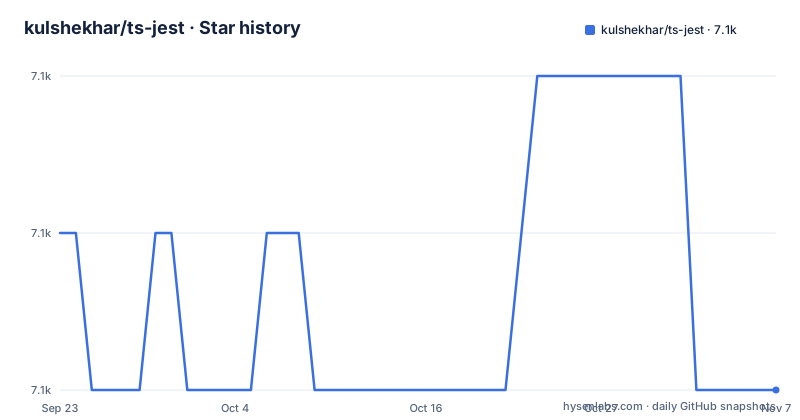
- kulshekhar/ts-jest7,071 ★ · -1
| Repository | 2026-09-23 | 2026-11-07 |
|---|---|---|
| kulshekhar/ts-jest | 7.1k | 7.1k |
-1 Stars in the last 45 days, measured from the daily GitHub snapshot. Compare with other projects
Editorial analysis
The problem ts-jest solves: Jest cannot read TypeScript
Jest runs JavaScript. A project written in TypeScript has .ts and .tsx files that Jest's transform pipeline cannot execute without a transformer registered against them. ts-jest is that transformer. The package description states it plainly: "A Jest transformer with source map support that lets you use Jest to test projects written in TypeScript."
The audience is narrow and specific. You already run Jest. You already have a tsconfig.json. What you lack is a bridge between the two, and you want the types to be part of the test run rather than a separate lint pass. The README makes a claim that separates ts-jest from transpile-only options: it "supports all features of TypeScript including type-checking." That sentence is the whole argument for choosing it over a faster transformer.
If your tests are plain JavaScript, or if your TypeScript never reaches a Jest process, nothing here applies to you.
How the transformer fits into the Jest pipeline
Jest resolves a source file, hands it to the configured transform, and runs the returned JavaScript. ts-jest sits at that transform step. It reads your tsconfig, compiles each matched file, and returns code plus a source map so stack traces point back at the original .ts line rather than the emitted .js line.
The repository layout reflects that role. The entry point is dist/index.js with types at dist/index.d.ts, and the package exposes a bin named ts-jest mapped to cli.js. There is a jest-preset.js at the top level and a presets/ directory: the preset is shipped by the package and referenced from Jest config, not installed separately. legacy.js and preprocessor.js also sit at the root.
Type-checking is the expensive part. Compiling each file in isolation is cheap; resolving the whole program to report type errors is not. The README does not document the performance profile of either mode, so treat any specific speed claim you read elsewhere as unverified.
Installing ts-jest and running a first test
The README gives a four-step table. Prerequisites are TypeScript 4.3 through 6 alongside Jest. Install the test runner and the compiler first, then the transformer and its type definitions.
npm i -D jest typescript
npm i -D ts-jest @types/jest
With yarn the equivalent commands are `yarn add --dev jest typescript` and `yarn add --dev ts-jest @types/jest`. The README also notes that a project on TypeScript 7 should follow the supported side-by-side compiler setup in the docs instead of installing typescript directly.
Next, generate a Jest config. The CLI ships with a config initializer.
npx ts-jest config:initThat creates the config. Then run the suite.
npm testor `npx jest` if you have no test script. What you should see is Jest picking up your .ts test files, compiling them through ts-jest, and reporting results with stack traces mapped to TypeScript source lines. If the preset cannot be resolved, check that ts-jest is in devDependencies and that the preset name in your Jest config matches the package.
The repository ships worked configurations under examples/, including js-with-ts, ts-only, react-app, and monorepo-app. Those directories are the fastest way to see what a working setup looks like for a layout close to yours.
Where ts-jest is the wrong tool
Type-checking is the feature and the cost. Every test run that type-checks is doing work a transpile-only transformer skips. If your suite is large and you run it on every save, the type-check pass sits directly in your edit loop. The project does not hide this; it is the trade you make for catching type errors during tests.
The second boundary is versioning. The README states outright that the project does not use semantic versioning, and that the major number follows Jest's rather than its own. It also carries a warning that 23.10 was a rewrite and that `npm i -D ts-jest@"<23.10.0"` is how you go back to the previous version. A dependency whose major version tracks another tool's major version makes upgrade planning harder than a conventional semver library: you cannot read the version number and infer the blast radius.
The third boundary is ecosystem. If your project is not on Jest, ts-jest has nothing to transform. It is a Jest transformer, not a standalone test runner, and it does not replace Jest's mocking, snapshot, or watch machinery.
ts-jest vs babel-jest and @swc/jest: what actually differs
The README links to a dedicated page comparing Babel 7 with preset-typescript against TypeScript and ts-jest, which tells you the maintainers consider that the primary alternative. The difference is not stylistic. Babel strips types; it does not check them. preset-typescript parses and removes type annotations so the code runs, and nothing in that path reports a type error. ts-jest runs the TypeScript compiler, so a mismatched argument type fails the test run.
@swc/jest occupies the same transpile-only position with a Rust-based compiler. It is a different implementation of the same bargain: fast output, no type-checking. Choosing between ts-jest and either of these is choosing whether type errors belong in your test feedback or in a separate tsc invocation. Running both is possible, but then you maintain two configurations of the same compiler settings.
Vitest is the other direction entirely. It does not use Jest's transformer interface, so the comparison is between test runners, not transformers. If you are evaluating Vitest, you are deciding whether to leave Jest, and ts-jest is not a factor in that decision beyond being left behind with it.
Maintenance, releases and the upgrade cost
The repository is not archived, and the last push was on 2026-11-01. Releases are frequent and small: v29.4.15 on 2026-10-15, v29.4.14 on 2026-09-25, and v29.4.13 on 2026-09-23. Those are patch-level bumps on the 29 line, which is the line that follows Jest 29. The CHANGELOG.md at the repository root is generated through conventional-changelog as part of the version script, so release notes are derived from commit messages rather than hand-written.
Upgrade cost concentrates in two places. First, the Jest major: when Jest moves, ts-jest's major moves with it, and the README's own versioning note means you should read the changelog rather than assume compatibility from the number. Second, the TypeScript range. The README states support for TypeScript 4.3 through 6 and points TypeScript 7 users at a separate side-by-side compiler setup. A project pinned to an older or newer compiler than that range should check the documentation before upgrading either side.
The licence is MIT, per both the README and the LICENSE.md file. MIT permits commercial use and modification; it requires the copyright notice and permission notice be included in copies or substantial portions. That is a summary of the terms, not legal advice, and the TROUBLESHOOTING.md file is the maintainers' first stop for issues before you file one.
What to check before you commit to it
Confirm three things against your own repository. Your TypeScript version against the documented 4.3 to 6 range, since a mismatch changes which setup path applies. Whether your tsconfig sets isolatedModules, because that setting interacts with what the transformer can check per file. And whether your Jest version's major matches the ts-jest major you install, given that the project deliberately ties them together.
If all three line up, the examples/ directory has a configuration close to most layouts, and `npx ts-jest config:init` produces a starting point you can diff against it. If any of them do not line up, the online documentation at the project homepage is the maintained source, and the README explicitly directs deeper questions there rather than answering them inline.
Editorial conclusion
Adopt ts-jest if your test runner is already Jest and you want type errors surfaced during the test run rather than in a separate tsc step. Do not adopt it if you are starting fresh and have no Jest investment, or if test wall-clock time dominates your feedback loop; a transpile-only transformer such as @swc/jest or babel-jest skips type-checking entirely, and Vitest drops the Jest transformer model. Before committing, verify the TypeScript version your project pins against the supported range (4.3 to 6, with TypeScript 7 handled by the side-by-side compiler setup in the docs), confirm that npx ts-jest config:init writes a config matching your tsconfig, and check whether isolatedModules in your tsconfig changes what the transformer can check.
Frequently asked questions
What is ts-jest used for?
It is a Jest transformer that lets Jest run tests written in TypeScript, with source map support so stack traces map back to the original TypeScript lines. The README states it supports all TypeScript features including type-checking.
How do I install and set up ts-jest?
The README's table lists `npm i -D jest typescript` as the prerequisite and `npm i -D ts-jest @types/jest` as the install step, then `npx ts-jest config:init` to create the config, then `npm test` to run. With yarn the equivalents are `yarn add --dev` for each and `yarn ts-jest config:init`.
What is the difference between ts-jest and babel-jest?
The README links to a page comparing Babel 7 with preset-typescript against TypeScript and ts-jest, and it emphasizes that ts-jest supports all TypeScript features including type-checking. Babel's TypeScript preset strips types rather than checking them, so type errors do not surface during the test run.
Why is ts-jest slow?
The README does not document a performance profile, but it does state that ts-jest supports all TypeScript features including type-checking. Type-checking a program is additional work beyond transpiling each file, and that work runs as part of the test pipeline.
What is the latest version of ts-jest?
The package.json in the repository lists version 29.4.15, and the release list shows v29.4.15 dated 2026-10-15. The README notes the project does not use semantic versioning and that its major number follows Jest's.
Official sources
Add this badge to your README
If you maintain this project, the badge below links readers to this analysis and shows its maintenance status from the daily GitHub snapshot. Paste the markdown into your README; add ?metric=license or ?metric=stars to the image URL for a different field.

[](https://hysenlabs.com/projects/kulshekhar-ts-jest)Star history chart for your README
[](https://hysenlabs.com/projects/kulshekhar-ts-jest)Was this useful?