Deep Agents: LangChain's opinionated agent harness for long-horizon, multi-step work
The batteries-included agent harness. Use LangChain's create_agent when you want a lighter harness without the bundled middleware.
At a glance
- What is it?
- Deep Agents is a Python library that bundles sub-agents, filesystem access, context management, and skills on top of LangGraph's create_agent. It targets teams that want a production-ready agent loop without assembling middleware themselves, but it assumes you trust the LLM with tool access.
- Who is it for?
- Adopt Deep Agents if you need a full agent harness with planning, context management, and delegation out of the box, and you are comfortable with LangChain's ecosystem. Skip it if you want a minimal loop or need to control the graph shape yourself; use create_agent or LangGraph directly.
- Can I use it commercially?
- Yes. MIT is a permissive licence: you can use, modify and sell software built on it, as long as you keep its copyright and licence notices.
- Is it still maintained?
- Yes. The repository last received commits 1 day ago.
- What is it written in?
- Mainly Python, according to GitHub's language statistics.
Answers come from the project's GitHub data, last synced on November 14, 2026, and from our analysis. They are not legal advice.
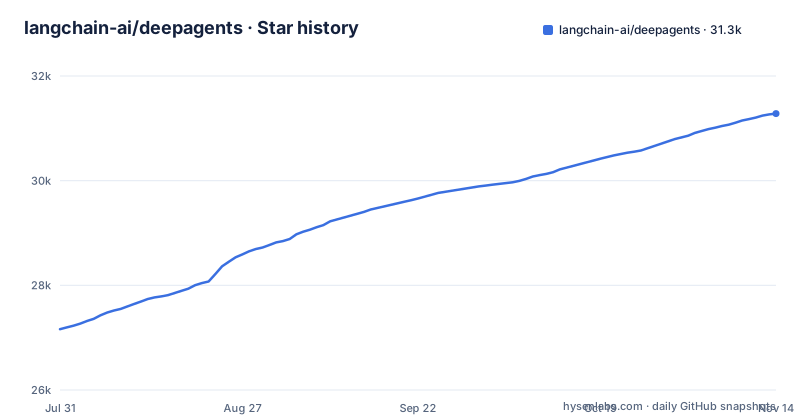
Star history
- langchain-ai/deepagents31,282 ★ · +4,120
| Repository | 2026-07-31 | 2026-11-14 |
|---|---|---|
| langchain-ai/deepagents | 27.2k | 31.3k |
4,120 Stars in the last 106 days, measured from the daily GitHub snapshot. Compare with other projects
Editorial analysis
What Deep Agents actually adds over create_agent
Deep Agents is not a new runtime. It sits on top of LangGraph and LangChain's create_agent, and it bundles middleware that create_agent leaves out. The README is explicit: use create_agent when you want a lighter harness without the bundled middleware, and use Deep Agents when you want the full harness with planning, context management, and delegation out of the box. The bundled pieces are sub-agents with isolated context windows, a filesystem tool with pluggable backends, context summarization and offloading of tool outputs to disk, shell access, persistent memory via state and store backends, human-in-the-loop approval, skills, and support for any MCP server. That is a long list, and it explains the 'batteries-included' label. The trade-off is that you inherit all of that middleware even if you only need two of those features. The README says you can extend, override, or replace any piece without forking, but it does not show how.
The architecture: an opinionated loop on LangGraph
The project is built on LangGraph, which provides streaming, persistence, and checkpointing. The agent loop itself is a LangGraph graph, and the README notes that any LangGraph CompiledStateGraph can be passed in as a sub-agent to a Deep Agent. That is a concrete composability point: you can plug a custom graph into the harness's defaults. The design principle is 'extend, override, or replace any piece without forking.' That sounds good, but the README does not show how overriding works in practice. There is no example of replacing the planner or the context manager. The claim is that you can override any piece, but the documentation would need to show the extension points before you can rely on that. The model-agnostic claim is concrete: any LLM that supports tool calling works, including frontier APIs, open-weight models on Baseten or Fireworks, and self-hosted models via Ollama, vLLM, or llama.cpp.
Getting started: one command and one function call
The quickstart is minimal. You install with `uv add deepagents`, then import `create_deep_agent` and call it with a model string and a system prompt. The example uses `model="openai:gpt-6-astra"` and a system prompt of "You are a research assistant."; it passes no custom tool, though the README says you can add your own tools. The result is an agent object with an `invoke` method that takes a message. That is the entire setup. The README does not show how to configure sub-agents, change the filesystem backend, or set up persistent memory. Those are presumably in the documentation, but the quickstart gives no config keys. For a project that claims production-readiness, the missing setup details are a gap. You can get a basic agent running in minutes, but you cannot configure the interesting parts without reading the docs.
The 'trust the LLM' security model is a hard boundary
The security section is the most important part of the README. It states plainly: 'Deep Agents follows a "trust the LLM" model. The agent can do anything its tools allow.' That means the agent has filesystem read/write/edit, shell access, and the ability to load skills on demand. The README says to enforce boundaries at the tool or sandbox level, not by expecting the model to self-police. This is a genuine limitation if you are deploying in an environment where the LLM might be prompted to take harmful actions. The filesystem backends are pluggable, so you could use a sandboxed backend, but that is your responsibility. The shell access feature amplifies the risk: if you give the agent shell access, it can run arbitrary commands. The project is honest about this, but it means Deep Agents is the wrong tool for any deployment where you cannot isolate the agent's environment.
Where Deep Agents fits versus create_agent and raw LangGraph
The README positions three layers: LangGraph is the graph runtime, create_agent is a minimal agent harness on top of it, and Deep Agents is a more opinionated harness on top of create_agent. The difference is concrete: create_agent gives you a loop with tool calling, but no filesystem, no sub-agents, no context management, and no skills. Deep Agents bundles all of those. If you only need a simple tool-calling loop, create_agent is lighter and you avoid the middleware overhead. If you need a custom graph shape, LangGraph is the right level, because the agent loop itself is not the right shape. The README gives a specific composition path: any CompiledStateGraph can be passed as a sub-agent, so you can mix custom orchestration with the harness defaults. That is the practical decision point: start with Deep Agents if the default loop matches your needs, and drop down when it does not.
Maintenance, license, and the JavaScript sibling
The project is under the MIT license, which is permissive and fits most commercial use. The repository is active, with the last push on 2026-11-02 and recent releases including deepagents-code 0.2.4 and 0.2.3 (2026-11-02) and langchain-quickjs 0.3.11 (2026-10-27). The README links a changelog for the Python SDK (libs/deepagents/CHANGELOG.md), which is the place to check for breaking changes. There is also a JavaScript/TypeScript version, deepagents.js, so the Python library is part of a broader effort. The README mentions a separate product, Deep Agents Code, which is a terminal coding agent installed via `curl -LsSf https://langch.in/dcode | bash`, but that is a different tool, not the library itself. For maintenance cost, the main consideration is that you are tied to LangChain's ecosystem, so upgrades to LangGraph or create_agent may affect Deep Agents.
A real alternative: LangChain's create_agent with your own middleware
The direct alternative is create_agent, which the README itself names. The difference is that create_agent is a minimal harness without the bundled middleware. You get the core loop: model, tools, and tool calling. But you do not get sub-agents, filesystem access, context summarization, or skills. You would have to build those yourself or pull in separate libraries. That is a real trade-off: create_agent gives you control over what middleware you add, but it costs you the integration work that Deep Agents already did. If you have very specific requirements for how sub-agents should share context or how filesystem access should be sandboxed, create_agent lets you implement that from scratch. Deep Agents gives you defaults that you may have to override, and the README does not show how to override them. So the choice is between a working harness with assumptions and a minimal harness with work.
Editorial conclusion
Adopt Deep Agents if you need a full agent harness with planning, context management, and delegation out of the box, and you are comfortable with LangChain's ecosystem. Skip it if you want a minimal loop or need to control the graph shape yourself; use create_agent or LangGraph directly. Before adopting, verify that the bundled middleware matches your security posture, since the project follows a 'trust the LLM' model and enforces boundaries only at the tool or sandbox level.
Frequently asked questions
How do I install DeepAgents?
The quickstart adds the package with uv add deepagents, then imports create_deep_agent from deepagents. The separate prebuilt terminal agent, Deep Agents Code, installs by running curl -LsSf https://langch.in/dcode | bash.
what is deepagents
It is the batteries-included agent harness: an opinionated agent that runs out of the box, with sub-agents, a pluggable filesystem, context management, shell access, persistent memory, human-in-the-loop approval, and skills bundled in. The repository is MIT licensed.
deepagents vs langchain vs langgraph
LangGraph is the graph runtime, LangChain's create_agent is a minimal harness on top of it, and Deep Agents is a more opinionated harness on top of create_agent with filesystem, sub-agents, context management, and skills bundled in. The layers compose, since any LangGraph CompiledStateGraph can be passed in as a sub-agent.
is deepagents open source
Yes. It is an MIT-licensed open source agent harness built in the langchain-ai organization, and a JavaScript and TypeScript version lives in a separate deepagentsjs repository.
What is Deep agents Code?
It is a pre-built coding agent that runs in your terminal, similar to Claude Code or Cursor, powered by any LLM. It is installed with curl -LsSf https://langch.in/dcode | bash and documented separately from the Python library.
deepagents vs claude code
The acknowledgements say Deep Agents was inspired by Claude Code, with the stated aim of identifying what makes it general-purpose and pushing that further. Deep Agents Code is a separate prebuilt terminal agent, similar to Claude Code or Cursor, that runs on any LLM you point it at.
Official sources
Add this badge to your README
If you maintain this project, the badge below links readers to this analysis and shows its maintenance status from the daily GitHub snapshot. Paste the markdown into your README; add ?metric=license or ?metric=stars to the image URL for a different field.

[](https://hysenlabs.com/projects/langchain-ai-deepagents)Star history chart for your README
[](https://hysenlabs.com/projects/langchain-ai-deepagents)Was this useful?