Project Raven: an open-source meeting copilot with local echo cancellation and bring-your-own AI keys
Open-source AI meeting copilot - real-time transcription, echo cancellation, and AI assistance. Captures system audio + mic, cancels echo via WebRTC AEC3, transcribes with Deepgram, and gives you Claude/OpenAI help during meetings. Runs locally on macOS and Windows.
At a glance
- What is it?
- Project Raven is an Electron desktop app for macOS and Windows that captures microphone and system audio, cancels echo on the machine with WebRTC AEC3, transcribes two streams in parallel, and answers from the live transcript using your own Deepgram, AssemblyAI, Anthropic or OpenAI keys. It is a good fit if you already pay for those APIs and want the transcript to stay in local SQLite; it is the wrong tool if you wanted a hosted service with no setup.
- Who is it for?
- Adopt Project Raven if you already hold Deepgram or AssemblyAI and Anthropic or OpenAI keys, meet on macOS 12+ Apple Silicon or Windows 10/11 x64, and accept that the transcript lives in a local SQLite file rather than a shared workspace. Skip it if you need a browser-only tool, an Intel Mac build, a Linux client, or a server-side record of every call.
- Can I use it commercially?
- Yes. MIT is a permissive licence: you can use, modify and sell software built on it, as long as you keep its copyright and licence notices.
- Is it still maintained?
- Yes. The repository received new commits within the last day.
- What is it written in?
- Mainly TypeScript, according to GitHub's language statistics.
Answers come from the project's GitHub data, last synced on November 15, 2026, and from our analysis. They are not legal advice.
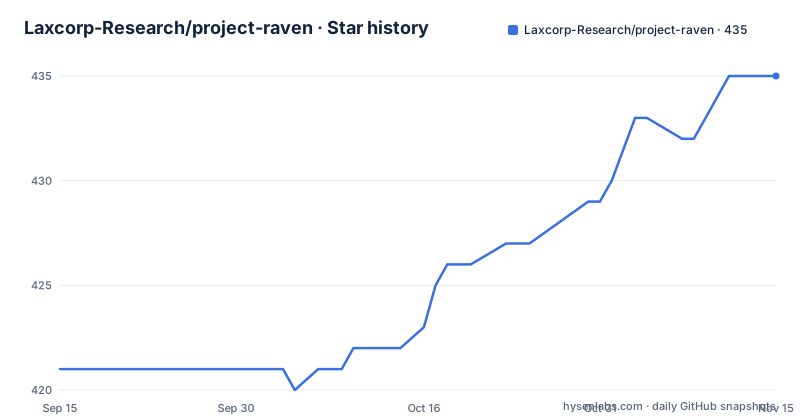
Star history
- Laxcorp-Research/project-raven435 ★ · +14
| Repository | 2026-09-15 | 2026-11-15 |
|---|---|---|
| Laxcorp-Research/project-raven | 421 | 435 |
14 Stars in the last 61 days, measured from the daily GitHub snapshot. Compare with other projects
Editorial analysis
What Project Raven solves, and who it is actually for
Most meeting assistants are hosted products. You join a call, a bot joins too, and the transcript ends up in someone else's account. Project Raven takes the opposite position. The README states plainly that this build has no Raven account, no hosted backend, and no cloud session sync, and that recordings and notes stay in local SQLite while transcription and AI use your API keys.
That single design decision defines the audience. It is for people who already hold a Deepgram or AssemblyAI key and an Anthropic or OpenAI key, and who are comfortable pasting them into a Settings screen on first launch. It is also for people who care that the audio leaves the machine only toward the speech-to-text vendor, not toward the app author. The README is explicit about the split: capture, echo cancellation, SQLite history and document RAG run locally, while microphone and system audio go to Deepgram or AssemblyAI and assist prompts go to Anthropic or OpenAI.
The second audience is anyone who presents while taking a call. The overlay is rendered with Electron setContentProtection so it is omitted from typical screen-share APIs such as Zoom, Meet, Teams and Discord. The README calls this Stealth Mode and, to its credit, adds that it is not a guarantee against every capture tool. That caveat matters more than the feature itself.
How the dual-stream capture and echo cancellation pipeline fits together
The capture layer is platform-specific. On macOS it uses ScreenCaptureKit plus CoreAudio; on Windows it uses WASAPI loopback plus capture, implemented in Rust and exposed through NAPI. That produces two raw streams: everything the machine plays, and everything your microphone hears.
The interesting part is what happens to the microphone stream. Because the microphone also hears your speakers, the raw mic signal contains a delayed copy of the far-end audio. Project Raven runs the mic through GStreamer's webrtcechoprobe and webrtcdsp, which wrap WebRTC AEC3, and then applies what the README calls a residual echo gate. That gate drops mic chunks which still look like speaker bleed before they reach speech-to-text.
The gate is the pragmatic half of the design. Acoustic echo cancellation is never perfect, especially on laptop speakers at high volume or with a headset that leaks. A second, cruder filter that discards suspicious chunks prevents the transcriber from attributing the other participant's words to you. The cost is real: aggressive gating can clip the first syllable of a genuine interruption. The README does not document a sensitivity control for the gate, so the threshold is not something a user can tune from Settings as far as the documentation shows.
Once cleaned, the two streams go to speech-to-text as separate channels labelled You and Them. The README names Deepgram nova-3 and AssemblyAI u3-rt-pro. Auto-routing prefers AssemblyAI for English, Spanish, French, German, Portuguese and Italian when that key is present, and falls back to Deepgram otherwise, with Settings able to force either engine.
Installing Project Raven on macOS or Windows
The project ships prebuilt installers on its GitHub Releases page rather than a package registry, so installation is a download and a double-click. The README lists two files for version 2.4.3: Raven-Windows-2.4.3-Setup.exe for Windows 10/11 x64, and Raven-Mac-2.4.3-Installer.dmg for macOS 12 or later on Apple Silicon.
The README warns that SmartScreen may flag the Windows build because it is unsigned, and tells you to choose More info then Run anyway. On macOS you open the DMG, drag Raven to Applications, and launch it. Intel Macs are not covered by that DMG; the README says to build from source instead.
After launch, the onboarding flow runs six steps: welcome, API keys, permissions, an overlay tour, shortcuts, and a final ready screen. The API keys step is where you paste your own credentials. There is no sample key and no trial key, so nothing works until you supply one.
git clone https://github.com/Laxcorp-Research/project-raven.git
cd project-raven
npm install
That is the source path, and it is only needed for Intel Macs or for contributors. The package.json declares an engines field of node >=22.12.0, and the postinstall script runs npx @electron/rebuild -f -w better-sqlite3 -m . so the native SQLite binding matches your Electron version. If you are on Apple Silicon or Windows x64, the installer is faster and avoids the native build entirely.
Building the native audio modules from source
Building from source is not a single command. The package.json exposes separate scripts for the two native pieces, and they are independent of the main Vite and electron-builder pipeline.
npm run build:aec
npm run build:swift
build:aec changes into src/native/aec, installs dependencies with a cache directory under /tmp, and runs npx cmake-js compile. build:swift changes into src/native/swift/AudioCapture and runs swift build -c release. The Swift target is macOS-only, so a Windows contributor would only run the first. The README does not state whether the standard npm run build depends on these having been run first, which is the kind of gap that costs an afternoon. Check the build ordering in CONTRIBUTING.md before assuming the packaging script handles it.
For day-to-day work the scripts are conventional: npm run dev starts Vite, npm run test runs tsc --noEmit followed by vitest run, and npm run test:e2e drives Playwright against the config in e2e/playwright.config.ts. The presence of a dedicated e2e directory and an integration test glob under src/main/__tests__/integration suggests the maintainers test the main process separately from the renderer, which is the right split for an Electron app that touches native audio.
RAG, session context, and the boundary the README draws around memory
Each mode in Project Raven carries a system prompt, notes templates, and optionally attached documents. You upload .txt, .md, .pdf or .docx files, and the app chunks and embeds them on-device with the Xenova/all-MiniLM-L6-v2 model through @xenova/transformers. The chunks are stored in SQLite and the top matches are injected into the Assist system prompt. The README notes that the first embedding run may download roughly 30MB of model weights.
The distinction between session context and long-term memory is where the documentation is unusually honest. During a recording, Assist keeps recent turns, pins the opening transcript and your typed questions, and may compress older context with a cheap model in RAM. The README then states that there is no cross-meeting user-memory profile. That is a deliberate limitation, and it is the right one for a local-first tool, but it means Raven will not learn your preferences or remember that a client prefers Tuesday calls. Anything you want carried across meetings has to live in a mode's attached documents or system prompt.
Sessions themselves are saved to SQLite with transcript, overlay chat, and an auto-generated title and summary. A per-session Ask tab answers from that call's transcript, and a separate Ask across all meetings searches the wider history. Incognito mode skips SQLite persistence for the session, which is the correct escape hatch for calls you would rather not keep.
Where Project Raven breaks down, and what to use instead
The most concrete limitation is platform coverage. The README lists installers for Windows 10/11 x64 and macOS 12+ on Apple Silicon only, and says Intel Macs must build from source. Linux is not mentioned at all, despite the Electron base and the Rust capture layer, which suggests the audio backends are the blocker rather than the UI.
The second limitation is cost transparency. Bring-your-own-key is a feature, not a free tier. Every minute of every meeting is billed by your speech-to-text vendor, and every Assist prompt is billed by your LLM vendor. Project Raven adds no metering layer that the README describes, so a long all-hands with the overlay left open could produce a surprise. The README does not document a hard spending cap or a per-session budget setting.
The third is the Stealth Mode claim. setContentProtection is an operating-system level hint. The README itself says it is not a guarantee against every capture tool. Anyone using this to hide an assistant during an interview or a proctored exam is relying on a mechanism the project does not promise will hold.
As an alternative, Otter.ai and Fireflies.ai take the hosted approach: a bot or a browser extension joins the call, and the transcript lives in a shared workspace with team features. The difference is not quality, it is custody. With those products, someone else's servers hold the recording and the search index works across your whole organisation. Project Raven gives you the opposite trade: local SQLite, your own keys, no cross-meeting memory, and no shared workspace. If your team needs a searchable archive that everyone can query, the hosted model fits better. If your constraint is that audio and notes must not sit on a vendor's infrastructure, Project Raven is the one that respects it.
Maintenance, releases, and what the MIT licence does and does not cover
The last push to the default branch was on 2026-08-28, the same day v2.4.3 shipped, following v2.4.2 and v2.4.1 earlier that month. The release cadence is tight and the changelogs are specific: v2.4.3 fixes macOS in-app self-update, v2.4.2 addresses a stealth Dock behaviour and OpenAI key validation. That is a project shipping fixes rather than a project parked after a launch.
Upgrades are handled in-app. Installed copies check GitHub Releases for updates using latest.yml on Windows and latest-mac.yml on macOS, and the updater only offers a build when the published version is newer than the installed one. From 2.4.1 onward, macOS self-updates in-app like Windows, with Update now to download and Restart and update to install. The README notes that Macs still on 2.4.0 must update via the DMG one final time. That is the one upgrade path worth planning around.
The licence is MIT, which permits commercial use, modification and redistribution provided the copyright notice and permission notice are retained. It offers no warranty. Two practical consequences for a team: you may ship a modified Raven internally without asking, and you have no contractual recourse if a transcription vendor changes its pricing or deprecates a model. The repository also contains a .premium-paths file at the top level, and the README does not explain what it gates. Before committing to a workflow, confirm that the features you depend on are not on the far side of that file.
Editorial conclusion
Adopt Project Raven if you already hold Deepgram or AssemblyAI and Anthropic or OpenAI keys, meet on macOS 12+ Apple Silicon or Windows 10/11 x64, and accept that the transcript lives in a local SQLite file rather than a shared workspace. Skip it if you need a browser-only tool, an Intel Mac build, a Linux client, or a server-side record of every call. Verify first that your own key quotas and per-minute pricing survive a full meeting, that Stealth Mode hides the overlay in your specific screen-share client, and that the .premium-paths file in the repository does not gate a feature you intend to rely on.
Frequently asked questions
What is Project Raven?
It is an open-source Electron meeting copilot for macOS and Windows that captures system audio and microphone input, cancels echo locally with WebRTC AEC3, transcribes the two streams separately, and provides AI assistance from an overlay. It uses your own Deepgram or AssemblyAI and Anthropic or OpenAI keys, and stores sessions in local SQLite.
Does Project Raven need my own API keys?
Yes. The README states there is no Raven account and no hosted backend, and that transcription and AI calls use your keys, entered in Settings on first launch. Nothing works until you supply at least one speech-to-text key and one LLM key.
Does Project Raven work on an Intel Mac?
The macOS DMG is for macOS 12 or later on Apple Silicon. The README says Intel Macs are not included in that DMG and must build from source, which requires running the build:aec and build:swift scripts.
Is the Project Raven overlay really invisible during screen sharing?
The overlay uses Electron setContentProtection, which the README says omits it from typical screen-share APIs such as Zoom, Meet, Teams and Discord. The README also states this is not a guarantee against every capture tool, so treat it as a strong default rather than an absolute.
Does Project Raven remember things across different meetings?
No. The README states there is no cross-meeting user-memory profile. During a recording, Assist keeps recent turns and pins the opening transcript and your typed questions in RAM, and you can search across past sessions with Ask across all meetings, but there is no persistent profile built from your history.
Official sources
Add this badge to your README
If you maintain this project, the badge below links readers to this analysis and shows its maintenance status from the daily GitHub snapshot. Paste the markdown into your README; add ?metric=license or ?metric=stars to the image URL for a different field.

[](https://hysenlabs.com/projects/laxcorp-research-project-raven)Star history chart for your README
[](https://hysenlabs.com/projects/laxcorp-research-project-raven)Was this useful?