ebook-to-mindmap: EPUB and PDF chapters turned into an editable mind map
AI-powered summaries by extracting content from EPUB and PDF.
At a glance
- What is it?
- ebook-to-mindmap opens an EPUB or PDF in the page, splits it into chapters, then spends a model of your choosing to write summaries or build a map you can reopen. The web build lives at the mercy of provider CORS headers, and whole-book mode stops dead on books that overflow the model context.
- Who is it for?
- Adopt it if you read long non-fiction locally and want the chapter skeleton as a map you own, but take the Tauri build rather than the web one when you bring your own key, because provider CORS headers decide whether the browser can reach Google or OpenAI at all. Pass on it for a quick skim: there is no library import, no partial run, and nothing to browse offline beyond the per-mode cache.
- Can I use it commercially?
- Yes. MIT is a permissive licence: you can use, modify and sell software built on it, as long as you keep its copyright and licence notices.
- Is it still maintained?
- Yes. The repository last received commits 46 days ago.
- What is it written in?
- Mainly TypeScript, according to GitHub's language statistics.
Answers come from the project's GitHub data, last synced on October 23, 2026, and from our analysis. They are not legal advice.
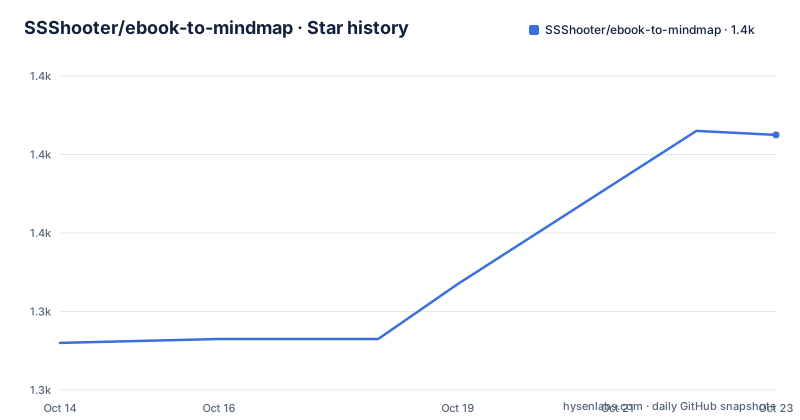
Star history
- SSShooter/ebook-to-mindmap1,385 ★ · +53
| Repository | 2026-10-14 | 2026-10-23 |
|---|---|---|
| SSShooter/ebook-to-mindmap | 1.3k | 1.4k |
53 Stars in the last 9 days, measured from the daily GitHub snapshot. Compare with other projects
Editorial analysis
Parsing happens in the page, before any model is called
ebook-to-mindmap is aimed at readers who finish a long book and cannot hold its shape afterwards: it converts `.epub` and `.pdf` files into chapter summaries and into a mind map you can walk back through. The file is opened by browser libraries, `@smoores/epub` alongside epubjs for EPUB and `pdfjs-dist` for PDF, so chapter text exists inside the page before any model is involved.
From there the pipeline runs in ordered steps you control. Chapter extraction is its own pass: press the extract button, the parser walks the file, a chapter list appears, and you select or drop chapters before spending tokens. Fiction and non-fiction are separate settings, since novels and technical books do not split on the same boundaries. Results are cached per mode, an interrupted run resumes from the last position, and finished output stays viewable with no connection.
Whole-book maps fail once the book outgrows the model context
Three processing modes decide the shape of the result and how much text reaches the model. Text summary mode writes a summary per chapter, an analysis of how the chapters relate to each other, and a summary of the whole book. Per-chapter mind map mode builds a separate map for each chapter. Whole-book mind map mode folds everything into one graph, and here the docs state the limit plainly: a book too long to fit the model context fails to generate. Nothing in that description is a knob you can tune around, because no chunking or trimming step is documented for this mode.
Per-chapter mode scales as books get longer, at the price of a fragmented result with no single view to return to. Whole-book mode supplies that view only for books a model can still hold.
A key you own still has to pass the browser same-origin policy
Bring your own key mode takes a provider, an API key and a model name, with Google Gemini named as the trial path and its keys created in Google AI Studio. Because the page calls the provider itself, any provider that does not return CORS response headers gets stopped by the browser. Diagnosis is documented and concrete: open developer tools with F12 and look in the Console or Network panel for `CORS policy` or `blocked by CORS`.
The fix offered is not a proxy and not a different key. Run the Tauri desktop build instead, which does not go through the browser same-origin policy and can reach every provider. In practice that makes the desktop build the honest version of the BYOK story, since owning the key buys privacy, not reachability.
Chapter detection, chapter grouping, and a depth dial from 0 to 3
Three options decide what the model ever sees. Smart chapter detection lets the AI find chapter boundaries when the file's own structure is unreliable. Skip irrelevant chapters drops front matter, the table of contents and acknowledgements before any summarising starts. Sub-chapter depth sets how deep extraction descends, from 0 to 3, so 0 keeps only the top level the file declares.
Grouping is the manual answer to books chopped into stubs. You click chapter rows to multi-select, hit the add tag button or the `Ctrl + G` shortcut, type a group name such as 第一部分, and the marked chapters are then analysed as one merged unit, which hands the model context it would never get from fragments. Membership is undone with the X icon after the tag on the chapter list. No config file is involved anywhere in this; every switch lives in the options dialog before extraction finishes.
Only text summary mode lets a custom prompt replace the system prompt
Prompts get their own page in the nav bar, where each entry carries a name, a description and the body text, and where existing entries can be edited, copied or deleted. The same library appears as a dropdown at the bottom of the options dialog after chapters are extracted, so a template written for one book can be reused on the next run.
One checkbox decides how much authority it has. Left unticked, your prompt rides along as a supplementary instruction on top of the system default. Ticked, it replaces the system default outright, and the docs restrict that replacement to text summary mode. What the docs do not say is why the two mind map modes are excluded, or how a custom prompt would reshape node structure there. Plan to iterate inside text summary mode and treat the map modes as fixed.
One tree, two targets: the Vite dev server and the Tauri bundle
Web development needs Node.js 20+ and pnpm 9+, with `[email protected]` pinned as the package manager. Install, serve, build and preview are the four commands you need, and the dev server answers on http://localhost:5173.
# 安装依赖
pnpm install

# 开发服务器(http://localhost:5173)
pnpm dev

# 生产构建(输出到 dist/)
pnpm build

# 预览生产构建
pnpm preview
`pnpm build` runs `tsc -b` ahead of Vite, so a type error stops the build instead of shipping, and the bundle lands in dist/.
docker compose upThat container serves the same dev server: the Dockerfile starts from node:20-alpine, installs pnpm globally, copies package.json and the lockfile, then ends on `CMD ["pnpm", "dev", "--host", "0.0.0.0"]`. docker-compose.yml sets `network_mode` to host and leaves its ports block commented out, so the container binds the host network directly rather than publishing 5173.
Desktop packaging adds Rust and the platform's Tauri prerequisites, and drops installers into src-tauri/target/release/bundle/: msi / nsis on Windows, dmg / app on macOS, deb / AppImage on Linux.
# 开发模式(启动 Vite + 原生窗口)
pnpm tauri:dev

# 打包安装包(输出到 src-tauri/target/release/bundle/)
pnpm tauri:build
Bundle format follows the host system, so an AppImage appears only when built on Linux.
Against NotebookLM, the argument is export and prompt control
The project positions itself against Google NotebookLM on two axes. The first is what happens to the map afterwards: online here it is for browsing only, yet the generated mind map can be exported as a data file and opened in an editor such as the Mind Elixir desktop app for further work, where NotebookLM's map stays in the web page with no export path at all. The second axis is prompt freedom, with full custom prompts and an option to override system settings set against a system prompt the project describes as built around retrieval and summarising.
A close reading turns up a wobble on the first axis. The comparison table promises export as a data file so you can edit a second time, while the results section describes export as an image or other formats. Those are different products: an image is a picture of the graph, a data file is something an editor can reopen and change. Only the data file claim names a tool able to act on it, so check what the export dialog actually offers before you plan a round of edits.
Star credits, provider sync, and a package name still from the template
Without a key, signing in with a Mind Elixir account calls hosted models and draws down a balance called star credits, described as charged on demand, permanent, and shared across the ecosystem, with the M10C browser extension named as another place they apply. The convenience is real, and so is the change of ownership: on that path the provider, the request route and the accounting all sit outside the repository, and the direct browser to provider connection promised for your own key no longer describes where the text goes.
Provider data is generated rather than typed in. Scripts include `update:providers`, which runs `node scripts/sync-providers.mjs`, so adding a provider is a script execution, not an edit inside the interface.
Smaller signs of a rename nobody finished: package.json still calls the package `react-tailwind-template-for-vibe-coding` at version `0.0.0`, and `.agent/`, `.agents/`, `.claude/` and skills-lock.json sit in the tree as scaffolding. The last push landed on 2026-09-07, and the code is MIT licensed through the LICENSE file. Nothing documents rollback, and the scripts expose `eslint .` with no test command beside it.
Editorial conclusion
Adopt it if you read long non-fiction locally and want the chapter skeleton as a map you own, but take the Tauri build rather than the web one when you bring your own key, because provider CORS headers decide whether the browser can reach Google or OpenAI at all. Pass on it for a quick skim: there is no library import, no partial run, and nothing to browse offline beyond the per-mode cache. Before you commit, confirm that the clone still matches ebook-to-mindmap v0.1.3 dated 2026-07-26 and that your book fits one model context before choosing whole-book mind map mode.
Frequently asked questions
Does ebook-to-mindmap run in the browser, or does it upload my book?
EPUB parsing runs on `@smoores/epub` plus epubjs and PDF on `pdfjs-dist`, both browser libraries, so chapter text is handled in the page. In bring your own key mode the docs state every AI request goes from the browser straight to Google or OpenAI, with no third-party proxy or relay in between; signing in for hosted models instead sends the book to Mind Elixir's hosted path.
Why does my API key fail in the web version of ebook-to-mindmap but work on the desktop?
A provider that sends no CORS headers gets stopped by the browser's same-origin policy. The docs give both the test and the fix: open developer tools with F12, look for `CORS policy` or `blocked by CORS` in the Console or Network panel, and switch to the Tauri desktop build, which does not go through the browser policy.
Can I export the mind map from ebook-to-mindmap and edit it somewhere else?
The comparison table states the generated map can be exported as a data file and reopened in editors such as the Mind Elixir desktop app, while the online version is for browsing only. A separate results section describes export as an image or other formats, and the README does not enumerate which formats the export dialog actually offers.
Which AI models can ebook-to-mindmap call, and what does it cost?
Google Gemini goes through `@google/generative-ai` and OpenAI through a custom implementation, with Gemini named as the recommended trial provider. Bring your own key means your provider bills you; the keyless path draws on star credits in a Mind Elixir account, charged on demand and shared across the ecosystem, while the code itself sits under the MIT licence.
How do I run ebook-to-mindmap locally?
You need Node.js 20+ and pnpm 9+, then `pnpm install` and `pnpm dev`, which serves on http://localhost:5173, or `docker compose up` for the containerised dev server. Desktop packaging also needs Rust and the platform's Tauri prerequisites, and `pnpm tauri:build` writes installers into src-tauri/target/release/bundle/.
Official sources
Add this badge to your README
If you maintain this project, the badge below links readers to this analysis and shows its maintenance status from the daily GitHub snapshot. Paste the markdown into your README; add ?metric=license or ?metric=stars to the image URL for a different field.

[](https://hysenlabs.com/projects/ssshooter-ebook-to-mindmap)Star history chart for your README
[](https://hysenlabs.com/projects/ssshooter-ebook-to-mindmap)Was this useful?