QVAC's two flagship code samples both stop mid-statement, and its local server has no API key
Open-source local AI SDK - run AI on-device with no cloud, no API keys. Supports GGUF, RAG, image, music, and video generation, speech-to-text, P2P inference, and more. Cross-platform: Linux, macOS, Windows, Android, iOS.
At a glance
- What is it?
- A local AI SDK and OpenAI-compatible server from Tether, with JavaScript and Python quickstarts, a bundled worker, and three install routes of different shapes. The quickstart code is cut off in both languages, and the only thing protecting the server is a loopback bind.
- Who is it for?
- The architecture choice is coherent: a local runtime that speaks OpenAI's protocol, so existing tools can point at a model on your own machine with a base URL and a placeholder key. That coherence is also the risk.
- Can I use it commercially?
- Yes. Apache-2.0 is a permissive licence: you can use, modify and sell software built on it, as long as you keep its copyright and licence notices.
- Is it still maintained?
- Yes. The repository last received commits 1 day ago.
- What is it written in?
- Mainly TypeScript, according to GitHub's language statistics.
Answers come from the project's GitHub data, last synced on November 14, 2026, and from our analysis. They are not legal advice.
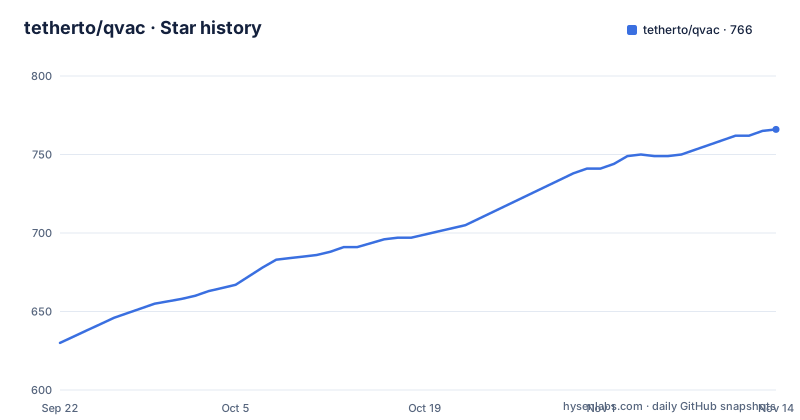
Star history
- tetherto/qvac766 ★ · +136
| Repository | 2026-09-22 | 2026-11-14 |
|---|---|---|
| tetherto/qvac | 630 | 766 |
136 Stars in the last 53 days, measured from the daily GitHub snapshot. Compare with other projects
Editorial analysis
Both quickstart code samples stop in the middle of a statement
There are three paths on the page: JavaScript, Python, and an HTTP server. The first two are the flagship quickstarts, and both code blocks are cut off inside an expression. The JavaScript sample loads a model with a progress callback, builds a one-message history asking for quantum computing in one sentence, and then ends:
  const history = [{ role: 'user', content: 'Explain quantum computing in one sentence' }];
  const r
The Python sample is the same story, ending at `model_src=LLA` mid-identifier. Each is followed by a run step and a sentence promising that the response tokens will stream to the terminal, so the missing lines are exactly the call that consumes the model and prints the answer. Neither block can be pasted into a file and executed, and neither the surrounding text nor the linked documentation fills the gap on the page.
The local server asks for any string as an API key
The server path is the most concrete feature description on the page, and it is also the one with an explicit security shape. The server is bound to `127.0.0.1:11434` by default. To connect a tool you add an OpenAI-compatible provider with the base URL `http://localhost:11434/v1`, `my-llm` as the model name, and any string as the API key. So the loopback bind is the entire access control, and the word by default implies the address can be changed. A page that states the key can be any string has told you there is no authentication to configure, which is a reasonable design for a loopback service and a real problem the moment the address is not loopback. The one other place a bind address enters the picture is the config file, whose model entry carries only a model constant, a default flag and a context size, with no host or key field anywhere in the example.
One config filename carries two different schemas
The file is called `qvac.config.json` in both places it appears, and it means different things. In the JavaScript quickstart it is a logging switch, located by an environment variable on the command line:
QVAC_CONFIG_PATH=./qvac.config.json node quickstart.jsIt sets `loggerConsoleOutput` and `loggerLevel`. In the server path the same filename declares what to serve, a `serve` block with a models map, one entry named `my-llm` bound to a model constant, marked `default: true`, with a `config` object holding `ctx_size: 8192`. The first is passed explicitly by path, the second is picked up implicitly, and a reader who copies the logging file into a server directory gets neither. Two unrelated schemas under one filename is the kind of thing that works until both live on the same machine.
The Python quickstart installs from GitHub release assets
The JavaScript path installs from npm. The Python path does not, even though a PyPI project page sits in the badge row at the top. Instead the documented command points pip at a release asset directory on GitHub and asks for an explicit version:
# Replace <version> with the release you want, e.g. sdk-v0.17.0:
pip install tetherto-qvac-sdk \
  -f https://github.com/tetherto/qvac/releases/expanded_assets/sdk-v<version>
The version is mandatory in that command, which is good practice, and the example in the comment names sdk-v0.17.0 while the newest tag is sdk-v0.20.1. The consequence for a reader is that the Python path always requires a decision about which release to take, where the JavaScript path takes the registry's current version, and the two can drift by three minor versions before anyone notices.
Three install routes with three different dependency footprints
What each path pulls in is worth comparing. The JavaScript path is `npm i @qvac/sdk`, nothing else stated. The Python path is described as self-contained, bundling the QVAC worker and the Bare runtime with no Node.js required, which is what lets a Python-only machine run it at all. The server path is `npm install -g @qvac/cli`, and the page notes in passing that this also installs the SDK as a transitive dependency, so the server carries the library whether or not your code imports it. Three routes, three shapes: a library, a self-contained wheel, and a global CLI with a hidden dependency. None of the three states a Node or Python version floor on the page, so a reader on an older interpreter finds out at install time.
The root manifest is a private 0.0.0 shell with only quality scripts
The repository's package manifest is not the SDK manifest. It is named `qvac`, marked private, versioned `0.0.0`, and its entire script list is six code-quality commands: an audit, a baseline, two triage variants, a test runner over a glob of test files, and a typecheck. Its dependencies are all development tooling, including nx, eslint and dependency-cruiser. So the actual packages live under `packages/` in a pnpm workspace with nx at the root, and the published version comes from tags named `sdk-v0.20.1` and not from any manifest here. A reader looking for the SDK's version, dependencies or entry points in package.json will find none of them.
Inference lives in a separate fork, and source builds need three tokens
The capabilities table points text generation at Fabric LLM, linking to a separate repository whose name ends in the C++ library it wraps, so the inference core is maintained outside this tree and native build scaffolding sits here instead: an `arch/` directory, a `cmake/` directory and a `vcpkg-overlays/` directory. The environment example is where the cost of working on this tree becomes concrete, because it asks for three credentials: a classic GitHub personal access token with `repo` and `read:packages` scopes, a Hugging Face token for model licence verification by a named script, and an npm token scoped read-only for resolving the scoped packages. Running models needs none of them. Building and releasing from source needs all three. The Why list makes one more claim that no quickstart touches, that models can be fetched directly between peers like BitTorrent or IPFS but for AI, and the header links a separate entry point for it. The page also notes that dedicated plugins are shipped for some tools and that those plugins run the server for you, so in that path the bind address is one the plugin chose rather than one you typed.
Editorial conclusion
The architecture choice is coherent: a local runtime that speaks OpenAI's protocol, so existing tools can point at a model on your own machine with a base URL and a placeholder key. That coherence is also the risk. The documented security boundary is a bind address, and the documentation tells you to type any string as an API key, so anyone who changes that default inherits an unauthenticated inference server on whatever interface they chose. The quickstart code is a second problem: both language samples terminate mid-expression, so neither can be pasted and run as written, and the missing lines are where the response is consumed. Before building against this, read the model licence verification step in the environment example, since the runtime asks Hugging Face about licences, and read the HTTP server documentation before changing the bind address. It suits an application that needs inference without a cloud dependency. It does not suit a server exposed beyond loopback with no authentication in front of it.
Frequently asked questions
What is QVAC?
An Apache-2.0 local AI project from Tether with an SDK for JavaScript, TypeScript and Python plus an HTTP server that speaks an OpenAI-compatible API. It runs open models on device across Linux, macOS, Windows, Android and iOS, covering text generation, embeddings, RAG, fine-tuning and multimodal work, and models are referenced by exported constants such as `LLAMA_3_2_1B_INST_Q4_0`.
How do I point OpenCode or another tool at QVAC?
Install the CLI globally, declare a model in a `serve` block of `qvac.config.json`, then run `qvac serve openai`. The server binds to `127.0.0.1:11434` by default. In your tool, add an OpenAI-compatible provider with base URL `http://localhost:11434/v1`, the model name you declared, and any string as the API key. Dedicated plugins are shipped for some tools.
Does the QVAC server require authentication?
The documented setup does not ask for one: the instructions say to use any string as the API key, and the protection described is the loopback bind address, which the page notes applies by default. No credential, token or access control appears in the server configuration.
Do I need cloud API keys to use QVAC?
Not to run models. The page states that no cloud or third-party APIs are required and that the model downloads on first use. Working on the source tree is different: the environment example asks for a classic GitHub token, a Hugging Face token used for model licence verification, and a read-only npm token for resolving the scoped packages.
Official sources
Add this badge to your README
If you maintain this project, the badge below links readers to this analysis and shows its maintenance status from the daily GitHub snapshot. Paste the markdown into your README; add ?metric=license or ?metric=stars to the image URL for a different field.

[](https://hysenlabs.com/projects/tetherto-qvac)Star history chart for your README
[](https://hysenlabs.com/projects/tetherto-qvac)Was this useful?