cslol-manager installs Fantome mods, and it is already on its way out
The mod manager for League of Legends
At a glance
- What is it?
- cslol-manager is a C++ and Qt mod manager for League of Legends that installs, packs and profiles Fantome .fantome mods, with a separate injection module under its own licence. The README puts it in maintenance and deprecation mode in favour of LTK Manager, so the honest question is whether the current release still fits your setup.
- Who is it for?
- Use cslol-manager if you already run .fantome mods and want profile switching, wad packing and mod creation on Windows 10 or 11 without setting up a launcher, but start from LTK Manager if you are beginning, because the cslol-manager README places the project in maintenance and deprecation mode with development shifted to LeagueToolkit/ltk-manager.
- Can I use it commercially?
- Yes, with conditions. GPL-3.0 is a copyleft licence: if you distribute software that includes it, you must release that software's source code under the same licence. Running it internally without distributing it does not trigger that obligation.
- Is it still maintained?
- No. The owners have archived the repository on GitHub, so it is read-only and no longer receives changes.
- What is it written in?
- Mainly C++, according to GitHub's language statistics.
Answers come from the project's GitHub data, last synced on November 7, 2026, and from our analysis. They are not legal advice.
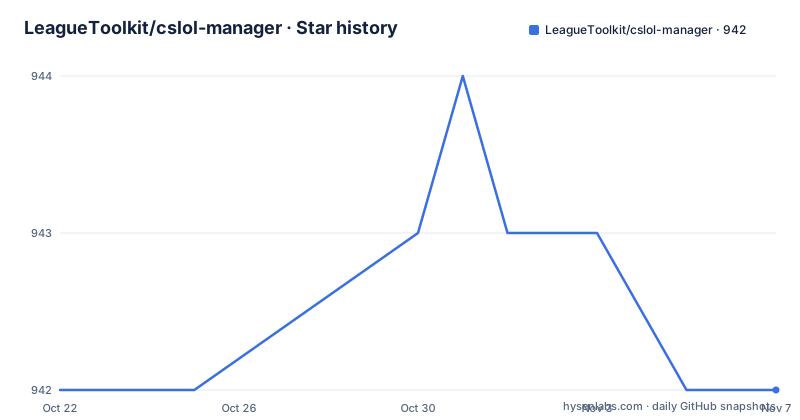
Star history
- LeagueToolkit/cslol-manager942 ★ · +0
| Repository | 2026-10-22 | 2026-11-07 |
|---|---|---|
| LeagueToolkit/cslol-manager | 942 | 942 |
0 Stars in the last 16 days, measured from the daily GitHub snapshot. Compare with other projects
Editorial analysis
A Windows desktop manager for .fantome mod files
cslol-manager is a standalone desktop application for League of Legends modding, written in C++ with a Qt interface. The README describes it as a modern, high performance mod manager that lets you install, manage and create custom skins and modifications using the Fantome mod format, and the repository is the League Toolkit Organisation's project with the description The mod manager for League of Legends.
The Fantome format is the pivot point. The .fantome mod format is described in the README as the industry standard for this ecosystem, and the manager claims full compatibility with it. That matters because the mod file format, not the launcher, is the interchange point between the people who make skins and the people who use them. A tool that speaks the standard format can consume mods made anywhere, and a tool that does not is locked to one pipeline.
The feature list splits into three groups. Mod creation covers building mods from RAW folders, packing and unpacking .wad files, and editing mod metadata and preview images. Profile management organises mods into profiles for quick switching. Then there is collection level work: advanced filtering to find and organise a mod collection, and automatic updates so the tool follows the latest features and patches.
The audience is Windows users with a valid League of Legends installation. The badge in the README states Windows 10+, and the prerequisites section spells out the two requirements: Windows 10 or 11 on a 64-bit operating system, and a valid game installation.
Installing it is a download, not a build
There is no build step in the getting started instructions, and that is deliberate. The project is distributed as a prebuilt binary, so the installation section is three steps: navigate to the latest releases on the GitHub releases page, download the cslol-manager.exe file or the zip bundle, then run the application and point it at your League of Legends game executable.
That last step is the actual configuration. You point the application at your League of Legends game executable during setup, so it knows where the game lives. There is no documented path override, no environment variable and no config file in the instructions, which means pointing it at the executable is the only documented piece of configuration.
The source tree is of course present. The top level holds a CMakeLists.txt, a.clang-format, src/ for the application, cslol-tools/ for auxiliary tooling, dist/ for distribution artefacts, docs/ for the screenshots referenced in the README, and a set of release scripts: make-release.sh, make-release-remote.sh, make-release-mac.sh, make-release-remote.ps1. The presence of a make-release-mac.sh script is worth noticing, since the README prerequisites only describe Windows 10 or 11.
The two licence files at the root, LICENSE and LICENSE-CSLOL.md, matter more than the build system here, and they are covered separately below.
The injection DLL has its own licence with four conditions
The repository includes cslol-dll.dll, described as the core injection module, and its use and distribution are governed not by the GPL but by the CSLOL DLL License Addendum. The README is explicit about the four obligations for a developer who wants to reuse the DLL in their own launcher.
First, re-signing: you cannot redistribute the DLL with the official signature, and you must re-sign it with your own publicly trusted code signing certificate. The README gives DigiCert and Certum as examples. Second, transparency: you must publish your certificate's SHA-256 fingerprint and the DLL's SHA-256 hash in your project documentation or about page. Third, the anti-skinhacking clause, which requires you to implement technical blocks preventing the use of Skinhacking, meaning replicating paid content, and competitive advantage mods. Fourth, no reverse engineering: patching or tampering with the DLL itself is strictly prohibited.
This is the part of the project with teeth, and it is a different arrangement from the GPL-3.0 that covers the core of the manager. The README states that the core of cslol-manager is open source under the GPL-3.0 licence, so you can read and reuse the manager source under copyleft terms. The injection module comes with conditions attached that are not the GPL. Whether a given distribution satisfies both sets of obligations is a question for your own legal review.
For a plain end user who just runs the official executable, none of this applies. It applies the moment you build a launcher of your own around the DLL.
Maintenance mode: the README points somewhere else
The first thing in the README is a warning banner, and it changes the framing of everything else on the page. cslol-manager is currently in maintenance and deprecation mode, and significant new features and development have shifted to the new LTK Manager at LeagueToolkit/ltk-manager. The banner says to check out the future of League modding there.
So the honest reading of this repository is that it is a stable artefact with a successor, not a project where new work is landing. The release names support that: 2026-02-28-8bc5b8e, 2026-03-21-aecf131 and 2026-04-15-23f2308, which look like dated nightly builds rather than semantically versioned releases. The repository is now archived and read-only; its recorded last push was on 2026-04-15. The code remains accessible, but this archive should not be assumed to receive new development.
There is a real decision here for anyone starting fresh. A manager in deprecation mode still works, and it may be the tool your existing mod collection is already built around. But if you are installing League mods today with no history, the successor project is the one the organisation is pointing at. The README does not document a migration path, a compatibility statement between the two managers, or whether Fantome mod files and profiles are portable between them, so you have to verify that yourself.
What the manager does not cover
The disclaimer section is short and should be read as a scope statement rather than boilerplate. The software is not endorsed by Riot Games, and users assume the risk themselves. More practically: the tool officially supports Riot operated servers, while Asian servers and Garena are not officially supported and may experience issues. If you play on a Garena or Asian server, the manager is outside the supported configuration, and you should expect problems rather than assume they are rare.
The second limitation is structural. The application is a Windows 10 or 11 binary with a Qt interface and a native C++ core, and the documentation gives no Linux path for end users, even though a make-release.sh exists in the tree. Third, the whole design is centred on one mod format and one injection mechanism. There is no documented support for other mod containers, and the addendum's own anti-skinhacking requirement tells you the maintainers have a specific view about what the tool is for.
The project also does not document a rollback procedure. If a mod pack leaves your client in a broken state, the instructions do not tell you how to restore the original files, so keeping a copy of the untouched installation is a sensible precaution before you start experimenting.
Contributions are still welcome in the sense that the README invites pull requests and issues for bugs and feature requests, but with development moved to LTK Manager, contributions here may not be the fastest route to getting a change made.
Who should install it, and what to check first
The case for cslol-manager is a Windows user with a Riot region server who already has.fantome mods or wants to author them, and who values the self contained desktop workflow: point it at the game, install a pack, switch profiles. The wad packing and unpacking, the RAW folder workflow and the metadata and preview editing are the parts that are hard to do casually by hand, and having them in one place with filtering over a large collection is the real value.
The case against is a new user. If you have no existing mod setup, adopting a tool whose own README calls it deprecated and points you to a different repository is a strange first move, especially with an installer that runs an injection module next to your game client.
Before installing, check three things. That you are on Windows 10 or 11 64-bit and on a Riot operated server. That you understand the cslol-dll.dll terms if you intend to reuse the DLL rather than just run the manager, including the re-signing and hash publication requirements and the prohibition on reverse engineering. And that you are clear on which project you are committing to, since the README's own answer is LTK Manager for anything new.
The licence is GPL-3.0 for the core, which is permissive in practice for end users and restrictive enough to matter for anyone who modifies and redistributes the manager source, and the addendum adds a separate set of conditions for the DLL. The final push date of 2026-04-15 is the concrete marker for how current this code is.
Editorial conclusion
Use cslol-manager if you already run .fantome mods and want profile switching, wad packing and mod creation on Windows 10 or 11 without setting up a launcher, but start from LTK Manager if you are beginning, because the cslol-manager README places the project in maintenance and deprecation mode with development shifted to LeagueToolkit/ltk-manager. Before you install, confirm you are on a Riot-operated server, since Asian servers and Garena are not officially supported, and read LICENSE-CSLOL.md before reusing cslol-dll.dll in your own launcher. The last push was on 2026-04-15.
Frequently asked questions
What is cslol-manager used for?
It is a desktop mod manager for League of Legends, built with C++ and Qt, used to install, manage and create custom skins and modifications in the Fantome .fantome mod format. It also supports packing and unpacking .wad files and switching between mod profiles.
How do I install cslol-manager?
Download the cslol-manager.exe or the zip bundle from the latest releases on GitHub, run the application and point it at your League of Legends game executable. You need Windows 10 or 11 on a 64-bit operating system and a valid game installation.
Is cslol-manager still being developed?
The README states that cslol-manager is in maintenance and deprecation mode, with significant new features and development shifted to LTK Manager at LeagueToolkit/ltk-manager. The last push was on 2026-04-15.
Can I reuse cslol-dll.dll in my own launcher?
The DLL is governed by the CSLOL DLL License Addendum rather than the GPL. You must re-sign it with your own publicly trusted certificate, publish the certificate fingerprint and the DLL hash, implement blocks against skinhacking and competitive advantage mods, and must not patch or tamper with the DLL.
Does cslol-manager work on Garena or Asian servers?
No. The README states that it officially supports Riot operated servers only, and that Asian servers and Garena are not officially supported and may experience issues.
Official sources
Add this badge to your README
If you maintain this project, the badge below links readers to this analysis and shows its maintenance status from the daily GitHub snapshot. Paste the markdown into your README; add ?metric=license or ?metric=stars to the image URL for a different field.

[](https://hysenlabs.com/projects/leaguetoolkit-cslol-manager)Star history chart for your README
[](https://hysenlabs.com/projects/leaguetoolkit-cslol-manager)Was this useful?