Lemo-Opuscar films are rendered frame by frame from code, and the styles only reliably work with Claude Opus 5.5
Claude Code skill for making short films with no video model: 43 film styles, each a style prompt plus a demo film made entirely in code by Claude Opus 5.5 (including OPUSCAR 98). By Lemomo.
At a glance
- What is it?
- lemomo-ai/lemo-opuscar is a Claude Code skill and a library of film styles. Each style is a prompt plus a demo short made entirely in code, with no video model. The repository states plainly that other models may not reproduce the styles.
- Who is it for?
- Use Lemo-Opuscar if you work in Claude Code with Opus 5.5 and want short, stylised films rendered from code, with your own narration or music if you have them. Skip it if you need photographic footage, a model other than Opus 5.5, or a counted list of styles you can rely on.
- Can I use it commercially?
- Check first. The repository uses a licence we do not classify automatically, so read its LICENSE file before any commercial use.
- Is it still maintained?
- Yes. The repository last received commits 3 days ago.
- What is it written in?
- Mainly JavaScript, according to GitHub's language statistics.
Answers come from the project's GitHub data, last synced on November 25, 2026, and from our analysis. They are not legal advice.
Star history
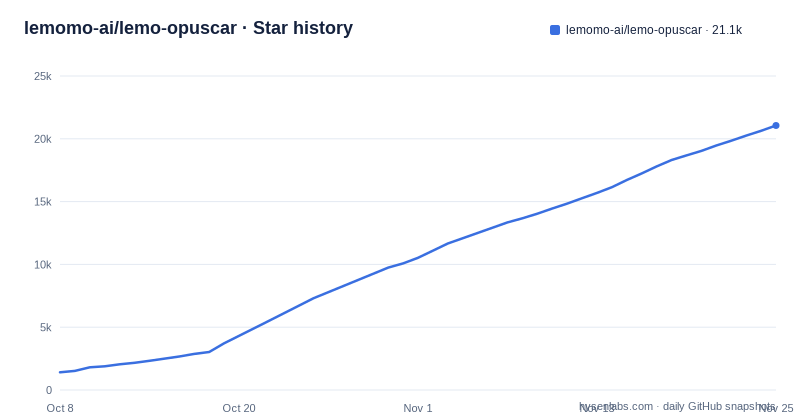
- lemomo-ai/lemo-opuscar21,055 ★ · +19,646
| Repository | 2026-10-08 | 2026-11-25 |
|---|---|---|
| lemomo-ai/lemo-opuscar | 1.4k | 21.1k |
19,646 Stars in the last 48 days, measured from the daily GitHub snapshot. Compare with other projects
Editorial analysis
Pictures, music and voice are all produced by code, with no video model
The README says every film was directed, drawn, scored and mixed by an AI agent writing code. The picture comes from canvas and WebGL pages rendered frame by frame. The music is original scores built from free sample libraries. The voice is text-to-speech narration. The summary line is blunt: no video generation, no stock footage.
The dependencies reflect that. package.json lists playwright-core ^1.63.0 and three ^0.170.0, which is a headless browser driver and a 3D library, and sets the engine to node >=20. The Python side is split into tiers. requirements.txt is the core tier with numpy, scipy, soundfile, soxr, pillow and fonttools, used for sound effects, the mix, subtitles and contact sheets. Separate files cover voice, music and maintainers.
For you, this means a film is a project of source files you can edit, not a clip you regenerate with a prompt. The cost is render time and the need for a working Node and Python setup.
The skill installs through a Claude plugin marketplace
The recommended route is Option 1, the skill. Two commands in a terminal add the marketplace and install the plugin:
claude plugin marketplace add lemomo-ai/lemo-opuscar
claude plugin install lemo-opuscar@lemolab
Afterwards you can use it from any folder. On first use it downloads the guides, tools and style prompts to ~/lemo-opuscar, shared by all your films. Each film's project, from source to finished video, goes in the folder you started from.
For other agents, the README says to copy plugin/skills/lemo-opuscar/ into their skills folder. Option 2 is cloning the repository and running claude inside it:
git clone https://github.com/lemomo-ai/lemo-opuscar.git
cd lemo-opuscar
claude
Films then go into films/<name>/ inside the repo. The skill route keeps your films out of the repository, which is the cleaner choice if you do not plan to contribute styles. The clone route puts everything in one tree.
The README warns that other models may not reproduce the styles
A warning appears twice in the README, once near the top and once in the About section: the styles are tuned for Claude Opus 5.5, and other models may not reproduce them well, so use them with care. The repository description repeats that the demo films were made entirely in code by Claude Opus 5.5.
This is the main limit. A style file is a prompt written against one model's habits. Run it with a different model and the prompt may still produce a film, but the README makes no promise about how it looks. If you do not have access to that model, expect to spend effort adjusting STYLE.md rather than just using it.
The README also makes the claim that this is not an awesome list. Every film in it was made by Lemomo with Claude Opus 5.5. So the demos are evidence of what that model did with these prompts. They are not a benchmark across models, and the visible README gives no measurements of render success rates.
Three guides split direction, technique and look
The agent reads three guides and works like a small studio. DIRECTOR.md covers how to direct: story, sound, rhythm, camera, performance and self-checks. TECHNIQUE.md covers how to build: frame-by-frame rendering, voice, music and mixing. Each style has a styles/<style>/STYLE.md describing what it looks and sounds like. The story is yours.
That separation explains the shape of a request. You supply the topic and any material, and the style supplies the visual language. Two example prompts in the README show the pattern: a 45-second film in the watercolor style about a family coffee farm with a warm female narrator, and a 40-second LiDAR Survey film about an old quarry using public laser-scan data.
You can name a style in English or Chinese. If you are unsure, type /lemo-opuscar:lemo-opuscar with nothing else. The skill asks which language to use, then offers three paths: a film in a library style, making a style your own, or a film in a style you have saved. It also asks, once, about anything it cannot decide, whether you have your own voice, music or material, and whether you want a storyboard first.
The style count differs between the description and the README
The repository description says 43 film styles. The README headline says 66 ready to use, filled in by a counter, and the Chinese line says 66 styles as well. The dated news items add more: seven new styles on 2026-10-29, eight Edit and Documentary styles on 2026-10-22, and eight Evidence Films styles on 2026-10-16.
The numbers are best read as a library that grows quickly and a description that lags behind. The 66 figure is the more recent one. If the count matters to you, open the style index at styles/README.md or the gallery rather than trusting either number.
The feature film OPUSCAR 98 is separate from the style count. It runs 6:31, covers 1927 to 2025, and walks one Clawd character through all 98 Best Picture winners, each redrawn in a style that fits the film. The README breaks the 98 styles down as 77 in 2D, 4 in 2.5D and 17 in 3D. Each film's style, a frame and a style prompt are published for reuse on your own topic.
Make a style your own, from a library style or a blank page
A section of the README is about changing a style so it matches your brand colours, logo, characters or channel tone. It describes the same process the author uses to add a new style to the library. Two entry points exist.
Change a library style: the skill lists every style with a gallery link, and you type the one to change. A sample sentence is I want to change the Ukiyo-e style into my own version. Start from a blank page: you describe the look in words or share a picture or film you like, and Claude picks the closest library style as the technique base, explains why, and you agree or choose another.
The process then runs in five steps, beginning with planning one question at a time, with recommended options listed first.
The example pair makes the idea concrete: Swiss Motion Graphics as a library style, and Material Grid as a derived style that keeps the Swiss grid, beat and type but renders the shapes as clay, plastic, felt, glass and chrome, in a 31-second demo. MY-STYLES.md at the repository root relates to saved styles.
Releases are asset bundles for films, and the project is new
The GitHub releases are not versions of software in the usual sense. They are named thanks, web and films. The films release is described as Films streamed by the gallery, the web release as Web cuts at 720p copied into the gallery, and thanks as Thank-you films. The OPUSCAR 98 1080p download is a file attached to the films release. package.json is at version 0.1.0 and marked private.
The repository is not archived, and its last push was on 2026-10-31. The news items run to 2026-10-29, so additions are frequent. There is no changelog file listed at the top level.
Installing the Python tiers uses a script. The core requirements file says to install with:
sh plugin/skills/lemo-opuscar/scripts/setup.sh depsand names deps voice and deps music for the other tiers. The project is MIT licensed. Treat the repository as a creative workbench with fast-moving content, and pin your own copy of a style once you like it.
Editorial conclusion
Use Lemo-Opuscar if you work in Claude Code with Opus 5.5 and want short, stylised films rendered from code, with your own narration or music if you have them. Skip it if you need photographic footage, a model other than Opus 5.5, or a counted list of styles you can rely on. Before starting, decide whether you want the skill install or a clone, and check that Node 20 and the Python requirement tiers are available.
Frequently asked questions
What is Lemo-Opuscar?
Lemo-Opuscar is a Claude Code skill and a library of film styles. Each style is a prompt plus a demo film made entirely in code, with no video model and no stock footage.
How do I install the Lemo-Opuscar skill?
Run claude plugin marketplace add lemomo-ai/lemo-opuscar, then claude plugin install lemo-opuscar@lemolab. You can also clone the repository and run claude inside it.
Does Lemo-Opuscar work with models other than Claude Opus 5.5?
The README says the styles are tuned for Claude Opus 5.5 and that other models may not reproduce them well, so they should be used with care.
Official sources
Where developers are discussing it
Posts on Hacker News, dev.to and Lobsters that link to this repository, found by our scan of those communities. 1 in the last 30 days; newest first.
- I Found an Open-Source Claude Code Plugin That Creates Insane Animations 🎬dev.to · Nov 17, 2026 · 7 points · 1 comments
Add this badge to your README
If you maintain this project, the badge below links readers to this analysis and shows its maintenance status from the daily GitHub snapshot. Paste the markdown into your README; add ?metric=license or ?metric=stars to the image URL for a different field.

[](https://hysenlabs.com/projects/lemomo-ai-lemo-opuscar)Star history chart for your README
[](https://hysenlabs.com/projects/lemomo-ai-lemo-opuscar)Was this useful?