kubeadm-certs: A 10-Year Certificate Patch for kubeadm, Nothing Else
kubeadm-certs sets the validity period of kubeadm certificates to 10 years.
At a glance
- What is it?
- kubeadm-certs is a MIT-licensed fork of kubeadm that extends certificate validity to 10 years. It patches only the certificate duration constants and ships binaries for each Kubernetes release.
- Who is it for?
- Adopt kubeadm-certs if you operate kubeadm clusters and need certificates that outlast the default one-year validity, and you accept running a modified kubeadm binary. Do not adopt it if you require upstream purity, automated certificate rotation, or if your organization forbids unofficial builds.
- Can I use it commercially?
- Yes. MIT is a permissive licence: you can use, modify and sell software built on it, as long as you keep its copyright and licence notices.
- Is it still maintained?
- Yes. The repository last received commits 26 days ago.
- What is it written in?
- GitHub does not report a main language for this repository.
Answers come from the project's GitHub data, last synced on October 22, 2026, and from our analysis. They are not legal advice.
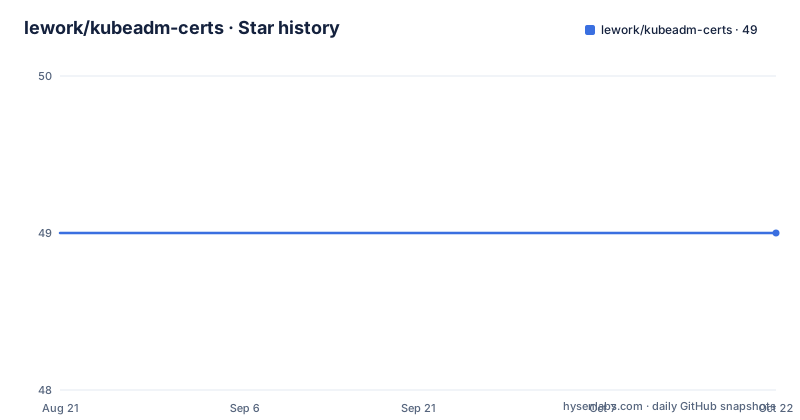
Star history
- lework/kubeadm-certs49 ★ · +0
| Repository | 2026-08-21 | 2026-10-22 |
|---|---|---|
| lework/kubeadm-certs | 49 | 49 |
0 Stars in the last 62 days, measured from the daily GitHub snapshot. Compare with other projects
Editorial analysis
The Problem: One-Year Certificates in a Five-Year Cluster
Kubernetes clusters built with kubeadm issue certificates that expire after one year. For a cluster expected to live longer, that means a scheduled renewal dance every 12 months. The kubeadm-certs project attacks this by recompiling kubeadm with a hardcoded validity period of 10 years. The README is explicit: it changes nothing in the source code except the certificate duration. This is a surgical fix for a specific operational pain. The target user is a cluster administrator who wants long-lived certificates without setting up automated rotation. It is not for someone who needs frequent cert rotation for security compliance. The project's own documentation shows a check-expiration output with residual times of 9 years, confirming the intended effect.
How the Patch Works: Two Constants in the Kubernetes Source
The mechanism is a source-level patch. The README links to the exact files where the validity periods are defined. For CA certificates, it points to cert.go in the client-go staging repo, lines 79-80. For issued certificates, it points to constants.go line 48 and pki_helpers.go line 659 in the kubeadm command. Those lines contain the default durations, and kubeadm-certs changes them to 10 years. The project does not add new features or alter any other logic. The build script is in .build.yml, and the CI pipeline produces release binaries. Each release is tagged with the corresponding Kubernetes version, so v1.21.0 matches Kubernetes 1.21.0. The patch is minimal, which is both its strength and its limitation.
Installation: Replace Your kubeadm Binary, Then Generate Certificates
The README gives a straightforward install procedure. First, back up the existing binary: mv /usr/bin/kubeadm{,_src}. Then download the matching release binary from GitHub, for example v1.21.0, and place it at /usr/bin/kubeadm. Finally, chmod +x. After that, you generate certificates with kubeadm init phase certs all and kubeadm init phase kubeconfig all. The README shows a version check that outputs a GitTreeState of 'dirty', which indicates the source was modified. There is no mention of a package manager or a container image. This is a binary swap, so it fits into existing provisioning scripts, but it also means you must re-apply the patch after every kubeadm upgrade. The release list shows versions up to v1.37.0, so the project tracks Kubernetes releases actively.
A Genuine Limitation: You Own the Maintenance Burden
The biggest limitation is that kubeadm-certs is a fork. You are not running the official kubeadm binary. The README's own version output shows a 'dirty' GitTreeState, which is a clear signal that this is not upstream code. That has consequences. When you upgrade Kubernetes, you must wait for the project to release a matching version, then swap the binary again. There is no automated upgrade path. Also, the patch only affects newly generated certificates. Existing certificates are not retroactively extended. If you already have a cluster with one-year certs, you must regenerate them with the patched binary, which may cause downtime. The project does not document any migration steps. This is a tool for greenfield clusters or for a planned maintenance window.
Wrong Tool Cases: When One-Year Certificates Are a Feature
There are scenarios where kubeadm-certs is the wrong tool. If your security policy requires short-lived certificates, a 10-year validity is a liability, not a benefit. Compromised CA certificates with a decade of validity are a nightmare for revocation. Also, if you are in a multi-tenant environment where each tenant has separate credentials, you may want frequent rotation. The project does not offer any configuration; the 10-year period is hardcoded. You cannot set it to 5 years or 2 years. If you need a configurable validity period, you must patch the source yourself or use a different tool. The README is silent on these trade-offs, so the decision rests on your risk appetite.
Alternatives: kubeadm's Built-in Rotation and Third-Party Tools
The obvious alternative is to use kubeadm's native certificate renewal. The official kubeadm supports 'kubeadm certs renew' and automated renewal via the kubeadm-controller-manager. That approach keeps the one-year validity but automates the rotation. The difference is philosophical: kubeadm-certs extends the lifetime, while native renewal keeps it short but handles the chore. Another alternative is to use a certificate management tool like cert-manager, which can issue certificates from an external CA and rotate them on a schedule. That requires integrating cert-manager into the cluster and moving away from kubeadm's default self-signed CA. Each approach has its own operational cost. The native renewal is upstream and supported, but requires a cron job or controller. cert-manager is more flexible but adds complexity. kubeadm-certs is the simplest if you want a one-time fix and can accept the fork.
Licence and Upgrade Cost: MIT and a Binary Swap Every Version
The project is licensed under MIT, which is permissive and allows commercial use with attribution. The README does not mention any patent or trademark concerns, so the legal risk is low, but you should still review the licence file if you distribute it. The upgrade cost is tied to the release cycle. The project releases versions that mirror Kubernetes versions, and the last push was in August 2026, with v1.37.0. That suggests active maintenance, but you must track new releases manually. Each upgrade requires downloading a new binary, swapping it, and regenerating certificates if you want the new validity to apply. There is no in-place upgrade path. The build script is available, so you could compile your own patched binary, but that requires a Go toolchain matching the Kubernetes version. The README lists Go versions for each Kubernetes release, which is a useful reference if you go that route. The maintenance cost is not trivial, but it is predictable.
Editorial conclusion
Adopt kubeadm-certs if you operate kubeadm clusters and need certificates that outlast the default one-year validity, and you accept running a modified kubeadm binary. Do not adopt it if you require upstream purity, automated certificate rotation, or if your organization forbids unofficial builds. Before use, verify the release version matches your Kubernetes version, check the sha256sum against the official binary, and confirm the GitTreeState shows 'dirty' to ensure the patch is applied. The project's value is its narrow scope: it changes only validity periods and nothing else, but that narrowness also means you must handle all other kubeadm maintenance yourself.
Frequently asked questions
What is the difference between kubectl and kubeadm in kubeadm-certs?
This project only touches kubeadm, which is the binary it rebuilds and the one whose certificate commands generate the material through kubeadm init phase certs all and kubeadm init phase kubeconfig all. kubectl appears in the output of kubeadm certs check-expiration only as the command that would inspect the kubeadm ConfigMap in the kube-system namespace.
How do kubeadm-certs users handle certificates in Kubernetes?
The README gives two generation commands, kubeadm init phase certs all and kubeadm init phase kubeconfig all, and one verification command, kubeadm certs check-expiration. The documented output of that check shows admin.conf and apiserver expiring on Apr 10, 2031 with a residual time of 9y.
How do I install a kubeadm-certs build?
Move any existing binary aside with the guard clause mv /usr/bin/kubeadm{,_src}, download the asset for your Kubernetes version with wget, then mark it executable with chmod +x. Release tags match Kubernetes release versions, so the asset you need is on the repository releases page.
How can I tell a kubeadm-certs binary from the stock kubeadm?
Run the version command and read the GitTreeState field. The README notes that a dirty marker means the source was modified after the GitCommit was taken, which is how a rebuilt binary differs from an official release. File size and sha256sum comparison are shown as a secondary check.
Official sources
Add this badge to your README
If you maintain this project, the badge below links readers to this analysis and shows its maintenance status from the daily GitHub snapshot. Paste the markdown into your README; add ?metric=license or ?metric=stars to the image URL for a different field.

[](https://hysenlabs.com/projects/lework-kubeadm-certs)Star history chart for your README
[](https://hysenlabs.com/projects/lework-kubeadm-certs)Was this useful?