Nano Stores: A 347-Byte Atomic State Manager for React, Vue and Svelte
A tiny (340 bytes) state manager for React/RN/Preact/Vue/Svelte with many atomic tree-shakable stores
At a glance
- What is it?
- Nano Stores splits application state into many small, independently subscribable atoms and maps. The README claims a 347-byte core, but the design assumes you are willing to move logic out of components.
- Who is it for?
- Adopt Nano Stores if your state is mostly independent pieces and you want the store modules to own the logic. Do not adopt it if you need a single normalized store with devtools-first debugging or if your team will not accept per-store subscriptions.
- Can I use it commercially?
- Yes. MIT is a permissive licence: you can use, modify and sell software built on it, as long as you keep its copyright and licence notices.
- Is it still maintained?
- Yes. The repository last received commits 7 days ago.
- What is it written in?
- Mainly TypeScript, according to GitHub's language statistics.
Answers come from the project's GitHub data, last synced on October 23, 2026, and from our analysis. They are not legal advice.
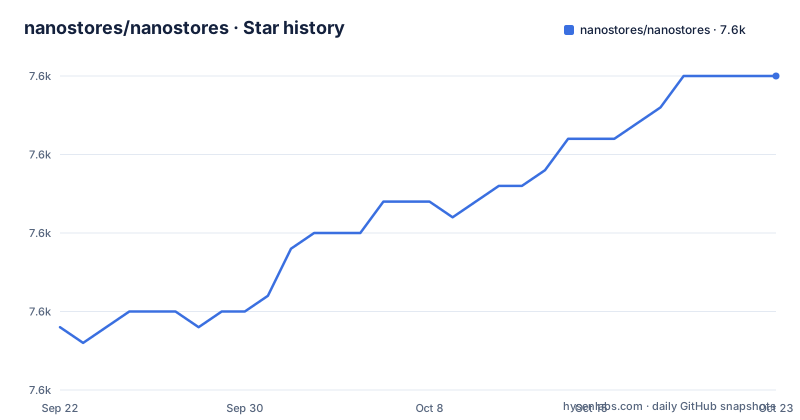
Star history
- nanostores/nanostores7,630 ★ · +16
| Repository | 2026-09-22 | 2026-10-23 |
|---|---|---|
| nanostores/nanostores | 7.6k | 7.6k |
16 Stars in the last 31 days, measured from the daily GitHub snapshot. Compare with other projects
Editorial analysis
The problem Nano Stores solves: state that re-renders everything
Most state managers put the whole application state in one object and ask every subscribed component to run a selector whenever anything changes. Nano Stores takes the opposite route. State is split into many atomic stores, each holding one value, and each component subscribes only to the stores it reads. The README states the consequence directly: with small atomic and derived stores, you do not need to call the selector function for all components on every store change. The intended audience is a frontend team building a React, React Native, Preact, Vue, Svelte, Solid, Lit, Angular or vanilla JS application where a global store has become a coordination point. Nano Stores is also designed to move logic from components to stores, so a store module can export both the atom and the functions that mutate it. That is a real architectural stance, not a packaging detail. If your team prefers colocating state logic inside components, the library will feel like it is fighting you.
How atoms, maps and computed stores fit together
The core primitives are atom, map and computed, and the repository layout mirrors them: separate atom/, map/, computed/, deep-map/, map-creator/, task/, effect/, lifecycle/, listen-keys/, keep-mount/ and clean-stores/ directories at the top level. An atom holds a value and exposes get(), set(nextValue), subscribe(cb) and listen(cb). The README notes that subscribe calls the listener immediately during subscription, while listen does not, and that the first subscribe call receives undefined as the previous value. A map holds an object one level deep and lets you change individual keys. A computed store derives from other stores; the README example filters a $users atom into an $admins computed store. The data flow is push-based: a set on an atom notifies its subscribers, and computed stores recompute from their inputs. Tree shaking follows from this design. Because each store is a separate module, a bundle chunk contains only the stores used by the components in that chunk, which is why the README lists tree shakability next to size and speed.
Installing Nano Stores and writing your first store
The README gives one install command and no package manager alternatives, so this is the path the project documents. The core package has zero dependencies and the package.json declares "type": "module", so it is ESM-only.
npm install nanostoresAfter that, create a store module. The README's own example defines an atom and an exported mutation function, which is the pattern the project recommends over exporting the raw atom and letting components call set.
// store/users.ts
import { atom } from 'nanostores'

export const $users = atom<User[]>([])

export function addUser(user: User) {
  $users.set([...$users.get(), user])
}
A derived store uses computed and reads from the atom. The README shows this file next to the atom file.
// store/admins.ts
import { computed } from 'nanostores'
import { $users } from './users.ts'

export const $admins = computed($users, users => users.filter(i => i.isAdmin))
For React and Preact the README uses a separate package, @nanostores/react, with a useStore hook that re-renders the component when any subscribed store changes. Vue, Svelte, Solid, Lit, Angular and Alpine.js each have their own integration page in the README's table of contents. If you skip the integration package and call subscribe in a component, you own the unsubscription yourself.
Where Nano Stores stops being the right tool
The README has a Known Issues section with a single entry: ESM. That is not a small caveat. The package.json sets "type": "module" and the exports map points only at ./index.js, so a CommonJS consumer cannot require it without a bundler or an interop layer. The engines field requires Node ^20.0.0 || >=22.0.0, which rules out older build images. The second limitation is structural. Because the library is a set of atoms rather than a store with a reducer and a single state tree, there is no built-in time-travel debugging, no action log, and no single place to inspect the whole state. The README lists a Logger devtools package and a Vue Devtools plugin, but nothing equivalent to the Redux DevTools extension for React. If your workflow depends on replaying actions, this is the wrong shape. Third, the atomic model pushes work onto you: deciding how many stores to create and which computed stores to derive is an application design decision the library does not make for you.
Nano Stores compared with Zustand and with signals
Zustand and Nano Stores both avoid the provider wrapper and both are small, but the difference in approach is where the state lives. Zustand centers on a single store object created by a factory, with selectors choosing slices of it; Nano Stores centers on many independent atoms that you compose. In Zustand a component subscribes to the store and a selector decides what it re-renders on. In Nano Stores a component subscribes to specific atoms, and the README's stated benefit is that you do not run a selector for every component on every change. Signals are the other comparison point. A signal is a reactive value with automatic dependency tracking inside a computation graph, and frameworks like Solid and Angular build their rendering around that graph. Nano Stores is closer to a plain observable with an explicit subscribe call and an explicit integration hook per framework, which is why the README needs a separate package for React, Vue, Svelte, Solid, Lit and Angular rather than one universal binding. The practical difference: signals hide the subscription, Nano Stores makes it explicit.
Maintenance, upgrades and the MIT licence
The repository is not archived, and the last push was on 2026-09-16, six days before this article. Release 1.5.3 landed on 2026-09-02, following 1.5.2 on 2026-08-20 and 1.5.1 on 2026-08-17, so the project is publishing patch releases on a short cadence. The package is MIT licensed, which permits commercial use and modification; this is a statement about the licence text, not legal advice, and anyone embedding the code in a product should read the LICENSE file in the repository. Upgrade cost is low in one direction and non-trivial in another. Patch releases within 1.5.x should not touch the atom, map and computed APIs the README documents. Major versions are the risk, and the repository ships a CHANGELOG.md at the top level, so that file is where to look before bumping. The size-limit configuration in package.json is also a constraint worth knowing: the Atom entry is capped at 347 B and the map plus computed set at 844 B, and the test script includes test:size and test:synced, so a pull request that grows the core will fail the project's own checks.
Editorial conclusion
Adopt Nano Stores if your state is mostly independent pieces and you want the store modules to own the logic. Do not adopt it if you need a single normalized store with devtools-first debugging or if your team will not accept per-store subscriptions. Before committing, verify the size-limit budget in package.json matches your bundle, check that @nanostores/react is installed alongside the core, and confirm the Node engine range ^20.0.0 || >=22.0.0 fits your build image.
Frequently asked questions
What is Nano Stores?
It is a state manager for React, React Native, Preact, Vue, Svelte, Solid, Lit, Angular and vanilla JS that uses many atomic stores and direct manipulation. The README describes it as tiny, fast and tree shakable, with TypeScript support and zero dependencies.
How does Nano Stores compare with Zustand?
Zustand centers on a single store object with selectors, while Nano Stores centers on many independent atoms and computed stores that components subscribe to individually. The README's stated benefit of the atomic approach is that you do not call a selector for all components on every store change.
How does Nano Stores compare with signals?
Signals track dependencies automatically inside a computation graph, while Nano Stores exposes an explicit subscribe call and needs a separate integration package per framework, such as @nanostores/react for React. The README lists integrations for React, Vue, Svelte, Solid, Lit, Angular and Alpine.js rather than one universal binding.
Is there an alternative to Nano Stores?
Zustand is the closest alternative in the same size class, differing in that it uses one store object with selectors instead of many atoms. The README also points to companion packages such as @nanostores/persistent, @nanostores/router and @nanostores/query for cases the core does not cover.
Official sources
Add this badge to your README
If you maintain this project, the badge below links readers to this analysis and shows its maintenance status from the daily GitHub snapshot. Paste the markdown into your README; add ?metric=license or ?metric=stars to the image URL for a different field.

[](https://hysenlabs.com/projects/nanostores-nanostores)Star history chart for your README
[](https://hysenlabs.com/projects/nanostores-nanostores)Was this useful?