vben-admin-thin-next: the thin Vben Admin template and the setup it borrows
vue-vben-admin-2.0 mini template.vue3,vite,typescript
At a glance
- What is it?
- vue-vben-admin-thin-next is the simplified Vue 3 and Vite admin skeleton in the Vben family, aimed at teams that want routing permissions, theming and mock data wired on day one. The judgement: the scaffold is sound, but its own README hands you the clone command for the full repository.
- Who is it for?
- A workable shell for a back office built on Vue 3, Vite and TypeScript, with permission routing, a mock layer and commit hooks already wired. Skip it when you need a documented upgrade path or an exact feature diff against vue-vben-admin, because this repository provides neither.
- Can I use it commercially?
- Yes. MIT is a permissive licence: you can use, modify and sell software built on it, as long as you keep its copyright and licence notices.
- Is it still maintained?
- Yes. The repository last received commits 29 days ago.
- What is it written in?
- Mainly TypeScript, according to GitHub's language statistics.
Answers come from the project's GitHub data, last synced on October 22, 2026, and from our analysis. They are not legal advice.
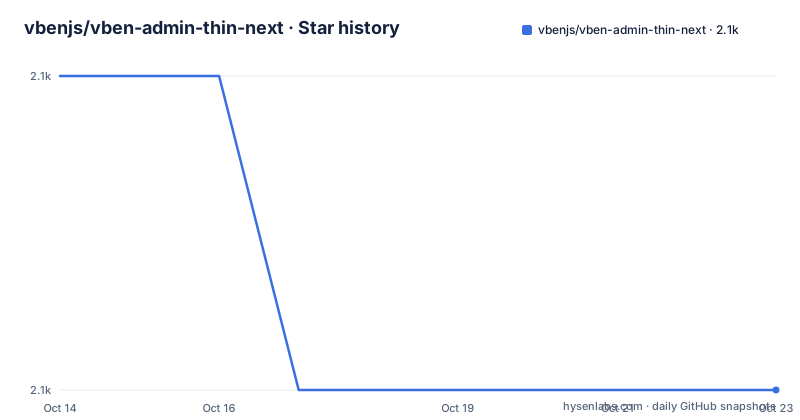
Star history
- vbenjs/vben-admin-thin-next2,070 ★ · -1
| Repository | 2026-10-14 | 2026-10-22 |
|---|---|---|
| vbenjs/vben-admin-thin-next | 2.1k | 2.1k |
-1 Stars in the last 8 days, measured from the daily GitHub snapshot. Compare with other projects
Editorial analysis
The simplified sibling of vue-vben-admin and its reader
vue-vben-admin-thin-next is one of two repositories published under the same maintainer. Its own README names vue-vben-admin as the full version and labels this repository the simplified version, so that choice gets made before a single file is written. Underneath sits Vue 3 with Vite, written in TypeScript, which is also the repository language. Commit subjects follow the Angular convention the README asks contributors to copy, with prefixes such as feat, fix, perf and refactor, so the history reads as a feature trail rather than one long squashed import.
It fits a team that wants the back office shell, the layout, the permission routing and the mock data plumbing ready on the first morning. The README counts theming, internationalisation, a built-in mock server, dynamic routing permission generation and twice-wrapped common components as the delivered set. All of it lands in your tree as code you own after the clone, and none of it arrives as a finished module.
The alternative is the full repository, and the difference is scope rather than approach. Both run Vue 3, Vite and TypeScript with the same family of companion plugins, and each one has its own preview site: `https://vvbin.cn/next/` for the full version, `https://vvbin.cn/thin/next/` for this one. Take the full version when you want the wider feature set, take this one when you would rather delete code than audit it. What the simplified variant actually drops is never written down here, so a feature diff between the two trees stays manual work.
The install sequence points at a different repository
Four commands in this repository's README put you in the full project. The clone line ends in vue-vben-admin, the next line steps into a directory of that name, and only then does the dependency install run:
git clone https://github.com/anncwb/vue-vben-admin.gitcd vue-vben-admin
yarn install
Start it, then build it, with two more lines:
yarn serveyarn buildNone of those five commands names vben-admin-thin-next, so the project you download and the project you just read are different codebases. For this repository, clone what you are reading and then run the same scripts. The Gitpod badge carries the same gap: it opens the full repository, and the `.gitpod.yml` at this root is what backs that button up.
Preparation is not a two-item list. The README asks for node, git, plus working knowledge of Vite, Vue 3, TypeScript, ES6+, Vue-Router-Next, Ant Design Vue and Mock.js, and the last three decide how fast you will be productive. No port is documented for the dev server, so read it from the terminal rather than assuming a default.
The script chain behind serve, build and preview
The manifest in this repository declares version 2.8.0 and stretches the quickstart into a longer chain. `serve` starts nothing by itself: it calls `npm run dev`, and dev runs `vite`. The command that looks like a legacy alias is a shim over Vite's own dev entry, which matters the moment you want to pass a flag, because the flag has to travel through the dev script.
Building takes two stages. `build` runs `cross-env NODE_ENV=production vite build` and then `esno ./build/script/postBuild.ts`, so a TypeScript post-build step executes once the bundle is on disk. `build:test` swaps in the test mode and keeps the same post-build call, `build:no-cache` runs `clean:cache` first, and `report` sets `REPORT=true` before the production build. That cache script clears `node_modules/.cache` and `node_modules/.vite`, the two paths to remove when a stale cache hides a config change.
Preview does more than its name says, because `preview` builds before it serves anything. `preview:dist` starts `vite preview` against whatever is already in `dist`, which is the right command for checking an artefact produced elsewhere. `test:gzip` and `test:br` serve `dist` through `npx http-server dist`, one with `--gzip` and one with `--brotli`. Four mode files sit at the root, `.env`, `.env.development`, `.env.production` and `.env.test`, matching the test mode `build:test` selects.
Dynamic route permissions, mock data and a jest runner
Permission handling is the feature the README pushes hardest, with dynamic routing permission generation listed as built in, so menus and route guards come out of a permission model rather than a hand-written route table. The preview sites are reached with a fixed pair, `vben/123456`, given for trying them, which is the only credential the documentation supplies. Where those routes and menu items get declared is not shown, and `types/` beside `src/` is where you would start reading.
Mock data has its own directory. `mock/` stands at the root next to `build/`, `tests/` and `types/`, and the README points at a separate repository, vite-plugin-mock, for local and development data mocking. Isolating that layer keeps it findable when a real backend arrives, which costs less than unpicking mocking calls from a shared entry point later.
Tests are configured and unexplained. `jest.config.mjs` sits at the root, `package.json` exposes `test:unit` and `test:unit-coverage`, and nothing says what the existing suite covers or how much of the template it reaches. Count it as scaffolding you extend, not as a safety net inherited on day one.
Theming, on-demand styles and a plugin family to assemble
Theming happens at build time rather than in the browser. The README's related repository list names vite-plugin-theme for online switching of theme colours and other colour-related configuration, and vite-plugin-style-import for pulling component library styles on demand. Three more cover packaging: vite-plugin-html for HTML template conversion and compression, vite-plugin-imagemin for compressed image resources, and vite-plugin-svg-icons for building an SVG sprite quickly. That is five repositories before compression enters the picture, and vite-plugin-compression is a sixth.
The list reads as a recommendation, not a declared dependency set. The visible `dependencies` block in `package.json` opens with `@ant-design/colors` at `6.0.0`, `@ant-design/icons-vue` at `6.0.1`, and `@iconify/iconify`, which pins the colour and icon layer to Ant Design. Swapping the component library therefore reaches into the twice-wrapped components instead of a single line of config, which is the real cost of that choice.
One entry deserves quoting exactly, since it is easy to misread: the compression plugin is described as used to pack input `.gz|.brotil` files. `test:br` in `package.json` spells the matching flag correctly as `--brotli`, so read the plugin's own repository before trusting the description.
A committed pnpm lockfile the reinstall script never touches
The root carries `pnpm-lock.yaml` while the scripts are written around yarn and npm. The bootstrap script is `yarn install`, and the reinstall script deletes `yarn.lock`, `package.lock.json` and `node_modules` before running bootstrap again. It never deletes `pnpm-lock.yaml`. Install with pnpm, then run `reinstall` to rescue a broken dependency tree, and the pnpm lockfile stays behind describing a resolution set that no longer matches what is on disk.
Quality gates are wired into the commit rather than the terminal. `commitlint.config.js` and the `.husky/` directory check subjects on write, `prepare` runs `husky install` so those hooks are live after a fresh clone, and `lint:eslint` passes `--max-warnings 0`, which turns any warning into a failed run. `lint:lint-staged` points lint-staged at `./.husky/lintstagedrc.js`, a path that does not appear in the root listing and lives inside `.husky/`. Knowing that before your first commit saves a broken hook on a clean checkout.
Formatting splits three ways across `.prettierignore`, `.stylelintignore` and `.eslintignore`, with `lint:prettier` and `lint:stylelint` as entry points. `clean:lib` removes `node_modules` outright, the blunt instrument sitting next to the gentler `clean:cache`.
What this repository's documentation leaves unsaid
Things a buyer would want are simply not written down here. There is no upgrade guide for moving a project forward through template versions, no rollback procedure, and no statement of which upstream Vue or Vite version the code was last aligned with. The enumeration of removed features is missing too, so the practical distance between the two repositories has to be measured by reading their directories side by side.
The code, meanwhile, keeps moving. The last push was on 2026-09-24. The last release record is v2.7.2 from 2021-09-13, preceded by v2.7.1 and v2.6.1, while `package.json` declares 2.8.0, so what you install sits ahead of anything published under a version tag.
Browser support is the one area stated plainly, and it is a floor rather than a target: `Chrome 80+` for local development, the last 2 versions of Edge, Firefox, Chrome and Safari, and no Internet Explorer at all. Nine preparation items are listed, no Node version is pinned, and nothing addresses whether a corporate proxy breaks the install.
Editorial conclusion
A workable shell for a back office built on Vue 3, Vite and TypeScript, with permission routing, a mock layer and commit hooks already wired. Skip it when you need a documented upgrade path or an exact feature diff against vue-vben-admin, because this repository provides neither. First, clone this repository rather than the URL printed in the README, confirm the post-build script runs in your environment, and check that the jest config and the husky hooks fit your CI before you merge a first change.
Frequently asked questions
What is the difference between vue-vben-admin and vben-admin-thin-next?
The README calls vue-vben-admin the full version and vben-admin-thin-next the simplified version, each with its own preview site at vvbin.cn/next/ and vvbin.cn/thin/next/. It does not list which features the simplified variant drops, so the comparison has to be made by reading both trees.
How do I install and start vben-admin-thin-next?
The README shows a clone, a cd, yarn install, yarn serve and yarn build, but the clone URL it prints points at the vue-vben-admin repository rather than this one. Clone this repository first, then run the same yarn scripts.
Which package manager does vben-admin-thin-next use?
The scripts assume two of them at once. bootstrap runs yarn install and serve routes through npm run dev, while the root ships pnpm-lock.yaml. The reinstall script deletes yarn.lock, package.lock.json and node_modules, and leaves pnpm-lock.yaml untouched.
What do I need to know before working on vben-admin-thin-next?
The README lists node, git, Vite, Vue 3, TypeScript, ES6+, Vue-Router-Next, Ant Design Vue and Mock.js as preparation, and recommends Chrome 80+ for local development with no Internet Explorer support. No Node version is stated anywhere.
Does vben-admin-thin-next come with tests and linting configured?
jest.config.mjs is at the root, and package.json defines test:unit, test:unit-coverage, lint:eslint, lint:prettier and lint:stylelint, with husky install run on prepare. The documentation does not say what the existing tests cover or publish a coverage figure.
Official sources
Add this badge to your README
If you maintain this project, the badge below links readers to this analysis and shows its maintenance status from the daily GitHub snapshot. Paste the markdown into your README; add ?metric=license or ?metric=stars to the image URL for a different field.

[](https://hysenlabs.com/projects/vbenjs-vben-admin-thin-next)Star history chart for your README
[](https://hysenlabs.com/projects/vbenjs-vben-admin-thin-next)Was this useful?