libratbag: a DBus daemon that makes gaming mice configurable
A DBus daemon to configure input devices, mainly high-end and gaming mice
At a glance
- What is it?
- A C library and daemon that turns per-vendor mouse protocols into one D-Bus API, so a GUI can set DPI, button mapping and lighting without knowing what HID++ is.
- Who is it for?
- libratbag earns its place when you own a mouse whose buttons and lighting are locked behind a vendor utility, and you would rather not install a vendor tool that talks to the device over a Windows-only protocol. The architecture is the reason it works: every protocol lives behind one hardware-agnostic API, and applications never touch USB HID reports directly.
- Can I use it commercially?
- Yes. MIT is a permissive licence: you can use, modify and sell software built on it, as long as you keep its copyright and licence notices.
- Is it still maintained?
- Yes. The repository last received commits 19 days ago.
- What is it written in?
- Mainly C, according to GitHub's language statistics.
Answers come from the project's GitHub data, last synced on October 22, 2026, and from our analysis. They are not legal advice.
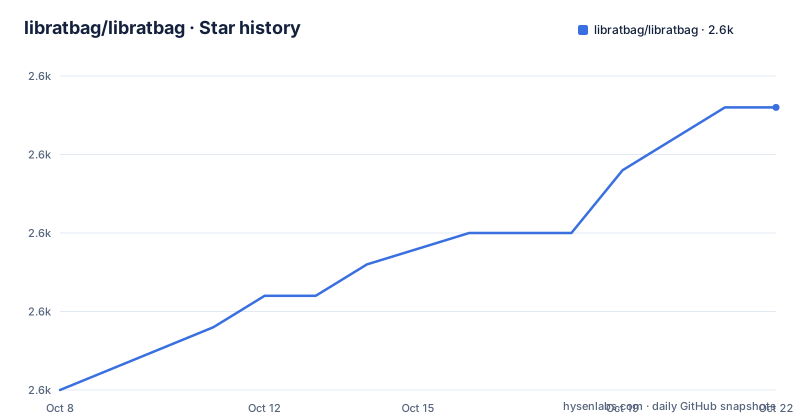
Star history
- libratbag/libratbag2,589 ★ · +9
| Repository | 2026-10-08 | 2026-10-22 |
|---|---|---|
| libratbag/libratbag | 2.6k | 2.6k |
9 Stars in the last 14 days, measured from the daily GitHub snapshot. Compare with other projects
Editorial analysis
What ratbagd does and where Piper fits
libratbag provides ratbagd, a DBus daemon to configure input devices, mainly gaming mice. The framing the README uses is accurate and useful: the daemon gives a generic way to access the various features these mice expose and abstracts away hardware-specific and kernel-specific quirks.
The stated device support covers Logitech, Etekcity, GSkill, Roccat and Steelseries, with the complete list living in the device files under `data/devices` rather than in the README. Those files are the real index of what works, and the README says so directly.
Two consumers matter. Users interact through a GUI like Piper, a separate project linked from the README, which is the normal way to reach this functionality. For developers, the README names ratbagctl as the prime tool for debugging, which is the piece to reach for when you want to see what the daemon exposes for a given mouse without launching a GUI.
GitHub reports the project as C, MIT licensed, 2,576 stars, 355 forks and 413 open issues, with the last push on 2026-08-18. The topic list is worth a note: it contains exactly one entry, hacktoberfest, which is a participation label rather than a description of a DBus input configuration daemon. So the topics are not a useful index here, and the description line and the device database are.
Building with meson and ninja from a clone
libratbag uses the meson build system, which in turn uses ninja to invoke the compiler. The full sequence is short:
git clone https://github.com/libratbag/libratbag.git
cd libratbag
meson builddir
ninja -C builddir
sudo ninja -C builddir install
The README is explicit about one behaviour that trips people up: the default prefix is `/usr/local`, meaning the install will not overwrite a system installation. That is a deliberate safety property and also the reason a fresh install may not be picked up by your session bus or init system without extra work, which is the next problem in the sequence.
Incremental work uses the same build directory:
ninja -C builddir
sudo ninja -C builddir install
Removing it is symmetric:
sudo ninja -C builddir uninstallConfigure-time options are set through meson itself, and disabling the documentation build is the example the README gives:
meson configure builddir -Ddocumentation=falseRunning `meson configure builddir` with no options lists everything available, and the README notes that `builddir` is only a convention for the build output directory and can be renamed. For most people the packaging route comes first: the README says libratbag is packaged for some distributions and points at the wiki's installation page, so check your package manager before compiling.
DBus activation depends on where the unit files land
ratbagd can be run directly as `sudo ratbagd`, but the README says it is intended to run as a dbus-activated systemd service. Three files make that work:
/usr/share/dbus-1/system.d/org.freedesktop.ratbag1.conf
/usr/share/dbus-1/system-services/org.freedesktop.ratbag1.conf
/usr/share/systemd/system/ratbagd.service
Put two facts about those paths side by side. The README lists them under `/usr/share`, and the same section says they are installed into the prefix by `ninja install`. With the default prefix of `/usr/local`, those two statements only line up if the configure-time options `-Dsystemd-unit-dir` and `-Ddbus-root-dir` point somewhere the system actually reads. The README names both options without prescribing values, so if you build from source, this is the step to get right before wondering why no device appears.
Developers are encouraged to skip the install entirely and symlink to the files in the git repository, which keeps the working tree in charge. Once the files are in place, three commands activate the service:
sudo systemctl daemon-reload
sudo systemctl reload dbus.servicesudo systemctl enable ratbagd.serviceThe last one places the symlink that makes D-Bus activation possible. Order matters and is spelled out: reload first, then enable.
The interface clients speak is documented off the repository, with the full DBus interface description published at libratbag.github.io. That is the reference to read before writing any client code, because it is the contract rather than an implementation detail.
A device database of .device files over shared vendor protocols
libratbag matches hardware to drivers through a device database in `data/devices`. The files are usually installed into `$prefix/$datadir`, with `/usr/share/libratbag/` given as the example, and each device is described by a `.device` file. `device.example` in the same directory is the template for what information must be set, and the README suggests looking at existing files from the same vendor as guidance.
The README is clear that adding a device is easy only when a protocol is already implemented. For many devices sharing a protocol, such as Logitech's HID++, adding the file is the whole job. When a device speaks something new and does not work after the file is added, you are reverse-engineering a vendor-specific HID protocol, and the README wishes you luck in five words. That is the honest shape of this project: the database grows cheaply inside a protocol and expensively outside one.
The internal architecture explains why. There are two components, libratbag and ratbagd. Applications talk over DBus to ratbagd, and ratbagd uses libratbag to reach the devices:
| Piper | -> | DBus | -> | ratbagd | -> | libratbag | -> deviceInside libratbag there is a general frontend and API, and each device is handled by a hardware-specific backend responsible for the device-specific communication, which is usually a vendor-specific HID protocol. The API layer is hardware agnostic by design. Depending on the hardware, the protocol may live inside the driver implementation, as with the etekcity case, or in a separate set of files, as with HID++. Where the protocol is separate, the README asks for the whole known protocol to be implemented, with the hardware driver accessing only the bits libratbag needs. That rule is what keeps the database consistent, and it also opens a door the README notes as future work: exporting a protocol as a separate library if another project needs it.
A C core that ships Python lint configuration
The tree is compact and maps closely onto the architecture described. `src/` holds the library, `ratbagd/` the daemon, `dbus/` the interface layer, `data/` the device database, `doc/` the documentation, `rbtree/` a red-black tree implementation, `test/` the test suite, and `tools/` helper scripts. There is also `meson.build`, `meson_options.txt`, a `release.sh` script, a `TODO` file, an `EDITORCONFIG` configuration and `.github/`.
One entry does not fit the C profile: `pyproject.toml`. It configures black with a target version of py37 and ruff with a rule selection covering pycodestyle, pyflakes, pyupgrade, flake8-bugbear, flake8-pie, flake8-return, pep8-naming and flake8-simplify. Three rules are explicitly ignored, and the comments explain why. E501 is off because some lines cannot be made to fit. SIM105 prefers `contextlib.suppress` over try-except-pass. SIM118 prefers `key in dict` over `key in dict.keys()`, and the comment records a specific reason: with `GLib.Variant`, following the linter's advice introduces `KeyError`.
So the project has Python in its build and test tooling even though GitHub reports the language as C, and the presence of a `tools/` directory plus a `test/` tree is consistent with scripts being linted alongside the C sources. That GLib.Variant note is also a good sign about the D-Bus layer: it tells you the daemon's Python side interacts with GVariant types directly.
The other loose end is distribution. GitHub reports no published releases for this repository, even though a `release.sh` script sits at the root and the README's recommended install path is a distribution package. Version history and release notes are therefore not on the repository page, which means the wiki and the issue tracker carry more of the historical record than usual.
Where the documentation lives, and who answers questions
The README is a compact operations document: install paths, the build sequence, service activation, the architecture in ASCII, how to add a device, where to file bugs, and the licence. It does not try to be a feature reference.
Everything else is elsewhere, and the README is explicit about each destination. Installation details and configure-time notes live in the wiki at the installation page. The complete DBus interface description lives at libratbag.github.io. Device-specific notes and observations, which is where per-model behaviour is recorded, live in the wiki's Devices page. The full list of supported devices is the `data/devices` directory. And the supported vendor list in the README, five names, is explicitly described as partial.
Community traffic goes to two places. Bugs go in the issue tracker, which carries 413 open items. Discussion happens on the input-tools mailing list hosted at freedesktop.org, and the README describes libratbag discussions as happening there rather than in a project-specific forum or chat room.
Licensing is unambiguous: the README states MIT, GitHub reports MIT, and the full text is in the `COPYING` file, which the README names directly rather than pointing at a URL. For anyone embedding the library or running the daemon in a distribution image, that is the simplest kind of answer to get.
The practical gap, then, is the option vocabulary. The README tells you the daemon exposes mouse features and that Piper is the GUI, but it does not enumerate what a given device can do. Reading a device file and the DBus interface description is the only way to know, and that is the pair to work through before planning an integration.
Editorial conclusion
libratbag earns its place when you own a mouse whose buttons and lighting are locked behind a vendor utility, and you would rather not install a vendor tool that talks to the device over a Windows-only protocol. The architecture is the reason it works: every protocol lives behind one hardware-agnostic API, and applications never touch USB HID reports directly. What the README leaves open is the option surface itself, since DPI curves, button macros and lighting effects are documented in the device files and on the project's site rather than in the README. Where to start: build it with meson and ninja, note that the default /usr/local prefix will not overwrite a system installation, and check whether your distribution already packages it before compiling anything.
Frequently asked questions
What is ratbagd?
ratbagd is the DBus daemon that libratbag provides for configuring input devices, mainly gaming mice. It offers one generic interface to device features and hides the hardware-specific and vendor-specific quirks, and applications such as the Piper GUI talk to it over DBus.
What is Piper in Linux?
Piper is the graphical front end that libratbag's README points users to for configuring mice. It is a separate project: libratbag itself supplies ratbagd and the library underneath, and the daemon can also be driven directly by developers with ratbagctl.
How do I build libratbag from source?
Clone the repository, then use meson to configure a build directory and ninja to compile and install. The default prefix is `/usr/local`, so an install does not overwrite a system copy. Options are set with `meson configure builddir` and listed by running it without any.
How do I add support for a new mouse?
If the mouse speaks a protocol libratbag already implements, such as Logitech's HID++, adding a `.device` file under `data/devices` is usually enough, using `device.example` as the template. A device with a new protocol needs reverse engineering of its vendor-specific HID protocol before a driver can be written.
Official sources
Add this badge to your README
If you maintain this project, the badge below links readers to this analysis and shows its maintenance status from the daily GitHub snapshot. Paste the markdown into your README; add ?metric=license or ?metric=stars to the image URL for a different field.

[](https://hysenlabs.com/projects/libratbag-libratbag)Star history chart for your README
[](https://hysenlabs.com/projects/libratbag-libratbag)Was this useful?