notifiers: one Python interface for Pushover, Slack, Telegram and fifteen other providers
The easy way to send notifications
At a glance
- What is it?
- notifiers is a Python library and CLI that wraps eighteen notification providers behind a single get_notifier call, a JSON schema for validation, and a stdlib logging handler. The design is deliberately thin, and that thinness is both why it is easy to adopt and why some users will outgrow it.
- Who is it for?
- Adopt notifiers if you have scripts, cron jobs or a small service that needs to reach one or more of the eighteen supported providers and you would rather not vendor three SDKs. Do not adopt it if you need guaranteed delivery, retry semantics or provider-specific features such as Slack blocks or Telegram buttons; the README describes a delivery layer, not a queue.
- Can I use it commercially?
- Yes. MIT is a permissive licence: you can use, modify and sell software built on it, as long as you keep its copyright and licence notices.
- Is it still maintained?
- Yes. The repository last received commits 1 day ago.
- What is it written in?
- Mainly Python, according to GitHub's language statistics.
Answers come from the project's GitHub data, last synced on November 24, 2026, and from our analysis. They are not legal advice.
Star history
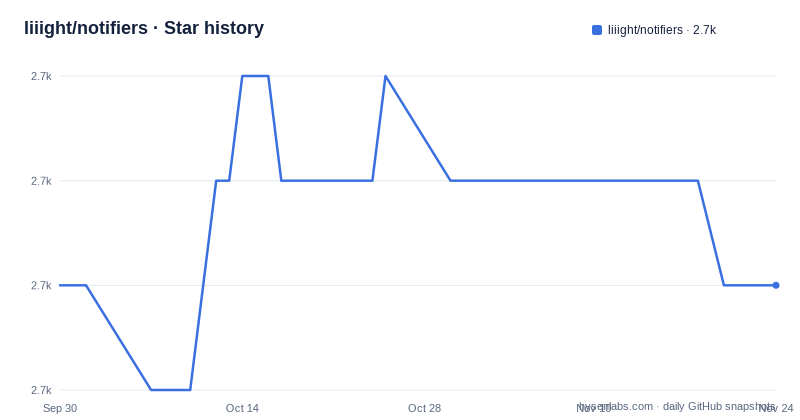
- liiight/notifiers2,736 ★ · +0
| Repository | 2026-09-30 | 2026-11-24 |
|---|---|---|
| liiight/notifiers | 2.7k | 2.7k |
0 Stars in the last 55 days, measured from the daily GitHub snapshot. Compare with other projects
Editorial analysis
The problem notifiers solves is provider sprawl, not delivery guarantees
Anyone who has wired alerts into a script knows the pattern. Pushover wants a user key and an application token. Slack wants a webhook or a bot token. Twilio wants an account SID and an auth token. Each provider ships its own Python SDK, its own error types, its own retry behaviour, and its own idea of what a successful response looks like. The README states the pitch directly: "A one stop shop for all notification providers with a unified and simple interface." The intended audience is developers who own an application or a script and want their users, or themselves, to receive notifications through whichever provider they already pay for. The library does not attempt to be an alerting platform. It is a translation layer that turns one Python call into the HTTP request the provider expects, and it keeps its dependency list to requests, jsonschema and click, which the README frames as an advantage over installing third party SDKs. That framing is accurate as far as it goes: fewer dependencies means fewer things that break when a vendor ships a major SDK version.
How get_notifier, JSON schemas and NotificationResponse fit together
The architecture visible in the README and repository layout is a registry of provider classes keyed by name. Calling get_notifier('pushover') returns a provider object, and that object exposes a required attribute, which the README shows as a dict with a 'required' key listing the arguments the provider needs: user, message and token for Pushover. That dict is generated from a JSON schema, and jsonschema is a declared dependency, so validation happens before any HTTP request leaves the process. Each provider also exposes notify(), which returns a NotificationResponse object whose repr includes the provider name and a status of Success. The CLI lives in a separate notifiers_cli package and is wired through a project.scripts entry point named notifiers, pointing at notifiers_cli.core:entry_point. A logging integration sits in notifiers.logging as NotificationHandler, which subclasses the stdlib handler interface and accepts a provider name plus a defaults dict. The data flow is therefore one-directional and synchronous: validate arguments against the provider schema, build the payload, call the provider over HTTP via requests, wrap the outcome in NotificationResponse. There is no queue, no background worker and no persistence layer in the described design.
Installing notifiers and sending a first notification
The README lists three installation routes. The pip route is the one most readers will take, and it is the only one that gives you the Python API. The Homebrew and Docker routes are also documented. After installation, the shortest path to a working notification is the get_notifier call, which also lets you inspect what the provider requires before you supply it.
pip install notifiersThat installs the library and the notifiers console script declared in pyproject.toml. If you prefer a container, the README documents a published image:
docker pull liiight/notifiersThe Dockerfile in the repository builds from ghcr.io/astral-sh/uv:python3.13-alpine, runs uv sync --no-dev, drops to the user account, and sets ENTRYPOINT to notifiers, so the container expects CLI arguments rather than a Python import.
To see what a provider needs, ask it. The README gives this exact example, and the output is the schema-derived requirement list:
>>> from notifiers import get_notifier
>>> p = get_notifier('pushover')
>>> p.required
{'required': ['user', 'message', 'token']}
>>> p.notify(user='foo', token='bar', message='test')
<NotificationResponse,provider=Pushover,status=Success>
If you would rather skip the object, the module-level notify function takes the provider name as its first argument. The README shows the same Pushover call through that path, returning the same NotificationResponse repr. From a shell, the CLI mirrors the API:
notifiers pushover notify --user foo --token baz "This is so easy!"One caveat worth flagging: the README does not document the exit code the CLI returns on a failed send, so if you plan to branch on it in a shell script, check the behaviour yourself rather than assuming.
Wiring notifiers into stdlib logging with NotificationHandler
The logging integration is the part of the project with the clearest operational use. NotificationHandler takes a provider name and a defaults dict, and once attached to a logger with a level set, every record at or above that level is forwarded to the provider. The README's example sets the handler to logging.ERROR and calls log.error, which is the pattern most people want: page me when something breaks, stay quiet otherwise. Two details matter in practice. First, the defaults dict is applied to every record, so it carries the credentials and the destination, while the message comes from the log record itself. Second, because the handler is synchronous and inherits the stdlib interface, a slow provider will block the thread that emitted the log record. The README does not document an async handler or a buffering mode, so a provider with a multi-second response time will add that latency to whatever code called log.error. For a cron job that is fine. For a request handler under load, it is a design constraint you should measure before deploying.
Where notifiers is the wrong tool
The library is a delivery layer, and the README does not describe retries, backoff, deduplication or delivery confirmation beyond the status field on NotificationResponse. If you need an alert that survives a provider outage, you need something that queues and retries, and notifiers is not that. The second limitation is scope. The supported list is broad but shallow: eighteen providers, each reduced to the fields its schema declares. If you need Slack Block Kit payloads, Telegram inline keyboards, or a provider's template system, the unified interface is working against you, because the whole point is to expose the common denominator. The third case is volume. A synchronous HTTP call per notification, with no batching, is the wrong shape for high-frequency events. The fourth is the roadmap itself: the README lists "Low level providers (Amazon SNS, Google FCM, OS Toast messages) via extra dependencies" as a future item, which tells you those transports are not available today. If your target is FCM or a native OS toast, look elsewhere for now.
Apprise and ntfy take different positions on the same problem
Apprise is the closest alternative in the Python ecosystem and the comparison is instructive. Apprise targets a much larger provider count and centres on URL-style configuration strings, so a destination is expressed as a single URI rather than a provider name plus a dict of arguments. That makes configuration portable across languages and easy to store in an environment variable, but it also means the validation story differs: notifiers leans on jsonschema and exposes required as a queryable dict, while Apprise's URL grammar is the validation. ntfy sits at the other end. It is a service with a publish endpoint and its own topic model, so you send to ntfy and ntfy fans out, rather than calling each provider's API directly from your process. That gives you a server in the middle, which means retries and history are possible, at the cost of running or trusting another component. notifiers occupies the middle: direct calls, no intermediary, one Python interface. If you want the smallest possible dependency surface inside a Python process and you are happy to own retry logic yourself, notifiers is the lighter choice. If you want configuration as strings or a broker that holds messages, the other two fit better.
Release cadence, licence and the cost of upgrading
The version history is uneven. Release 1.2.0 landed in July 2019, 1.3.0 in August 2021, and 1.3.6 in May 2025, with the last push to the repository on 2026-09-21. The repository is not archived. That pattern suggests a project that is maintained in bursts rather than continuously, which has a practical consequence: provider APIs change on their own schedule, and a burst-maintained wrapper can lag behind a breaking change at a provider. The pyproject.toml pins requests to >=2.27.1,<3 and requires Python 3.8 or newer, with classifiers through 3.13, so the floor is old but the ceiling is current. The build backend is hatchling, and the sdist excludes tests. The licence is MIT, which permits commercial use and modification provided the copyright notice and permission notice are retained; that is a summary of the licence text, not legal advice, and you should read the LICENSE file if the distinction matters to your organisation. Upgrading is cheap in dependency terms because there are only four runtime dependencies, but the changelog is the place to look before bumping, since a provider fix is the most likely reason to move between patch releases.
Editorial conclusion
Adopt notifiers if you have scripts, cron jobs or a small service that needs to reach one or more of the eighteen supported providers and you would rather not vendor three SDKs. Do not adopt it if you need guaranteed delivery, retry semantics or provider-specific features such as Slack blocks or Telegram buttons; the README describes a delivery layer, not a queue. Before committing, verify that your chosen provider appears in the supported list, that the required keys returned by p.required match what you can supply, and that the CLI entry point resolves after install with notifiers --help.
Frequently asked questions
What is notifiers used for?
It sends notifications through a single Python interface to any of eighteen providers, including Pushover, Slack, Telegram, Email over SMTP, PagerDuty and Twilio. The README describes two main uses: sending notifications from your own application or script, and forwarding stdlib log records at or above a chosen level.
How do I install notifiers?
The README documents three routes: pip install notifiers, brew install notifiers, and docker pull liiight/notifiers. The pip route is the one that gives you the Python API in addition to the notifiers console script.
How do I know which arguments a notifiers provider requires?
Call get_notifier with the provider name and read its required attribute. The README shows get_notifier('pushover').required returning {'required': ['user', 'message', 'token']}, which is derived from the provider's JSON schema before any request is sent.
Can notifiers send notifications from a shell script?
Yes. The README gives the example notifiers pushover notify --user foo --token baz "This is so easy!", and pyproject.toml declares the notifiers entry point at notifiers_cli.core:entry_point. The README does not document the exit code returned on a failed send.
Does notifiers retry a notification if the provider is down?
The README does not describe retries, backoff or queuing. Each notify call is a synchronous HTTP request that returns a NotificationResponse with a status, so any retry logic has to live in your own code.
Official sources
Add this badge to your README
If you maintain this project, the badge below links readers to this analysis and shows its maintenance status from the daily GitHub snapshot. Paste the markdown into your README; add ?metric=license or ?metric=stars to the image URL for a different field.

[](https://hysenlabs.com/projects/liiight-notifiers)Star history chart for your README
[](https://hysenlabs.com/projects/liiight-notifiers)Was this useful?