is-website-vulnerable: checking deployed pages for vulnerable frontend JavaScript libraries
finds publicly known security vulnerabilities in a website's frontend JavaScript libraries
At a glance
- What is it?
- is-website-vulnerable is a Node.js CLI that visits a URL in headless Chrome and checks the frontend JavaScript libraries against publicly known vulnerabilities from the Snyk database. It exits with code 2 when findings are present, which makes it usable as a CI gate, and requires Node.js 24.0.0 or newer.
- Who is it for?
- is-website-vulnerable fills one specific role: confirming that a deployed production page has not shipped frontend JavaScript libraries with known public CVEs. Exit code 2 is the signal a CI gate can act on, and npx runs the check without a permanent install.
- Can I use it commercially?
- Yes. Apache-2.0 is a permissive licence: you can use, modify and sell software built on it, as long as you keep its copyright and licence notices.
- Is it still maintained?
- Yes. The repository last received commits 77 days ago.
- What is it written in?
- Mainly JavaScript, according to GitHub's language statistics.
Answers come from the project's GitHub data, last synced on October 23, 2026, and from our analysis. They are not legal advice.
Star history
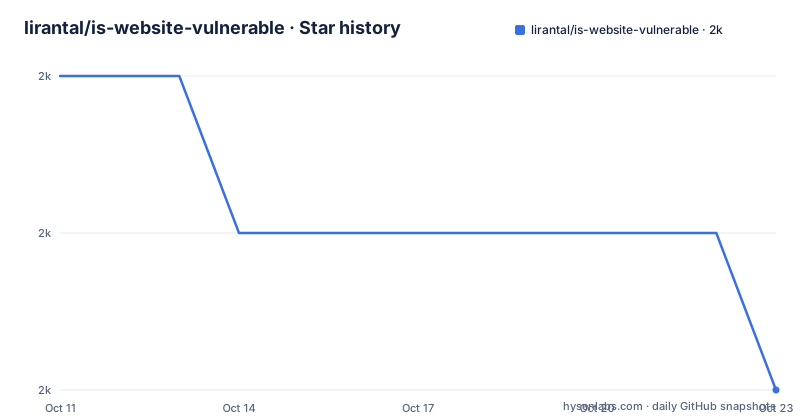
- lirantal/is-website-vulnerable2,042 ★ · -2
| Repository | 2026-10-11 | 2026-10-23 |
|---|---|---|
| lirantal/is-website-vulnerable | 2k | 2k |
-2 Stars in the last 12 days, measured from the daily GitHub snapshot. Compare with other projects
Editorial analysis
What the scan covers and what it cannot reach
Given a URL, is-website-vulnerable reports whether the frontend JavaScript libraries that page loads in a browser carry publicly known security vulnerabilities. Snyk is the source of the vulnerability data, and the README credits Snyk by name as a supporting sponsor. Only what a visitor's browser downloads and executes falls within scope: server-side code, backend dependencies, APIs and database drivers are outside what the tool can detect.
That boundary matters before adoption. A production site can pass this scan while running a backend library with a known CVE, because the tool has no access to the server environment. One question the check answers is whether vulnerable JavaScript packages are being delivered to users' browsers right now.
It is published on npm as is-website-vulnerable, carries an Apache-2.0 licence, and the most recent release is v1.14.17, published on 2026-08-07.
Lighthouse 6.0.0 and the Snyk database as the two-layer mechanism
Chrome is the actual page visitor. Lighthouse, pinned at version 6.0.0 in package.json, launches a Chrome instance, navigates to the target URL, and collects the JavaScript resources the page loaded. is-website-vulnerable then takes those resources and checks their versions against the Snyk vulnerability database.
Chrome is not optional. The README warns that a modern version of Chrome is assumed to be available and that it may not be safe to assume this is satisfied automatically on some CI services. Travis CI is named as a case where additional Chrome configuration is required, with a link to its documentation.
Pinning Lighthouse at exactly 6.0.0 rather than a version range means that version is always used, regardless of what Lighthouse version may be present on the host. In package.json, the entry reads `"lighthouse": "6.0.0"` with no caret or tilde.
Running the first scan with npx and reading the exit code
A one-off scan uses npx with no permanent install required:
npx is-website-vulnerable https://example.com [--json] [--js-lib] [--mobile|--desktop] [--chromePath] [--cookie] [--token]If the URL is omitted, the CLI prompts interactively rather than failing:
$ npx is-website-vulnerable
Woops! You forgot to provide a URL of a website to scan.
? Please provide a URL to scan: › https://example.com
For a permanent installation, the README gives:
npm install -g is-website-vulnerablePackage.json lists two engine requirements: Node.js 24.0.0 or newer and npm 11.10.0 or newer.
After the scan, one of three exit codes comes back. Exit 0 means no vulnerabilities were found. Exit 1 means an error occurred and the logs contain details. Exit 2 means vulnerabilities were found. For CI, exit 2 is the code that breaks a build on a positive result, and exit 1 should be routed to a separate alert, because a network failure and a missing Chrome binary both produce it.
Seven flags the usage string lists without prose documentation
Seven optional flags follow the target URL in the usage string: --json, --js-lib, --mobile, --desktop, --chromePath, --cookie, and --token. Each appears only in that usage string, with no prose explaining what it does or what values it accepts.
--mobile and --desktop appear as alternatives in the usage string, separated by a vertical bar, which indicates they are mutually exclusive. How they differ in practice is not described.
One additional data point appears in the Docker section: the README shows --json combined with a URL argument as `docker run --rm lirantal/is-website-vulnerable:latest https://www.google.com --json`. That confirms --json works with the direct URL argument form, not only with the SCAN_URL environment variable form. A documentation section in the README links to docs/README.md, described as covering development, testing, architecture and conventions, for a fuller account of flag behavior.
The Dockerfile specifies node:12-alpine, package.json requires node>=24
Opening the Dockerfile shows `FROM node:12-alpine`. Package.json lists `"node": ">=24.0.0"` under engines. Those two facts cannot both be satisfied by the same node binary: the base image provides node 12, while the engine requirement starts at node 24.
Instead of copying local source, the Dockerfile installs the package from the npm registry:
RUN npm install --only=prod -g is-website-vulnerableWhether that command succeeds on node 12 depends on which npm version is bundled in the Alpine image and how that npm handles engine requirements at install time. A consequence is that the container may install a different published version of the tool than the repository's current source describes.
Chromium is also installed from Alpine's package repository:
RUN apk add --no-cache chromiumCompatibility between this Chromium build and Lighthouse 6.0.0 is not documented in the repository.
Adding the scan to a GitHub Actions workflow
An action.yml in the repository exposes the scanner as a GitHub Action. This example workflow is given in the README:
name: Test site for publicly known js vulnerabilities

on: push
jobs:
  security:
    runs-on: ubuntu-latest
    steps:
      - name: Test for public javascript library vulnerabilities
        uses: lirantal/is-website-vulnerable@main
        with:
          scan-url: "https://yoursite.com"
Within the example, the action reference is `lirantal/is-website-vulnerable@main`, pointing to the default branch rather than a pinned tag. Workflows referencing a branch name pick up whatever the branch contains at run time, not a fixed published build. Version tags in the repository are available as alternative references for a workflow that must not change unless updated deliberately.
What a missing Chrome produces and how to diagnose it
Without a working Chrome, the tool cannot visit the target page. A missing or misconfigured Chrome binary produces exit 1, the same code a network error returns. Only the logs distinguish between the two causes.
For Docker users, the Dockerfile handles Chrome by installing Chromium from Alpine's package repository with `apk add --no-cache chromium`. For direct installs on CI environments, --chromePath is the flag for pointing the tool at a binary that is not in the expected location, though the README does not document what the expected location is or what format the path should take.
Travis CI is named in the README as a service where Chrome is not available by default and where additional configuration is required. Any CI environment with a restricted sandbox faces the same requirement. Verifying Chrome is present and reachable before relying on exit codes is the most direct way to rule out that failure mode.
npm-shrinkwrap.json and the difference from a package-lock
An npm-shrinkwrap.json file sits at the repository root. npm publishes a shrinkwrap file alongside the package, so a global install or an npx invocation picks up the same locked dependency tree the author built with. A package-lock.json is private to the development environment and is not applied when a package is installed globally or as a dependency.
For a security scanner, that difference is practical. A nested dependency update that changed which library versions Lighthouse flags would go unnoticed without a locked tree. npm-shrinkwrap.json makes the scanner's own behavior consistent across different machines and install times.
Package.json lists the version field as 0.0.0-development, a placeholder the build tooling replaces at publish time. Checking the npm registry entry for is-website-vulnerable confirms the current published version before pinning an npx call to a specific tag.
Editorial conclusion
is-website-vulnerable fills one specific role: confirming that a deployed production page has not shipped frontend JavaScript libraries with known public CVEs. Exit code 2 is the signal a CI gate can act on, and npx runs the check without a permanent install. It does not cover server-side dependencies, APIs or anything not delivered to a visitor's browser. Before using the Docker image, verify the build succeeds: the Dockerfile's node:12-alpine base and package.json's node>=24.0.0 requirement cannot both be satisfied by the same node binary. For GitHub Actions, pin the action to a specific version tag rather than @main.
Frequently asked questions
What is is-website-vulnerable?
A Node.js command-line tool that visits a URL in headless Chrome and checks which frontend JavaScript libraries the page loads against publicly known vulnerabilities from the Snyk database. It exits with code 2 when vulnerabilities are found and code 0 when none are.
How do I run is-website-vulnerable without a permanent install?
Pass the package name and the target URL to npx. npm downloads and executes the package without adding it to any project or global install list. If no URL is provided, the CLI prompts for one rather than exiting with an error.
What does exit code 2 mean in is-website-vulnerable?
Exit code 2 means the scan found publicly known vulnerabilities in the frontend JavaScript libraries the page loaded. Exit code 0 means none were found. Exit code 1 means an error occurred during execution, and the logs contain the details.
Does is-website-vulnerable work in Docker?
The repository includes a Dockerfile that builds a container image. After building it locally, run the container with the SCAN_URL environment variable set to the target URL. The container exits once the scan completes. The Dockerfile base is node:12-alpine while package.json requires Node.js 24 or newer, so verify the build before relying on it.
Can is-website-vulnerable run as a GitHub Action?
Yes. The repository includes an action.yml and the README provides a workflow example that triggers on every push. The example references the action at @main; pinning to a specific release tag instead gives a workflow tied to a fixed published build.
Official sources
Add this badge to your README
If you maintain this project, the badge below links readers to this analysis and shows its maintenance status from the daily GitHub snapshot. Paste the markdown into your README; add ?metric=license or ?metric=stars to the image URL for a different field.

[](https://hysenlabs.com/projects/lirantal-is-website-vulnerable)Star history chart for your README
[](https://hysenlabs.com/projects/lirantal-is-website-vulnerable)Was this useful?