Retire.js: exit code 13 by default, six CycloneDX output names, three deprecated front ends
scanner detecting the use of JavaScript libraries with known vulnerabilities. Can also generate an SBOM of the libraries it finds.
At a glance
- What is it?
- Retire.js finds JavaScript libraries with known vulnerabilities, including ones that were downloaded and committed without ever appearing in a package manifest, and it can emit a CycloneDX SBOM. Of its seven documented ways to run, three are marked deprecated, and the Chrome extension is not officially available in the Chrome web store.
- Who is it for?
- Use Retire.js when your JavaScript dependencies are not fully described by a manifest, which in practice means vendored files, copies of scripts and browser-loaded libraries, and use its CycloneDX output when a downstream tool needs an SBOM. Plan for the exit code, since a finding exits 13 by default and you have to ask for zero explicitly in a build script that should not stop on a finding.
- Can I use it commercially?
- Yes. Apache-2.0 is a permissive licence: you can use, modify and sell software built on it, as long as you keep its copyright and licence notices.
- Is it still maintained?
- Yes. The repository last received commits 4 days ago.
- What is it written in?
- Mainly JavaScript, according to GitHub's language statistics.
Answers come from the project's GitHub data, last synced on November 13, 2026, and from our analysis. They are not legal advice.
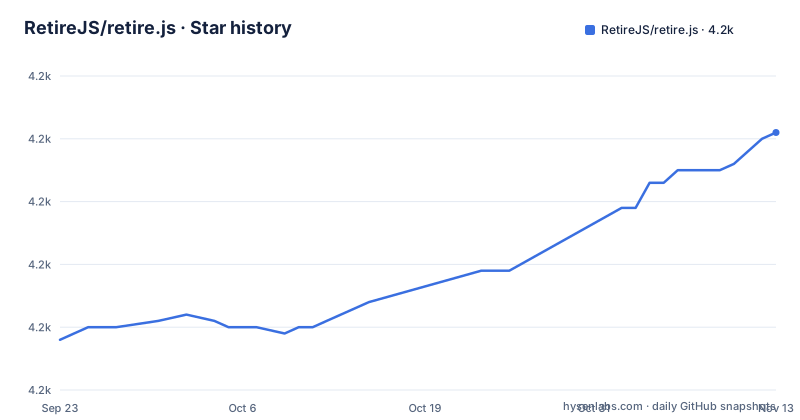
Star history
- RetireJS/retire.js4,211 ★ · +33
| Repository | 2026-09-23 | 2026-11-13 |
|---|---|---|
| RetireJS/retire.js | 4.2k | 4.2k |
33 Stars in the last 51 days, measured from the daily GitHub snapshot. Compare with other projects
Editorial analysis
Exit code 13 is the default, and overrides are explicit
The scanner exits with code 13 when it finds vulnerabilities.
$ npm install -g retire
$ retire
Thirteen is a deliberate signal rather than a generic failure, so a build script can distinguish a finding from a crash. The override is a flag.
$ retire --outputformat cyclonedxThat example is for the SBOM output; the flag that neutralises the exit behaviour is `--exitwith 0`.
The practical trap is a CI job that runs the scanner directly. On a repository with a known vulnerable vendored library, every build fails until somebody fixes the file or somebody passes the override, and the override is easy to leave in place afterwards because nothing about it announces itself in the job log.
The other thing the scanner needs is context. It is run in the source folder of the application, where it reads the files and the manifest it finds there, which is why the install instructions put both commands in the project directory rather than anywhere on the path.
Six output format names, differing by spec version and VEX
The SBOM feature emits CycloneDX, and the format is chosen by name rather than by a flag pair.
The plain name produces CycloneDX 1.4 as XML. Then there are three JSON variants, one for 1.4 and one each for the 1.6 and 1.7 specification versions, and two more that are the 1.6 and 1.7 JSON formats with an additional section listing vulnerabilities.
Those last two are the interesting ones. A CycloneDX document can describe components, and a vulnerability exchange format document describes findings as well, so the two suffixes produce an SBOM that carries the retire.js results inside it rather than requiring a consumer to correlate the component list with a separate finding list.
So the naming scheme encodes three independent choices in one string: XML or JSON, which specification version, and whether findings are included. That is compact and entirely positional, which means a script that hardcodes one name will break silently when the naming convention gains a dimension.
The XML form is the default shape, which is a reasonable choice for tools that expect a document rather than a data structure.
Three of the seven front ends are marked deprecated
The project lists seven ways to use it, and the status of each is stated.
The command line scanner is the primary one. The Chrome extension scans visited sites, writes warnings to the developer console, and shows an address bar icon indicating whether vulnerable libraries loaded, but it is explicitly not officially available in the Chrome web store. The Firefox extension is marked deprecated with an invitation: let the maintainers know if you want to maintain it and undeprecate it. The Grunt plugin and the Gulp task are both marked deprecated.
That leaves two integrations. The Burp plugin is an adaptation by an individual, and the OWASP ZAP add-on is officially supported by the ZAP team, published through the ZAP Marketplace and included by default in the weekly releases. A headless site scanner lives in a separate repository and scans a site without the browser extensions.
The browser extensions are built by scripts in the repository
There is no packaged extension to download, which follows from the web store note, so the extensions are built from the source tree.
The top level of the repository contains two build scripts with the same purpose and different platforms, one shell script and one Windows batch file for Chrome, plus a separate script for the Firefox build. There is also a small Python script whose role is to serve files locally.
The two build scripts existing side by side is the practical signal about which platforms the maintainer actually builds on.
For a team that wants the browser warnings, the practical answer is that someone has to run those scripts, and the resulting extension has to be loaded by hand. For everyone else, the command line scanner and the ZAP add-on are the paths with published artefacts.
The vulnerability data and the SBOM files live in the same tree
The repository is not only code. Alongside the source directories for the command line tool and the two browser extensions, it carries a directory named for the vulnerability repository, an entry named bom, and a documentation directory.
That is the shape of the project. The scanner is only half of it: the other half is the data it matches against, and the donation note says as much, stating that donations will fund the maintenance of the tool and the vulnerability repository.
What this means for accuracy is straightforward. A scanner that reads its findings from a data file is only as good as the last update to that file, and the recency of the repository as a whole tells you nothing about the recency of the entries inside it. Anyone relying on a clean result should check when the data was last updated, not when the code was.
The Gulp example stops in the middle of a function
The deprecated Gulp integration is documented with a code example, and the example is cut off.
const c = require("ansi-colors");

var gulp = require("gulp");
var beeper = require("beeper");
var log = require("fancy-log");
var spawn = require("child_process").spawn;
The watcher task registers a file pattern and the manifest, and re-runs the scanner when either changes. The scanner itself is not called in process: it is spawned as a child process, with the working directory passed explicitly, and the optional option parameters go in a second argument that the text invites you to fill in.
Then the snippet stops, in the middle of setting the output encoding on the child's standard output. There is no closing brace.
So the documented example is a starting point rather than something you can paste. What survives the truncation is still the important part: watching for JavaScript files and the manifest, and running the scanner out of process rather than importing it, which keeps the gulp task independent of the scanner's own module structure.
The target is libraries that no manifest mentions
The reason the project exists is narrower than dependency scanning in general.
In 2013, the OWASP Top 10 added a category for using components with known vulnerabilities, which is cited as the moment the problem became a named risk. Retire.js was created to find library versions with known vulnerabilities, and the case it targets specifically is libraries that are not in a package manifest but were simply downloaded and committed into source control.
That is the gap a lockfile-based tool does not cover. A file copied into a repository years ago, or a script tag pointing at a host, leaves no manifest entry, and an ordinary audit of declared dependencies will never see it. The browser extensions exist for the same reason: they inspect what a page actually loaded, which catches the case where the dependency is not in your project at all but arrives at run time.
The tagline compresses the argument into one line: what you require, you must also retire.
Editorial conclusion
Use Retire.js when your JavaScript dependencies are not fully described by a manifest, which in practice means vendored files, copies of scripts and browser-loaded libraries, and use its CycloneDX output when a downstream tool needs an SBOM. Plan for the exit code, since a finding exits 13 by default and you have to ask for zero explicitly in a build script that should not stop on a finding. Pick a front end deliberately: the command line scanner, the officially supported ZAP add-on and the headless site scanner are the maintained paths, while the Grunt plugin, the Gulp task and the Firefox extension are marked deprecated, and the Chrome extension has to be built from the repository rather than installed from the store. Know also that the vulnerability data this tool reads lives in the same repository, so its accuracy depends on that data staying current.
Frequently asked questions
What is Retire.js used for?
It scans a web or Node application for the use of JavaScript libraries and modules with known vulnerabilities, including ones that were downloaded and committed without ever appearing in a package manifest. It can also generate a CycloneDX SBOM of the libraries it finds.
Is the Retire.js extension available in Chrome?
Not officially. The README states the Chrome extension is not officially available in the Chrome web store, and the repository ships build scripts for it instead, so it has to be built and loaded locally.
How do I install retire js?
Install node and npm first, then run npm install -g retire and run retire in the source folder of the application you want to scan. For an SBOM instead of a report, pass the CycloneDX output format option.
How do you use retire.js in Burp?
Through the plugin adapted by the maintainer of the burp-retire-js repository, which runs Retire.js inside Burp. If you would rather use OWASP ZAP, its add-on is officially supported by the ZAP team, available in the ZAP Marketplace and included in the weekly releases.
What does retire js do about a browser-loaded script?
The Chrome and Firefox extensions scan visited sites for references to insecure libraries, put warnings in the developer console, and display an address bar icon indicating whether vulnerable libraries were loaded, which catches libraries that your manifest does not mention at all.
What is a retire.js alternative for site scanning?
The headless site scanner in the retire-site-scanner repository scans a web site without using the browser extensions. For interactive testing there is also the officially supported OWASP ZAP add-on, included in ZAP weekly releases.
Official sources
Add this badge to your README
If you maintain this project, the badge below links readers to this analysis and shows its maintenance status from the daily GitHub snapshot. Paste the markdown into your README; add ?metric=license or ?metric=stars to the image URL for a different field.

[](https://hysenlabs.com/projects/retirejs-retire-js)Star history chart for your README
[](https://hysenlabs.com/projects/retirejs-retire-js)Was this useful?