LiveKit Meet is a reference video conferencing app, and reads like one
Open source video conferencing app built on LiveKit Components, LiveKit Cloud, and Next.js.
At a glance
- What is it?
- LiveKit Meet is the open source conference application from the LiveKit team, built on the React components library, Next.js and the hosted LiveKit Cloud, and it has been rewritten from the ground up on the new components. What makes it worth reading is that it is small, complete and honest about what a conferencing product needs, from the three environment variables that identify your LiveKit project to the S3 credentials that turn on recording.
- Who is it for?
- LiveKit Meet suits a developer who wants to see a working WebRTC application end to end rather than a component gallery, since the app shows token minting, room joining, the control bar, recording and the settings menu wired together. It is a poor fit if you need a product rather than a starting point, because the version number is 0.2.0 and there are no published releases, which means you are reading a moving target and should pin a commit.
- Can I use it commercially?
- Yes. Apache-2.0 is a permissive licence: you can use, modify and sell software built on it, as long as you keep its copyright and licence notices.
- Is it still maintained?
- Yes. The repository last received commits 8 days ago.
- What is it written in?
- Mainly TypeScript, according to GitHub's language statistics.
Answers come from the project's GitHub data, last synced on November 6, 2026, and from our analysis. They are not legal advice.
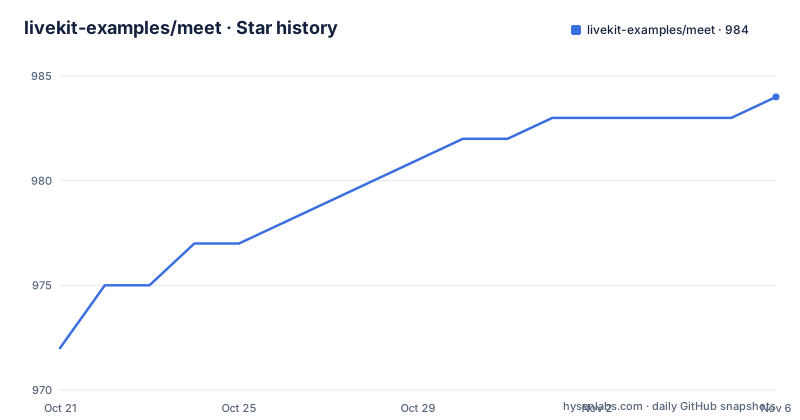
Star history
- livekit-examples/meet984 ★ · +12
| Repository | 2026-10-21 | 2026-11-06 |
|---|---|---|
| livekit-examples/meet | 972 | 984 |
12 Stars in the last 16 days, measured from the daily GitHub snapshot. Compare with other projects
Editorial analysis
What this repository actually is
LiveKit Meet is the open source video conferencing app from the LiveKit project, and the README is clear about its status, it has been completely redesigned from the ground up using the new components library. That framing matters, because the repository is a reference implementation rather than a hosted product, and the demo is linked separately at meet.livekit.io. What you get in the tree is a Next.js application, an `app/` directory for the routes, a `lib/` directory for the logic, a `public/` directory for static assets, a `styles/` directory, and the usual configuration files. The description says the app is built on LiveKit Components, LiveKit Cloud and Next.js, and the topics record the stack as Next.js, React and WebRTC. The interesting judgement is what it leaves out, since a reference app usually skips the things a product needs, and the things it does include are the ones that are hard to work out from documentation.
The dependency versions tell you which generation of LiveKit this is
The manifest pins the versions, and they matter. The interface is `@livekit/components-react` at 2.9.24 with the matching `@livekit/components-styles` at 1.2.0, which is the newer component generation the README refers to, and the client and server sides are separate packages, `livekit-client` at 2.23.0 and `livekit-server-sdk` at 2.19.1. The split is the architecture of the whole thing, since the client is what runs in the browser and joins the room, while the server SDK is what mints the access token on a trusted machine. The application itself is Next.js at 15.5.21 with React 18.3.1, bootstrapped with create-next-app, so this is the Pages or App Router era of Next on React 18 rather than the React 19 line. The version of the components library is the number to check if you are copying from an older tutorial, because the API moved between generations and the README says the app was rewritten onto the new one.
Four steps to a running conference room
The development setup is four steps, and the second one is the step people miss. First the dependencies:
pnpm installSecond, the environment file. You copy `.env.example` in the project root and rename it to `.env.local`, and the third step is to fill in the missing environment variables in the file you have just created. The fourth is to run the development server with `pnpm dev` and open http://localhost:3000. The renaming is not cosmetic, because Next.js treats `.env.local` as a file that is never committed, while `.env.example` is the committed template, and putting your secret in the wrong one is how keys end up in a git history. The project also declares pnpm 10.18.2 as its package manager and asks for Node 18 or later, and the tree carries a pnpm lock file rather than an npm one, so the pnpm in the instructions is the one to use.
The environment file is the deployment shape in three variables
The `.env.example` file is short and it is the most instructive document in the repository, because it tells you what a LiveKit application actually needs. There are three required settings. `LIVEKIT_API_KEY` and `LIVEKIT_API_SECRET` are the credentials for your project, and the comment says that if you are using LiveKit Cloud they can be generated from the Cloud dashboard. `LIVEKIT_URL` is the URL pointing to the LiveKit server, with a worked example given as `wss://my-livekit-project.livekit.cloud`, which is the shape of a hosted project and also shows that the server is reached over a secure websocket. Everything else is optional, and the optional block is where the product decisions show. Recording is off until you fill in S3_KEY_ID, S3_KEY_SECRET, S3_ENDPOINT, S3_BUCKET and S3_REGION, so the app can put the recording into a bucket you control rather than a vendor's storage. The settings menu is behind a flag, and the comment says to uncomment it when using LiveKit Cloud because it enables the Krisp noise filters. And logging to Datadog is two public variables, a client token and a site.
The smaller dependencies are the interesting ones
Most of the dependency list is predictable, but a few entries explain what the app does. The Krisp noise filter is included as `@livekit/krisp-noise-filter` at 0.4.5, and the connection to the settings menu comment is that the menu enables those filters, which makes sense since a noise filter needs to be switched on and configured rather than always on. The track processors package is for handling the media tracks, which is where a conferencing app touches the plumbing. `react-hot-toast` is the notification style, which is how you tell a participant their recording finished or their share link was copied. `tinykeys` is a keyboard shortcut library, and in a conferencing app the shortcuts are the difference between a usable grid view and a frustrating one, since you are joining and leaving rooms repeatedly. `@datadog/browser-logs` with the two public variables in the environment file is the client side error reporting, which is a normal choice for a demo app that people run on their own machines. And `source-map-loader` in the development dependencies is a hint that the team wanted readable stack traces from the compiled application.
Tooling, tests and the state of the project
The scripts are the standard Next.js set, with `next dev`, `next build`, `next start` and `next lint`, plus a fix variant of the lint task. The interesting additions are a test script that runs vitest, and the formatting tasks, which run prettier in check and write mode over TypeScript, TSX, Markdown and JSON files. The type definitions and the linter are modern, with TypeScript 5.9.3, eslint 9.39.4 and the matching eslint-config-next, and prettier 3.8.3. The repository also carries a renovate configuration, which is the usual way a project like this keeps its dependency updates automatic, and a `.prettierrc` and `.prettierignore` alongside an `.eslintrc.json`. On the state of the project, the package version is 0.2.0 and the project is private, there are no published releases, and the last push to the repository was on 2026-10-19, so the work is current even though the version number says early. The licence is Apache-2.0, so for a reference application that is a straightforward one to build on.
Editorial conclusion
LiveKit Meet suits a developer who wants to see a working WebRTC application end to end rather than a component gallery, since the app shows token minting, room joining, the control bar, recording and the settings menu wired together. It is a poor fit if you need a product rather than a starting point, because the version number is 0.2.0 and there are no published releases, which means you are reading a moving target and should pin a commit. Before you build on it, check three things: which LiveKit deployment you point at, since the URL, the API key and the secret are the only required settings and they decide whether you talk to LiveKit Cloud or to your own server, whether you need recording, since that needs S3 credentials that the example file leaves commented out, and which Node version you run, since the manifest asks for 18 or later and the project uses pnpm 10.
Frequently asked questions
How do I run LiveKit Meet locally?
Run `pnpm install`, copy `.env.example` to `.env.local`, fill in the missing environment variables, then run `pnpm dev` and open http://localhost:3000. The project expects pnpm 10.18.2 as the package manager and Node 18 or later.
Which environment variables does LiveKit Meet require?
Three are required, LIVEKIT_API_KEY, LIVEKIT_API_SECRET and LIVEKIT_URL, where the URL points at the LiveKit server, with a hosted project example given as `wss://my-livekit-project.livekit.cloud`. The API key and secret can be generated from the LiveKit Cloud dashboard.
How do I enable recording in LiveKit Meet?
By filling in the S3 settings, S3_KEY_ID, S3_KEY_SECRET, S3_ENDPOINT, S3_BUCKET and S3_REGION, which are left commented out in the example environment file. The recordings then go to a bucket you control.
What is the difference between livekit-client and livekit-server-sdk?
The client is the browser side that joins the room and handles the media, and the server SDK is the trusted side that mints the access token. The manifest pins livekit-client at 2.23.0 and livekit-server-sdk at 2.19.1, and the token is what the required API key and secret in the environment file are for.
Can I turn on noise filtering in LiveKit Meet?
Yes, by uncommenting NEXT_PUBLIC_SHOW_SETTINGS_MENU, which the example environment file says to do when using LiveKit Cloud because it enables the Krisp noise filters. The app includes the Krisp noise filter package at version 0.4.5.
Official sources
Add this badge to your README
If you maintain this project, the badge below links readers to this analysis and shows its maintenance status from the daily GitHub snapshot. Paste the markdown into your README; add ?metric=license or ?metric=stars to the image URL for a different field.

[](https://hysenlabs.com/projects/livekit-examples-meet)Star history chart for your README
[](https://hysenlabs.com/projects/livekit-examples-meet)Was this useful?