LjyYano/Thinking_in_Java_MindMapping: a personal knowledge repository, not a library
Programming notes, AI study notes, movie-watching guides, reading notes, life reflections and gaming logs.
At a glance
- What is it?
- The repository is a Chinese-language note collection that grew out of a reading of Thinking in Java into Java, Redis and Spring source analysis, AI notes, film and book logs, and a script that keeps its own README navigation in sync. It is worth adopting as a reading model, not as a dependency.
- Who is it for?
- Adopt this repository as a reference for how one person structures a long-running technical notebook, and read the Java, Redis and AI folders directly. Do not add it as a dependency, vendor it, or expect an API, a package or a release artefact, because nothing in the repository provides one.
- Can I use it commercially?
- Check first. The repository uses a licence we do not classify automatically, so read its LICENSE file before any commercial use.
- Is it still maintained?
- Yes. The repository last received commits 14 days ago.
- What is it written in?
- Mainly Python, according to GitHub's language statistics.
Answers come from the project's GitHub data, last synced on November 22, 2026, and from our analysis. They are not legal advice.
Star history
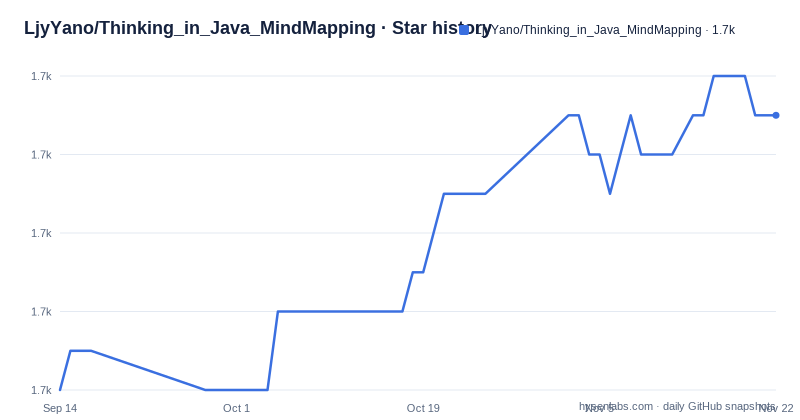
- LjyYano/Thinking_in_Java_MindMapping1,693 ★ · +7
| Repository | 2026-09-14 | 2026-11-22 |
|---|---|---|
| LjyYano/Thinking_in_Java_MindMapping | 1.7k | 1.7k |
7 Stars in the last 69 days, measured from the daily GitHub snapshot. Compare with other projects
Editorial analysis
What Thinking_in_Java_MindMapping actually is, and who it is for
The name points at a reading of Java 编程思想, and the README says the project started there: the author published mind-map screenshots on 简书, readers left comments, and the notes were moved into a repository. That origin explains the shape of the thing. It is a notebook with a table of contents, not a library with an API. The top level holds AI/, 编程/, 读书/, 观影/, 游戏/, 随笔/, a scripts/ folder and a .github/ folder. The primary language reported for the repository is Python, and the Python that exists is the navigation generator, not application code.
The audience is narrow and specific. A developer who wants a worked example of how to keep a technical notebook alive across years will find one here. Someone looking for a Java utility, a Redis client wrapper or an installable package will not. The topics list includes java, jvm, kotlin, netty, redis, spring, ai-agent, chatgpt and claude, and the article navigation shows notes such as a source-level analysis of the Apache Log4j remote code execution vulnerability, a GC progress write-up covering JDK 8 to JDK 17, and a Java ClassLoader note. Those are explanations, not code you can call.
How the repository is organised and how the article navigation is generated
The README is the entry point and it is partly machine-written. Between the markers <!-- AUTO-ARTICLE-NAV:START --> and the matching end marker sits a set of collapsible tables, one per category, with a title column and a date column. The maintenance note in the README states that the 文章导航 area is generated by a script and should not be edited by hand. Two paths are given: a local run of python scripts/update_readme_nav.py, and a CI path where committing any *.md file triggers a workflow that updates the navigation and commits it back to the repository.
That is the only mechanism in the repository that behaves like software. Everything else is content. Because the generated block is delimited by HTML comments, the rest of the README can be edited freely without the script overwriting it.
Running the navigation script: the only executable step the README documents
There is no install step for the notes themselves. The only runnable piece documented is the navigation updater. The README gives the command for it, and the script reads the local tree, so work from a copy of the repository.
The README's maintenance note lists the local command as follows.
python scripts/update_readme_nav.pyRun it from the repository root. The README describes the effect as updating the 文章导航 region, which sits between the AUTO-ARTICLE-NAV markers in README.md, so that is where to look afterwards. If the tree has not changed, the tables should match what was already there. Read scripts/update_readme_nav.py to see which options and edge cases it handles.
The CI workflow writes to your repository, and that is the main operational catch
The README's maintenance note says a workflow updates the navigation and commits it back after any *.md commit. For the author this is convenient: write a note, push, and the index maintains itself. For anyone who forks the repository to write their own notes in it, the same workflow becomes a source of surprise commits on a branch they may also be editing by hand.
The failure mode is the ordinary one for generated files under version control. If a contributor edits the generated tables directly, the next script run or workflow run discards those edits, and the README explicitly warns against hand-editing that region. If two people push notes at nearly the same time, the workflow must reconcile two regenerated README.md files, and a conflict there is a conflict in a file nobody wants to resolve manually. The documented automation covers only the article index.
Why this is the wrong tool for most engineering teams
Teams usually arrive at a repository like this looking for one of three things, and it supplies none of them. It is not a dependency: there is no package manifest for consumers, no published artefact, and no release is published for it. It is not a documentation site: the homepage is a Notion page, and the repository itself is a folder tree of Markdown. It is not a knowledge base with editorial guarantees: the notes are one person's study record, written in Chinese, with dates that in several cases are years old, such as the 2021 Log4j analysis and the 2021 GC write-up.
There is also a licensing gap worth naming plainly. The repository metadata reports no licence. That means the default position for a company is that reuse and redistribution of the text are unresolved, which is a different problem from technical quality. If you need a citable internal reference, this is not the source to copy from. If you need to understand how someone else structures a long-running notebook, the structure is the useful part and you can rebuild it under your own terms without copying the prose.
A real alternative: a static site generator over the same Markdown
The closest alternative in approach is a static site generator such as MkDocs with the Material theme, or Docusaurus. The difference is where the index comes from. Here, a Python script parses the folder tree and writes HTML tables into README.md, so the published artefact is the repository page itself and the index is a generated Markdown block. With MkDocs or Docusaurus, you keep the same Markdown files but add a configuration file and a navigation file, and the tool renders a searchable site with its own routing.
That trade is concrete. A generator gives you full-text search, per-page navigation and a build step that fails loudly when a link target is missing. It also adds a toolchain, a theme dependency and a build to maintain, and it moves the canonical reading surface away from GitHub. The script approach keeps everything visible in the repository, needs only Python, and has no theme to upgrade. If your notes are for you and a handful of readers arriving through GitHub, the script is the smaller commitment. If you want search and stable URLs for an audience, the generator earns its extra moving parts.
Maintenance, cost and the licence question
The last push to the repository was on 2026-08-18, and the repository is not archived, so the project has been touched recently. That says nothing about the age of the individual notes, which run from 2019 viewing summaries to AI notes dated late 2025. There are no releases, so there is no version to pin and no changelog to read. Upgrading means pulling the branch and reading the diff.
The running cost is low and mostly yours. The script needs a Python interpreter, the workflow needs CI minutes, and every generated commit adds a commit to the history. On the licence side, the metadata shows no licence, so the safe reading is that no permission has been granted for reuse. That is a statement about the repository's own metadata, not legal advice; if you intend to redistribute the notes, ask the author for terms rather than assuming. The related project linked from the README, skill-pack, is a separate repository with its own terms and is not covered by anything stated here.
Editorial conclusion
Adopt this repository as a reference for how one person structures a long-running technical notebook, and read the Java, Redis and AI folders directly. Do not add it as a dependency, vendor it, or expect an API, a package or a release artefact, because nothing in the repository provides one. Verify two things before you rely on any single note: the file's own date in the article navigation, and whether the claim is backed by source code in the repository or only by prose. The licence field is empty, so treat redistribution of the text as unresolved until the author states terms.
Frequently asked questions
Is Thinking_in_Java_MindMapping a Java library or a notes repository?
It is a notes repository. The README describes it as a knowledge map built between code, books, films and life, and the top-level folders are AI/, 编程/, 读书/, 观影/, 游戏/ and 随笔/ rather than a source package.
How do I update the article navigation in Thinking_in_Java_MindMapping?
Run python scripts/update_readme_nav.py from the repository root, or let the CI workflow do it. The README states that committing any *.md file triggers a workflow that updates the navigation and commits it back, and it warns against editing the generated region by hand.
What topics does Thinking_in_Java_MindMapping cover?
The repository topics list java, jvm, kotlin, netty, redis, spring, ai, ai-agent, chatgpt, claude, interview and switch, and the article navigation shows notes on Java internals, a Redis source analysis series, Spring, AI agents and MCP, plus reading, film and game logs.
Can I use Thinking_in_Java_MindMapping notes in my own project?
The repository metadata reports no licence, so no permission for reuse is documented there. Treat redistribution as unresolved and ask the author before copying the text.
Is Thinking_in_Java_MindMapping still maintained?
The repository is not archived and the last push was on 2026-08-18. The repository publishes no releases, so there is no versioned artefact to track; changes arrive as commits.
Official sources
Add this badge to your README
If you maintain this project, the badge below links readers to this analysis and shows its maintenance status from the daily GitHub snapshot. Paste the markdown into your README; add ?metric=license or ?metric=stars to the image URL for a different field.

[](https://hysenlabs.com/projects/ljyyano-thinking-in-java-mindmapping)Star history chart for your README
[](https://hysenlabs.com/projects/ljyyano-thinking-in-java-mindmapping)Was this useful?