ReArk: a desktop workbench for HarmonyOS HAP/APP/ABC and Android APK/AAB analysis
An intelligent reverse engineering analysis tool designed for multiple target platforms, currently supporting HarmonyOS (HAP/APP/ABC) and Android (APK/AAB).
At a glance
- What is it?
- ReArk is a C++ desktop tool that opens HarmonyOS and Android packages in one workspace, combining static inspection with device workflows and an AI agent. It ships as a signed installer, and its Linux build is not available yet.
- Who is it for?
- Adopt ReArk if you already work with HarmonyOS HAP/APP/ABC or Android APK/AAB packages and want static inspection, device control and an agent in one window; the sample files under samples/ give you something to open on the first run.
- Can I use it commercially?
- Yes. Apache-2.0 is a permissive licence: you can use, modify and sell software built on it, as long as you keep its copyright and licence notices.
- Is it still maintained?
- Yes. The repository last received commits 29 days ago.
- What is it written in?
- Mainly C++, according to GitHub's language statistics.
Answers come from the project's GitHub data, last synced on November 25, 2026, and from our analysis. They are not legal advice.
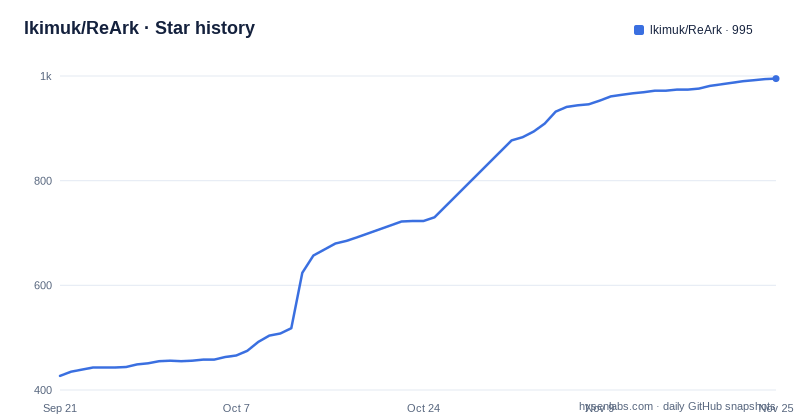
Star history
- lkimuk/ReArk995 ★ · +568
| Repository | 2026-09-21 | 2026-11-25 |
|---|---|---|
| lkimuk/ReArk | 427 | 995 |
568 Stars in the last 65 days, measured from the daily GitHub snapshot. Compare with other projects
Editorial analysis
What ReArk is for, and who it is not for
ReArk is a desktop reverse engineering and AI-assisted analysis tool. The README describes its scope plainly: open HarmonyOS `.hap`, `.app` and `.abc` files or Android `.apk` and `.aab` packages and inspect code, resources, metadata and application behavior in one workspace. That single-workspace claim is the product's whole argument. HarmonyOS package work and Android package work normally live in separate toolchains, and ReArk puts both behind one window, then adds a connected-device panel and an agent on top.
The audience is narrow and specific. The README names three uses: investigating application logic, reviewing security, and working through CTF challenges. The repository's samples directory matches that: `samples/Bridge.hap`, `samples/contacts.hap`, `samples/EasyHap-default-unsigned.app`, `samples/fpt-default-signed.app`, `samples/shctf.app` and `samples/遥遥领先.hap` are test material for exactly those tasks. If you are a mobile security engineer, a CTF player, or someone doing interoperability research on HarmonyOS packages, this is aimed at you. If you want a library to embed in a CI pipeline, nothing in the README suggests that exists: the documented distribution is installers for Windows and macOS plus a user guide at cppmore.com/ReArk.
One boundary is stated in the README itself. ABC evidence tools and HarmonyOS re-signing are specific to HarmonyOS packages. Android users get manifest, permission, component, resource and icon inspection, disassembly and Java-like decompiled output, but not the ABC path. The reverse is also true: the Android device installation path uses APK files, so an AAB is not what you push to a device.
How the analysis pipeline is put together
The repository is a C++ project built with CMake, with `CMakeLists.txt` at the top level and `cmake/`, `src/`, `plugin/`, `resources/`, `installer/`, `third_party/` and `assets/` alongside it. The `plugin/` directory is the interesting one. The README lists capabilities that map cleanly onto separable units: HarmonyOS package parsing, ABC disassembly and decompilation, Android disassembly and decompilation, signing and repackaging, device discovery over HDC and ADB, screen mirroring, and the agent. A plugin directory suggests those are not all compiled into one monolith, though the README does not document the plugin interface, so anyone planning to extend ReArk is working from the source tree rather than from a specification.
ReArk Agent is the part with the clearest described data flow. The README says the agent discovers analysis capabilities and retrieves package files, metadata, strings, disassembly and decompiled output as needed. That is a tool-calling loop over the same evidence the static views expose, not a separate index built at import time. You can also attach reference documents, which the README describes as supplementing package evidence with your own materials. Model providers include OpenAI-compatible endpoints and local Ollama models.
The safety model is documented, not implied. The README states that host commands, Python execution and device operations use the applicable approval flows. It also warns that when using remote model providers you should avoid submitting secrets, certificates, user data, trade secrets or other sensitive content. That warning is doing real work: if you point the agent at a remote endpoint and let it pull decompiled output, package content leaves your machine. Local Ollama is the configuration that avoids that.
Installing ReArk and opening a package
ReArk is distributed as a binary installer, not as a source build you are expected to compile. The README points to the latest release page and gives direct links for two platforms. Windows requires Windows 10 or later on x64 and the file is `ReArk-1.0.0-windows-x64-setup.exe`. macOS requires macOS 14.0 or later on Apple Silicon and the file is `ReArk-1.0.0-macos-arm64.dmg`. Linux is listed with x64 under requirements but the direct-links column says coming in the next release, with system requirements to be announced. There is no Linux download to fetch.
Download the installer for your platform from the release page:
# Windows (x64, Windows 10+)
ReArk-1.0.0-windows-x64-setup.exe

# macOS (Apple Silicon, macOS 14.0+)
ReArk-1.0.0-macos-arm64.dmg
After installing, the first real task is opening a package. The samples directory in the repository is the fastest way to see whether the views you care about work on your machine before you point ReArk at anything sensitive.
# Clone the repository to get the sample packages
 git clone https://github.com/lkimuk/ReArk.git
 cd ReArk/samples
 ls
You should see `Bridge.hap`, `contacts.hap`, `EasyHap-default-unsigned.app`, `fpt-default-signed.app`, `shctf.app` and `遥遥领先.hap` among the entries. Open one of the `.hap` files to exercise the HarmonyOS path, including ABC disassembly, strings and cross-references. Open an Android `.apk` or `.aab` to exercise the Android path: manifest, permissions, components, entry points, resources and icons. If you want device work, connect a device and let ReArk discover it through HDC for HarmonyOS or ADB for Android, then install, launch, capture screenshots, inspect UI nodes or read logs.
The README does not document a command-line interface, environment variables or configuration file paths, so treat the desktop application as the entry point. The user guide at cppmore.com/ReArk is the place the README sends readers for more detail.
Where ReArk stops being the right tool
The most concrete limitation is platform coverage. Linux users are told to wait for the next release, and the system requirements for that release are not yet announced. If your analysis machines run Linux, ReArk is not an option today regardless of how well the feature list matches your needs.
The second limitation is capability drift across package formats. The README states directly that available analysis views and device actions depend on the package format, operating system version and device capabilities. That sentence covers a lot of ground. A view you rely on for a HarmonyOS package may simply not exist for an Android one, and device features such as screen recording, audio, clipboard and device controls are qualified with where supported by the device and runtime. The mirroring and control features in particular depend on what the connected device exposes. Nothing in the README promises parity across platforms.
The third is the agent's privacy surface. ReArk Agent with a remote provider sends package-derived content to that provider. The README's own safety section tells you to avoid submitting secrets, certificates, user data and trade secrets. For malware analysis or CTF work on packages you did not write, that is a real constraint, and the documented answer is a local Ollama model or a provider you control.
Finally, the repository is a C++ application with an undocumented plugin directory. If your goal is to script ReArk or extend it, the README gives you no interface contract to build against. You would be reading `src/` and `plugin/` to find one. That is a different kind of project from a library with a stable API.
How ReArk differs from jadx and Ghidra on the same packages
The obvious comparison for the Android half is jadx, which decompiles APK and DEX files into Java-like output. ReArk does that too, but it is not a decompiler with a UI bolted on. It is a workspace that also parses HarmonyOS HAP, APP and ABC files, inspects signing certificates and validity, re-signs and repackages HarmonyOS applications, and drives connected devices over both HDC and ADB. jadx has none of the HarmonyOS side and no device mirroring. If your work is Android-only, jadx is a smaller tool that does the decompilation job without asking you to learn a second package format.
Against Ghidra, the difference is the level of abstraction. Ghidra works on binaries and expects you to supply processor modules and loaders; ReArk works on application packages and already knows what an APK manifest or a HarmonyOS ABC module is. Ghidra is the better answer for native code inside a package, for arbitrary architectures, and for scripted analysis through its own extension mechanism. ReArk is the better answer when the question is about package structure, permissions, components, signing and runtime behavior on a device.
The agent is the part with no direct equivalent in either. Ghidra has scripting and jadx has no assistant at all. ReArk Agent can pull strings, disassembly and decompiled output on demand and take attached reference documents as context. Whether that is faster than reading the decompiled output yourself depends on the question, and the README does not characterize accuracy, so treat agent output as a lead to verify in the static views rather than a result.
Maintenance, releases and the Apache-2.0 licence
ReArk is not archived, and the last push to the default branch was on 2026-09-10. The release history is short and recent: v0.2.0 on 2026-07-07, v0.3.0 on 2026-07-16, and v1.0.0 on 2026-09-07. Three releases in roughly two months, with the 1.0.0 tag landing three days before the last push, is a project moving quickly through its early versions. The practical consequence is that the 1.0.0 label should not be read as interface stability. A project that reached 0.3.0 in mid-July and 1.0.0 in early September has not had time to settle.
Upgrade cost is low by design for the desktop use case. Installers are per-platform files, so moving from v0.3.0 to v1.0.0 means downloading a new setup executable or DMG. The README does not document rollback, a portable build, or a way to run two versions side by side, so if you need to keep an older version available you should retain the installer yourself. There is also no documented auto-update mechanism.
On licensing: ReArk is licensed under the Apache License 2.0, and the README points to `LICENSE` for details. Apache-2.0 is a permissive licence that includes an explicit patent grant, which matters for a tool that touches codec and parser implementations. The repository also carries `THIRD_PARTY_NOTICES.md`, which the README says lists third-party notices. If you plan to redistribute ReArk or bundle it into an internal product, read that file and the licence text rather than assuming the top-level licence covers everything. This is a description of what the repository states, not legal advice.
Editorial conclusion
Adopt ReArk if you already work with HarmonyOS HAP/APP/ABC or Android APK/AAB packages and want static inspection, device control and an agent in one window; the sample files under samples/ give you something to open on the first run. Do not adopt it if you need Linux, since the README lists Linux as coming in the next release with system requirements to be announced, or if you need scripted headless analysis, because the documented surface is the desktop application and its release installers. Before rolling it into a workflow, verify on your own packages which analysis views actually appear: the README states that available views and device actions depend on the package format, OS version and device capabilities, and that ABC evidence tools and HarmonyOS re-signing apply only to HarmonyOS packages.
Frequently asked questions
Which file formats can ReArk open?
The README lists HarmonyOS `.hap`, `.app` and `.abc` files, and Android `.apk` and `.aab` packages. Available analysis views depend on the package format, operating system version and device capabilities, and ABC evidence tools plus HarmonyOS re-signing apply only to HarmonyOS packages.
Is there a Linux build of ReArk?
Not yet. The platform table lists Linux with x64 under requirements, but the direct-links column says coming in the next release, and the system requirements are to be announced. Windows 10+ x64 and macOS 14.0+ on Apple Silicon have installers for v1.0.0.
Which model providers can ReArk Agent use?
The README says supported providers include OpenAI-compatible endpoints and local Ollama models. When using remote providers, the README advises against submitting secrets, certificates, user data, trade secrets or other sensitive content.
Does ReArk install applications on connected devices?
Yes. The README says ReArk discovers HarmonyOS devices through HDC and Android devices through ADB, and can install and launch applications, capture screenshots, inspect UI nodes and read device logs. Android device installation uses APK files.
Official sources
Add this badge to your README
If you maintain this project, the badge below links readers to this analysis and shows its maintenance status from the daily GitHub snapshot. Paste the markdown into your README; add ?metric=license or ?metric=stars to the image URL for a different field.

[](https://hysenlabs.com/projects/lkimuk-reark)Star history chart for your README
[](https://hysenlabs.com/projects/lkimuk-reark)Was this useful?