Plaso: the Python engine behind log2timeline super timelines, and what its dependency list says about it
Super timeline all the things
At a glance
- What is it?
- Plaso collects timestamped events from a computer system into one timeline for forensic analysis, and it is the engine several other tools build on. This covers the super timeline idea, the parser and plug-in framework, the date-based versions, the pyproject requirements and what the README leaves out.
- Who is it for?
- Plaso fits a forensic analyst who needs every timestamped event from a system in one place and wants to extend the parsers and analysis plug-ins in Python. It is the wrong starting point for someone who wants a one-line install guide from the README, because that file contains none.
- Can I use it commercially?
- Yes. Apache-2.0 is a permissive licence: you can use, modify and sell software built on it, as long as you keep its copyright and licence notices.
- Is it still maintained?
- Yes. The repository last received commits 1 day ago.
- What is it written in?
- Mainly Python, according to GitHub's language statistics.
Answers come from the project's GitHub data, last synced on November 26, 2026, and from our analysis. They are not legal advice.
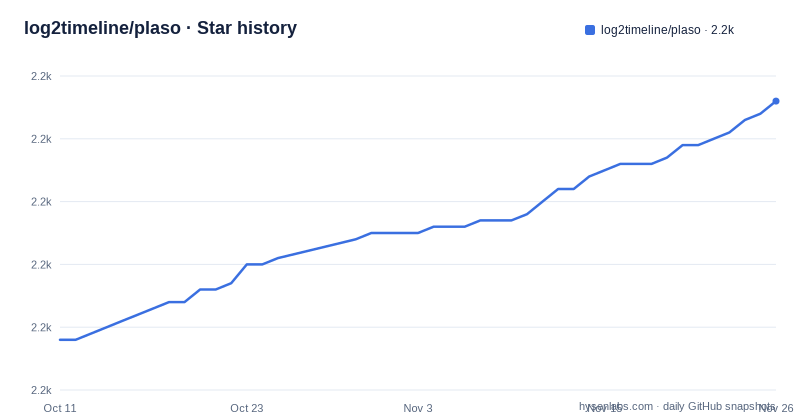
Star history
- log2timeline/plaso2,206 ★ · +38
| Repository | 2026-10-11 | 2026-11-26 |
|---|---|---|
| log2timeline/plaso | 2.2k | 2.2k |
38 Stars in the last 46 days, measured from the daily GitHub snapshot. Compare with other projects
Editorial analysis
A super timeline puts every timestamped event on one axis
Plaso began with one purpose: collect all timestamped events of interest on a computer system and aggregate them in a single place for computer forensic analysis. That aggregate is called a super timeline, and the repository description is the slogan super timeline all the things.
The README defines Plaso as a Python-based engine used by several tools for automatic creation of timelines. The word engine matters. Plaso is the layer that parses and aggregates, and other tools sit on top of it. log2timeline, the name in the pyproject description, is the name most analysts know.
The default behaviour is to create super timelines, but Plaso also supports targeted timelines, which the README links to a 2013 blog post. A targeted timeline narrows what gets collected, and a super timeline takes everything.
The stated audience is digital forensic investigators and analysts. The timelines help them correlate the large amount of information found in logs and other files on an average computer. A single machine can hold evidence in many places, and the point of the tool is to stop you reading them one at a time.
The name expands to Plaso Langar Að Safna Öllu, and the README translates it
Plaso expands to Plaso Langar Að Safna Öllu, which the README renders as super timeline all the things. The project's own two-word summary comes from that phrase.
The bare word plaso is ambiguous outside forensics, so add log2timeline or forensic when you look the tool up. The pyproject description reads Plaso (log2timeline) - Super timeline all the things, tying the two names together in the package metadata.
The package name on the Python side is plaso, and the maintainers are listed as the Log2Timeline maintainers, with a Google Groups address for contact.
Parsers, analysis plug-ins and one-off scripts are the three extension points
The README's longer version says Plaso has become a framework. It supports adding new parsers or parsing plug-ins, adding new analysis plug-ins, and writing one-off scripts to automate repetitive tasks in computer forensic analysis or equivalent work.
The split matters in practice. A parser or parsing plug-in is where a new data source gets read, so supporting a new file format means writing one. An analysis plug-in works on events that are already collected. A one-off script is the lightest route, for a task that you will not repeat.
The plaso directory in the repository is the package itself, and tests, test_data, config, docs and utils sit beside it. The root has run_tests.py, a tox.ini and a pylint configuration, so a contributor runs the test suite from the checkout. CONTRIBUTING.md and SECURITY.md are present for the contribution and reporting rules.
The README gives no code for any of these extension points. The detailed how-to material is in the documentation site, which is linked from the README.
The roadmap in the README points at events with no timestamp at all
The README names four directions the project is moving toward. The first is general-purpose parsers and plug-ins for data that may not have timestamps associated with it. That reverses the original premise, which was collecting timestamped events.
The second is more analysis context. The third is tagging events. The fourth is a more targeted approach to collection and parsing. None of these comes with a version number or a date in the README, so the text cannot tell you whether any of them has shipped.
If you depend on one of them, check the release notes and the documentation. The README states them as direction, written as moving to support.
Whether tagging is implemented today is not something the README says, so verify it against the version you install.
Releases are numbered by date, and the pyproject is already ahead of the last tag
Plaso versions are dates. The recent releases are plaso-20261027 on 2026-10-27, plaso-20260720 on 2026-07-20 and plaso-20260512 on 2026-05-12. There is no semantic version to read a breaking change from, so the gap between two dates tells you only how long apart they were.
The pyproject.toml on the default branch carries version 20261029, two days after the newest tagged release. A checkout of main therefore reports a version that no downloadable release has yet. The last push was on 2026-10-25, and the repository is not archived.
The package asks for Python 3.10 or newer and a build system of setuptools 77 or later with wheel. The development status classifier is 4 - Beta, which is the maintainers' own label for the project.
Because the version is a date, pinning means pinning an exact date string, and an upgrade across several months is a larger step than the number suggests.
Dozens of format libraries sit in the dependency list with date-based minimum versions
The dependency list in pyproject.toml is long and almost entirely a list of format libraries. It includes dfvfs, dfdatetime, dfwinreg, dtfabric, artifacts and acstore from the same ecosystem, then a run of Python bindings such as libewf-python, libevtx-python, libesedb-python, libregf-python, libfsntfs-python, libscca-python, liblnk-python and libmsiecf-python.
The floors are dates too. dfdatetime needs 20260730 or newer, dfvfs 20260731 or newer, and libfsfat-python 20260717 or newer. The oldest floor in the visible list is libmsiecf-python at 20150314. Ordinary dependencies sit in the same list: PyYAML, XlsxWriter, defusedxml, certifi and bencode.py.
Two files in the root, dependencies.ini and test_dependencies.ini, track the same requirements for the project's own tooling. The list in the repository is cut off before its end, so a complete inventory belongs to the file itself.
The practical result is an install with many native bindings. Anything that breaks one of them breaks Plaso, so check the platform you intend to use against the documentation before you start.
The README gives no install command, so setup lives in the documentation
The README is short. It contains the definition, the longer version, and a list of contacts. There is no install command, no usage example and no sample timeline output. It does not cover installation on Windows or on Kali.
It points to four places. The homepage is the GitHub repository. The downloads are the GitHub releases page. The documentation is plaso.readthedocs.io. For contact, there is a Plaso channel in the Open Source DFIR Slack community, a log2timeline-discuss mailing list for general discussion and a log2timeline-dev list for development.
Because nothing in the README shows a command, this article gives none either. Use the releases page for a download and the documentation for platform steps.
One more limit: the README does not say which output formats are supported or how large an image Plaso can process.
Editorial conclusion
Plaso fits a forensic analyst who needs every timestamped event from a system in one place and wants to extend the parsers and analysis plug-ins in Python. It is the wrong starting point for someone who wants a one-line install guide from the README, because that file contains none. Read the documentation at plaso.readthedocs.io and the release notes before choosing a version, since releases are numbered by date.
Frequently asked questions
What does Plaso mean?
Plaso stands for Plaso Langar Að Safna Öllu, rendered in the README as super timeline all the things. It is a Python engine for building forensic timelines.
What is Plaso log2timeline?
Plaso is the Python-based engine that several tools use to create timelines automatically, and log2timeline is the name in its package description. It aggregates timestamped events from a system for forensic analysis.
How do I install Plaso?
The README has no install command. It points to the GitHub releases page for downloads and to plaso.readthedocs.io for documentation, and the package requires Python 3.10 or newer.
Official sources
Add this badge to your README
If you maintain this project, the badge below links readers to this analysis and shows its maintenance status from the daily GitHub snapshot. Paste the markdown into your README; add ?metric=license or ?metric=stars to the image URL for a different field.

[](https://hysenlabs.com/projects/log2timeline-plaso)Star history chart for your README
[](https://hysenlabs.com/projects/log2timeline-plaso)Was this useful?