n.eko: A Self-Hosted WebRTC Virtual Browser for Shared and Private Browsing
A self hosted virtual browser that runs in docker and uses WebRTC.
At a glance
- What is it?
- n.eko runs a full browser inside a Docker container and streams it over WebRTC to multiple users. It is a practical tool for watch parties, collaborative debugging, and throwaway browsing, with real limits around latency and setup complexity.
- Who is it for?
- Adopt n.eko if you need a self-hosted, multi-user browser for watch parties, collaborative debugging, or a persistent private browsing environment, and you are comfortable with Docker and WebRTC configuration. Do not adopt it if you need low-latency remote desktop for heavy applications, or if you lack a stable network with sufficient upload bandwidth.
- Can I use it commercially?
- Yes. Apache-2.0 is a permissive licence: you can use, modify and sell software built on it, as long as you keep its copyright and licence notices.
- Is it still maintained?
- Yes. The repository received new commits within the last day.
- What is it written in?
- Mainly Go, according to GitHub's language statistics.
Answers come from the project's GitHub data, last synced on November 13, 2026, and from our analysis. They are not legal advice.
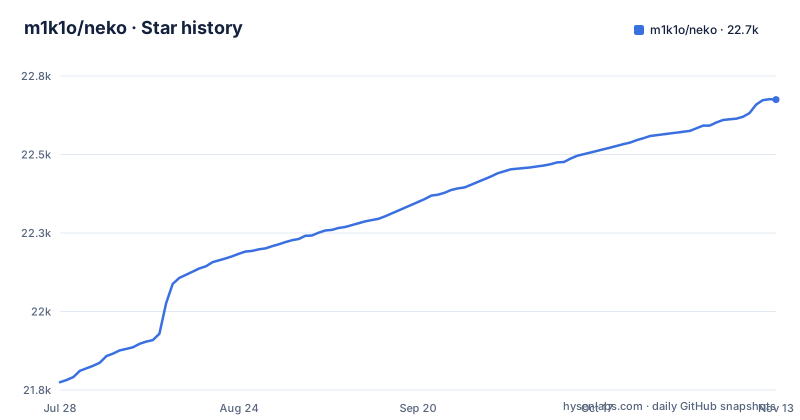
Star history
- m1k1o/neko22,675 ★ · +900
| Repository | 2026-07-28 | 2026-11-13 |
|---|---|---|
| m1k1o/neko | 21.8k | 22.7k |
900 Stars in the last 108 days, measured from the daily GitHub snapshot. Compare with other projects
Editorial analysis
What n.eko Actually Solves
n.eko is a self-hosted virtual browser that runs inside a Docker container and streams the desktop to clients using WebRTC. The core problem it addresses is simple: multiple people need to see and control the same browser session in real time, without installing software or sharing credentials. The original author built it because a service like rabb.it shut down and they wanted to watch anime with friends. The README lists several concrete use cases: watch parties, interactive presentations where others can control the screen, collaborative debugging, and remote support. It also covers single-user scenarios like a persistent browser with cookies that never touch the host, or a throwaway browser for private purchases. The key distinction is that n.eko is not a remote desktop gateway in the traditional sense; it is a WebRTC-based relay that streams video and captures input. This makes it different from clientless gateways like Apache Guacamole, which rely on VNC or RDP protocols. n.eko is for people who want a browser environment that is shared, isolated, and accessible from anywhere, without the overhead of a full VPN or a dedicated remote desktop server.
How the WebRTC Streaming Mechanism Works
The documentation describes the architecture in broad terms. n.eko uses WebRTC to stream a desktop inside a Docker container. The container runs a browser or other Linux application, and the desktop is captured and encoded as video. Clients connect via WebRTC, which establishes a peer-to-peer connection for low-latency video and input events. The README notes that n.eko is not limited to a browser; it can run anything that runs on Linux, including VLC or a full desktop environment like XFCE or KDE. It also mentions that it does not strictly need to run in a container; you could install n.eko on a host and connect to an X server. The theoretical extension to RDP or VNC protocols, where n.eko would act as a WebRTC relay, is listed as future work. The current implementation works with an X server; the README adds that theoretically "anything that can be controlled and scraped periodically for images could be used instead." The data flow is straightforward: the container runs the application, the X server renders frames, n.eko captures them, encodes them as video, and sends them over WebRTC to connected clients. Input from clients is sent back to the container to control the application. This design keeps sensitive data like cookies on the server, never transferring them to the client, as the README states.
Getting Started with Docker and Configuration
n.eko is distributed as a Docker image, and the README points to Docker Hub for pulls. The bundled docker-compose.yaml runs the image ghcr.io/m1k1o/neko/firefox:latest. The README mentions neko-rooms as a companion project that allows requesting rooms using an API, which suggests there is a separate service for managing multiple instances. For configuration, the bundled docker-compose.yaml uses environment variables such as NEKO_WEBRTC_EPR, NEKO_DESKTOP_SCREEN, NEKO_MEMBER_MULTIUSER_USER_PASSWORD and NEKO_MEMBER_MULTIUSER_ADMIN_PASSWORD, publishes port 8080 plus the UDP range 52000-52100 for WebRTC, and sets passwords for the default user and admin accounts. The documentation emphasizes that n.eko can run in a container or on a host, so the setup varies. A practical starting point is to run the container with a browser like Firefox or Chromium, expose the WebRTC ports, and connect via a web client. The project has a homepage at neko.m1k1o.net that hosts the configuration documentation, and you should expect to configure network ports and authentication manually. The release history shows active maintenance, with v3.2.0 released in October 2026, so recent changes may affect configuration syntax.
Real Limitations and Failure Modes
n.eko has several genuine limitations. First, WebRTC requires a stable network with sufficient upload bandwidth on the server side, because the server streams video to each client. Second, the current implementation relies on X server capture, which means it is tied to the X11 ecosystem. Third, the README states that the RDP or VNC relay mode is "currently only future," so you cannot use n.eko as a generic remote desktop gateway today. Fourth, because it streams video, there is inherent latency. For interactive tasks like code debugging or presentations, the latency may be acceptable, but for fast-paced gaming or precise remote control, it could be problematic. Finally, the project is a fork of an archived project, and while it is actively maintained, detailed configuration lives on the documentation site at neko.m1k1o.net, with community support through Discord and GitHub issues.
Comparing n.eko with Apache Guacamole and Hyperbeam
The README explicitly compares n.eko to Apache Guacamole and Hyperbeam. Apache Guacamole is a clientless remote desktop gateway that uses VNC or RDP protocols. It does not use WebRTC; instead, it renders the remote desktop in a web browser using HTML5. n.eko, by contrast, streams video. Guacamole is better for general remote desktop access to a full OS, while n.eko is specialized for sharing a single browser session. Hyperbeam is a commercial API for embedding virtual browsers, and n.eko positions itself as an open-source alternative. The difference is that Hyperbeam offers a managed API, while n.eko requires you to self-host and manage the infrastructure. For watch parties, n.eko is a direct replacement for giggl.app or Hyperbeam, but you must handle scaling and maintenance yourself. If you need a simple way to share a browser with friends, n.eko is more flexible than Guacamole, but it is not a drop-in replacement for a full remote desktop solution.
Maintenance, Upgrades, and Licensing
n.eko is licensed under Apache-2.0, which allows commercial use, modification, and distribution, with the requirement to retain copyright notices. This is a permissive license, so you can embed n.eko in your own applications without open-sourcing your code, as long as you comply with the license terms. The project is actively maintained, with releases v3.1.5 in August 2026, v3.1.6 in September 2026 and v3.2.0 in October 2026. This indicates a steady release cadence, which is good for bug fixes and feature additions. The maintenance cost is moderate: you need to keep the Docker image updated, monitor WebRTC connectivity, and potentially update configuration when new versions change environment variables. The project has a Discord server and GitHub issues for support, which can help with troubleshooting. The neko-rooms companion project suggests that for multi-room deployments, you will need to run an additional service, adding to the operational overhead. Overall, the maintenance burden is typical for a self-hosted Docker application, but you should budget time for reading the documentation site or asking for help.
Editorial conclusion
Adopt n.eko if you need a self-hosted, multi-user browser for watch parties, collaborative debugging, or a persistent private browsing environment, and you are comfortable with Docker and WebRTC configuration. Do not adopt it if you need low-latency remote desktop for heavy applications, or if you lack a stable network with sufficient upload bandwidth. Before production use, verify your NAT and firewall settings for WebRTC, test with your intended number of concurrent users, and confirm that your browser and desktop environment choices (e.g., XFCE, KDE) are compatible with your container image. The project is actively maintained with recent releases, but you must be prepared to manage the Docker setup and potential WebRTC connectivity issues yourself.
Frequently asked questions
What is Neko browser?
It is a self-hosted virtual browser that runs inside Docker and streams the desktop over WebRTC to several people in one room. Multiple users see the same screen and can take turns controlling it, and only video is shared, not cookies.
How do I keep my Firefox profile between restarts of the Neko container?
Uncomment a volume in the supplied docker-compose.yaml so a host directory is mounted on /home/neko/.mozilla/firefox/profile.default. The file offers both an empty ./profile directory and a pre-configured profile as the source side, and the comment notes that this persists settings, bookmarks, extensions and history.
Which ports does the Neko Docker image need?
The compose file publishes 8080 for the service and the UDP range 52000-52100 for WebRTC, configured through NEKO_WEBRTC_EPR. A comment notes you can configure either EPR or MUX ports instead, and the examples directory contains a turn-server directory for the relay case.
Can Neko run something other than Firefox?
Yes. The README says it is not limited to a browser but can run anything that runs on Linux, giving VLC as an example, and that a full desktop environment such as XFCE or KDE can be installed. The default and most tested image in the compose file is Firefox.
How do I broadcast a Neko session to a streaming service?
The README lists session broadcasting over RTMP, for example to Twitch or YouTube, and session recording by saving that RTMP output to a file with something like nginx-rtmp. Both are listed among the uses that benefit from a single user.
Is the Neko project still being worked on?
The repository is not archived and its last push was on 2026-10-28, and the latest release is v3.2.0 from 2026-10-15, after v3.1.6 on 2026-09-30 and v3.1.5 on 2026-08-05. It is a fork of nurdism/neko, whose original author stopped working on it and where it was archived.
Official sources
Add this badge to your README
If you maintain this project, the badge below links readers to this analysis and shows its maintenance status from the daily GitHub snapshot. Paste the markdown into your README; add ?metric=license or ?metric=stars to the image URL for a different field.

[](https://hysenlabs.com/projects/m1k1o-neko)Star history chart for your README
[](https://hysenlabs.com/projects/m1k1o-neko)Was this useful?