django-imagekit: virtual ImageSpecFields, stored ProcessedImageFields, and specs you call by hand
Automated image processing for Django. Currently v6.0
At a glance
- What is it?
- matthewwithanm/django-imagekit is a Django app that generates one image from another through spec classes. This article covers its three ways of defining a spec, the dependencies it pulls in, and what the usage overview leaves unanswered.
- Who is it for?
- Choose django-imagekit if you run Django on Python 3.9 or newer and want thumbnails or recolored copies defined as model fields or spec classes, with the generated path computed for you. Look elsewhere if you need a managed media pipeline with documented cleanup of generated files.
- Can I use it commercially?
- Yes. BSD-3-Clause is a permissive licence: you can use, modify and sell software built on it, as long as you keep its copyright and licence notices.
- Is it still maintained?
- Yes. The repository last received commits 71 days ago.
- What is it written in?
- Mainly Python, according to GitHub's language statistics.
Answers come from the project's GitHub data, last synced on November 25, 2026, and from our analysis. They are not legal advice.
Star history
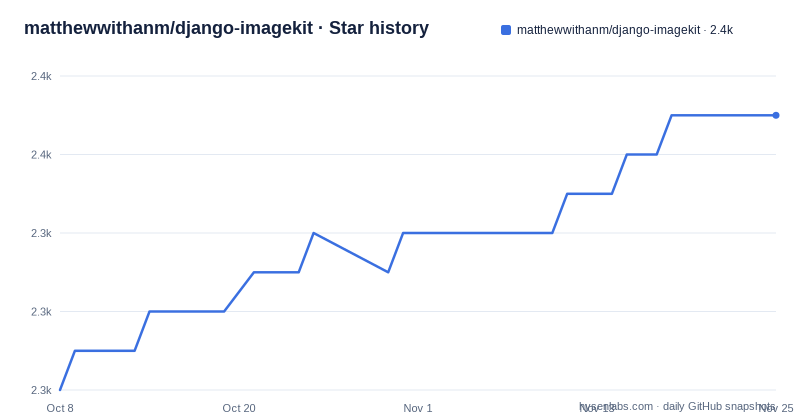
- matthewwithanm/django-imagekit2,351 ★ · +7
| Repository | 2026-10-08 | 2026-11-25 |
|---|---|---|
| matthewwithanm/django-imagekit | 2.3k | 2.4k |
7 Stars in the last 48 days, measured from the daily GitHub snapshot. Compare with other projects
Editorial analysis
ImageSpecField adds no column, so its file path is computed from the source and the spec
An ImageSpecField sits on a model class beside the ImageField it reads from. The usage overview defines `avatar_thumbnail` with `source='avatar'`, a processor list of `ResizeToFill(100, 50)`, `format='JPEG'` and `options={'quality': 60}`. Reading `profile.avatar_thumbnail.url` returns a path under `/media/CACHE/images/` that ends in a hash and a `.jpg` extension, and `profile.avatar_thumbnail.width` returns 100.
The field is virtual. It adds nothing to the database and needs no migration, which is the reason it takes no `upload_to` argument. Since there is no stored path to read back, the file location has to be built from the source image and the spec, and the hash in the example URL is where that shows up. Change a processor or a quality value and the computed name changes with it.
What that gives you is a model that carries its own thumbnail definition without schema churn. What it costs you is control over the output path: with an ImageSpecField the location is not something you choose, and the overview shows no argument for choosing it.
ProcessedImageField throws the upload away and brings back the migration
Sometimes the original is not worth keeping. ProcessedImageField handles that case: the user uploads a file, ImageKit runs the processors, and only the result is saved. The example drops the `source` argument, because there is no second field to read from, and adds `upload_to='avatars'`, which behaves as it does for a Django ImageField:
class Profile(models.Model):
    avatar_thumbnail = ProcessedImageField(upload_to='avatars',
                                           processors=[ResizeToFill(100, 50)],
                                           format='JPEG',
                                           options={'quality': 60})
The URL in the example is `/media/avatars/MY-avatar.jpg`, a plain upload path, not a hashed cache path. The trade is spelled out in a note: a ProcessedImageField is just like an ImageField, so it saves a file path in the database and you must run syncdb or create a migration when you add one to a model.
The consequence is permanence. Because the original is not kept, a later change to the processors cannot be applied to existing uploads. The overview does not describe any re-processing step, so a thumbnail size decision made on day one is hard to reverse for files already stored.
The `format='JPEG'` setting matters here too. A JPEG-only output on a field that receives transparent PNG uploads is a decision you make in the field definition, and the overview does not show a way to pick the format per upload.
A bare ImageSpec subclass does nothing until you hand it a source and write the result yourself
When fields on a model are not an option, ImageKit has a lower level. You subclass `ImageSpec`, set `processors`, `format` and `options` as class attributes, and instantiate it with a source:
source_file = open('/path/to/myimage.jpg', 'rb')
image_generator = Thumbnail(source=source_file)
result = image_generator.generate()
The class says what to do to an image, and nothing about which image or where the output goes. Both are your job. The source can be any file-like object, including a model's ImageField, so the `open` call above is only one choice.
`generate()` returns a file-like object holding the resized image. Saving it is explicit, and the overview does it by hand with `dest.write(result.read())`. This makes the class a good fit for views where the processing depends on user input, which is the use the overview names for it. It also means nothing is cached or stored for you here. The `/media/CACHE/` path and the computed file name belong to the model-field route, and the overview does not say the same machinery applies to a spec you call directly.
A practical reading of this: reach for the class when the same transformation must run on files that never touch a model, such as an uploaded file handled inside a single request. Reach for a model field when you want the URL and dimensions available as attributes, as `profile.avatar_thumbnail.url` and `.width` are in the earlier examples.
Template use needs a registered generator, and the template snippet itself is missing from the overview
A model with an ImageSpecField or ProcessedImageField can be used in a template like any image field, with the processed image in place of a plain one. For images that have no model field behind them, ImageKit lets you generate processed files straight from a template. That path has two preconditions: you define an image generator class somewhere in your app, and you register it so the template has a name to refer to.
The registration example imports `register` next to `ImageSpec`, then defines the same `Thumbnail` class with `ResizeToFill(100, 50)`, `format = 'JPEG'` and `options = {'quality': 60}`. The text of the usage overview cuts off right after that class, so the registration call and the template syntax that follows are not visible in it. The two HTML blocks it does reach are empty: the one that should show the template using `profile` has only its introductory sentence, and the overview mentions a view that sets a context variable named `profile`.
For the full template syntax you need the hosted documentation at django-imagekit.readthedocs.org, which the repository points to as the reference for the latest stable version.
Two runtime dependencies, one Python floor, and three optional task-queue extras
Installation is three steps: install Pillow, run `pip install django-imagekit`, and add `'imagekit'` to `INSTALLED_APPS` in `settings.py`. The Pillow step is already done if you use an ImageField in Django.
pyproject.toml lists the runtime dependencies as `django-appconf` and `pilkit`, and sets `requires-python = ">=3.9"`. The classifiers name Python 3.9 through 3.14 and mark the project `Development Status :: 5 - Production/Stable`. The build backend is setuptools at version 61 or newer.
Three optional extras exist for background image generation, each tied to a different queue library:
async = ["django-celery>=3.0"]
async_rq = ["django-rq>=0.6.0"]
async_dramatiq = ["django-dramatiq>=0.4.0"]
The extras install the queue integration and nothing more. The portion of the usage overview that was available does not show how to switch generation onto a worker, so check the hosted documentation before assuming it is on after you install one. The `test` extra pulls in beautifulsoup4, Pillow, pytest, pytest-cov and pytest-django, which is useful if you plan to run the suite yourself.
A description that still says v6.0 while releases have moved to 6.1.1
The repository description reads "Automated image processing for Django. Currently v6.0". The release list has moved on since: 6.0 on 2025-10-12, 6.1 on 2026-02-22 and 6.1.1 on 2026-09-15. The last push to the default branch, `develop`, is dated 2026-09-15, the same day as 6.1.1. The repository is not archived, and the license is BSD-3-Clause.
Two people appear in the package metadata. Matthew Tretter is listed as author, and Venelin Stoykov is listed as maintainer. That split matters when you read old issues or pull requests, since the original author and the current maintainer are different people.
The small description line is a reminder not to treat repository text as the version source. The version is read from `imagekit.pkgmeta.__version__` at build time, as the `[tool.setuptools.dynamic]` entry shows, so the number you get from PyPI and the number in the GitHub description can disagree without anything being broken. Pin against the release tag or the installed package metadata.
Nothing in the usage overview covers deleting generated files or choosing where they go
The overview shows what ImageKit writes: a hashed file under `/media/CACHE/images/` for an ImageSpecField, a regular upload path for a ProcessedImageField. It stops short of saying how stale files are removed after you change a processor, or how to move the cache directory. If your spec definitions change often, the computed name changes, and the older files stay wherever they were written. Whether that matters depends on your storage and your traffic, and the README's usage overview does not settle it.
There is also no comparison with other image libraries here. The one pointer to related work is Instakit, a separate project linked as an example of what custom processors can do. ImageKit ships processors for common tasks such as resizing and cropping, and you can write your own.
For contributors, the repository has a `justfile` with two recipes: `publish` runs `python -m build` followed by `python -m twine upload dist/*`, and `test` runs `tox`. There is also a CONTRIBUTING.rst, a docs directory built for Read the Docs, and an AUTHORS file.
One more gap sits in the same area. The overview names `format` and `options` as the way to control output, with JPEG at quality 60 as the only worked example, and it lists no other formats or option keys. If you need PNG or WebP output, or a different quality trade, you will be reading the hosted documentation or the source under the `imagekit/` directory, since the overview gives you no value to copy. The same goes for processors beyond `ResizeToFill`: the overview says processors exist for resizing and cropping, but only that one class appears in its code.
Editorial conclusion
Choose django-imagekit if you run Django on Python 3.9 or newer and want thumbnails or recolored copies defined as model fields or spec classes, with the generated path computed for you. Look elsewhere if you need a managed media pipeline with documented cleanup of generated files. Before adopting it, decide per field whether you want the original kept (ImageSpecField) or discarded (ProcessedImageField), because only the second adds a database column and a migration.
Frequently asked questions
How does django-imagekit work?
You define an image spec, which is an image generator that creates a new image from a source image. Specs can live on a model as an ImageSpecField or ProcessedImageField, or as a standalone ImageSpec class you call with generate().
Does django-imagekit have anything to do with Scikit-image?
Nothing in the repository links the two. django-imagekit depends on django-appconf and pilkit and expects Pillow to be installed, and it does not list scikit-image anywhere.
What is a model in Python Django, as django-imagekit uses it?
In the usage overview a model is a Django class such as Profile that holds fields like an ImageField. An ImageSpecField is declared on it and adds no database column, while a ProcessedImageField does store a file path.
Official sources
Add this badge to your README
If you maintain this project, the badge below links readers to this analysis and shows its maintenance status from the daily GitHub snapshot. Paste the markdown into your README; add ?metric=license or ?metric=stars to the image URL for a different field.

[](https://hysenlabs.com/projects/matthewwithanm-django-imagekit)Star history chart for your README
[](https://hysenlabs.com/projects/matthewwithanm-django-imagekit)Was this useful?