MDXEditor: a React markdown editor built on Lexical
A rich text editor React component for markdown
At a glance
- What is it?
- MDXEditor is an MIT-licensed React component for authoring markdown in a rich text interface, with plugins for headings, tables, code blocks and JSX. It fits React apps that already treat markdown as a first-class format, and it is a poor fit for anything outside the browser.
- Who is it for?
- Adopt MDXEditor if you are building a React application where markdown is the storage format and you want users editing headings, tables and code blocks without seeing the syntax. Do not adopt it if you need a non-React editor, a server-side markdown pipeline, or a component that provides every advanced feature without plugin configuration.
- Can I use it commercially?
- Yes. MIT is a permissive licence: you can use, modify and sell software built on it, as long as you keep its copyright and licence notices.
- Is it still maintained?
- Yes. The repository last received commits 5 days ago.
- What is it written in?
- Mainly TypeScript, according to GitHub's language statistics.
Answers come from the project's GitHub data, last synced on November 6, 2026, and from our analysis. They are not legal advice.
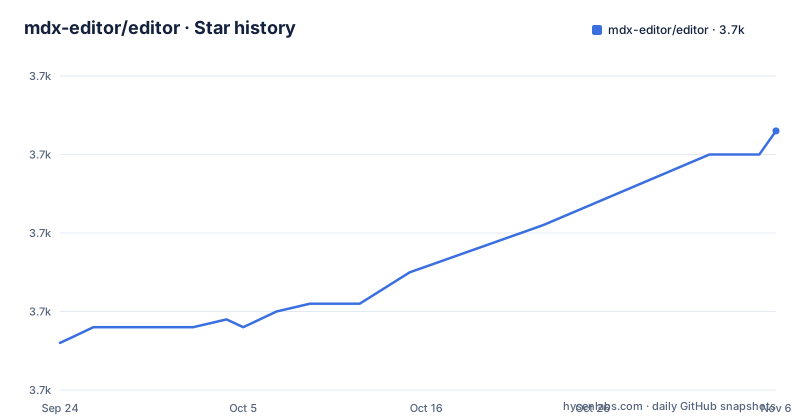
Star history
- mdx-editor/editor3,713 ★ · +27
| Repository | 2026-09-24 | 2026-11-06 |
|---|---|---|
| mdx-editor/editor | 3.7k | 3.7k |
27 Stars in the last 43 days, measured from the daily GitHub snapshot. Compare with other projects
Editorial analysis
What MDXEditor solves for React teams that store markdown
Markdown is easy to store and awkward to edit. A textarea works until someone needs a table, an image or a code block, at which point you either accept raw syntax in the editor or build a toolbar yourself. MDXEditor takes the second path: it is a React component that presents markdown documents in a rich text interface, in the same category as Google Docs or Notion according to the README, while keeping markdown as the underlying format. The package is published as @mdxeditor/editor and the repository is mdx-editor/editor.
The audience is narrow and specific. You need a React application, you need markdown or MDX as the persisted representation, and you need non-technical authors to edit it. The README also states that the component supports editing JSX components, either through a built-in JSX editor or a custom one, which is the part that separates it from a generic rich text editor: MDX documents mix prose and component invocations, and an editor that treats component tags as plain text is unusable for that format. The component is written in TypeScript, which matters if you expect typed plugin configuration rather than string keys.
The Lexical foundation and the plugin array as the real API
The dependency list in package.json is the clearest statement of how this works. MDXEditor depends on @lexical/clipboard and the surrounding Lexical packages, plus a set of CodeMirror packages (@codemirror/state, @codemirror/view, @codemirror/lang-markdown, @codemirror/merge, @codemirror/commands, @codemirror/language-data). The architecture follows from that split: Lexical holds the document model and the editing surface, while CodeMirror handles the code editing paths, including markdown source and code blocks. If you already run Lexical elsewhere in your app, the model is familiar; if you do not, you are adding an editor framework as a transitive dependency.
The plugin array is where behaviour lives. The README's own example passes plugins={[headingsPlugin()]} and nothing else, which enables heading support explicitly. Tables, images, code blocks and the JSX editing path are described as extensions, so each one is a plugin you add. That design keeps the bundle from carrying features a given app never uses, while allowing basic text editing without a plugin list. The repository's own scripts reinforce how much of the project is about integration correctness rather than the editor itself: there are dedicated scripts named test:lexical-versions, test:package and test:cross-version, which suggests the maintainers treat version compatibility and consumer packaging as first-class risks.
Installing @mdxeditor/editor and getting a working editor
The README points to the documentation site for getting started rather than listing install commands, so the package name from package.json is the reliable starting point. Install the scoped package with your package manager of choice, then import the component and its stylesheet. The README's example is the shortest complete usage and is worth reproducing exactly, because it shows both required imports:
import {MDXEditor, headingsPlugin} from '@mdxeditor/editor';
import '@mdxeditor/editor/style.css';

export default function App() {
  return <MDXEditor markdown={'# Hello World'} plugins={[headingsPlugin()]} />;
}
The markdown prop takes the initial document as a string. The optional plugins array enables additional capabilities and node types; the official basic example also works without it. The stylesheet import is not optional in practice: the package declares sideEffects for *.css, which tells bundlers the CSS files must be kept even when tree shaking is aggressive.
To go beyond headings, extend the plugin array. The README names tables, images and code blocks as supported extensions, and each maps to a plugin you import from the same package. Expect to consult the documentation site at mdxeditor.dev for the exact plugin names and their options, since the README does not enumerate them. If you need to inspect how the maintainers wire things up, the repository ships a Ladle-based development setup: running npm run dev or npm run start launches ladle dev, which serves the component stories locally. The package also includes an image-upload-backend script pointing at src/examples/file-backend.js, which is a reference backend for image uploads rather than a production service.
Where MDXEditor is the wrong choice
The component is browser-only and React-only. There is no documented server-side rendering path for producing markdown, no CLI, and no framework-agnostic build. If your authors work in Vue, Svelte or plain HTML, this package does not help you, and neither does it help if your pipeline needs to convert markdown on the server. The repository layout confirms the scope: the published files are dist, the entry points are React components, and the test suite is built around Playwright browser tests plus Vitest component tests.
A second limitation is the plugin array itself. Because the README's example enables only headings, a team that copies that snippet and expects tables and images to work will find they do not. Basic editing is available without plugins, but many additional capabilities are explicit opt-ins, and the README does not list the full plugin catalogue, so the documentation site is a required stop rather than a convenience. The third area to weigh is the Lexical coupling. The package depends on Lexical at a caret range, and the repository carries a dedicated assertion script for Lexical versions. If your application already pins a different Lexical version, that constraint is yours to resolve, and the project's own tooling exists precisely because mismatches have been a real failure mode. Nothing in the README documents a rollback or migration path between major versions of MDXEditor itself.
MDXEditor compared with a plain markdown textarea or CodeMirror alone
The obvious alternative is not another rich text editor but the absence of one. A controlled textarea or a bare CodeMirror instance gives authors the raw markdown, which is honest, cheap and impossible to get out of sync with the stored document. MDXEditor inverts that trade: authors see formatted output, and the markdown string is the serialised result. If your users are developers writing MDX by hand, the rich text layer adds indirection and hides the component tags they actually care about. If your users are writers who have never seen a pipe table, the same layer is the entire point.
The more interesting comparison is with CodeMirror alone, and MDXEditor's own dependency list makes it concrete. The package already pulls in @codemirror/lang-markdown and @codemirror/merge, so the source-editing and diff capabilities exist inside the same install. Choosing MDXEditor over a CodeMirror setup is choosing Lexical's document model and a plugin toolbar over a text buffer with syntax highlighting. That choice buys you structured editing of JSX components and loses you the guarantee that what the user sees is exactly what is stored, character for character.
Maintenance, licensing and what upgrading costs
The repository is not archived, and the last push was on 2026-09-13, the same day as the v4.2.5 release. The release cadence visible in the repository is roughly one to two weeks between v4.2.3, v4.2.4 and v4.2.5, all within August and September 2026. That is a maintained project by any reasonable reading, and the version numbers suggest patch-level stabilisation rather than a rewrite in progress.
The licence is MIT, with copyright attributed to Petyo Ivanov. For most adopters that is the permissive end of the spectrum: you can ship the component in a commercial product, and the README explicitly mentions commercial integration, offering dedicated assistance in exchange for sponsorship via email. Sponsorship is optional and separate from the licence grant; nothing in the README makes support conditional on payment. As always, the licence text itself governs, not this summary.
The upgrade cost is dominated by the Lexical dependency rather than by MDXEditor's own API. Because the package depends on Lexical packages at caret ranges and the repository ships a script named test:lexical-versions alongside a compatibility test file, version alignment is a documented concern inside the project. Budget time for that when you upgrade, and read the release notes for each minor version rather than assuming the plugin API is frozen. The README does not describe a deprecation policy.
Editorial conclusion
Adopt MDXEditor if you are building a React application where markdown is the storage format and you want users editing headings, tables and code blocks without seeing the syntax. Do not adopt it if you need a non-React editor, a server-side markdown pipeline, or a component that provides every advanced feature without plugin configuration. Basic editing works without plugins; headings and other capabilities require the relevant plugins. Before committing, verify the Lexical version your app already depends on, because the component depends on @lexical/clipboard and its sibling packages at a pinned range, and check that the plugin set you need exists rather than assuming the core markdown syntax ships enabled.
Frequently asked questions
How do I install MDXEditor in a React project?
It is published as the scoped npm package @mdxeditor/editor, and the README's example imports MDXEditor and headingsPlugin from it along with the package stylesheet. The README itself points to the documentation site for full getting-started steps rather than listing install commands.
Does MDXEditor support tables, images and code blocks out of the box?
The README states the component supports the core markdown syntax and certain extensions including tables, images and code blocks. The README's usage example enables only headingsPlugin(), so the extensions are added through the plugins prop rather than being on by default.
Can MDXEditor edit JSX components inside an MDX document?
Yes. The README states the component allows users to edit JSX components with a built-in JSX editor or a custom one.
What licence does MDXEditor use?
MIT, with copyright attributed to Petyo Ivanov in the README and in the package.json license field.
Official sources
Add this badge to your README
If you maintain this project, the badge below links readers to this analysis and shows its maintenance status from the daily GitHub snapshot. Paste the markdown into your README; add ?metric=license or ?metric=stars to the image URL for a different field.

[](https://hysenlabs.com/projects/mdx-editor-editor)Star history chart for your README
[](https://hysenlabs.com/projects/mdx-editor-editor)Was this useful?