ReviOS Playbook: customizing Windows via AME Wizard on five supported builds
A lightweight, stable, and performance-focused customized version of Windows that enhances privacy and compatibility
At a glance
- What is it?
- ReviOS Playbook is a CC-BY-SA-4.0 PowerShell playbook for AME Wizard that removes Windows bloatware, reduces telemetry and tunes performance. It works only on five specific Windows build numbers across ARM64 and AMD64.
- Who is it for?
- ReviOS Playbook suits PC enthusiasts and gamers who want a leaner, more private Windows installation and are willing to start from a fresh base on one of the five supported builds (19044, 19045, 22631, 26100, or 26200). Users who rely on software that requires components ReviOS removes, or who run an enterprise environment with Group Policy configurations, are not the intended audience.
- Can I use it commercially?
- Yes, with credit. CC-BY-SA-4.0 allows commercial use as long as you credit the authors and indicate what you changed. It is written for creative content, so check how it applies to any code.
- Is it still maintained?
- Yes. The repository last received commits 2 days ago.
- What is it written in?
- Mainly PowerShell, according to GitHub's language statistics.
Answers come from the project's GitHub data, last synced on October 23, 2026, and from our analysis. They are not legal advice.
Star history
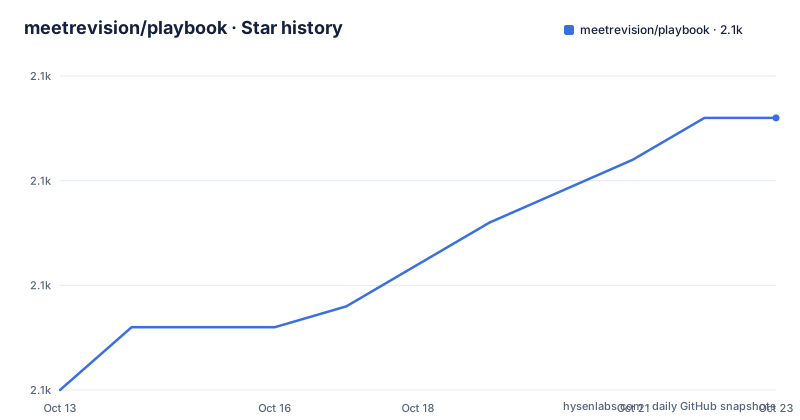
- meetrevision/playbook2,108 ★ · +13
| Repository | 2026-10-13 | 2026-10-23 |
|---|---|---|
| meetrevision/playbook | 2.1k | 2.1k |
13 Stars in the last 10 days, measured from the daily GitHub snapshot. Compare with other projects
Editorial analysis
AME Wizard as the required delivery mechanism for playbook changes
ReviOS does not install by running an executable or a standard installer. It is a playbook file that AME Wizard, a tool from amelabs.net, reads and executes. AME Wizard acts as the execution layer: it parses the playbook, verifies its contents, and applies the modifications to the running Windows system. The install step is drag and drop: you drag the playbook file into AME Wizard.
This design separates the specification of changes from the mechanism that applies them. The playbook in the repository's src/ directory declares what gets removed and configured, while AME Wizard handles the actual application on a live Windows system. Updating ReviOS and updating AME Wizard are independent tasks, and both projects are required: the playbook is inert without AME Wizard, and AME Wizard does nothing useful without a playbook.
ReviOS is now compatible with AME Wizard, and that history is not detailed in the repository.
Five supported builds across Windows 10 and Windows 11, with a hard stop at the boundary
ReviOS explicitly covers five Windows builds, each identified by a build number. Windows 10 21H2 at build 19044 is supported, including its LTSC variant. Windows 10 22H2 at build 19045 follows. On the Windows 11 side, 23H2 at build 22631, 24H2 at build 26100 including LTSC, and 25H2 at build 26200 are the three covered versions. Both ARM64 and AMD64 architectures work on all five.
The README puts the constraint plainly: 'Any other build is not supported by Revision.' That covers Windows 10 builds before 21H2, any future Windows 11 build not in the list, and Windows versions not listed such as Windows 11 Home Insider Preview builds. Someone who upgrades a supported build to a newer servicing update that shifts the build number is outside this boundary.
The tight build specification is characteristic of this class of tool. A playbook that removes specific system components must know precisely what those components are called and where they sit. A build mismatch means that component names, paths or registry keys may differ, and the playbook's operations may fail silently or corrupt the target.
Installing via AME Wizard on a fresh Windows base
Getting Started in the README opens with a CAUTION note that recommends starting with a fresh Windows installation. A clean base ensures that existing software and customized Windows components do not conflict with what the playbook removes. Applying the playbook on a system with years of installed applications and modified settings is not the recommended path.
Once Windows is installed and AME Wizard is downloaded from amelabs.net, the process is drag and drop: the playbook file goes into AME Wizard. The exact sequence of prompts and what AME Wizard shows before and during the run is not described in the README.
After the playbook finishes, the Revision Tool at github.com/meetrevision/revision-tool allows further adjustments. That tool is separate from the playbook itself. The division keeps the baseline ReviOS configuration stable while giving users a way to make incremental changes without reapplying the full playbook.
ISO Injection is available for Windows 11 ISOs but not Windows 10 ISOs
ISO Injection is a mode that incorporates the playbook into a Windows installation image rather than applying it to a running system. ISO Injection is only supported on Windows 11 ISOs. Windows 10 appears in the supported build list as two entries (19044 and 19045), but neither benefits from ISO Injection.
For Windows 11 users, ISO Injection means the resulting installation image already has the playbook applied, so the system comes out of setup in a modified state without a second pass. For Windows 10 users, the only path is to install Windows first and then apply the playbook separately through AME Wizard.
Why ISO Injection is Windows 11-only is not explained in the README. Possibly the Windows 11 ISO format or AME Wizard's Windows 11 support includes a hook that Windows 10 ISOs do not expose. Whatever the technical reason, the practical outcome is asymmetric: Windows 11 deployments have one more option than Windows 10 deployments.
The change list lives at revi.cc/docs/features, not in the repository
Four items appear in the feature list: drag-and-drop install, bloatware removal, performance and privacy optimization, and Revision Tool integration. For what 'bloatware' and 'unnecessary components' mean specifically, the README sends readers to revi.cc/docs/features.
That redirect has a practical implication. Someone who wants to audit what changes will happen before applying the playbook cannot do so from the repository's README alone. The options are to read the documentation site or to inspect the PowerShell scripts in the src/ directory directly.
For the src/ path, the playbook files are there but the README does not describe their format or which scripts correspond to which features. Someone familiar with AME Wizard's playbook format can read them, but casual users are directed to the documentation site. Changes to the documentation site are outside the repository, so there is no guarantee that the site and the repository stay synchronized between CalVer tags.
CC-BY-SA-4.0 terms and CalVer package tags since December 2024
ReviOS Playbook is licensed under Creative Commons Attribution-ShareAlike 4.0 International. This differs from the permissive software licences common on GitHub: CC-BY-SA-4.0 requires attribution to the original authors and requires that any modified version be distributed under the same CC-BY-SA-4.0 terms. A project that forks the playbook, adds changes, and distributes the result must publish those changes under CC-BY-SA-4.0 and credit the ReviOS project. This article does not offer legal analysis of what that permits in specific deployment scenarios.
The three most recent package tags follow a CalVer pattern: 24.12 from 2024-12-01, 25.10 from 2025-10-03, and 26.04 from 2026-04-08. The year and month encode the time of each package, so 26.04 means April 2026. The last push to the repository was on 2026-10-05.
What a fresh-start requirement means for reversibility
The CAUTION about starting from a fresh installation is not just a recommendation for a clean experience. It is also an acknowledgment that applying a playbook is not a reversible operation in the same way as installing or uninstalling an application. A playbook removes system components, and restoring them typically requires re-running Windows setup or applying a fresh image. The README does not document a rollback or undo path.
For users who want to experiment before committing, the ISO Injection option on Windows 11 has a practical advantage: it lets you build an image that can be tested in a virtual machine or on spare hardware before applying it to a production system. For Windows 10 users without ISO Injection, a virtual machine install is the closest equivalent.
The Revision Tool at github.com/meetrevision/revision-tool handles post-install customization, but it operates on top of the already-modified system. It cannot restore components that the playbook removed. That boundary between the playbook and the Revision Tool is not explained in detail in the README.
Editorial conclusion
ReviOS Playbook suits PC enthusiasts and gamers who want a leaner, more private Windows installation and are willing to start from a fresh base on one of the five supported builds (19044, 19045, 22631, 26100, or 26200). Users who rely on software that requires components ReviOS removes, or who run an enterprise environment with Group Policy configurations, are not the intended audience. Before applying the playbook, read the detailed list at revi.cc/docs/features, because the README gives only a summary and the full scope of removals is not documented in the repository itself.
Frequently asked questions
What is ReviOS Playbook?
ReviOS Playbook is a CC-BY-SA-4.0 collection of PowerShell scripts that AME Wizard applies to Windows to remove bloatware, reduce telemetry and optimize performance. It covers five Windows builds from Windows 10 21H2 to Windows 11 25H2.
How do I install ReviOS?
Download the playbook and drag and drop it into AME Wizard, which is available at amelabs.net. The README recommends starting from a fresh Windows installation before running the playbook.
Which Windows versions does ReviOS Playbook support?
ReviOS supports Windows 10 21H2 (build 19044), Windows 10 22H2 (build 19045), Windows 11 23H2 (build 22631), Windows 11 24H2 (build 26100) and Windows 11 25H2 (build 26200). The README states that any other build is not supported.
What is ISO Injection in ReviOS?
ISO Injection is a mode that embeds the playbook into a Windows installation image so the modifications are applied during setup rather than on a running system. The README states it is only available for Windows 11 ISOs, not Windows 10.
Can ReviOS Playbook be modified and redistributed?
Yes, under the terms of CC-BY-SA-4.0: modified versions must be distributed under the same licence and must attribute the original ReviOS project. The repository is hosted at github.com/meetrevision/playbook.
Official sources
Add this badge to your README
If you maintain this project, the badge below links readers to this analysis and shows its maintenance status from the daily GitHub snapshot. Paste the markdown into your README; add ?metric=license or ?metric=stars to the image URL for a different field.

[](https://hysenlabs.com/projects/meetrevision-playbook)Star history chart for your README
[](https://hysenlabs.com/projects/meetrevision-playbook)Was this useful?