pdoom-video: a music video where every frame is a function of song time
Code-rendered music video for "I'm Upping My P(doom)"
At a glance
- What is it?
- mexicat/pdoom-video renders a karaoke-style music video for "I'm Upping My P(doom)" from TypeScript and three.js. The preview and the 1080p60 or 4K60 export come from the same code, and the 4K path asks for 23 GB of memory.
- Who is it for?
- Clone it if you want a worked example of a deterministic, timeline-driven three.js renderer with an offline export path, or if you want the song video at full quality instead of the outdated YouTube upload. Skip it if you need a reusable video editor: the scenes are written for this one song.
- Can I use it commercially?
- Yes. MIT is a permissive licence: you can use, modify and sell software built on it, as long as you keep its copyright and licence notices.
- Is it still maintained?
- Yes. The repository last received commits 52 days ago.
- What is it written in?
- Mainly TypeScript, according to GitHub's language statistics.
Answers come from the project's GitHub data, last synced on November 24, 2026, and from our analysis. They are not legal advice.
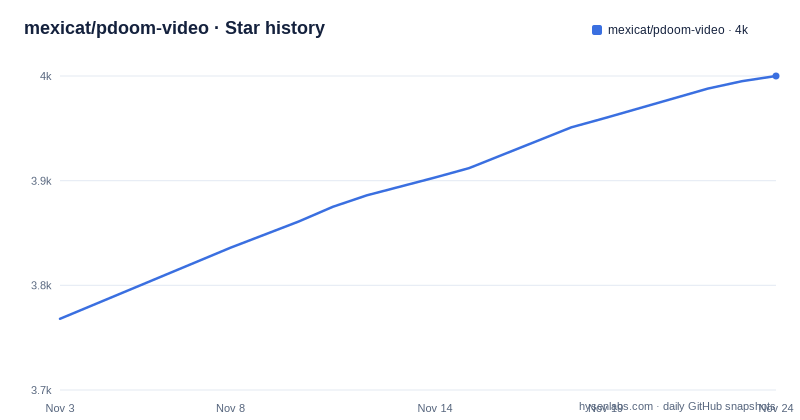
Star history
- mexicat/pdoom-video4,000 ★ · +232
| Repository | 2026-11-03 | 2026-11-24 |
|---|---|---|
| mexicat/pdoom-video | 3.8k | 4k |
232 Stars in the last 21 days, measured from the daily GitHub snapshot. Compare with other projects
Editorial analysis
Every frame is a deterministic function of song time
The central design choice in pdoom-video is stated in the first paragraph of its README: a frame depends only on the song time. That is why the live preview in the browser and the offline export match, and why a scrubbed position in the preview shows the same image the final file will contain at that moment.
The repository is split by job. audio/pdoom.mp3 holds the song. lyrics/lyrics.src.js holds the original line-level lyrics with approximate timings. data/lyrics.json carries word-level timings, with some syllable-level entries. data/audio.json carries the tempo (132.007 BPM), beats, downbeats, sections, drum and vocal onsets and loudness envelopes. The renderer lives in app/ as TypeScript and three.js, built with bun and Vite.
The committed data/*.json files are everything the renderer needs. Anyone who only wants to watch or re-render the video never touches the analysis code.
One scene module per plate, snapped to the beat grid
src/scenes/ contains one module per plate: open, loss, prompt, hook, room, shoggoth, spacetime, ascent, bureau, leftturn, paperclips, fuse, stack, dense, loom, ilya and outro, plus shared motifs. src/timeline.ts is described as the edit: scene windows are anchored to lyric lines and snapped to the beat grid.
The engine in src/engine/ covers timeline playback, post-processing (bloom, halation, grain), typography in Archivo, IBM Plex Mono, Cormorant Garamond and single-stroke plotter fonts, GPU line batches and a HUD. The concept, the style bible and the plate-by-plate treatment are written up in docs/TREATMENT.md, and the engine and scene API in docs/ENGINE.md.
Because the scenes are tied to this song's lyrics and timings, the code is a reference for how to structure such a project, not a library you drop another track into.
The browser preview needs a recent Mac to run in real time
Preview starts from the app folder with bun install and bunx vite, then opens http://localhost:5173. The URL parameter ?t=23 starts playback at a given time.
cd app
bun install
bunx vite
Keys are space for play and pause, the arrow keys for seeking one second (five with shift), comma and period for single frames, square brackets for the previous or next scene, l to loop the current scene and h to hide the UI. The README states that the preview renders in real time on a recent Mac. It gives no figure for other hardware, so on a Windows or Linux machine you will have to measure for yourself.
Requirements are bun, Google Chrome (the offline renderer drives it headless through playwright-core) and ffmpeg with libx264.
Motion blur is built from up to 324 sub-frames per tile
The offline render command is bun scripts/render.ts video --samples auto --shutter 0.2 --out ../out/pdoom.mp4, run from app. Output is 1920 by 1080 at 60 fps with x264 CRF 16 and AAC audio.
cd app
bun scripts/render.ts video --samples auto --shutter 0.2 --out ../out/pdoom.mp4
Each frame is the average of many sub-frames spread over a shutter of 0.2, a fifth of the frame time. With --samples auto the count is chosen per 32 by 32 tile: 12 where the image is still, 36 for ordinary camera motion, and 108 or 324 for whips, slams and fast zooms. A tile stops sampling once more sub-frames would change it by no more than --tol levels of 255 (default 3). --refine frame picks one count for the whole frame, and --samples 4 gives a quick draft.
Two headless Chromes (--workers 2) render chunks of 8 frames (--chunk) in turn into one ffmpeg, so the file matches what a single renderer produces. Waiting frames are buffered in memory up to --mem-gb (default 1) and then on disk up to --spool-gb (default 20, in the system temp folder).
The 4K path costs about 57 minutes and 23 GB of memory
The 4K command adds --scale 2 and a shorter x264 lookahead.
cd app
bun scripts/render.ts video --scale 2 --samples auto --shutter 0.2 --x264 aq-mode=3:rc-lookahead=30 --out ../out/pdoom-4k.mp4
It is a true 3840 by 2160 render, not an upscale, and scenes are laid out in 1920 by 1080 logical pixels, so the 4K frame looks like the 1080p one, only sharper. A frame takes from about 40 ms for a still frame to several seconds for the ray-marched rooms at 108 to 324 sub-frames. The README reports about 57 minutes for the whole song on an M5 Pro, a peak of about 23 GB of memory, up to 6 GB per headless Chrome, and ffmpeg at about 3.5 GB for most of the run but up to 10 GB near the end.
The file is large because grain is rendered per 4K pixel. At the default CRF 16 it runs at about 670 Mbit/s, 13 GB for the song, 8 times the 1080p file. --crf 18 gives about 450 Mbit/s and --crf 20 about 230 Mbit/s.
Regenerating the timing data pulls about 4 GB of model weights
The analysis folder uses Python through uv. Stems come from Demucs htdemucs_ft, plus a lead vocal from a mel-band-roformer karaoke model, and they are not in the repository. ctc_emissions.py, whisper_run.py and vocal_feats.py write intermediates to analysis/work/. Alignment is CTC forced alignment cross-checked with Whisper.
cd analysis
uv run python align.py      # data/lyrics.json
uv run python analyze.py    # data/audio.json
The models download about 4 GB of weights into analysis/.cache/, and the README says to delete that folder afterwards. The renderer itself does not need uv.
The YouTube upload is a slightly outdated render, so the repository's own render is the way to the latest version. The project has no GitHub releases and its last push was on 2026-10-05.
Editorial conclusion
Clone it if you want a worked example of a deterministic, timeline-driven three.js renderer with an offline export path, or if you want the song video at full quality instead of the outdated YouTube upload. Skip it if you need a reusable video editor: the scenes are written for this one song. Before starting a 4K render, check that you have bun, Google Chrome, ffmpeg with libx264 and around 23 GB of free memory, and try --samples 4 for a quick draft first.
Frequently asked questions
What does pdoom-video render?
It renders a generative, code-rendered music video with word-synced karaoke typography for the song "I'm Upping My P(doom)". The song itself is credited to others in the README.
What do I need to render pdoom-video locally?
You need bun, Google Chrome and ffmpeg with libx264. The analysis tools additionally need uv, but the renderer does not.
How long does the pdoom-video 4K render take?
The README reports about 57 minutes for the whole song on an M5 Pro, with memory peaking around 23 GB. The output at the default CRF 16 is about 13 GB.
Official sources
Where developers are discussing it
Posts on Hacker News, dev.to and Lobsters that link to this repository, found by our scan of those communities. 0 in the last 30 days; newest first.
- Code-rendered music video for "I'm Upping My P(doom)"Hacker News · Sep 28, 2026 · 2 points · 0 comments
Add this badge to your README
If you maintain this project, the badge below links readers to this analysis and shows its maintenance status from the daily GitHub snapshot. Paste the markdown into your README; add ?metric=license or ?metric=stars to the image URL for a different field.

[](https://hysenlabs.com/projects/mexicat-pdoom-video)Star history chart for your README
[](https://hysenlabs.com/projects/mexicat-pdoom-video)Was this useful?