microfeed: A Cloudflare-Native CMS That Runs Entirely on Workers, R2, and D1
Project brief: a lightweight cms self-hosted on cloudflare, for podcasts, blogs, photos, videos, documents, and curated urls.
At a glance
- What is it?
- microfeed is a TypeScript CMS that runs on Cloudflare's free tier, publishing blogs, podcasts, photos, and more to web, RSS, and JSON feeds. It trades server management for Cloudflare lock-in and an AGPL license.
- Who is it for?
- Adopt microfeed if you are a technical individual or small team comfortable with Cloudflare's platform and want a free, serverless CMS for personal or small business feeds. Do not adopt it if you need on-premise hosting, want to avoid Cloudflare lock-in, or require a permissive license for commercial redistribution.
- Can I use it commercially?
- Yes, with strict conditions. AGPL-3.0 is a network copyleft licence: if people use a modified version over a network, for example as a hosted service, you must offer them its source code under the same licence.
- Is it still maintained?
- Yes. The repository last received commits 38 days ago.
- What is it written in?
- Mainly TypeScript, according to GitHub's language statistics.
Answers come from the project's GitHub data, last synced on November 14, 2026, and from our analysis. They are not legal advice.
Star history
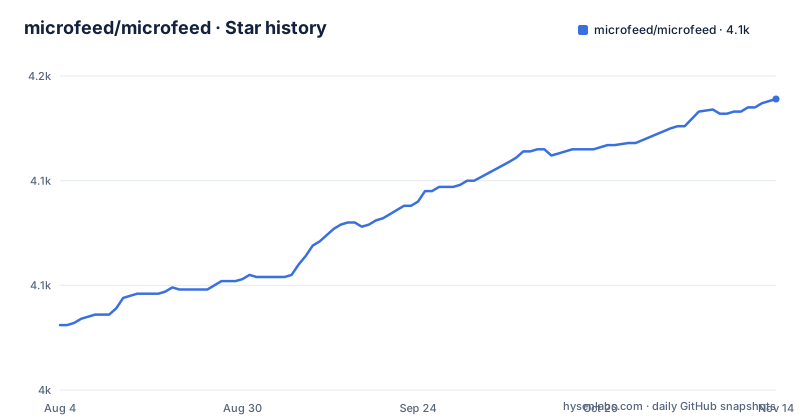
- microfeed/microfeed4,139 ★ · +108
| Repository | 2026-08-04 | 2026-11-14 |
|---|---|---|
| microfeed/microfeed | 4k | 4.1k |
108 Stars in the last 102 days, measured from the daily GitHub snapshot. Compare with other projects
Editorial analysis
What microfeed Actually Solves
microfeed solves the problem of running a content site without owning or renting a server. It targets individuals who want a blog, podcast, photo gallery, or link curation feed but do not want to manage VPS instances, databases, or backups. The README positions it for tech-savvy users who want self-hosting in the sense of controlling their domain and data, but without the operational burden. It runs on Cloudflare Workers for code, R2 for media storage, and D1 for metadata. The core output is a web feed, an RSS feed, and a JSON feed. That covers podcasting, blogging, and content curation in one package. The built-in admin dashboard is described as familiar to WordPress users, which lowers the barrier for non-developers. The project is built by Listen Notes, which gives it a credible pedigree for feed-related software, though you should not assume that translates to enterprise support.
How the Architecture Fits Together
The architecture is a triangle of Cloudflare services. Workers run the application logic and serve the web, RSS, and JSON endpoints. R2 holds media files like images, audios, and videos. D1 stores metadata about posts and items. The README states that Cloudflare's free quotas make hosting essentially free, aside from a domain name. The data flow is straightforward: an admin creates or edits content in the dashboard, which writes to D1 and uploads media to R2. Public visitors hit the Workers endpoints, which read from D1 and R2 to render pages or feeds. The system also exposes an API, webhooks, and a CLI for programmatic access. A notable design choice is the use of D1, which is a SQLite-based database. That means you get transactional integrity but also Cloudflare-specific constraints like eventual consistency and a 5 GB free tier limit, which is not mentioned in the README but is a known platform limitation. The documentation mentions 'immutable D1-backed versions' for themes, which suggests a versioning mechanism that stores snapshots in the database. That is a sensible approach for rollback but adds storage overhead.
Installation: The CLI Launcher and Its Cache
The README gives a minimal installation path: run `npx @microfeed/cli manage` from any folder. The launcher requires Node.js 22.12 or newer with npm. It does not require Git or Corepack. The launcher downloads the exact microfeed release, verifies it, copies it into a private cache, and installs dependencies. It does not create source files in your current folder, which is a clean design. The first run may use about 1.3 GB and take several minutes. Later runs reuse the cache. The README also suggests using a local AI coding agent like OpenAI Codex or Claude Code to run that command and follow instructions. That is an unusual but practical approach for a CMS that is otherwise manual. If you clone the repository, `yarn microfeed` runs the local CLI version. The deployment itself is not described in detail beyond the launcher, but the mention of 'deployment verified' implies an interactive process. The heavy first-run footprint is a real consideration for low-disk environments. Also, the cache location is not specified, so you may need to find it if you want to reclaim space.
Publishing: Dashboard, API, and Agentic CLI
Content creation happens through three paths. The admin dashboard is the primary interface, described as a simple yet powerful tool for creating posts, uploading media, and customizing the site's look. The API is exposed at `/api/v1/` with interactive docs, OpenAPI JSON and YAML, and agent-ready `llms.txt` files. That is a strong signal that the project is designed for machine consumption. The `@microfeed/cli` allows a local AI agent to create, update, and delete items, and upload media. The README calls this 'agentic content management.' The CLI can be run from any folder with `npx @microfeed/cli`. This is a differentiator: most CMSs do not ship a CLI that is explicitly meant for AI agents. The CLI is also used for theme management, with `npx @microfeed/cli manage theme` for GitHub-based theme installation. The release notes mention 'Clone-free deployment, showcase themes, and browser agents' in v1.0.6, which suggests that recent versions have focused on making the tool easier to use without local Git. That is a practical improvement for non-developers.
Theming and Versioning: A Trade-Off
Theming is a core feature. The README mentions a 'themeable publishing platform' with 'immutable D1-backed versions.' That means each theme version is stored as an immutable snapshot in D1. The `@microfeed/theme-kit` is a standalone authoring CLI for creating themes. The v1.0.7 release is titled 'Reliable remote theme workflows,' which indicates that remote theme installation has been a focus. The benefit is that you can switch themes without worrying about file conflicts, and rollbacks are straightforward because versions are immutable. The cost is that D1 storage grows with each theme version, and the database is the single source of truth for your site's presentation. If you are used to a static site generator where themes are just files in a repo, this is a different model. The README also mentions 'editable generated robots.txt, llms.txt, and sitemap.xml files,' which means you can customize SEO files through the admin, not by editing files directly. That is convenient but also means you need to trust the admin UI for those settings.
Limitations and Failure Modes
The biggest limitation is the tight coupling to Cloudflare. If Cloudflare has an outage or changes its pricing, your CMS is affected. The README says hosting is 'essentially free,' but that depends on Cloudflare's free quotas, which can change. The D1 database has a 5 GB free tier limit, which is not mentioned in the README but is a platform constraint. For a podcast with many episodes or a photo blog with high-resolution images, you could hit that limit. Another limitation is the reliance on Node.js 22.12+, which is relatively recent. If you are on an older LTS or a system without npm, installation fails. The launcher's 1.3 GB first-run footprint is also heavy for a lightweight CMS. The README does not mention backup or export mechanisms, which is a gap. If you need to migrate away, you would have to use the API to export content, but that is not documented. The admin login uses email and password, which is simple but lacks two-factor authentication, a security consideration for a public-facing dashboard.
Alternatives: Static Generators and Traditional CMSs
The closest alternative is a static site generator like Hugo or Eleventy paired with a headless CMS. That approach uses your own hosting or a CDN, and it does not lock you into a specific cloud provider. The difference is that microfeed provides a built-in admin dashboard, RSS and JSON feeds, and an API out of the box, whereas a static generator requires you to assemble those pieces. For example, with Hugo you would need to add a separate CMS like Decap CMS and configure feed templates manually. Another alternative is a traditional CMS like WordPress, which offers a familiar admin but requires server hosting or a managed service. microfeed avoids that server cost but also avoids the plugin ecosystem. The trade-off is clear: microfeed is simpler to deploy and operate, but it is a closed platform in terms of hosting. If you want to move to another provider, you would need to rebuild your site. That is a significant consideration for long-term projects.
Maintenance and License Implications
The project is actively maintained, with recent releases in August 2026 and a last push on the same day. The release notes show a steady cadence of feature additions, not just bug fixes. The license is AGPL-3.0, which is a strong copyleft license. If you modify microfeed and deploy it as a network service, you are required to make the source code available to users of that service. That is a serious consideration for businesses that want to customize the CMS without open-sourcing their changes. For personal use, it is unlikely to matter. The maintenance cost is mostly tied to Cloudflare's platform changes. You need to keep the CLI and Workers code updated to match new Cloudflare features. The README mentions that the launcher pins a specific microfeed release, which means updates are controlled. However, there is no mention of an automatic update mechanism, so you will need to manually run `npx @microfeed/cli` again to get a new version. That is a simple but manual process.
Editorial conclusion
Adopt microfeed if you are a technical individual or small team comfortable with Cloudflare's platform and want a free, serverless CMS for personal or small business feeds. Do not adopt it if you need on-premise hosting, want to avoid Cloudflare lock-in, or require a permissive license for commercial redistribution. Before deploying, verify your Cloudflare account limits, confirm Node.js 22.12+ is available, and test the CLI's cache behavior on your machine. The AGPL-3.0 license means any modifications you distribute must be open-sourced, so check your compliance posture first. If you accept those constraints, microfeed offers a genuinely serverless publishing stack with a built-in admin dashboard and an agent-friendly CLI.
Frequently asked questions
What is microfeed used for?
It is a lightweight content management system for publishing audio, video, photos, documents, blog posts and external URLs as a website, an RSS feed and a JSON feed. The README's own examples include a podcast feed, a blog, an image feed, a curation feed of news links, a site for a book and a changelog site.
What does microfeed run on?
Cloudflare Workers runs the code, Cloudflare R2 stores and serves the media files, and Cloudflare D1 stores the metadata. The admin dashboard is protected by a built-in email and password login, and the README describes hosting as essentially free apart from paying for a domain name.
How do I deploy microfeed?
The documented quickstart is to open a local AI coding agent such as Codex, Claude Code or Cursor and paste a prompt that tells it to run npx @microfeed/cli manage and follow the instructions until deployment is verified, so the agent handles Cloudflare authorisation, deployment and verification. GitHub Actions is the other documented route, and the project is built by Listen Notes.
Can an AI agent publish content to microfeed?
Yes, through the official @microfeed/cli package, which lets a local agent create, update and delete items and upload images, audio, video and documents. Run it from any folder with npx @microfeed/cli, or use yarn microfeed inside a cloned repository to run the local build of the same CLI.
What does the microfeed API expose to integrations?
An API, webhooks, an RSS feed and a JSON feed. The public demo publishes an interactive reference, the OpenAPI specification as JSON and as YAML, and agent-readable llms.txt and llms-full.txt files. The repository also has a redocly configuration and a lint script, so the specification is checked rather than maintained by hand.
Is microfeed related to Microsoft SharePoint?
Nothing in the repository connects the two. microfeed is a self-hosted CMS that runs on Cloudflare Workers, R2 and D1, publishes feeds in RSS and JSON, and offers a CLI, an API and a theme kit for authoring. The project has no Microsoft component and makes no comparison with SharePoint.
Official sources
Add this badge to your README
If you maintain this project, the badge below links readers to this analysis and shows its maintenance status from the daily GitHub snapshot. Paste the markdown into your README; add ?metric=license or ?metric=stars to the image URL for a different field.

[](https://hysenlabs.com/projects/microfeed-microfeed)Star history chart for your README
[](https://hysenlabs.com/projects/microfeed-microfeed)Was this useful?