Microsoft Coyote: deterministic concurrency testing for C#
Coyote is a library and tool for testing concurrent C# code and deterministically reproducing bugs.
At a glance
- What is it?
- Microsoft Coyote is a C# library and CLI tool that systematically explores concurrent executions and records a trace for reproducing a discovered bug. It suits teams testing actors, tasks, controllers, or other nondeterministic code, but requires test instrumentation and binary rewriting.
- Who is it for?
- Adopt Microsoft Coyote when nondeterministic C# behavior causes intermittent failures or may hide race conditions. Do not treat it as a replacement for ordinary deterministic tests or production load testing.
- Can I use it commercially?
- Check first. The repository uses a licence we do not classify automatically, so read its LICENSE file before any commercial use.
- Is it still maintained?
- Yes. The repository last received commits 2 days ago.
- What is it written in?
- Mainly C#, according to GitHub's language statistics.
Answers come from the project's GitHub data, last synced on November 6, 2026, and from our analysis. They are not legal advice.
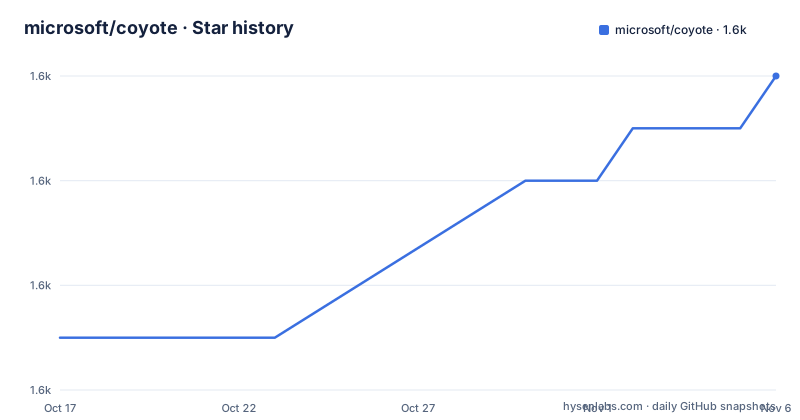
Star history
- microsoft/coyote1,604 ★ · +5
| Repository | 2026-10-17 | 2026-11-06 |
|---|---|---|
| microsoft/coyote | 1.6k | 1.6k |
5 Stars in the last 20 days, measured from the daily GitHub snapshot. Compare with other projects
Editorial analysis
The intermittent scheduling problem Coyote targets
Microsoft Coyote addresses a specific weakness in conventional C# unit tests: concurrent code can produce different outcomes depending on how tasks and other operations are scheduled. A test may pass during most executions while failing under one unlucky ordering. Repeating a flaky test can eventually expose a failure, but it does not provide a controlled account of the execution that caused it.
The README uses a simple race between an assertion and `Task.Run`. The assertion usually runs before the task changes `value`, yet a different schedule lets the task run first. Coyote addresses that hidden ordering by repeatedly controlling concurrent execution and exploring multiple schedules. It is relevant to developers testing actors, asynchronous tasks, and concurrent requests handled by ASP.NET controllers.
It is aimed at engineers who need evidence about concurrency defects before deployment, rather than developers looking only for sequential API or business-logic failures. The repository states that teams in Azure use Coyote to test distributed systems and services. That is a stated use case, not independent evidence of performance, scale, or suitability for every service.
Coyote does not wait for an unlucky scheduler by chance. Its purpose is systematic exploration followed by deterministic reproduction. That distinction matters because a failure that depends on interleaving can be difficult to recreate on another machine or after unrelated code changes.
TestingEngine controls systematic C# schedules
The central library API is `Microsoft.Coyote.SystematicTesting.TestingEngine`. A normal asynchronous test is wrapped in a Coyote test, configured with an iteration count, and passed to `TestingEngine.Create`. Calling `engine.Run()` then causes Coyote to take control and execute the workload repeatedly while search strategies explore execution paths.
The documented configuration for the example is ten testing iterations. Ten is not a completeness guarantee. It is the number of executions requested for that test, and the README does not claim that this small value covers every schedule in a larger program.
When Coyote finds a failure, it exposes a trace through the `engine.TestReport` API. The intended workflow is to use that trace to reproduce the same bug repeatedly, then inspect and correct the code. This replay-oriented report serves a different purpose from a unit-test framework merely reporting that an assertion failed.
The API remains recognizably close to a standard C# test. It uses an asynchronous test method and can run from a familiar framework such as xUnit. Coyote changes how the concurrent workload is exercised rather than replacing the basic unit-test structure. It also does not remove the need for meaningful assertions inside that workload.
coyote rewrite instruments compiled C# binaries
Coyote does not control concurrency solely through the source-level `TestingEngine` call. The README requires running `coyote rewrite` from the CLI, typically as a post-build task. According to the documentation, this command automatically rewrites the IL of test and production binaries. Coyote can then inject hooks that take control of concurrent execution during testing.
This architecture separates test scheduling from application setup. Developers select a build or test pipeline where binary rewriting is acceptable, then execute the instrumented test through their chosen framework. Coyote repeatedly runs the test from beginning to end and applies search strategies during those iterations.
IL rewriting is the most visible adoption constraint. The test must be built into binaries that Coyote can rewrite, and production code paths exercised by the test must be included in the rewritten output. The README does not document assembly exclusions, rollback for rewritten binaries, or an execution mode that skips instrumentation. Those details need to be established against the project documentation before applying the command to a controlled build pipeline.
The command belongs after compilation but before execution of the instrumented test. The README presents it as a typical post-build operation, which suggests integration into an existing build script rather than an unrelated manual step.
A first xUnit concurrency test with Coyote
The README directs new users to its installation guide and the `Microsoft.Coyote` package on NuGet. It does not provide a complete shell installation command, package version, or platform-specific setup sequence. Once the `coyote` CLI is installed and the library is referenced, the documented test pattern begins with the `SystematicTesting` namespace.
The following example wraps an asynchronous task test, requests ten iterations, and runs it through Coyote. It is the test shape documented by the repository:
using Microsoft.Coyote.SystematicTesting;

[Fact]
public async Task CoyoteTestTask()
{
  var configuration = Configuration.Create().WithTestingIterations(10);
  var engine = TestingEngine.Create(configuration, TestTask);
  engine.Run();
}
The actual production binary and test binary then need to pass through the CLI rewriting step. The repository gives this command:
coyote rewriteAfter rewriting, run the test through the selected unit testing framework, such as xUnit. According to the README, Coyote takes control for the configured number of iterations. If an iteration exposes a concurrency bug, inspect the trace exposed by `engine.TestReport` and use it as the basis for reproduction.
The README does not provide a universal command for running a rewritten test. The test invocation therefore remains tied to the chosen framework and project build configuration. The installation guide at `https://microsoft.github.io/coyote/#get-started/install/` is the authoritative starting point for obtaining the CLI.
Deterministic replay narrows concurrency debugging
The main benefit over an ordinary repeated unit test is control. A normal test runner can show that a failure occurred but may not preserve enough scheduling information to recreate it. Coyote explores execution paths and reports a trace when it finds a bug. That trace connects the observed assertion failure to a repeatable schedule.
This changes the debugging target. Instead of rerunning a test until the scheduler happens to expose the same problem again, the engineer can work from the execution Coyote recorded. For race conditions involving several tasks or actors, that distinction can reduce ambiguity around operation order, delayed execution, and failures buried inside complex control flow.
A real alternative is a conventional deterministic unit test that avoids concurrency or arranges task ordering explicitly. That approach is simpler when the intended behavior has one known sequence. Coyote becomes relevant when concurrency itself is part of the behavior under test and the team wants schedules explored rather than suppressed.
Another alternative is conventional stress or soak testing, which repeats a workload to find failures over time. Coyote takes a different approach: the README describes controlled, systematic exploration with search strategies and a reproducibility trace. The repository does not describe Coyote as a load generator, so throughput, production traffic simulation, and endurance capabilities should not be inferred from it.
Iteration limits and binary rewriting constrain testing
Coyote is the wrong tool when a codebase cannot accept instrumentation of its compiled test and production paths. Because the documented mechanism rewrites IL, adding `TestingEngine` alone does not create the same testing environment. A project built around assembly boundaries or build rules that prohibit post-build rewriting would need an answer outside this concise README before adoption.
Iteration count is another design decision. Increasing it expands the portion of the execution space explored, but the README gives no method for choosing a practical count, estimating coverage, or estimating test duration. It also does not state that every possible interleaving will be covered. A passing run should therefore be interpreted as the result of the configured exploration, not proof that all concurrency bugs have been excluded.
The project is not presented as a general test runner. The example still relies on xUnit or another familiar framework. Coyote controls the concurrent workload and supplies a report, while surrounding assertions, test selection, compilation, and execution remain part of the developer's existing .NET setup.
The command also has to operate on binaries that match the selected build. The README does not specify how to select target assemblies or avoid stale rewritten output. That build detail deserves attention when Coyote is introduced into a solution with several configurations or generated assemblies.
Custom LICENSE and upgrade work for adopters
The repository license is classified as a custom license that GitHub cannot classify, and users are directed to the `LICENSE` file. The README does not reproduce its terms, so it would be inappropriate to infer permissions, redistribution conditions, or obligations. Organizations considering Coyote need to read `LICENSE` directly. This is a licensing review requirement, not legal advice.
Contributors are asked to agree to a Contributor License Agreement. The README states that a CLA bot checks pull requests and that the agreement generally needs to be completed once across relevant Microsoft repositories. External contributors therefore face a repository-specific contribution process before a pull request can proceed.
The repository is not archived. Its last push was on 2026-10-09, which records recent development activity, but it has no GitHub releases. As a result, the stated release history provides no versioned upgrade trail. The README instead points contributors and users to `History.md` when upgrading Coyote dependencies.
Support is explicitly limited. Microsoft describes Coyote as provided "as-is" and states that it cannot provide formal support. An internal Microsoft Teams channel exists for employees, but the README does not present it as a support channel for outside adopters. Upgrade checks should begin with `History.md`, the current README, and the documentation linked from the project website.
Editorial conclusion
Adopt Microsoft Coyote when nondeterministic C# behavior causes intermittent failures or may hide race conditions. Do not treat it as a replacement for ordinary deterministic tests or production load testing. Before adoption, verify that `coyote rewrite` can instrument your build outputs, that your tests work with `TestingEngine`, and that your organization accepts the custom `LICENSE` terms.
Frequently asked questions
What is Microsoft Coyote used for?
Microsoft Coyote tests concurrent and nondeterministic C# code, including actors, tasks, and concurrent ASP.NET controller requests. It explores execution paths and can provide a trace for reproducing a discovered bug.
How do I run a Microsoft Coyote test?
Create a test that uses `TestingEngine`, run `coyote rewrite` against the compiled binaries, and execute the test through a unit test framework such as xUnit. The README does not give one universal command for executing every rewritten test.
Does Microsoft Coyote require changing or rebuilding binaries?
The documented workflow rewrites the IL of test and production binaries, typically through a post-build `coyote rewrite` step. Binary instrumentation is therefore a central part of the testing setup.
Is Microsoft Coyote formally supported?
No. The README describes the project as provided "as-is" and states that Microsoft cannot provide formal support.
Official sources
Add this badge to your README
If you maintain this project, the badge below links readers to this analysis and shows its maintenance status from the daily GitHub snapshot. Paste the markdown into your README; add ?metric=license or ?metric=stars to the image URL for a different field.

[](https://hysenlabs.com/projects/microsoft-coyote)Star history chart for your README
[](https://hysenlabs.com/projects/microsoft-coyote)Was this useful?