microsoft/fluentui-system-icons: Microsoft's Fluent icon set and how to install it
Fluent System Icons are a collection of familiar, friendly and modern icons from Microsoft.
At a glance
- What is it?
- Fluent UI System Icons is Microsoft's MIT-licensed icon collection, shipped as platform packages for Android, iOS, macOS, Flutter and plain SVG. The packages install in a few lines, but the icon list, direction metadata and importer pipeline are where the real constraints live.
- Who is it for?
- Adopt it if you are building on Microsoft's design language and want the same icon artwork across Android, iOS, macOS, Flutter and inline SVG, with RTL behaviour declared in metadata rather than guessed per screen. Do not adopt it if you need a web component or React package from this repository: the README only documents Android, iOS/macOS, Flutter and plain SVG, so a web app has to consume the SVG files directly.
- Can I use it commercially?
- Yes. MIT is a permissive licence: you can use, modify and sell software built on it, as long as you keep its copyright and licence notices.
- Is it still maintained?
- Yes. The repository last received commits 1 day ago.
- What is it written in?
- Mainly HTML, according to GitHub's language statistics.
Answers come from the project's GitHub data, last synced on November 14, 2026, and from our analysis. They are not legal advice.
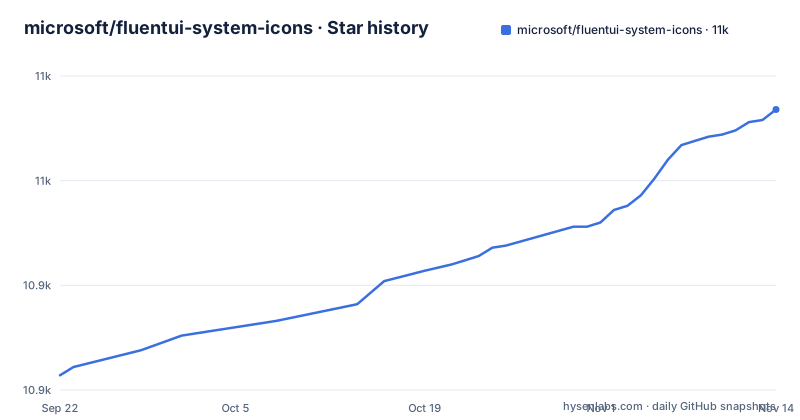
Star history
- microsoft/fluentui-system-icons10,984 ★ · +127
| Repository | 2026-09-22 | 2026-11-14 |
|---|---|---|
| microsoft/fluentui-system-icons | 10.9k | 11k |
127 Stars in the last 53 days, measured from the daily GitHub snapshot. Compare with other projects
Editorial analysis
What Fluent UI System Icons solves, and who it is for
Most icon sets are a folder of SVG files with no opinion about platforms. Fluent UI System Icons is the opposite: it is a design system asset that Microsoft also publishes as installable libraries. The README describes it as "a collection of familiar, friendly and modern icons from Microsoft". If you are building an app that should look like it belongs next to Microsoft products, and you need the same glyph to appear on Android, iOS, macOS and Flutter, this is the set that removes the redraw work. The MIT licence makes the artwork reusable without a commercial conversation.
The less obvious audience is design and localization teams. The repository carries metadata per icon, including a directionType property with the values unique (the icon has specific RTL and LTR versions) and mirror (the icon can be mirrored). A singleton property marks the default direction. That is a design decision encoded as data, and it matters more than the file count for anyone shipping in Arabic or Hebrew.
How the packages, assets, importer and metadata fit together
The repository is a single yarn workspace. The root package.json declares workspaces for packages/* and importer, pins the package manager to [email protected], and requires Node ^22.0.0 || ^24.0.0. The source icons live in the assets directory. The importer directory generates the Android and iOS libraries from those assets. The .github/workflows/ definitions run deploy:android and deploy:ios to produce the published libraries, according to the README's build pipeline section. So the flow is: artwork in assets, metadata alongside it, importer transforms it, CI publishes platform artifacts.
That architecture explains why the packages are versioned together. The README shows the same version string, 1.1.345, in the Android Maven coordinate, the CocoaPods pod line and the Flutter pubspec dependency. The repository has no published GitHub releases, so the version you see in the README is the version to check against the package registries rather than against a release page.
One structural detail worth noticing: the top level contains icons_regular.md, icons_filled.md, icons_light.md and icons_color.md, plus generate_icons_md.py. The icon list is generated, not hand-maintained, which is why the README points you at those files instead of embedding a table.
Installing Fluent UI System Icons on Android, iOS, macOS and Flutter
Android publishes through Maven Central. The README asks you to make sure the mavenCentral() repository is present in the root build.gradle, then add the dependency. The coordinate below is quoted exactly as the README gives it.
repositories {
    ...
    mavenCentral()
}
With that repository in place, the dependency line goes into your project's build.gradle. The @aar suffix is part of the coordinate, so keep it.
implementation 'com.microsoft.design:fluent-system-icons:1.1.345@aar'For iOS and macOS, the README gives two routes. CocoaPods uses a pod line with use_frameworks! enabled.
use_frameworks!

pod "FluentIcons", "1.1.345"
Carthage uses a git entry instead, pointing at the repository and the same version tag.
git "[email protected]:microsoft/fluentui-system-icons.git" "1.1.345"Flutter projects add a pub dependency in pubspec.yaml. The caret range is what the README shows.
dependencies:
  ...
  fluentui_system_icons: ^1.1.345
If you want no package manager at all, the README's plain SVG route is to inline the SVG directly and read packages/svg-icons/README.md for the details. After any of these installs, the first real check is to open icons_regular.md or icons_filled.md, pick a name, and render it. Those two files are the authoritative list; guessing a name from the visual is the usual way people waste an afternoon.
Building locally and running the demo apps
Contributors and anyone regenerating the libraries need the importer. The README's steps start at the repository root, and it notes this is a single yarn workspace, so dependencies for every package install in one pass. corepack enable turns on the pinned package manager before yarn install runs.
corepack enable
yarn install
Then move into the importer directory, clean, and list the available commands. The README is explicit that yarn run with no script name prints the command list, which is the intended way to discover the deploy targets.
cd importer
yarn clean
yarn run
The Android demo app path is: run yarn deploy:android from the importer setup, open the android directory in Android Studio, select sample-showcase in the build configuration dropdown, and run. The Flutter demo instead requires Flutter configured in Android Studio; you open the flutter directory, open the example directory, and run. Note the asymmetry: the Android demo depends on the importer having generated the libraries first, while the Flutter demo does not mention that step.
Where Fluent UI System Icons is the wrong choice
The README's installation section covers Android, iOS, macOS, Flutter and plain SVG. It does not document a web component package, a React component package, or a Figma plugin, even though people search for those things. If your product is a web application, the supported path in this repository is inlining SVG from packages/svg-icons, which means you own caching, sprite generation, tree-shaking and accessibility attributes yourself. That is a real amount of work compared with a component library that hands you a typed component per icon.
There is a second boundary. The icons are Microsoft's visual language. Dropping them into a product with a different design system produces the specific awkwardness of a Microsoft glyph sitting next to someone else's stroke weights. The set is coherent with Fluent and less so outside it.
Finally, treat the direction metadata as something you must read, not something the packages will enforce for you. Because directionType distinguishes unique icons (which have separate RTL and LTR artwork) from mirror icons (which can be flipped), a mirrored layout that flips everything uniformly will be wrong for the unique ones. The README describes the fields; it does not promise the libraries apply them automatically.
Alternatives and how their approach differs
The most direct comparison is a general-purpose icon library such as Material Symbols or Font Awesome. Those ship a web-first delivery mechanism (font or sprite or web component) and treat mobile as a secondary target. Fluent UI System Icons inverts that: the README's installation section leads with Maven Central, CocoaPods, Carthage and pub, and treats plain SVG as the fallback. If your product is a web app, the general-purpose library will get you to a working icon faster. If your product is a mobile or cross-platform app in Microsoft's visual language, the Fluent packages save the platform-by-platform asset work.
The other comparison is drawing your own SVGs in the Fluent style. That gives you exact control over the glyphs you need and no dependency, at the cost of maintaining direction variants and matching Microsoft's grid. The repository's metadata model, with directionType and singleton, is the part that is genuinely tedious to reproduce by hand.
Maintenance, licence and what upgrades cost
The repository is not archived, and the last push was on 2026-10-30. It is MIT-licensed, with a separate NOTICE file at the top level, which is the usual pattern for a project that includes third-party attributions. MIT is permissive: you can use the icons in commercial products, but you should read LICENSE and NOTICE yourself rather than treat this paragraph as legal advice.
The upgrade cost is tied to the version pin. The README pins 1.1.345 in four separate places, and the packages are versioned in lockstep, so an upgrade is a coordinated change across whichever platforms you ship. The repository has no published GitHub releases, so the practical check before bumping is the icon list files: if an icon you depend on was renamed or removed between versions, the build will fail at the reference site, not at install time. Pin the version in build.gradle, your Podfile and pubspec.yaml, and diff the generated icon list files when you move.
Editorial conclusion
Adopt it if you are building on Microsoft's design language and want the same icon artwork across Android, iOS, macOS, Flutter and inline SVG, with RTL behaviour declared in metadata rather than guessed per screen. Do not adopt it if you need a web component or React package from this repository: the README only documents Android, iOS/macOS, Flutter and plain SVG, so a web app has to consume the SVG files directly. Before wiring it in, open icons_regular.md or icons_filled.md and confirm the exact icon names you plan to ship, then check metadata.json for the directionType and singleton values of any directional icon, because those two fields decide whether a mirrored layout renders correctly.
Frequently asked questions
What do the icon symbols mean?
The README does not document a meaning for each glyph. What it does document is a directionType property in each icon's metadata.json, with the values unique and mirror, plus a singleton property for the default direction, which describes rendering behaviour rather than semantic meaning.
What are the system icons?
In this project, system icons are the Fluent UI System Icons collection, which the README describes as familiar, friendly and modern icons from Microsoft. They are published as libraries for Android, iOS, macOS and Flutter, and as plain SVG files.
What are 10 different types of icons?
The repository does not classify icons into ten types. What it does provide is separate lists in icons_regular.md, icons_filled.md, icons_light.md and icons_color.md, and a per-icon directionType of unique or mirror.
Official sources
Add this badge to your README
If you maintain this project, the badge below links readers to this analysis and shows its maintenance status from the daily GitHub snapshot. Paste the markdown into your README; add ?metric=license or ?metric=stars to the image URL for a different field.

[](https://hysenlabs.com/projects/microsoft-fluentui-system-icons)Star history chart for your README
[](https://hysenlabs.com/projects/microsoft-fluentui-system-icons)Was this useful?