Microsoft Win32 Content Prep Tool for Intune
A tool to wrap Win32 App and then it can be uploaded to Intune
At a glance
- What is it?
- Microsoft Win32 Content Prep Tool converts Windows Classic installer files into encrypted .intunewin packages for upload and assignment through Intune. It suits Windows administrators packaging MSI or setup.exe applications, but requires .NET Framework 4.7.2 and controlled source folders.
- Who is it for?
- Intune administrators should adopt this tool when they need to turn a Windows Classic MSI or setup.exe distribution into an uploadable .intunewin package. Operators that require a documented installer, uninstall mechanism, or details about signed package integrity should first confirm those controls in their Intune environment.
- Can I use it commercially?
- Not without permission. GitHub finds no licence file in the repository, and without a licence all rights are reserved by default: you may read the code but not reuse it. Check the README, or ask the authors, before using it.
- Is it still maintained?
- Yes. The repository last received commits 75 days ago.
- What is it written in?
- GitHub does not report a main language for this repository.
Answers come from the project's GitHub data, last synced on November 7, 2026, and from our analysis. They are not legal advice.
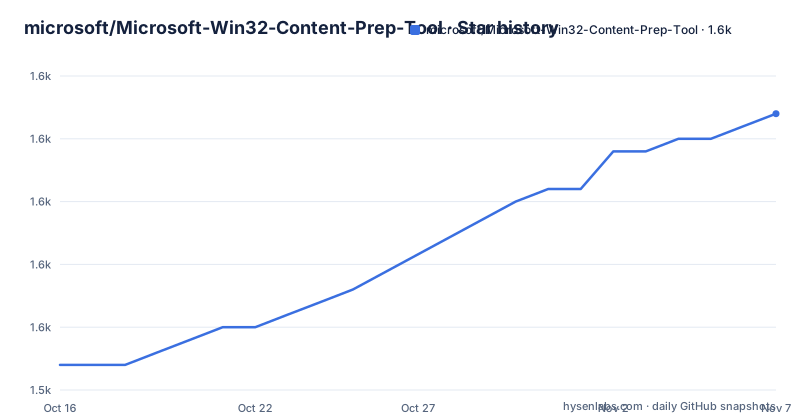
Star history
- microsoft/Microsoft-Win32-Content-Prep-Tool1,567 ★ · +20
| Repository | 2026-10-16 | 2026-11-07 |
|---|---|---|
| microsoft/Microsoft-Win32-Content-Prep-Tool | 1.5k | 1.6k |
20 Stars in the last 22 days, measured from the daily GitHub snapshot. Compare with other projects
Editorial analysis
Packaging Windows Classic Apps for Intune
The Microsoft Win32 Content Prep Tool addresses a specific gap in the Intune application workflow: Windows Classic applications are distributed as installer files rather than in the application package formats used by newer Windows application models. The repository provides `IntuneWinAppUtil.exe`, which turns a selected setup file and its supporting folder into a `.intunewin` file. According to the README, the generated package can then be uploaded and assigned in the Microsoft Intune console.
The intended users are Windows and Intune administrators who already have a Classic Win32 application to deploy. The source can be an MSI installer or another supported setup file such as `setup.exe`. MSI processing has special relevance because, according to the README, the tool retrieves information required by Intune. This does not remove the need to design the application command line, detection rule, and installation behavior correctly. It prepares the content and gathers applicable MSI information for the later Intune workflow.
The tool has a deliberately narrow role. It is not presented as an application installer, deployment service, or universal Windows packaging engine. Its output is specifically the `.intunewin` format named throughout the documentation. Organizations that need MSIX creation, application modernization, or a deployment method outside Intune should not assume this executable covers those tasks.
Inside the .intunewin Packaging Flow
The documented data flow begins with a setup folder containing all files required by one application. The `-c` option selects that folder, while `-s` identifies the entry setup file. Every file in the setup folder is compressed into the resulting `.intunewin`, so folder hygiene directly affects package size and behavior. The README warns that only setup files for the selected application should be placed there.
For an MSI source, the utility retrieves required Intune information during processing. For Win32 S mode catalog content, `-a` can designate a catalog folder whose files are bundled into the output and treated as catalog files. This is an optional path rather than the normal packaging behavior for every application.
The output folder is created automatically when it does not exist. In quiet mode, an existing item at the output location is overwritten. The documentation also distinguishes `-q` from `-qq`: `-q` suppresses interactive prompts while retaining console output, whereas `-qq` applies the quiet conditions and produces no console output. If both are supplied, the README says that `-qq` takes precedence.
Security and distribution handling deserve special attention. The README states that a `.intunewin` contains compressed and encrypted source setup files, along with the information needed to decrypt the package. The generated file is therefore sensitive build content and should not be placed in a public artifact store merely because it is ready for upload. The README does not document signing, certificate handling, key custody procedures, or rollback, so those points require separate verification.
Preparing IntuneWinAppUtil.exe for First Use
The repository contains `IntuneWinAppUtil.exe`, but the README does not provide an installation wizard, package manager command, or supported download-and-install procedure. It says to review the Microsoft License Terms for Microsoft Win32 Content Prep Tool and retain a copy. It also directs users to the Intune privacy documentation before installation and use. The stated technical prerequisite is `.NET Framework 4.7.2`.
There is no documented deployment block to reproduce here because inventing a download command or installer would go beyond the README. A new operator should obtain the executable from the project repository or its release page, ensure the required runtime is available, and review the linked terms before running it.
The first useful check is the built-in help and version output. These commands are copied from the README. The first displays usage information, while the second reports the executable version and is documented as available starting with version 1.8.2.
IntuneWinAppUtil -hIntuneWinAppUtil -vA successful version check should identify the installed executable version. If the executable cannot start on the machine, the first prerequisite to check is `.NET Framework 4.7.2`. The README does not describe prerequisite validation performed by the tool itself.
Creating the First Intune Package
For an interactive first run, the README says that invoking `IntuneWinAppUtil` without parameters guides the operator through the required values step by step. That mode can help an administrator identify missing inputs, but automation should use the documented parameter form.
The repository presents this command template for generating a package from a setup folder and setup file:
IntuneWinAppUtil -c <setup_folder> -s <source_setup_file> -o <output_folder> <-q>The angle-bracketed items are documentation placeholders and must be replaced with paths belonging to the application being packaged. The setup folder should contain only the files needed by that application. The setup file can be an MSI or an executable such as `setup.exe`.
The README describes `-o` once as an output folder, although its parameter summary calls it an output file. Elsewhere, it explicitly says that the output folder is created automatically, so treating it as a directory is the consistent reading. This naming inconsistency is minor but worth checking when scripting the utility.
For noninteractive processing, add `-q`. The utility then avoids prompts, creates the output folder if necessary, and overwrites existing content at that location. The fully silent `-qq` mode also removes console output. Neither quiet option changes the documented file selection rules, so the setup folder still needs careful preparation. After generation, verify that the expected `.intunewin` appears in the chosen location and then upload it through the Intune workflow.
Catalog Files, Overwrite Risk, and MSI Metadata
The optional `-a` path exists for catalog files used with Win32 S mode. The command template documented by the README accepts `-a <catalog_folder>`, and every file in that folder is treated as a catalog file for that mode. The ordinary packaging path does not require catalog folders. Adding catalog content when it is irrelevant would increase package contents without serving the documented purpose, so this option should be reserved for the case described in the README.
MSI sources receive dedicated handling. The tool retrieves information required by Intune, which can reduce manual packaging work compared with a generic archive. However, the documentation does not enumerate the exact metadata fields, detection rules, or command-line requirements generated in every case. An administrator still needs a way to define how Intune should decide whether the application is installed. The README's claim that Intune information is retrieved does not mean that the whole deployment configuration is automated.
Overwrite behavior is explicit in quiet mode. If content already exists in the `-o` location, it will be overwritten. That behavior is useful in controlled build automation, but it also means a mistyped output location can replace data. Because the source folder is compressed in full, old installers, logs, documents, or unrelated binaries left there will also enter the package. A staging directory containing only the selected application's required files is therefore a concrete packaging requirement, not merely organizational tidiness.
Release History, Licensing, and Upgrade Work
The repository is not archived, and the recorded last push was on 2026-08-24. The latest listed release is v1.8.7, published on 2025-08-13 with the release-note summary "Added FIPS compliance." Earlier listed releases include v1.8.6 on 2024-02-28 and v1.8.5 on 2023-11-06, both described as fixes for crashes involving the Win32 content prep tool. This release history shows specific fixes and a compliance-related change, although the README does not describe the operational scope of the FIPS change.
The repository's top-level files include `SECURITY.md` and `ReleaseNotes.txt`, but the README does not reproduce their contents. No update policy, automatic upgrade mechanism, compatibility matrix, or long-term support statement is documented in the README. Administrators should therefore treat upgrades as an explicit operational action and read the linked release notes before replacing the executable. They should also retest packaging because fixes for crashes and compliance changes can alter the binary even when the command interface remains familiar.
The repository does not expose an open source license identifier in the README. Instead, it links a document named `Microsoft License Terms For Microsoft Win32 Content Prep Tool.pdf` and states that downloading and using the tool means accepting those terms. This review cannot assess legal implications. Operationally, the linked terms and the Intune privacy documentation should be retained and reviewed alongside the executable version used by the organization.
Limitations Compared with Direct Intune Upload
The main limitation is platform coupling. The utility's documented output and purpose are both tied to Microsoft Intune, so it is the wrong tool for teams that only need a compressed installer archive or deploy Windows Classic applications through another management channel. A generic archive utility could preserve installer files for transfer, but it would not perform the documented `.intunewin` packaging or MSI metadata retrieval.
Another boundary is operational transparency. The README does not document package signing, retention policies for encryption information, rollback behavior, a machine-readable exit-code contract, or an automated validation of deployment success. It also does not explain how an existing output should be backed up before quiet mode overwrites it. These omissions matter in a build pipeline because successful file creation alone does not prove that the application will install or report the intended state in Intune.
The source-folder rule can also become a practical constraint. Every file placed under `-c` is compressed into the package. Bundling support files is necessary for many installers, but retaining unrelated or superseded binaries can increase output size and make the package harder to audit. There is no documented exclusion-file option in the README's parameter list. If the source inventory cannot be controlled, the packaging step should pause until the application folder is cleaned.
Editorial conclusion
Intune administrators should adopt this tool when they need to turn a Windows Classic MSI or setup.exe distribution into an uploadable .intunewin package. Operators that require a documented installer, uninstall mechanism, or details about signed package integrity should first confirm those controls in their Intune environment. Before processing production software, verify the prerequisite runtime, inspect the selected setup folder, protect the generated package, and perform a deployment test with the exact application version being packaged.
Frequently asked questions
What does Microsoft Win32 Content Prep Tool convert?
It converts Windows Classic application installation files into the `.intunewin` format for upload and assignment through the Microsoft Intune console. For MSI files, it also retrieves information required by Intune.
What is required to run Microsoft Win32 Content Prep Tool?
The stated technical prerequisite is `.NET Framework 4.7.2`. The repository includes `IntuneWinAppUtil.exe`, but the README does not document an installation wizard or package manager command.
How do I create an .intunewin file with Microsoft Win32 Content Prep Tool?
Use `-c` for the setup folder, `-s` for the source setup file, and `-o` for the output folder. Add `-q` for a quiet run with no interactive prompts, or `-qq` to suppress console output.
Official sources
Add this badge to your README
If you maintain this project, the badge below links readers to this analysis and shows its maintenance status from the daily GitHub snapshot. Paste the markdown into your README; add ?metric=license or ?metric=stars to the image URL for a different field.

[](https://hysenlabs.com/projects/microsoft-microsoft-win32-content-prep-tool)Star history chart for your README
[](https://hysenlabs.com/projects/microsoft-microsoft-win32-content-prep-tool)Was this useful?