PowerApps-Samples: Microsoft's public shelf of importable Power Platform samples
Sample code for Power Apps, including Dataverse, model-driven apps, canvas apps, Power Apps component framework, portals, and AI Builder.
At a glance
- What is it?
- A Microsoft repository that carries code samples for Dataverse, canvas apps, portals, the component framework and AI Builder. Most of the README is links, so the directory names and the two managed solution releases tell you more than the prose does.
- Who is it for?
- This repository is a directory of starting points rather than a framework, and it is most useful to someone who already knows the Power Platform and wants a working artifact to open in an environment. Two of its releases are genuinely importable, a JavaScript web resource walkthrough solution and a metadata browser, and those are the shortest path to seeing the code run.
- Can I use it commercially?
- Yes. MIT is a permissive licence: you can use, modify and sell software built on it, as long as you keep its copyright and licence notices.
- Is it still maintained?
- Yes. The repository last received commits 9 days ago.
- What is it written in?
- Mainly C#, according to GitHub's language statistics.
Answers come from the project's GitHub data, last synced on November 7, 2026, and from our analysis. They are not legal advice.
Star history
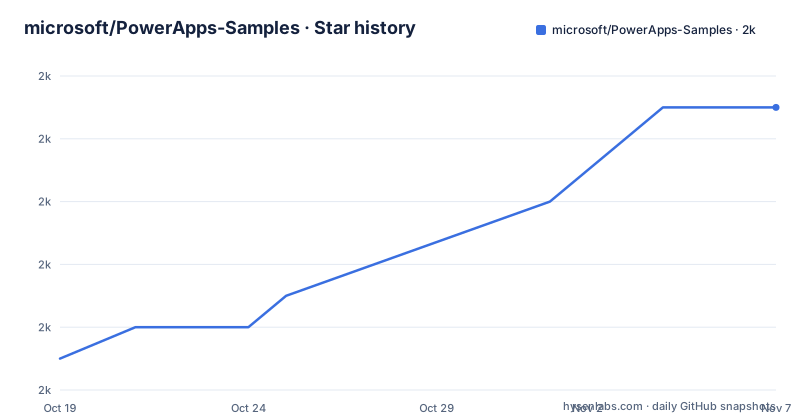
- microsoft/PowerApps-Samples2,003 ★ · +8
| Repository | 2026-10-19 | 2026-11-07 |
|---|---|---|
| microsoft/PowerApps-Samples | 2k | 2k |
8 Stars in the last 19 days, measured from the daily GitHub snapshot. Compare with other projects
Editorial analysis
The directory names are the catalogue
The README is 1,698 characters long and most of it is a link list. The file listing at the root is a more useful index, because each entry maps to a different part of the Power Platform:
ai-builder/
component-framework/
dataverse/
model-driven-apps/
portals/
powershell/
`dataverse/` is the data layer, the tables and columns that everything else in the platform reads and writes. `model-driven-apps/` is the form and app surface built on top of that data, where the app is generated from metadata rather than drawn by hand. `component-framework/` holds custom controls, the code-first counterpart to canvas apps. `portals/` is for external-facing sites backed by Dataverse rows. `powershell/` is where you would look for deployment and environment scripting. `ai-builder/` covers the prompt and model configuration features. `build-tools/` sits alongside them for packaging.
There is no dedicated `canvas-apps/` directory, which is worth flagging because canvas apps are the part of Power Platform most people mean when they say Power Apps. The README's resources list does link canvas developer docs, so the omission looks like an accident of curation rather than a decision against canvas. A developer looking for canvas samples should expect to find them filed under the component framework or model-driven apps directories and spend time there.
The repository is written in C# as its primary language, and the default branch is `master` rather than the `main` that has become the default almost everywhere else in the industry.
Two releases you can import as managed solutions
The release history has three entries and they are wildly uneven, which tells you something about how this repository is used. The newest, tagged `JavaScriptWebResourceExampleSolutionv1.0` on 2026-08-31, packages a managed solution zip called `JavaScriptWebResourceExampleSolution_1_0_managed.zip`. The release notes say it delivers the finished result of the walkthrough on writing a first client script, and that other articles reuse it as a starting point.
A managed solution is the unit of deployment in this ecosystem. Importing one gives you metadata and any bundled web resources already assembled, so you can inspect a working configuration in a sandbox environment instead of reconstructing it from documentation. That is the single most useful thing this repository offers, and it is a much more concrete offer than a folder of loose source files.
The second release, `MetadataBrowser_v4.0.0.0` from 2026-04-26, is a metadata browser that bundles a web resource inside a model-driven application. The notes point out you can either run it as a model-driven app or open the web resource directly, which is the kind of detail that saves an hour when the app scaffolding will not cooperate. The versioning here is not semver: a solution zip named v1.0 and a tool at v4.0.0.0 in the same repository tell you these are artifacts, not a library with a release train.
MIT code and a Contributor License Agreement side by side
GitHub reports the repository as MIT licensed, and a LICENSE file exists at the root. That covers the sample code as published. The README then describes a different arrangement for anything you send in: contributions require agreeing to a Contributor License Agreement, a CLA-bot decides per pull request whether you need one, and the instruction is to complete it once across all Microsoft repositories.
Two legal mechanisms coexisting here is not a contradiction but it is a distinction worth making plainly, because people conflate them. MIT is the license you get when you use this code. The CLA is the license you grant when you contribute code back, and it asserts you have the right to grant Microsoft rights to your contribution. The first is a grant to you. The second is a grant from you.
The practical effect for a reader: you can read, copy and modify every sample in this repository under MIT terms, including commercially, without signing anything. The moment you open a pull request, the CLA process applies. The README also states the project has adopted the Microsoft Open Source Code of Conduct and points at a code of conduct FAQ and an [email protected] address, which tells you contributions are reviewed against that policy rather than merged on a first-come basis.
A `SECURITY.md` and a `CLAUDE.md` sit at the root next to the README, and the `.azuredevops/` directory indicates the repository is built through Azure DevOps pipelines rather than GitHub Actions.
Where the README stops and Microsoft Learn begins
The README does two things: it names the sample categories in one sentence, and it links five documentation sets. Dataverse developer docs, model-driven apps developer docs, canvas apps developer docs for enterprise, the component framework overview, and the Power Platform developer hub.
That is the entire instructional content. There is no build instruction, no prerequisite list, no statement about which environment these samples target, and no explanation of how the build-tools directory is invoked. For a repository whose name promises samples, that is a defensible choice, because a sample that only works inside a licensed Power Platform environment cannot be run by a stranger anyway. It does mean that the repository answers the question of what exists and leaves the question of how to run it entirely to the documentation.
The topics listed on the repository are a useful signal of scope: ai-builder, dataverse, dynamics-365, dynamics365, microsoft-dataverse, pcf-controls, power-apps, power-pages, power-platform, powerapps, powerappscomponentframework, powerplatform. Read as a set, they confirm that this is a Dataverse-centred collection spanning the whole platform rather than a set of canvas app demos.
The last push was on 2026-09-03, days after the August release, so the repository is being kept in step with the platform's release cadence rather than left to gather samples.
Three releases over six years is not a package cadence
It is easy to read three releases and conclude this repository is abandoned. It is not, given the push date, but the release history does need reading carefully. The third entry is tagged `179031` with the name Audit entity data changes, dated 2020-08-04, with an empty release body and a tag that looks like a work item number rather than a version.
So the picture is: a 2020 tag that is probably an accidental or internal marker, then nothing until April 2026, then two deliberate releases eight months apart. Neither of the recent two carries semver. This is what a samples repository looks like when it is maintained on the platform's schedule rather than a software schedule: new artifacts get tagged when the documentation needs them, and the repository itself has no version.
The same pattern shows up in the versioning of the artifacts themselves, where a walkthrough solution is v1.0 and a metadata browser is v4.0.0.0 with a four-part version that matches the Dataverse solution convention. Do not expect to find a changelog, a semantic version, or a compatibility matrix in this repository. There is no package to install and no version range to respect, which is both its limitation and the reason it stays small.
What this repository is not
PowerApps-Samples is not a Power Apps SDK, a testing harness, or a component library, and treating it as any of those leads to the wrong conclusion. Nothing here is published to a registry, nothing is versioned against the platform, and nothing is designed for import into an application you are building. It is a shelf.
The comparison worth drawing is with a vendor's example gallery or a book appendix, both of which assume the reader knows the subject. The MIT license makes it more useful than either, since you can lift a sample into a project without asking. What you cannot do is rely on it for anything contractual, because no artifact here declares which platform version it was built against, and Power Platform environments are tenant-specific in ways that make that gap matter.
The realistic use is diagnostic. If you are trying to work out how client-side scripts attach to model-driven forms, the JavaScript web resource solution gives you a finished example instead of a tutorial to misread. If you want to see table definitions in an environment, the metadata browser does that. If you are looking for the answer to how the platform works, that answer lives in the five documentation links, and this repository is best understood as the place those walkthroughs publish their finished artifacts.
Editorial conclusion
This repository is a directory of starting points rather than a framework, and it is most useful to someone who already knows the Power Platform and wants a working artifact to open in an environment. Two of its releases are genuinely importable, a JavaScript web resource walkthrough solution and a metadata browser, and those are the shortest path to seeing the code run. The licensing arrangement is the thing to read twice: MIT covers the code you find, while a Contributor License Agreement governs what you send back. If you need to know whether a specific sample exists for a problem you have, the eight top-level directories answer that faster than the README does, and if you need to know how the platform behaves, the documentation links in the README are the only place that question is answered.
Frequently asked questions
What are some examples of Power Apps?
This repository splits its samples into eight top-level directories: `ai-builder/`, `build-tools/`, `component-framework/`, `dataverse/`, `model-driven-apps/`, `portals/` and `powershell/`, covering the data layer, generated app surfaces, custom controls, external portals and deployment scripting. The two tagged releases are concrete finished examples: a JavaScript web resource walkthrough solution and a metadata browser v4.0.0.0.
Can you explain Power Apps in a simple way?
The repository's own description splits the platform into parts a newcomer can hold at once: Dataverse holds the data, model-driven apps generate app screens from that metadata, the component framework covers custom controls, portals publish Dataverse-backed sites to the public, and AI Builder covers the prompt and model configuration features. Each has a documentation link in the README under the matching topic.
Can I use these Power Apps samples in a commercial project?
Yes. GitHub reports the repository as MIT licensed and a LICENSE file sits at the root, so you may use, modify and redistribute the sample code, including commercially, without contributing anything. A Contributor License Agreement applies instead when you submit a pull request, where you assert you have the right to grant Microsoft rights to your contribution.
Do the PowerApps-Samples releases follow semantic versioning?
Not consistently. The three tags are `JavaScriptWebResourceExampleSolutionv1.0` from 2026-08-31, `MetadataBrowser_v4.0.0.0` from 2026-04-26, and `179031` from 2020-08-04, a work-item-style tag with an empty release body. The four-part version on the metadata browser follows the Dataverse solution convention rather than semver, and no artifact declares the platform version it targets.
Official sources
Add this badge to your README
If you maintain this project, the badge below links readers to this analysis and shows its maintenance status from the daily GitHub snapshot. Paste the markdown into your README; add ?metric=license or ?metric=stars to the image URL for a different field.

[](https://hysenlabs.com/projects/microsoft-powerapps-samples)Star history chart for your README
[](https://hysenlabs.com/projects/microsoft-powerapps-samples)Was this useful?