MicrosoftLearning/AZ-104-MicrosoftAzureAdministrator: what the lab repository actually contains
AZ-104 Microsoft Azure Administrator
At a glance
- What is it?
- The AZ-104 lab repository is a template collection for instructors delivering the Microsoft Azure Administrator course, not a self-study package. Here is what it holds, who it is written for, and where it stops.
- Who is it for?
- Adopt it if you are an MCT or a partner instructor delivering AZ-104T00 and you need the lab files that match the current Azure portal. Do not adopt it if you are a student looking for a self-paced course, because the README routes students to their instructor and the repository holds lab files rather than teaching material.
- Can I use it commercially?
- Yes. MIT is a permissive licence: you can use, modify and sell software built on it, as long as you keep its copyright and licence notices.
- Is it still maintained?
- Yes. The repository last received commits 52 days ago.
- What is it written in?
- Mainly Bicep, according to GitHub's language statistics.
Answers come from the project's GitHub data, last synced on November 15, 2026, and from our analysis. They are not legal advice.
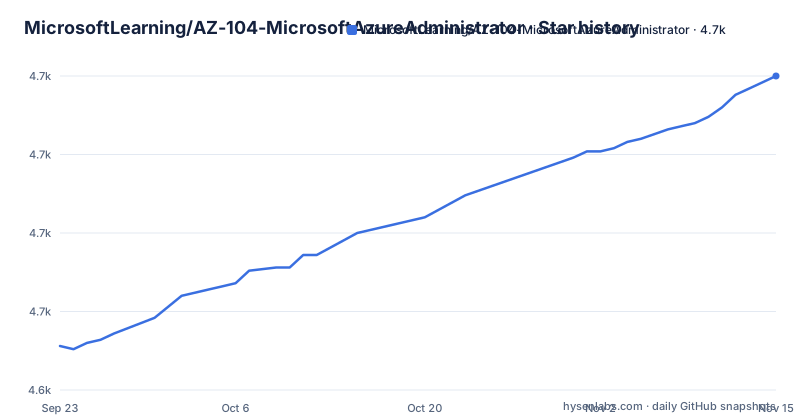
Star history
- MicrosoftLearning/AZ-104-MicrosoftAzureAdministrator4,725 ★ · +86
| Repository | 2026-09-23 | 2026-11-15 |
|---|---|---|
| MicrosoftLearning/AZ-104-MicrosoftAzureAdministrator | 4.6k | 4.7k |
86 Stars in the last 53 days, measured from the daily GitHub snapshot. Compare with other projects
Editorial analysis
Who the AZ-104 Microsoft Azure Administrator repository is written for
This is a course support repository, and the README is explicit about the audience. Its first line states that the repository is for instructors teaching Microsoft courses, and that anyone in a class should ask their instructor for assistance. That single sentence rules out the most common misunderstanding about the project: it is not a self-study path to the AZ-104 Microsoft Azure Administrator Associate certification.
The problem it solves is drift. Azure changes, and printed lab instructions fall out of date between course revisions. Microsoft Learning publishes the lab instructions and lab files on GitHub so that course authors and Microsoft Certified Trainers can share one current source, and the README frames contributions as a way for trainers who find a change during a live delivery to fix the lab source directly. The instructor handbook and the PowerPoints remain the primary teaching material. The repository supplies the lab steps and the deployment files that sit underneath them.
If you are preparing for the exam on your own, the README points elsewhere: an interactive lab simulation hosted on mslabs.cloudguides.com, which it describes as a self-paced preview. The repository itself assumes an instructor, a class, and an Azure subscription to deploy into.
How the lab files are organised: Instructions, Allfiles and the template parameters
The top level of the repository is small and readable. Instructions/ holds the lab text. Allfiles/ holds the deployment artifacts that the lab steps reference. The README links to an HTML rendering of the demonstrations and labs at microsoftlearning.github.io, and the top level also holds index.md, _config.yml and _build.yml. LICENSE carries the MIT terms, readme.md carries the text quoted above, and .github/ holds the repository automation.
The mechanism that matters for a trainer is the parameter file. The README documents a change made in April 2023: effective immediately, the admin password was removed from the JSON template parameter files, so students must supply a password when the template is deployed. That change affects Labs 4, 5, 6, 7, 10 and 11, and the README says the lab instructions will be changed to reflect it. This is the clearest example of how the repository works in practice. The template defines the resources, the parameter file supplies the values, and the password is now a value the person deploying must type rather than one committed to the repository.
Bicep is listed as the primary language, which fits a lab set that has to be readable by trainers who are not full-time infrastructure engineers. The trade-off is that a parameter file change can break a lab step that still assumes the old default, and the README does not describe a compatibility check for that.
Cloning the repository and deploying your first lab template
The README gives no install command for the repository itself, because there is nothing to install. You clone it, or you read the rendered lab pages, and then you deploy the templates it contains with your own Azure tooling. The README does not name a deployment tool or pin a version, so the exact command you run comes from the lab instructions in Instructions/ for the lab you are teaching. Read that page before you deploy.
The only command the repository layout supports without guessing is the clone itself. The README gives the repository URL and the published lab site, so start there:
git clone https://github.com/MicrosoftLearning/AZ-104-MicrosoftAzureAdministrator.gitAfter the clone, the Instructions/ and Allfiles/ directories are present in your working copy. Because the README recommends that trainers check GitHub for changes before every delivery, pull the master branch again before class rather than relying on the copy you cloned last month.
From there, open the lab page for the lab you are delivering. The README states that the admin password was removed from the JSON template parameter files, so for Labs 4, 5, 6, 7, 10 and 11 the deployment step will ask you to supply a password that the parameter file no longer carries. The README does not document a rollback step for a failed deployment, so plan the resource group you deploy into carefully.
Where the repository stops: no student handbook and no exam content
The README draws a boundary that is easy to miss. This repository is only for issues with the course labs. Feedback or corrections on the course content go through the reporting link at the bottom of each page on the Microsoft Learn course page for AZ-104T00, not through this repository. So a wrong lab step is in scope here, and a disagreement with the exam objectives is not.
The second boundary is the student handbook. The README states that the GitHub files are designed to be used in conjunction with the student handbook, and that the handbook and PowerPoints remain the primary source for teaching. Nothing in the repository replaces them. A trainer who treats the lab repository as the course will be missing the material the labs are meant to illustrate.
The third is support. The README says Microsoft Learning support for accessing files on GitHub and for navigating the GitHub site is limited to MCTs teaching this course. If you are not an MCT, you are outside the support boundary the project describes for itself. That is an unusual thing for a repository to state plainly, and it should be read as a real constraint rather than boilerplate.
AZ-104 labs versus the self-paced lab simulations
The README itself names the alternative, which makes the comparison concrete. The interactive lab simulations at mslabs.cloudguides.com present the course in a self-paced format. The README notes that you may find slight differences between the simulations and the hosted labs, but that the core concepts and ideas demonstrated are the same.
The difference in approach is where the work happens. The repository's labs deploy real templates into a real subscription, which is why the password removal in April 2023 mattered enough to document. The simulation is the lower-friction path for a student working alone. The repository is the higher-fidelity path for a trainer who needs the class to touch the actual service behavior, including the parts that changed since the last course revision.
Choosing between them is not a quality judgement. It is a question of whether you need a live subscription and a template deployment in the room, or whether a guided browser session covers what you are teaching.
Maintenance, contribution and what the MIT licence covers
The last push to the default branch was on 2026-09-24, and the repository is not archived. That is recent enough that the lab files are being touched, which is consistent with the README's stated intent to keep the content current with Azure services. The README also recommends that trainers check GitHub for changes before every delivery, which tells you the project expects to move between course revisions rather than on a fixed release cadence. The repository has no published GitHub releases, so there is no version tag to pin a delivery to. Your upgrade path is the master branch itself.
The contribution model is a pull request. Any MCT can submit one, and Microsoft and the course author triage and include content and lab code changes as needed. That means a fix you submit during a delivery may or may not land before your next class. It also means the repository is not a support channel: it is a shared source that Microsoft and the course author triage.
The licence is MIT. That is permissive, and it is a different question from the course content, which the README routes to the Microsoft Learn course page. The MIT licence on the repository code does not by itself tell you what you may do with the instructor handbook, the PowerPoints or the exam objectives. If your use goes beyond running the labs, read the terms attached to those materials separately.
Editorial conclusion
Adopt it if you are an MCT or a partner instructor delivering AZ-104T00 and you need the lab files that match the current Azure portal. Do not adopt it if you are a student looking for a self-paced course, because the README routes students to their instructor and the repository holds lab files rather than teaching material. Before your first delivery, check the master branch for changes since your last run, confirm that the Labs 4, 5, 6, 7, 10 and 11 parameter files no longer carry the admin password, and be ready to supply that password at deployment time.
Frequently asked questions
What is the AZ-104 Microsoft Azure Administrator repository for?
It is a support repository for instructors teaching the AZ-104 Microsoft Azure Administrator course, holding lab instructions and the lab deployment files. The README states that the instructor handbook and PowerPoints remain the primary source for teaching the course content.
Can I use the AZ-104 Microsoft Azure Administrator repository to study for the exam on my own?
The README says the repository is for instructors teaching Microsoft courses and that anyone in a class should ask their instructor for assistance. It points self-paced learners to the interactive lab simulations instead, noting that the simulations and the hosted labs may differ slightly while demonstrating the same core concepts.
Why does deploying an AZ-104 lab template ask for a password?
The README documents an April 2023 change that removed the admin password from the JSON template parameter files, so students must provide a password when the template is deployed. This affects Labs 4, 5, 6, 7, 10 and 11, and the README says the lab instructions will be changed to reflect it.
How do I get the latest AZ-104 Microsoft Azure Administrator lab files?
Clone the repository from GitHub and pull the master branch, since the README recommends that trainers check GitHub for any changes before every delivery. The lab pages are also published in HTML at microsoftlearning.github.io/AZ-104-MicrosoftAzureAdministrator/.
Where do I report a problem with the AZ-104 course content rather than the labs?
The README states that the repository is only for issues with the course labs. Feedback or corrections on course content go through the reporting an issue link at the bottom of each page on the Microsoft Learn course page for AZ-104T00.
Official sources
Add this badge to your README
If you maintain this project, the badge below links readers to this analysis and shows its maintenance status from the daily GitHub snapshot. Paste the markdown into your README; add ?metric=license or ?metric=stars to the image URL for a different field.

[](https://hysenlabs.com/projects/microsoftlearning-az-104-microsoftazureadministrator)Star history chart for your README
[](https://hysenlabs.com/projects/microsoftlearning-az-104-microsoftazureadministrator)Was this useful?