hacdias/webdav: a standalone WebDAV server in a single Go binary
A simple and standalone WebDAV server.
At a glance
- What is it?
- hacdias/webdav is an MIT-licensed WebDAV server distributed as a static Go binary, a Homebrew formula and a container image. Its permission model and partial-update support are the parts worth checking before you point a client at it.
- Who is it for?
- Adopt hacdias/webdav when you need a small WebDAV endpoint over directories you already own and you are willing to write a config file with explicit users and permission rules. Skip it if you need a groupware suite, a web UI, sharing links or storage backends other than the local filesystem: the repository shows none of those.
- Can I use it commercially?
- Yes. MIT is a permissive licence: you can use, modify and sell software built on it, as long as you keep its copyright and licence notices.
- Is it still maintained?
- Yes. The repository last received commits 2 days ago.
- What is it written in?
- Mainly Go, according to GitHub's language statistics.
Answers come from the project's GitHub data, last synced on November 15, 2026, and from our analysis. They are not legal advice.
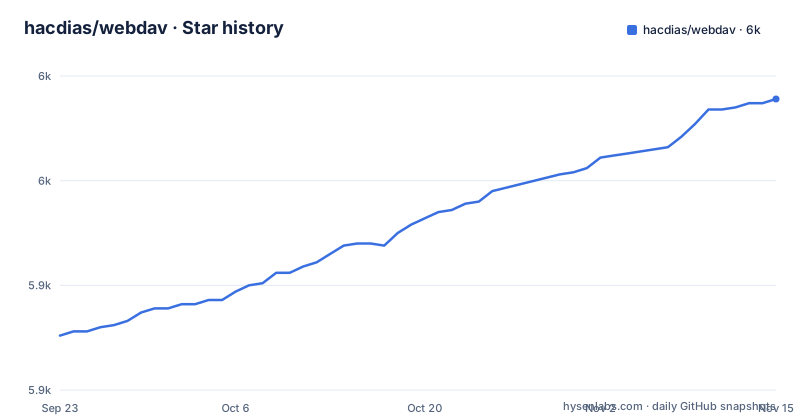
Star history
- hacdias/webdav5,989 ★ · +113
| Repository | 2026-09-23 | 2026-11-15 |
|---|---|---|
| hacdias/webdav | 5.9k | 6k |
113 Stars in the last 53 days, measured from the daily GitHub snapshot. Compare with other projects
Editorial analysis
What hacdias/webdav is, and the problem it removes
WebDAV is the HTTP extension that lets a client treat a remote directory as a mounted filesystem. Plenty of software speaks it without offering a server: desktop file managers, document tools, note-taking apps and mobile clients all expect a URL, a username and a password. hacdias/webdav supplies exactly that endpoint and nothing around it. The README describes it in one line as "A simple and standalone WebDAV server", and the repository layout backs that up: a main.go, a cmd/ directory for the CLI, a lib/ directory for the server, and no frontend assets, no database migrations and no plugin directory. Configuration lives in a single file, and the README states it can be provided as YAML, JSON or TOML.
That makes the target user fairly narrow but well defined. You have a directory on a machine, you want a handful of people or devices to reach it over HTTP with per-user access rules, and you do not want to run a full collaboration platform to get there. The alternative in that situation is usually a general-purpose file server that happens to implement WebDAV as one of several protocols, which means carrying its user database, its web interface and its upgrade path. hacdias/webdav asks you to bring your own authentication decisions and your own certificates. It is a server for people who already know which directory they want to expose.
How the server maps requests onto directories and permissions
The configuration file is the architecture. The README's YAML example lists the options, starting with address, port, TLS settings, an HSTS header and a path prefix, and the server can serve more than one directory, each probed at startup for file-system case sensitivity.
Permissions are letters such as C for create, U for update and D for delete, and the README spells out the cases people get wrong. Being overwritten counts: a COPY or MOVE onto an existing file replaces it and needs U, while one onto an existing collection removes everything it holds and needs D, on the collection and on every path under it. That last sentence is the one to reread before granting D anywhere near a shared tree.
Rules are matched against the request path after dot segments have been resolved, a path rule is a prefix match, and the last rule that matches wins. Anyone who has debugged an iptables chain will recognise the shape, and the same failure mode applies, where a broad rule at the bottom of the list quietly swallows the specific one above it.
Installing hacdias/webdav and serving a first directory
There are four documented routes in. The releases page carries prebuilt binaries for manual installs. Homebrew users get a formula. The Go toolchain can install the module directly. Containers are published on both GitHub's registry and Docker Hub, and the README notes that the pull commands fetch the latest released version, that specific tags pin versions, and that main tracks the development branch.
The Go route is the shortest path to a running server on a machine that already has a Go toolchain:
go install github.com/hacdias/webdav/v5@latestHomebrew is the equivalent for macOS and Linuxbrew users:
brew install webdavWith the binary on your PATH, the next step is a configuration file. The README gives a YAML example with every option; it opens with the listen address and port:
address: 0.0.0.0
port: 6065
Start the server against that file and the CLI will read it. For usage information regarding the CLI, the README points at webdav --help. The container path is documented as an equivalent command, mapping the same port and mounting the config read-only and the data directory read-write:
docker run \
  -p 6065:6065 \
  -v ./config.yml:/config.yml:ro \
  -v ./data:/data \
  ghcr.io/hacdias/webdav -c /config.yml
After that, a client connects to the host on port 6065 with the configured credentials. The README also notes that if you use fail2ban, adding --log-driver journald and --name webdav to the Docker run helps with log analysis.
Partial updates and the SabreDAV PATCH extension
Most WebDAV servers accept whole-file PUTs only. hacdias/webdav also implements partial file updates, and the README is explicit that this follows SabreDAV's PATCH extension rather than an official WebDAV specification. Requests must use the application/x-sabredav-partialupdate content type, include Content-Length, and carry the target range in X-Update-Range. Supported values are bytes=start-end, bytes=start-, bytes=-N and append.
There is a second compatibility path: partial PUT requests with Content-Range, for example Content-Range: bytes 6-8/*. The README describes this as an extra compatibility path and says it should be treated as a client and server agreement. That wording is the honest part. Because neither mechanism is standardised, the behaviour you get depends on which client is on the other end, and a client that does not send the right content type or header will fall back to a full-file write or fail. If your workload depends on appending to large files over the network, test the specific client rather than assuming the extension is portable.
Where hacdias/webdav is the wrong choice
The permission model is coarse. Four letters, applied per user and per path rule, with no notion of groups, quotas, share links, expiry or per-file ACLs. If two people need different rights inside the same subtree, you express that with rules and accept the last-to-first evaluation order, or you split the tree. There is no web interface either. The README documents no administrative UI, so every change to users or rules is a file edit.
Directory contents are whatever the process can see on the local filesystem. Nothing in the README or the repository layout suggests object storage, S3 or database-backed volumes, so if your files live in a bucket, this server is not the layer that reaches them.
TLS is available directly through the tls, cert and key keys, and an hsts setting sends a Strict-Transport-Security header when the server handles TLS itself; behind a proxy, the README says to set that header there.
How it compares with a full file-sync platform
Nextcloud is the obvious alternative and the difference is structural rather than a matter of features. Nextcloud is a PHP application with a database, a web interface, user and group management, sharing, versioning and a WebDAV endpoint on top of all of it. hacdias/webdav is a single Go binary that reads one config file and serves directories. If you want a browser UI where users can reset their own passwords, or you want sharing links and quotas, Nextcloud gives you those and hacdias/webdav does not. If you want a small endpoint in front of a directory that already exists, on a host where you would rather not run a database, the trade goes the other way.
The dependency list in go.mod supports that reading. The direct requirements are a systemd binding, mapstructure, rs/cors, cobra and pflag, viper, testify, gowebdav, zap, golang.org/x/crypto and a few golang.org/x packages. Viper is what lets the same configuration be read as YAML, JSON or TOML. zap handles logging. cobra and pflag produce the CLI behind webdav --help. There is no ORM, no templating engine and no asset pipeline. The Dockerfile ends in a scratch base image with a single binary at /bin/webdav, which is about as small as a container gets, and the compose.yml in the repository maps 6065:6065 and mounts ./data and ./config.yml. That file is a starting point rather than a finished deployment: it references the image webdav:test, so you would point it at ghcr.io/hacdias/webdav or hacdias/webdav before using it.
Maintenance, licensing and what an upgrade costs
The project is MIT licensed. That is permissive: you can use it commercially, modify it and redistribute it, provided the copyright notice and licence text travel with it. This is not legal advice, and if you ship the binary inside a product you should read the LICENSE file in the repository rather than a summary of it. The Docker image bundles the compiled binary, so the usual questions about attribution in a distributed artifact apply.
On maintenance, the last push to the default branch was on 2026-10-31, and the most recent release is v5.17.3 from 2026-10-30, with v5.17.2 and v5.17.1 arriving earlier in October. The repository is not archived. That is a recent cadence, and the presence of a renovate.json at the top level is consistent with automated dependency updates. The module path carries a /v5 suffix, which under Go module rules means major version 5 is a distinct import path; a future v6 would be a new module path rather than an in-place breaking change. Upgrades within v5 are therefore the low-risk case, and the configuration keys documented in the README are the surface to re-read on each release, particularly the rules and permissions semantics, since those govern access rather than presentation.
The operational cost is mostly configuration review. There is no migration tool and no state to migrate: the server holds no database, so an upgrade is a binary swap or an image tag change plus a restart. The thing that needs attention after an upgrade is the config file, because a key that changes meaning changes who can reach which path.
Editorial conclusion
Adopt hacdias/webdav when you need a small WebDAV endpoint over directories you already own and you are willing to write a config file with explicit users and permission rules. Skip it if you need a groupware suite, a web UI, sharing links or storage backends other than the local filesystem: the repository shows none of those. Before exposing it, verify three things in your own deployment: that your rules array produces the intended allow or deny decision under the last-to-first evaluation order, and that TLS is either terminated by a reverse proxy or enabled through the tls, cert and key keys. The Dockerfile exposes port 6065 and the compose file maps 6065:6065, so a default deployment is reachable there.
Frequently asked questions
What is hacdias/webdav used for?
It serves directories over WebDAV so that clients expecting a URL, username and password can treat a remote folder as a mounted filesystem. The README describes it as a simple and standalone WebDAV server, configured through a single YAML, JSON or TOML file.
How do I install hacdias/webdav?
The README lists four routes: download a binary from the releases page, use brew install webdav, run go install github.com/hacdias/webdav/v5@latest, or pull the container image from ghcr.io/hacdias/webdav or Docker Hub as hacdias/webdav.
How do I use a WebDAV server like hacdias/webdav on Windows?
The README documents the server side: after starting the binary or container with a config file, clients connect to the configured address and port, which is 6065 in the README example and in the Dockerfile EXPOSE line.
Official sources
Add this badge to your README
If you maintain this project, the badge below links readers to this analysis and shows its maintenance status from the daily GitHub snapshot. Paste the markdown into your README; add ?metric=license or ?metric=stars to the image URL for a different field.

[](https://hysenlabs.com/projects/hacdias-webdav)Star history chart for your README
[](https://hysenlabs.com/projects/hacdias-webdav)Was this useful?