kitty-scrollback.nvim: search the Kitty scrollback from Neovim
😽 Open your Kitty scrollback buffer with Neovim. Ameowzing!
At a glance
- What is it?
- kitty-scrollback.nvim is a Lua plugin that opens the Kitty terminal scrollback buffer inside Neovim so you can search it, copy from it and run commands out of it. It needs Neovim 0.10 or newer and Kitty 0.43.0 or newer, and its configuration is split between a Kitty kitten side and a plugin side with a documented precedence order.
- Who is it for?
- Adopt kitty-scrollback.nvim if you live in Kitty and Neovim together and regularly need to search what a command printed rather than scroll a terminal buffer by hand, since the plugin puts the scrollback in an editor buffer with search, copy and command execution.
- Can I use it commercially?
- Yes. Apache-2.0 is a permissive licence: you can use, modify and sell software built on it, as long as you keep its copyright and licence notices.
- Is it still maintained?
- Yes. The repository last received commits 45 days ago.
- What is it written in?
- Mainly Lua, according to GitHub's language statistics.
Answers come from the project's GitHub data, last synced on November 7, 2026, and from our analysis. They are not legal advice.
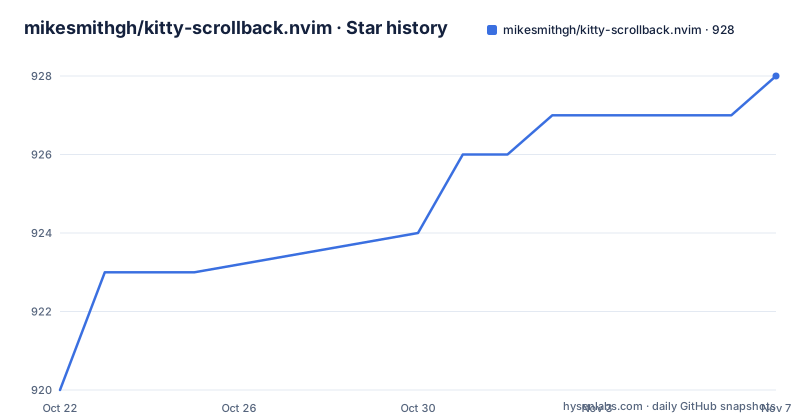
Star history
- mikesmithgh/kitty-scrollback.nvim928 ★ · +8
| Repository | 2026-10-22 | 2026-11-07 |
|---|---|---|
| mikesmithgh/kitty-scrollback.nvim | 920 | 928 |
8 Stars in the last 16 days, measured from the daily GitHub snapshot. Compare with other projects
Editorial analysis
The problem is that Kitty keeps the text and Neovim keeps the skills
Kitty has a scrollback buffer. It holds everything your shell has printed, including the output of commands that scrolled past, and it comes with its own search, which is fine for looking at one command's output and poor for everything else. You cannot run a normal editor workflow over it. Select a block with a mouse, copy it, or extract a URL from three hundred lines of build output, and you are doing it with terminal keystrokes rather than editor motions.
Neovim is good at exactly those things. It has incremental search that handles regexes, visual selection, register based copy and paste, and a command line you can send text into.
kitty-scrollback.nvim sits between the two. The project description is short: navigate your Kitty scrollback buffer to quickly search, copy and execute commands in Neovim. The mechanism is that the Kitty side exposes the scrollback contents to the editor side, which presents them as a buffer. Once the text is in a Neovim buffer, every editor tool applies to it, including running a line as a command.
The interesting consequence is the third item in that list. A terminal buffer is dead text. An editor buffer is a place where you can select a line and execute it. That turns a search result into an action, which is the difference between reading an old error and rerunning the command that produced it.
Two version floors that decide whether the plugin loads at all
The requirements are stated in the badges at the top of the project page and they are strict. Neovim must be v0.10 or newer, and Kitty must be v0.43.0 or newer.
Both floors exist for a reason. Kitty 0.43.0 is the version where the remote control and kitten APIs that the plugin depends on became usable in the way the plugin needs, and Neovim 0.10 is where the plugin API features the Lua code relies on landed. A plugin that uses a new terminal API on one side and a new editor API on the other is going to have a hard floor on both.
That is worth checking before you spend time on configuration. If your Kitty is older, the plugin will not have the hooks it needs to read the scrollback, and if your Neovim is older than 0.10, the Lua side will not have the API surface it calls. Neither failure is likely to produce a clear message.
The project also publishes release tags with semantic-release using the angular preset, which means conventional commit messages drive the version bump and the changelog automatically. That convention matters to you as a user because it means a major version bump corresponds to a breaking change, and the documentation has a dedicated section for breaking changes and migration steps. The listed releases are v9.3.1 on 2026-09-23, v9.3.0 on 2026-09-22 and v9.2.1 on 2026-07-18, and the last push was on 2026-09-23.
Where the configuration lives on both sides of the bridge
The configuration is not a single Lua table, and this is the part that surprises people. The documentation splits it into two halves.
On the Kitty side there is a kitten, and the documentation has a section for kitten arguments. The topic list on the repository also includes kitty-config, which is a strong hint that the plugin expects you to configure the kitten in your Kitty configuration file, not only in Neovim. A kitten in Kitty is a small terminal program that Kitty runs and that can talk back to the terminal, and the plugin uses one to pull the scrollback out.
On the Neovim side there is plugin configuration, with sub-sections for overriding builtin configurations, global configuration, and configuration precedence. The precedence section is the one to read carefully. When you have a builtin configuration, a global configuration and a specific override all in play, something has to win, and the project documents that order rather than leaving you to discover it.
The practical advice is to configure the kitten side in your kitty.conf and the plugin side in your Neovim config, then check the precedence section so you know which of your two settings actually takes effect when both apply to the same thing.
The repository structure supports this split too. The lua/ directory holds the plugin code, doc/ holds the generated documentation, scripts/ holds helper tooling including an internal language server check, and media/ holds the assets used in the documentation.
Installation and quickstart live in the README and the wiki
The project README carries dedicated Installation and Quickstart sections, and it links a wiki page for the plugin, named kitty_scrollback_nvim, which the animated demo comes from. The README also links a separate documentation directory in the repository, under doc/.
Because the README in the repository is assembled for publishing, its structure is worth understanding. The table of contents is generated by doctoc, and the file contains panvimdoc markers, which is the tool that converts the Markdown documentation into a Vim help file. That means the same source produces the GitHub page, the wiki content and the in-editor help, and it also means the help file you read with :help inside Neovim is the same documentation rather than a second, thinner version.
For a plugin with two halves, the wiki is where the integration details live, and the in-editor help is the reference for the configuration keys.
The plugin is Lua, so it is loaded by a plugin manager rather than installed as a package, and the repository is laid out accordingly with a lua/ directory at the root, which is the convention that Neovim plugin managers expect.
The test suite runs headless Neovim with a thirty minute budget
The Makefile shows how this plugin is tested, and the setup is more careful than a typical Lua plugin.
The tests run inside a headless Neovim, with plugins disabled, using a minimal init file at tests/minimal_init.lua, and they are driven by the plenary test harness. The timeout is set to thirty minutes, expressed in milliseconds by the shell arithmetic in the Makefile, which is a generous budget for a suite that may be waiting on terminal interaction.
-c "lua require([[plenary.test_harness]]).test_directory([[tests ! -regex .*_config.*_spec.*]], { minimal_init = '"${TESTS_INIT}"', timeout = "${TIMEOUT_MINS}", })"bash
There are four test targets and the distinction between them matters. The default test target excludes config specs using a regular expression on the file name, and the test-all target includes the whole tests directory. Each has a sequential variant, which passes a sequential flag to the harness so the tests run one at a time rather than in parallel.
Why exclude the configuration specs by default is a reasonable guess about flakiness, since configuration tests are the kind that interfere with each other when run in parallel, but the exact reason is not stated in the file. The sequential target is there for when you need to isolate a failure.
The check target does two things. It starts Neovim headless with the minimal init and quits, which verifies that the plugin loads at all without error, and then it runs a separate Lua language server check.
@LUA_LS_CONFIGPATH=scripts/internal/.luarc.json nvim -l scripts/internal/__lua_language_server_check.luabash
So the project type checks its own Lua as part of the same workflow as the tests. There is also a .stylua.toml file, so the formatting of the source is enforced by StyLua, and a .codespellrc file, so spelling in the source and documentation is checked too.
Limits: one terminal, one editor, one version each
The boundaries are clear and they are worth stating before you adopt it.
First, this is a Kitty plugin. The Kitty side of the bridge is a kitten, and kittens are a Kitty concept, so there is no equivalent for other terminal emulators here. If your terminal is iTerm2, WezTerm or GNOME Terminal, this plugin does nothing for you, whatever your Neovim setup looks like.
Second, the amount of history available is still Kitty's business. The plugin reads the scrollback buffer, and the size of that buffer is set by Kitty's own scrollback configuration. A small scrollback limit means there is little to search even with the plugin installed, and the plugin does not change that. If you expected to search back through a whole build session, the fix is a larger scrollback setting in Kitty, not a plugin option.
Third, the API surface moves. The plugin sits on two fast moving codebases, Neovim and Kitty, and the requirement floors of 0.10 and 0.43.0 show that the project tracks both. When either side changes its API, the plugin needs a release, and a release can carry breaking changes, which is why the documentation keeps a breaking changes and migration steps section.
Finally, the plugin is Lua and lives in your Neovim config directory, so a broken update affects your editor startup. That is a small but real cost, and it is why the project keeps a CHANGELOG.md and uses semantic-release with conventional commits, so that the version in your lockfile tells you what you are running.
Licence, maintenance state and where to look
The licence is Apache-2.0, with the LICENSE file at the repository root. The project is not archived and the last push was on 2026-09-23, the same day as the v9.3.1 tag, so the repository is being worked on rather than left alone.
The release history is regular and the version numbers move quickly for a plugin of this size, with three releases listed in the space of roughly two months, v9.3.1 and v9.3.0 one day apart on 2026-09-23 and 2026-09-22, and v9.2.1 on 2026-07-18. The semantic-release setup with the angular preset means the version and the changelog come from your commit messages, so a contributor with a conventional commit message gets a release without ceremony.
The repository also carries a .releaserc file, a .neoconf.json file for the Neovim configuration metadata, a setup.cfg file, a CONTRIBUTING.md and a python/ directory alongside the Lua source, which suggests some of the tooling around the project is written in Python rather than Lua.
For usage, the three places to go are the wiki page linked from the README for the guided walkthrough, the doc/ directory in the repository for the reference, and the in-editor help for the configuration keys. For problems, the issue tracker on the repository is the place to report them.
Editorial conclusion
Adopt kitty-scrollback.nvim if you live in Kitty and Neovim together and regularly need to search what a command printed rather than scroll a terminal buffer by hand, since the plugin puts the scrollback in an editor buffer with search, copy and command execution. Do not adopt it if you use a different terminal emulator, because the plugin is built on the Kitty kitten API, and do not expect it to replace Kitty's own scrollback configuration, which still governs how much history exists to search. Verify first that your Kitty version is 0.43.0 or newer and your Neovim is 0.10 or newer, that you have read the configuration precedence section so your overrides are not silently ignored, and that you read the breaking changes migration steps before upgrading across a major version.
Frequently asked questions
What are the requirements for kitty-scrollback.nvim?
Neovim v0.10 or newer and Kitty v0.43.0 or newer. The plugin also needs the Kitty kitten side configured, since the configuration is split between kitten arguments in your Kitty configuration and the plugin configuration in Neovim.
How do I search the Kitty scrollback buffer with Neovim?
kitty-scrollback.nvim opens the Kitty scrollback buffer inside Neovim, where you can search it, copy from it and execute commands out of it. Once the scrollback is in an editor buffer, normal editor search, selection and copy operations apply to it.
Does kitty-scrollback.nvim work with terminals other than Kitty?
No. The plugin relies on Kitty's kitten mechanism and the associated Kitty APIs, so it is specific to Kitty as a terminal emulator. The stated minimum version is Kitty 0.43.0.
How is kitty-scrollback.nvim tested?
The Makefile runs the test suite in headless Neovim with plugins disabled, using a minimal init file and the plenary test harness, with a thirty minute timeout. There are parallel and sequential variants, and a separate check target that verifies the plugin loads and runs a Lua language server check.
Official sources
Add this badge to your README
If you maintain this project, the badge below links readers to this analysis and shows its maintenance status from the daily GitHub snapshot. Paste the markdown into your README; add ?metric=license or ?metric=stars to the image URL for a different field.

[](https://hysenlabs.com/projects/mikesmithgh-kitty-scrollback-nvim)Star history chart for your README
[](https://hysenlabs.com/projects/mikesmithgh-kitty-scrollback-nvim)Was this useful?