GoofCord: a standalone Discord client built on Electron and Legcord
:shield: Take control of your Discord experience with GoofCord – a highly configurable and privacy minded discord client.
At a glance
- What is it?
- GoofCord is a TypeScript Electron client for Discord that does not depend on the official app at all, blocks tracking, supports plugins and themes through Vencord, Equicord and Shelter, and ships on Windows, Linux and macOS. The README is candid about macOS being limited and about using it going against the Discord terms of service, and the licence is OSL-3.0 rather than a permissive one.
- Who is it for?
- Adopt GoofCord if you want a Discord client you can modify, with plugin support, on a Linux machine where the official client is a problem, and you are willing to accept the terms of service position the project itself states.
- Can I use it commercially?
- Yes, with conditions. OSL-3.0 is a weak copyleft licence: you can use it inside commercial and closed-source software, but if you distribute changes to its own files, you must publish those changes under the same licence.
- Is it still maintained?
- Yes. The repository last received commits 11 days ago.
- What is it written in?
- Mainly TypeScript, according to GitHub's language statistics.
Answers come from the project's GitHub data, last synced on November 7, 2026, and from our analysis. They are not legal advice.
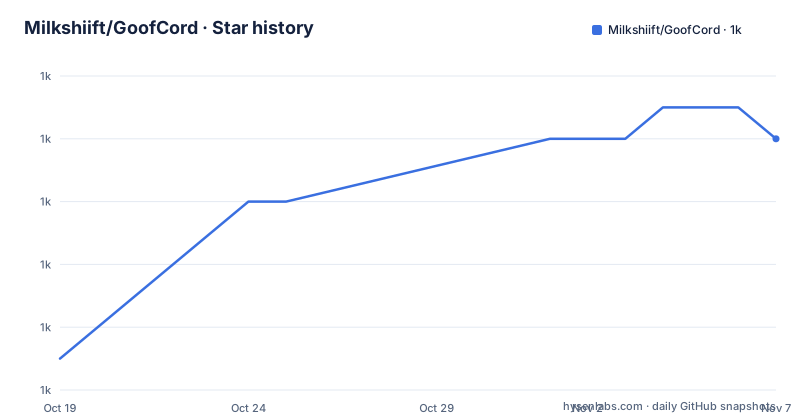
Star history
- Milkshiift/GoofCord1,014 ★ · +7
| Repository | 2026-10-19 | 2026-11-07 |
|---|---|---|
| Milkshiift/GoofCord | 1k | 1k |
7 Stars in the last 19 days, measured from the daily GitHub snapshot. Compare with other projects
Editorial analysis
A client that does not need the official app
GoofCord is described as taking control of your Discord experience with a highly configurable and privacy focused Discord client, and the README states that it is based on Legcord.
The property that defines it is in the feature list as standalone: GoofCord is a standalone application, not reliant on the original Discord client in any way. That is a different proposition from a client mod, which is the more common shape for this kind of project. A mod patches the official app and inherits its updater, its installer and its update behaviour. GoofCord ships the whole thing, and the reason the README gives for using Electron is exactly this: achieving a user experience on par with the official Discord client inherently requires embedding its web version within a browser or webview, and currently no other frameworks come close to Electron in providing that capability and covering all of GoofCord's needs.
That reasoning also explains the technical choices in the package metadata. The dependencies are a short list, mostly the maintainer's own forks: `arrpc`, `electron-sync-store`, `picocolors` and `stegcloak`, plus Preact for the interface, and two optional dependencies, `goofbind` and `patchcord`, which are also the maintainer's own repositories. The last one, `stegcloak`, is a Rust implementation pulled in by its GitHub URL, and its presence alongside a privacy section that mentions message encryption is the clearest signal of what the project means by privacy.
The intended user is a Discord user on Linux, or anyone who wants plugins and themes and does not want the official client in the picture. The repository is a TypeScript project with an Electron build, an `electron-builder.ts` configuration, a `build/` directory for the build script, and a `dist` folder for the packaged output. The version is 2.3.1, the default branch is `main`, the last push was on 2026-10-01, and the recent releases are 2.3.1 Victus Clavis, 2.3.0 Kinetic Clavis and 2.2.2 Vesper Phoneme.
The privacy story rests on blocking and on encryption
The privacy claim is the first item in the feature list and it is specific in its wording. GoofCord blocks as much tracking as possible and uses multiple techniques like message encryption to improve your privacy and security, with a link to a privacy FAQ in the project wiki.
There are two separate things in that sentence, and they deserve different levels of scepticism.
Blocking tracking is the tractable half. The Discord web client is a web application, and web applications in a browser context can be made to send less information about what you do and who you are. The project also ships a Rust dependency, `stegcloak`, which suggests steganographic message handling rather than a simple in-memory encryption, and the `loginFix` script in the package metadata, which clears the Electron local storage and copies GoofCord's own local storage into place, is the kind of housekeeping a client that manages its own profile directory has to do.
Encryption is the harder claim. The subject here is a closed source service with its own protocol, and any client that must talk to that protocol has to authenticate with it. A third party client can change what it collects about its user, but it cannot change what the server receives.
The README's own framing is more measured than the feature bullet, and it is worth reading alongside it. On the question of bans, the answer is that while using GoofCord goes against the Discord terms of service, there are no known bans from using it or any client mods. That is a factual statement about observed enforcement, and it is not a promise.
So the honest reading is that GoofCord reduces the metadata the client sends and gives you control over your own installation, and that the terms of service position is unchanged by any of it. The wiki page on privacy is the place to check the specific claims.
Vencord, Equicord and Shelter: a plugin ecosystem you do not own
The plugin and theme support is listed as a headline feature, and the way it is worded tells you the important thing: you can easily use client mods like Vencord, Equicord or Shelter for plugins and themes. To explore plugins and themes, the README says to head over to the Vencord category in the Discord settings.
So GoofCord does not implement its own plugin system. It hosts one, and the one it hosts is Vencord's, with Equicord and Shelter named as alternatives that the same mechanism can carry. That is a sensible division of labour for a project with one maintainer, and it is also the main dependency risk in the whole stack.
The consequence is that you now track three or four release cycles instead of one: the Electron application, the plugin host, and the plugins themselves. A Vencord update that assumes a specific upstream Discord web client can break a GoofCord build, and the failure looks like a client bug rather than a version mismatch.
The other feature in that group is global keybinds, which the README documents in its own wiki page. A system-wide keybind layer is the kind of thing a desktop client built on Electron can do that a web page cannot, and it is one of the clearest examples of what building your own application rather than patching someone else's buys you.
The Linux support claim is also specific and worth noting for anyone choosing on that basis: screensharing with audio and native Wayland support on Linux. Both are the kind of feature that makes the difference between a client you can actually use as your daily driver and one you keep switching back to the official app for.
Installing on each platform, and who maintains the packages
The install section is organised by platform, and the details differ enough to be worth going through.
On Windows there are three routes. Prebuilt binaries from the releases page, where you choose `GoofCord-Setup-<YOUR ARCHITECTURE>.exe` for an installer or `GoofCord-<VERSION>-win-<YOUR ARCHITECTURE>.zip` to unpack manually into a directory of your choice. Then Winget, with:
winget install GoofCordAnd Scoop:
scoop install extras/goofcordOn Linux, prebuilt binaries from the same releases page, Flathub, the AUR, and NixOS from nixpkgs. The AUR instruction comes with a caveat worth reading: `yay -S goofcord-bin`, and the note that the AUR package is not maintained by the developers of GoofCord. That is a normal state for AUR packages and it is exactly the kind of thing to check before trusting a package to install an application that holds your account session.
On macOS, the README is unusually honest. As I don't have a macOS device, macOS support is limited. You pick `mac-arm64.dmg` for Apple Silicon or `mac-x64.dmg` otherwise, and two troubleshooting steps are given. For a damaged app error there is a linked issue, and for a crash on launch the fix is:
xattr -cr /Applications/GoofCord.app && codesign --force --deep --sign - /Applications/GoofCord.appThat command clears the quarantine attribute and re-signs the bundle with an ad hoc signature. It is a standard workaround for a downloaded macOS app, and it is also a reminder that on macOS you are running an app whose maintainer cannot test it on that platform.
Building from source with Bun and electron-builder
The source build is six steps, and the second one is the one to read twice.
Install Bun, download the source code from the latest release, and note the instruction: getting it from the main branch is not recommended for a stable experience. Open a command line in the source directory, install the dependencies with `bun install`, and package the app with `bun run packageWindows`, `bun run packageLinux` or `bun run packageMac`. The compiled app ends up in the `dist` folder.
The distinction between the release source and the main branch is a deliberate warning, and it matters because the tags move faster than the releases. The recent tags are 2.3.1 from 2026-10-01, 2.3.0 from 2026-07-21 and 2.2.2 from 2026-07-10, so the release line is every few weeks while the branch is continuous.
The package metadata shows the tooling in full. The build is `bun build/build.ts` and the start script runs the dev build followed by Electron with source maps enabled. Packaging goes through electron-builder with separate Linux, Windows and macOS scripts, and the dev dependencies pin `electron` at 44.5.1, `electron-builder` at 27.0.0-alpha.9, `oxlint` and `oxfmt` for linting and formatting, and TypeScript at 7.0.2 with a `typescriptOld` alias pointing at a 6.x release, which is a project keeping two compiler lines in play at once. The `trustedDependencies` list names electron, and the `loginFix` script copies the local storage directory between the Electron profile and the GoofCord profile.
The open question for anyone building from source is the pre-release electron-builder, which is an alpha, and a TypeScript 7 line that is newer than the toolchain most of the ecosystem is on.
The terms of service, and where this client is the wrong tool
Two questions decide whether GoofCord is right for you, and neither of them is technical.
The first is the terms of service. The README says plainly that using GoofCord goes against the Discord terms of service, while also noting there are no known bans from using it or any client mods. For a personal account that many people have never read, that is a position you accept knowingly. For a device on an employer's account, or in a school or workplace that monitors its Discord usage, the same position may be a policy breach, and the absence of known bans is not a defence.
The second is whether you want a client you maintain. GoofCord is a fork of Legcord, it is a single maintainer's Electron application with three releases in three months, and it depends on a plugin host you also do not control. The interesting feature set, the privacy work, the global keybinds and the Linux polish are real, and the cost is that when something breaks, you are the one who fixes it or waits.
There are cases where it is clearly the wrong tool. If you need a Discord client that your organisation supports officially, with a support contract, this is not it. If you are on macOS, the maintainer says the support is limited and has no device to test on. If you are not interested in plugins, themes or keybinds, you are paying for Electron and a third party client's worth of maintenance for a marginal privacy gain.
The alternative approach is a browser client with an extension for the platform specific parts, which needs no installation and no account session of its own, at the cost of the native integrations and the keybinds.
The licence is the last thing to weigh, and it is unusual. The project is OSL-3.0, the Open Software License, declared in the package metadata and recorded in the project metadata. That is a copyleft licence, and for a desktop application it is a different kind of obligation from the permissive licences most client tools use, so if you intend to redistribute a modified build, read the LICENSE file before you do.
Editorial conclusion
Adopt GoofCord if you want a Discord client you can modify, with plugin support, on a Linux machine where the official client is a problem, and you are willing to accept the terms of service position the project itself states. Do not adopt it for a machine where Discord use is contractually sensitive or where an unpatched third party client is a policy violation, and do not adopt it for macOS as a primary client, because the README says macOS support is limited and the author has no macOS device. Verify three things first: that the plugin ecosystem you want is the one you expect, since Vencord, Equicord and Shelter are separate projects with their own update cycles, that the release you install is the one you tested rather than the per-commit build, and that the OSL-3.0 licence terms fit how you redistribute it, because that licence is copyleft and unusual for a desktop application.
Frequently asked questions
What is GoofCord and what is it based on?
GoofCord is a highly configurable, privacy focused Discord client written in TypeScript with Electron, based on Legcord. It is a standalone application that does not rely on the original Discord client in any way, and it supports plugins and themes through client mods such as Vencord, Equicord and Shelter.
How do I install GoofCord on Windows and Linux?
On Windows you can use the prebuilt installer or zip from the releases page, `winget install GoofCord`, or `scoop install extras/goofcord`. On Linux there are prebuilt binaries, Flathub, the AUR with `yay -S goofcord-bin`, and nixpkgs, and the README notes the AUR package is not maintained by the GoofCord developers.
Can I get banned for using GoofCord?
The README states that using GoofCord goes against the Discord terms of service, while there are no known bans from using it or any client mods. That is a statement about observed enforcement rather than a guarantee, and it does not change the terms of service position.
How do I build GoofCord from source?
Install Bun, download the source from the latest release rather than the main branch, run `bun install`, then `bun run packageWindows`, `bun run packageLinux` or `bun run packageMac`. The compiled app appears in the dist folder.
What licence is GoofCord released under?
OSL-3.0, the Open Software License, as declared in the package metadata and the project metadata. It is a copyleft licence, which is unusual for a desktop application and worth reading in the LICENSE file if you plan to redistribute a modified build.
Official sources
Add this badge to your README
If you maintain this project, the badge below links readers to this analysis and shows its maintenance status from the daily GitHub snapshot. Paste the markdown into your README; add ?metric=license or ?metric=stars to the image URL for a different field.

[](https://hysenlabs.com/projects/milkshiift-goofcord)Star history chart for your README
[](https://hysenlabs.com/projects/milkshiift-goofcord)Was this useful?