mkdocs/catalog: A Curated Catalog of MkDocs Projects
:trophy: :books: A list of awesome MkDocs projects and plugins.
At a glance
- What is it?
- mkdocs/catalog is an open-source directory for finding MkDocs themes, plugins, extensions, integrations, and documentation tools. It is useful for teams evaluating additions to their documentation stack, but it is a discovery list rather than an installable library.
- Who is it for?
- Adopt mkdocs/catalog when you need a structured way to compare MkDocs themes, plugins, and extensions across several documentation needs. Do not treat its ranking as an automatic procurement decision or install the catalog itself as an application dependency.
- Can I use it commercially?
- Yes, with credit. CC-BY-SA-4.0 allows commercial use as long as you credit the authors and indicate what you changed. It is written for creative content, so check how it applies to any code.
- Is it still maintained?
- Yes. The repository last received commits 2 days ago.
- What is it written in?
- Mainly Python, according to GitHub's language statistics.
Answers come from the project's GitHub data, last synced on November 7, 2026, and from our analysis. They are not legal advice.
Star history
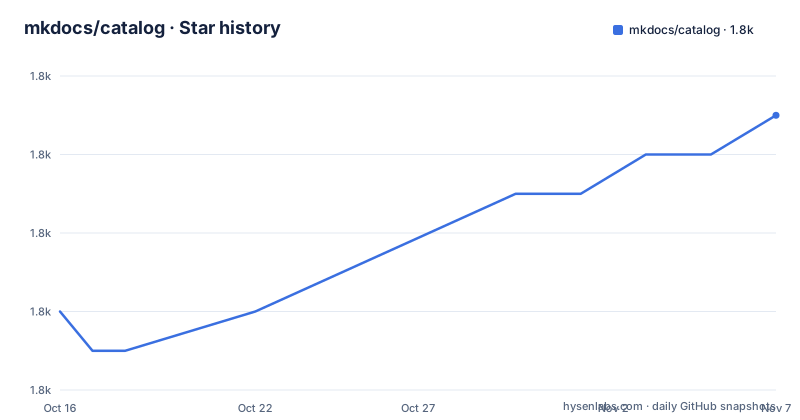
- mkdocs/catalog1,815 ★ · +5
| Repository | 2026-10-16 | 2026-11-07 |
|---|---|---|
| mkdocs/catalog | 1.8k | 1.8k |
5 Stars in the last 22 days, measured from the daily GitHub snapshot. Compare with other projects
Editorial analysis
What mkdocs/catalog Does for MkDocs Users
mkdocs/catalog solves a discovery problem rather than a software runtime problem. MkDocs users often need more than the core site generator: they may require a theme, search support, diagrams, code execution, localization, content reuse, PDF output, or quality checks. The catalog groups 300 open-source projects into 17 categories, including theming, API documentation, blogging, charts and images, code execution, Git repository information, HTML processing, internationalization, links, Markdown extensions, navigation, search, site conversion, site management, and snippets.
The target audience is a documentation author, developer, or technical writer who already knows that MkDocs is the site-building tool but does not yet know which extension to choose. Each catalog entry is intended to link a reader to the project’s repository, package page, or configuration example. The README presents the catalog as a reference list, not as a package that changes MkDocs behavior.
The list also identifies entries by type. Icons distinguish MkDocs plugins, themes, MkDocs-based projects, and Markdown extensions. That distinction matters because a plugin, a theme, and a general site project may solve adjacent problems through different integration points. The catalog is therefore useful as a map of the ecosystem, but it does not define a common interface or installation process for the listed projects.
How the Catalog Classifies and Ranks Projects
The catalog says that projects are ranked by a project-quality score calculated from metrics collected automatically from GitHub and different package managers. The displayed entries combine that score with metadata such as license, project type, package updates, and usage information. The README defines the medal markers as a combined project-quality score, while separate markers indicate a new project, inactivity, trend direction, recent addition, warnings, and GitHub or package-manager metadata.
That mechanism gives the catalog a consistent presentation across otherwise unrelated projects. It also creates an important limitation. The README does not publish the formula, weighting, collection interval, or normalization rules for the score. A reader can see that a score is used, but cannot determine from the README whether a particular score reflects recent activity, adoption, licensing, technical depth, or another input. The score should therefore be treated as a ranking signal for browsing, not as a complete technical evaluation.
The catalog also records status labels. The README defines an inactive project as one with no activity for 12 months and a dead project as one with an extremely long inactivity period. It includes warnings for situations such as a missing or risky license. These signals are useful because project descriptions alone can hide maintenance and licensing concerns. They are still metadata summaries, not a substitute for checking the underlying repository and package release history.
Browsing the Catalog and Adding a Project
There is no installation command for mkdocs/catalog. The README does not describe installing it with `pip`, cloning it as an application, or running it as a service. The first real use is to open the README’s category contents, select a category such as “Theming” or “Markdown extensions,” and follow the project links to inspect the implementation that matches the documentation requirement. The catalog itself does not configure MkDocs.
For a contribution, the documented workflow is to open an issue, submit a pull request, or directly edit `projects.yaml`. A contributor should use one of those paths instead of adding an unstructured entry to prose documentation. The README specifically names `projects.yaml` as the catalog data file. It does not provide a local validation command in the displayed instructions, so a contributor should follow the repository’s contribution guidance before assuming that an edit is complete.
The catalog includes examples for individual entries. For example, the Material for MkDocs entry shows installation with `pip` and a theme setting in `mkdocs.yml`. Those commands belong to Material for MkDocs, not to mkdocs/catalog. Copying such an example into the catalog configuration would confuse the directory’s role with the selected project’s integration steps. The distinction is important for new users who may interpret every package command shown in the README as part of installing the catalog.
Reading the README’s MkDocs Project Examples
The entries are intended to help a reader move from discovery to a concrete configuration. The README shows Material for MkDocs as an example of a project that can provide a theme and plugin-related configuration. The relevant project documentation and entry provide commands such as the following. This installs Material for MkDocs in an environment where Python packages are available.
pip install mkdocs-materialAfter installation, the README’s example configures MkDocs to use the `material` theme. This changes the documentation site configuration rather than installing mkdocs/catalog.
theme: materialThe entry also lists optional plugins in a separate `plugins` block. That block illustrates how the selected project’s features may be declared in `mkdocs.yml`; it is not a catalog configuration file.
plugins:
  - blog
  - group
  - offline
  - search
  - social
  - tags
The practical lesson is to treat each linked project’s instructions as authoritative for that project. The catalog’s README does not state compatibility ranges for every listed plugin, nor does it promise that all optional plugins can be enabled together for a given MkDocs version. Users should inspect the linked project’s documentation and package metadata before applying the example.
What the Catalog Does Not Decide for You
The main limitation is that a large directory can create a false sense of completeness. Having 300 entries across 17 categories does not mean the catalog covers every MkDocs extension, every supported Python version, or every current release. It also does not establish that a listed project is compatible with the reader’s MkDocs configuration. The README provides links and metadata, but it does not present a compatibility matrix.
A second limitation is the opacity of ranking. The catalog says that quality metrics are collected automatically, but it does not explain how different metrics are weighted. GitHub activity, package-manager timestamps, license signals, and usage indicators can measure different things. A project with fewer visible GitHub signals may still be suitable for a narrow internal documentation workflow. Conversely, a high ranking cannot establish that a plugin will meet a team’s accessibility, security, localization, or documentation requirements.
The catalog is also the wrong tool when you need a single answer to a specific compatibility or operational question. It is not a dependency resolver, package manager, integration test suite, or policy engine. It should be used to discover candidates, then the candidate project’s repository, release notes, license, and configuration documentation should determine adoption.
Catalog Data, Licensing, and Maintenance Signals
The repository is licensed under CC-BY-SA-4.0. That license applies to the catalog material and does not automatically license the projects linked from it. Each listed project has its own license, and the README explicitly includes license information or warning markers for some entries. This separation means that a user must review the license of the selected theme, plugin, extension, or other dependency rather than treating the catalog’s CC-BY-SA-4.0 designation as coverage for the entire MkDocs ecosystem.
The repository is not archived, and its last push was on 2026-10-15. The catalog also lists dated releases in 2023, including versions labeled `2023.06.29`, `2023.06.22`, and `2023.06.15`. The README’s contribution model allows updates through issues, pull requests, and direct edits to `projects.yaml`, but the presence of recent repository activity does not guarantee that every linked project has a recent release. Conversely, an older listed project can still be relevant if its documentation-specific role and compatibility are clear.
For maintainers of the catalog, the upgrade cost is primarily editorial and data-related rather than an application migration. Entries can become stale, package names or configuration examples can change, and ranking metadata must be regenerated from external sources. The README does not document an automated update command, so it would be incorrect to promise a one-command refresh procedure.
A Different Discovery Route for MkDocs Projects
A real alternative is best-of.org, which the README identifies as a place to discover other best-of lists and a way to create a list. The README identifies best-of.org as a place to discover other best-of lists or create one. That difference makes best-of.org useful when the documentation technology is not yet fixed, but it provides less direct focus for someone already committed to MkDocs.
Another route is to follow the linked project repositories and package-manager pages directly. That approach is less structured and requires the reader to perform the categorization, comparison, and maintenance checks manually. mkdocs/catalog adds value by placing many candidates in one categorized list and attaching a common set of metadata symbols. It does not remove the need to inspect the original project. For a team with a specific plugin requirement, the catalog is the better discovery entry point; for a team comparing documentation ecosystems generally, best-of.org may be the more relevant starting point.
Editorial conclusion
Adopt mkdocs/catalog when you need a structured way to compare MkDocs themes, plugins, and extensions across several documentation needs. Do not treat its ranking as an automatic procurement decision or install the catalog itself as an application dependency. Verify the selected project’s current documentation, license, package source, compatibility with your MkDocs setup, and maintenance activity before adopting it.
Frequently asked questions
What is mkdocs/catalog used for?
mkdocs/catalog is a curated list of 300 open-source MkDocs projects grouped into 17 categories. It helps users discover themes, plugins, extensions, integrations, and other documentation tools.
How do I install mkdocs/catalog?
The README does not provide an installation command for mkdocs/catalog. It is a catalog and contribution repository, not an installable MkDocs plugin. Commands such as `pip install mkdocs-material` belong to a listed project, not to the catalog.
How are projects ranked in mkdocs/catalog?
The README says rankings use a project-quality score calculated from metrics collected automatically from GitHub and different package managers. It does not document the formula or weighting, so the score should be treated as a browsing signal rather than a complete evaluation.
How can I add or update a project in mkdocs/catalog?
The README directs contributors to open an issue, submit a pull request, or directly edit `projects.yaml`. It does not provide a separate local validation command in the displayed instructions.
Official sources
Add this badge to your README
If you maintain this project, the badge below links readers to this analysis and shows its maintenance status from the daily GitHub snapshot. Paste the markdown into your README; add ?metric=license or ?metric=stars to the image URL for a different field.

[](https://hysenlabs.com/projects/mkdocs-catalog)Star history chart for your README
[](https://hysenlabs.com/projects/mkdocs-catalog)Was this useful?