floatThead: a fixed table header for the cases position:sticky cannot handle
Fixed <thead>. Doesn't need any custom css/html. Does what position:sticky can't
At a glance
- What is it?
- floatThead is a jQuery plugin that keeps a table's thead visible while the page or a scroll container moves, and the documentation is refreshingly blunt about when you should not use it. It suits a codebase on an older browser or an awkward scroll parent, and it has been in production at large companies for years.
- Who is it for?
- floatThead fits a project that must keep a table header visible in a scroll container or a browser without `position: sticky`, and where a jQuery plugin is still an acceptable dependency. Skip it for a new project on modern browsers, because the documentation itself says you probably should just use `position: sticky`, and skip it if you need Safari, mobile Safari, right to left text or a locked first column, since all four are listed as unsupported.
- Can I use it commercially?
- Yes. MIT is a permissive licence: you can use, modify and sell software built on it, as long as you keep its copyright and licence notices.
- Is it still maintained?
- Yes. The repository last received commits 87 days ago.
- What is it written in?
- Mainly JavaScript, according to GitHub's language statistics.
Answers come from the project's GitHub data, last synced on November 7, 2026, and from our analysis. They are not legal advice.
Star history
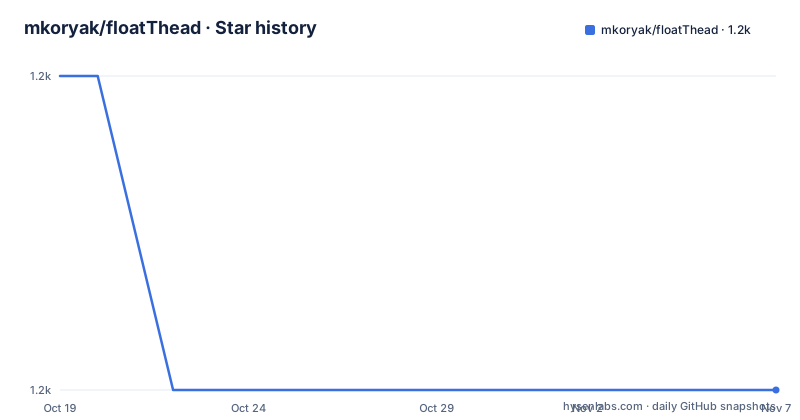
- mkoryak/floatThead1,213 ★ · -1
| Repository | 2026-10-19 | 2026-11-07 |
|---|---|---|
| mkoryak/floatThead | 1.2k | 1.2k |
-1 Stars in the last 19 days, measured from the daily GitHub snapshot. Compare with other projects
Editorial analysis
The plugin's own answer to why it exists
floatThead floats the table header on scroll, and no changes to your HTML or CSS are required. It supports floating the header while scrolling within the window or while scrolling within a container with overflow, and it supports responsive tables.
The most valuable thing in the documentation is the section that asks why not just use `position:sticky` and then answers it honestly. The first line is that you probably should. The plugin was created years before `position: sticky` existed.
Then the reasons that remain, and they are specific rather than nostalgic.
Some browsers do not support `position: sticky` at all, and the documentation links to a compatibility table. Your code runs in the real world, so that is not a hypothetical.
The second reason is the interesting one: any kind of non-standard scroll parent scenario, where the thing that you scroll with is not supported by `position: sticky`. Two sub-cases are given. Your table's scroll parent is not the body, but the body is what scrolls and you cannot change this. And your table scrolls horizontally within a container, but vertically within the page. That second case is the one that breaks most sticky implementations, because a sticky element sticks to its nearest scrolling ancestor, and if that ancestor scrolls in a different axis from the one the user is moving in, the result is wrong.
The third reason is behavioural rather than technical. Your sticky `top` position is dynamic, or you want to know when the header becomes sticky and you do not want to write code to do this.
And the fourth reason is the one the author enjoys: you do not want to learn these newfangled CSS things, you want a proven solution that works and uses jQuery, the greatest thing ever.
That last line is a joke and it is also the honest summary of the project. It is a jQuery plugin that predates the CSS feature it emulates, and it is still in production at large organisations.
Fixed or absolute, and why the choice is yours
The plugin's most interesting design decision is that it offers two positioning modes and picks one for you.
The header can be floated with `position:absolute`, which adds a wrapper, or `position:fixed`, which does not. Both have their pros and cons, and by default the best option is chosen based on your configuration.
The distinction is not cosmetic. The absolute mode wraps the table in an extra element, which changes the DOM the table lives in, and the wrapper participates in layout. The fixed mode does not add a wrapper, so the table's structure is untouched, but a fixed element is removed from the normal flow, which means it does not scroll with anything and needs manual repositioning relative to the page.
That trade is the same one the `position:fixed` and `position:absolute` choice in plain CSS presents, except the plugin also has to handle the wrapper's effect on the table's own layout, and it has to work out where the table currently is on the page in order to position a fixed header against it.
The other feature list entry worth reading is that it does not clone the thead, so your events stay bound. That is the difference between this and the many float-header implementations that duplicate the header into a fixed overlay. Cloning is simpler in some ways and it breaks every event handler, every jQuery plugin and every reference to the original cell, and it duplicates ids. Not cloning means the plugin has to move the real header rather than a copy, which is harder and is why the plugin has to be careful about table layout.
The rest of the list covers the awkward cases that a naive implementation gets wrong. It works with tables within a scrollable container or with whole window scrolling. It works with responsive table wrappers, and with dynamically hidden, added or removed columns, which matters because a column set that changes at runtime breaks anything that caches the header geometry. It works with border-collapse variants, weird margins, padding and borders, which is a long way of saying it does not assume your table is a simple grid.
And it works with libraries such as datatables, perfect-scrollbar and bootstrap3, which is a practical signal: if it survives those, it survives most real pages.
What it does not do, and the Safari problem
The documentation has a matching list of things the plugin does not do, and it is the most useful part of the page for anyone deciding.
It does not float the footer. It does not let you lock the first column like in Excel. Safari and mobile Safari are not supported, and the note adds that it might work or it might not, depending on your markup and Safari version, with a link to an issue about it. RTL is not really supported, it might work in overflow scrolling mode if you are lucky, and it expects `dir` on the `html` element. Layout issues resulting from document zoom not being 100% are not supported.
That Safari entry deserves a bit of thought, because it is the most likely to surprise. A plugin that positions elements by measuring and then setting pixel offsets runs into a browser whose layout model differs in ways that are hard to detect. The stated position is that it might work depending on markup and version, which is the least useful answer a plugin can give, and it is a warning that the Safari path is untested territory rather than a supported configuration.
The RTL entry is the second one to read carefully. Expects `dir` on the `html` element means the plugin has one expectation about document direction and no fallback, so a right to left deployment needs that attribute set correctly before the plugin initialises, or the offsets are computed against the wrong direction.
The zoom entry is a third, and it is the kind of thing that appears only in real deployments. If a user has the browser zoomed to 110%, the plugin's measurements and the browser's layout can disagree, and the header drifts.
The documentation also has a blunt line about the general case. If you use CSS and HTML best practices, this plugin will work. If you are stuck in 1999, you better read the FAQ.
That is the author's framing of the whole project, and it is a fair one. The plugin is a solution for a specific set of situations, and outside them, modern CSS is the better answer.
Installing it, and the wrapper ecosystems
Installation is through a package manager, a zip, or a CDN, and the CDN route is the quickest to try:
<!-- Latest compiled and minified JavaScript -->
<script src="https://unpkg.com/floatthead"></script>
<script>
  $(() => $('table').floatThead());
</script>
The call itself is the entire API surface for the common case. Select the tables and call the method.
The package managers are npm and bower, `npm install floatthead` and `bower install floatThead`, and there is a zip of the latest release for people who do not use either. The CDNs are cdnjs, jsdelivr and unpkg. There is also a Webjar for Java people, and a set of framework wrappers: a Vue component by tmlee, an AngularJS directive by brandon-barker, and a Yii2 framework wrapper by bluezed.
The existence of those wrappers is informative. The wrappers exist because the awkward part of using this plugin is not the call, it is the lifecycle, since the header has to be re-initialised when the table's data changes or its columns change, and each framework has its own idea of when that happens. A wrapper moves that decision into the framework's rendering cycle.
The requirements are minimal and stated plainly: jQuery 1.8.x or better, 1.9 compliant, or jQuery 1.7.x with jQuery UI core. Supported browsers are IE9 or better and Chrome and Firefox, all versions from the last ten or more years.
That browser list is a good summary of the project. The IE9 requirement is an old one the plugin still carries, and the Chrome and Firefox line covers a decade of versions, so the code is conservative about what browser APIs it uses.
A decade-old plugin, and what the repository shows
The release history is the thing to notice. The versions are 2.2.3 on 2021-08-20, 2.2.4 on 2021-09-01 and 2.2.5 on 2023-03-10, and the last push was on 2026-08-13.
So the last published release is more than three years old, while the repository is being touched. That is the same pattern as many long-lived libraries, and it has two possible explanations, and the difference matters for whether you can depend on it.
The package manifest is remarkably small. The version is 2.2.5, the description is literally fixed table header plugin that works, the main entry point is `dist/jquery.floatThead.min.js` and the types are `dist/jquery.floatThead.d.ts`. The dependencies object is empty, and the only dev dependency is `uglify-js` at `^3.3.8`.
That is a plugin with no runtime dependencies beyond jQuery itself, and the build is a single command that copies the source into `dist/` and minifies it with uglifyjs. There is no bundler, no transpiler, no test runner in the manifest and no linting configuration. The whole toolchain is one dev dependency and one shell command, and the TypeScript declaration file is checked into `dist/` rather than generated, which means it is maintained by hand.
That simplicity is a genuine strength for a plugin that ships into other people's pages, since there is no dependency tree to audit. It is also a signal about the project's shape. This is a single-file plugin that has reached a stable state, and the maintenance activity in 2026 is likely small corrections rather than new capability.
The repository top level matches that reading. There is a `src/` directory with the source, a `dist/` directory with the built and minified files, a `bower.json` for the bower package, a `package-lock.json`, a `CHANGELOG.md`, and the usual project files. The `npmFileMap` in the manifest maps the published package to the `dist/` directory with a `*.js` glob, so the published tarball contains the built files and not the source.
The keywords are a small joke and a decent summary at once, listing locked header, floating header, fixed header, fixed table header, table, thead, fixed position, the cat is cute, floatThead, scrolling table and jQuery plugin. The cat is in there, and the project topics list `cats-are-cute` alongside the technical ones.
The user list in the documentation is the best evidence of longevity. It names Ctrl O, WheresTheGig.com, a Google internal use, tld-list.com and Samsung, the last with a link to an IoT project, plus a figure of around 153,000 hits on GitHub code search. A plugin that is in a Samsung IoT repository and in production at large organisations is not going to break your build when a dependency audit flags it as unmaintained, which is a different kind of risk.
Editorial conclusion
floatThead fits a project that must keep a table header visible in a scroll container or a browser without `position: sticky`, and where a jQuery plugin is still an acceptable dependency. Skip it for a new project on modern browsers, because the documentation itself says you probably should just use `position: sticky`, and skip it if you need Safari, mobile Safari, right to left text or a locked first column, since all four are listed as unsupported. Before you adopt it, check whether your table scrolls inside a container that is not the body, because that is the case the plugin genuinely adds value in, and note the maintenance state, with the last release v2.2.5 from 2023-03-10 and a last push on 2026-08-13.
Frequently asked questions
What does floatThead do?
It floats a table's thead on scroll without requiring changes to your HTML or CSS, and it supports both scrolling within the window and scrolling within a container with overflow, plus responsive tables.
Why not just use position: sticky?
The documentation says you probably should. The remaining reasons are browsers that do not support position sticky, non-standard scroll parent situations such as a table scrolling horizontally inside a container while the page scrolls vertically, a dynamic sticky top position, and a desire to be told when the header becomes sticky.
How do I install and use floatThead?
Install with `npm install floatthead` or `bower install floatThead`, or load it from a CDN with a script tag pointing at unpkg, then call the method on your tables, for example `$(() => $('table').floatThead());`. It requires jQuery 1.8.x or better.
Which browsers and situations does floatThead not support?
Safari and mobile Safari are not supported, right to left text is not really supported and expects a dir attribute on the html element, document zoom other than 100% is not supported, and it does not float the footer or lock the first column.
How current is floatThead?
The last release was v2.2.5 on 2023-03-10, though the repository had a push on 2026-08-13. The package has no runtime dependencies beyond jQuery, and its only dev dependency is uglify-js.
Official sources
Add this badge to your README
If you maintain this project, the badge below links readers to this analysis and shows its maintenance status from the daily GitHub snapshot. Paste the markdown into your README; add ?metric=license or ?metric=stars to the image URL for a different field.

[](https://hysenlabs.com/projects/mkoryak-floatthead)Star history chart for your README
[](https://hysenlabs.com/projects/mkoryak-floatthead)Was this useful?