Shelfab: A Local-First EPUB Manager That Rewrites Your Files and Syncs StoryGraph
An elegant, EPUB library manager with StoryGraph sync, beautiful cover arts, and automatic series grouping.
At a glance
- What is it?
- Shelfab is a GPLv3, TypeScript-based EPUB library manager that edits metadata inside your files, pulls cover art from the web, groups series automatically, and syncs with StoryGraph. It is unsigned, so expect OS warnings, and its automation comes with trade-offs you should weigh before adopting.
- Who is it for?
- Adopt Shelfab if you are a StoryGraph user who wants a local-first, open-source EPUB manager that edits metadata directly into your files and groups series automatically. Do not adopt it if you need signed installers for corporate or managed devices, or if you require a tool with a longer track record.
- Can I use it commercially?
- Yes, with conditions. GPL-3.0 is a copyleft licence: if you distribute software that includes it, you must release that software's source code under the same licence. Running it internally without distributing it does not trigger that obligation.
- Is it still maintained?
- Yes. The repository last received commits 37 days ago.
- What is it written in?
- Mainly TypeScript, according to GitHub's language statistics.
Answers come from the project's GitHub data, last synced on October 22, 2026, and from our analysis. They are not legal advice.
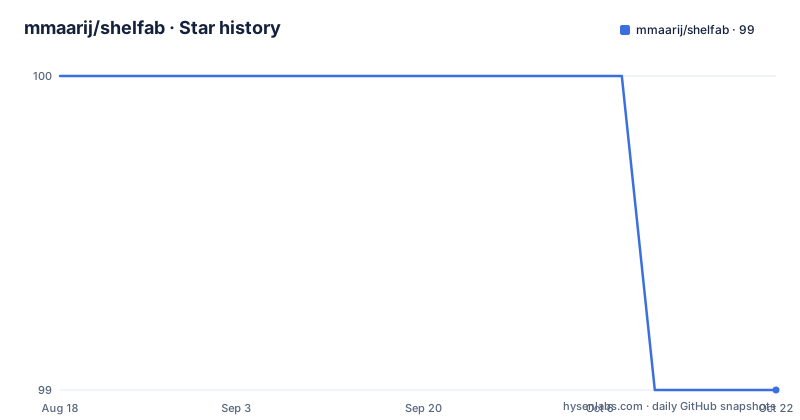
Star history
- mmaarij/shelfab99 ★ · -1
| Repository | 2026-08-18 | 2026-10-22 |
|---|---|---|
| mmaarij/shelfab | 100 | 99 |
-1 Stars in the last 65 days, measured from the daily GitHub snapshot. Compare with other projects
Editorial analysis
What Shelfab Solves and Who It Is For
Shelfab targets readers who have a StoryGraph account and a local collection of EPUB files that they want to organize without sending their library to a cloud service. The README is explicit about the privacy stance: your StoryGraph username and library data never leave your machine except when you interact with metadata providers. That means the app fetches cover art and series information from external sources, but it does not phone home for analytics or tracking. The intended user is someone who values a polished, native-feeling interface over the clunkier open-source tools, and who is comfortable with the fact that the project is unsigned and developed by an independent developer. The feature list is short but focused: metadata editing, cover art search, series grouping, and StoryGraph sync. This is not a general-purpose ebook reader or a Calibre replacement; it is a manager that assumes you already have your EPUBs and want them to look good and stay consistent.
The Core Mechanism: Rewriting EPUBs Internally
The most consequential design decision in Shelfab is that it does not just store metadata in a sidecar database. According to the README, Shelfab automatically updates and refactors your EPUB files internally so your files carry the accurate data anywhere. That means when you edit a title, author, series, or description, the app writes the change back into the EPUB container itself. This is a different approach from Calibre, which keeps metadata in a library database and only writes to the file when you explicitly convert or send to device. The benefit is portability: your files are self-describing, and any reader will see the corrected metadata. The risk is that rewriting EPUBs can corrupt files if the code has a bug, and it changes the file hash, which matters if you use file-level syncing or backup tools. The README does not explain how the rewrite is performed, what EPUB version it targets, or whether it preserves all internal elements like fonts, scripts, or embedded media. That is a gap you should probe before trusting it with a large library.
Getting It Running: Installation and First Steps
Installation is straightforward if you use the prebuilt binaries. Windows users download an .exe installer and may have to click through SmartScreen. macOS users get a .dmg and may need to right-click and select Open to bypass Gatekeeper. Linux users can choose between .deb for Debian or Ubuntu and .rpm for Fedora or RHEL. The README notes that the app is unsigned to keep the project free, which explains the standard OS warnings. If you prefer to build from source, you need Node.js. The commands are: git clone https://github.com/mmaarij/shelfab.git, cd shelfab, npm install, npm run start for development mode, and npm run make to package the app for your OS. There is no mention of configuration files, environment variables, or a CLI. The app appears to be a GUI application, so the first-run experience likely involves pointing it at a directory of EPUBs and entering your StoryGraph username. The README does not describe the setup flow, so you should expect to explore the interface on your own.
StoryGraph Sync: What It Promises and What It Omits
The StoryGraph sync is the headline feature, but the README gives almost no detail on how it works. It says you can sync your reading progress and managed library effortlessly. It does not say whether the sync is one-way or two-way, whether it updates reading progress from StoryGraph to local files or the reverse, or how conflicts are resolved. It also does not mention whether you need to authenticate with a StoryGraph account or if a username is enough. Given that Shelfab is local-first and privacy-focused, the sync likely uses StoryGraph's public interface or an unofficial API, which can break if StoryGraph changes its backend. The README's claim that your StoryGraph username and library data never leave your machine except when directly interacting with metadata providers suggests that the sync itself is done locally, but the exact data flow is unspecified. If you rely on StoryGraph for reading tracking, you should test the sync with a small set of books before trusting it with your entire history.
Automatic Series Grouping and Cover Art: The Aesthetic Payoff
Shelfab's second differentiator is automatic series grouping. The README says it pulls series information and groups related books in a beautiful, animated timeline so you always know what to read next. This sounds like it uses metadata providers to fetch series order and then displays books in a visual timeline. The value is clear for readers who own long series and forget the reading order. The cover art feature lets you search the web for high-resolution artwork directly within the app or upload your own custom covers. This is a practical feature because many EPUBs come with low-quality or missing covers. The combination of series grouping and cover art is what makes Shelfab feel like a physical bookshelf, as the tagline suggests. However, the README does not specify which metadata providers are used, whether the cover search is automated or manual, or whether the series grouping works reliably for indie or self-published books that may not have metadata entries. The timeline is a visual feature, but it is not clear if it affects the actual file structure or just the display.
Limitations and Failure Modes: Unsigned, Young, and Opaque
The most obvious limitation is the lack of code signing. The README acknowledges this, and it means users on Windows and macOS will see security warnings. On managed corporate or school devices, unsigned apps may be blocked entirely by policy. The project is also young: the first release v1.0.0 was pushed on 2026-04-28, with earlier versions v0.0.4 and v0.0.3 from April 2026. That is a very short history, and the README is thin on operational details like backup, restore, or error handling. A more serious failure mode is the in-file EPUB rewriting. If Shelfab encounters a malformed EPUB or a file with unusual internal structure, the rewrite could produce a broken file. The README does not mention any backup mechanism before rewriting, so you should make your own copies. Another limitation is the dependency on external metadata providers. If those providers change their APIs or rate-limit requests, the cover art search and series grouping will degrade. The README also does not specify whether the app works with DRM-protected EPUBs, which is a common issue for library books. You should assume it does not, since DRM would block metadata rewriting.
Alternatives and How They Differ
The most direct alternative is Calibre, which is a mature, open-source ebook manager that also supports metadata editing and series grouping. Calibre uses a central library database and can convert between formats, which Shelfab does not. The key difference is that Calibre does not rewrite your EPUBs unless you ask it to, so your source files remain untouched until you explicitly convert or update metadata. Calibre also has a built-in content server and a plugin system, but its interface is often criticized as clunky. Shelfab's approach is to feel native and elegant, as the README says, and to write changes back to files automatically. Another alternative is StoryGraph itself, if you only need reading progress tracking and do not care about local file management. StoryGraph is a web-based service, so it is not local-first and does not manage your files. For readers who want a visual bookshelf without any sync, there are simpler tools like Bookpedia or Delicious Library on macOS, but they are not open source and do not rewrite EPUBs. The choice comes down to whether you want a database-centric tool like Calibre or a file-rewriting tool like Shelfab.
Maintenance and License Implications
Shelfab is licensed under GPL-3.0, which means you can use, modify, and distribute the software, but any derivative works must also be licensed under GPL-3.0. If you are an individual reader, this has no practical impact. If you are an organization that wants to integrate Shelfab into a proprietary product, the GPL is a deal-breaker unless you are willing to open-source your modifications. The project is actively maintained, with a release on 2026-04-28, but the maintenance cost is a concern because it is a single-developer project. The README asks for support via Ko-fi, which suggests the funding is minimal. You should check the repository for open issues, commit frequency, and response times, but the provided material does not include that information. The upgrade path is also unclear: the README does not mention auto-updates, so you will likely need to download new releases manually. Given the file-rewriting behavior, you should always back up your library before upgrading, because a new version might change the rewrite logic.
Editorial conclusion
Adopt Shelfab if you are a StoryGraph user who wants a local-first, open-source EPUB manager that edits metadata directly into your files and groups series automatically. Do not adopt it if you need signed installers for corporate or managed devices, or if you require a tool with a longer track record. Before committing, verify that the StoryGraph sync works with your account type, test the metadata rewriting on a backup copy of your library, and check the repository for recent commits and open issues, since the project is young and the README is thin on operational details.
Frequently asked questions
Is Shelfab free, and what licence is Shelfab under?
Shelfab is free and open source under the GNU General Public License v3.0, built by an independent developer who keeps the builds unsigned to keep the project free. Support is offered through a Ko-fi page.
Does Shelfab send my reading data to a server?
Shelfab is local first, with your StoryGraph username and library data staying on your machine except when directly interacting with metadata providers. The project states there is no analytics and no tracking.
Why does Windows or macOS warn me when I install Shelfab?
The builds are intentionally unsigned so the project stays free, so standard OS warnings appear on first install. On Windows, click More Info then Run Anyway in SmartScreen; on macOS, right-click the app and select Open in Gatekeeper.
How do I install Shelfab on Linux?
Download the .deb package for Debian or Ubuntu, or the .rpm package for Fedora or RHEL, from the project's Releases page.
Can I build Shelfab from source instead of downloading Shelfab?
Yes, with Node.js installed: clone the repository, run npm install, then npm run start for development mode or npm run make to package the app for your OS.
Official sources
Add this badge to your README
If you maintain this project, the badge below links readers to this analysis and shows its maintenance status from the daily GitHub snapshot. Paste the markdown into your README; add ?metric=license or ?metric=stars to the image URL for a different field.

[](https://hysenlabs.com/projects/mmaarij-shelfab)Star history chart for your README
[](https://hysenlabs.com/projects/mmaarij-shelfab)