compose-lint: a security linter that grades what actually deploys
Security-focused linter for Docker Compose files. Catches dangerous misconfigurations before they reach production. Grounded in OWASP and CIS Docker Benchmark.
At a glance
- What is it?
- compose-lint checks Docker Compose files against four families of security findings, previews auto-fixes as a diff, and can turn a stack's current findings into a tracked baseline. Its container is distroless and its rule docs ship inside the wheel so --explain works offline.
- Who is it for?
- compose-lint suits a team that wants a security gate in CI on the Compose files it already ships, and that is willing to write a justification for each accepted finding. It does not replace a runtime check, and its auto-fix only touches the unambiguous cases, so a clean pass is not the same as a safe deployment.
- Can I use it commercially?
- Yes. MIT is a permissive licence: you can use, modify and sell software built on it, as long as you keep its copyright and licence notices.
- Is it still maintained?
- Yes. The repository last received commits 1 day ago.
- What is it written in?
- Mainly Python, according to GitHub's language statistics.
Answers come from the project's GitHub data, last synced on October 21, 2026, and from our analysis. They are not legal advice.
Star history
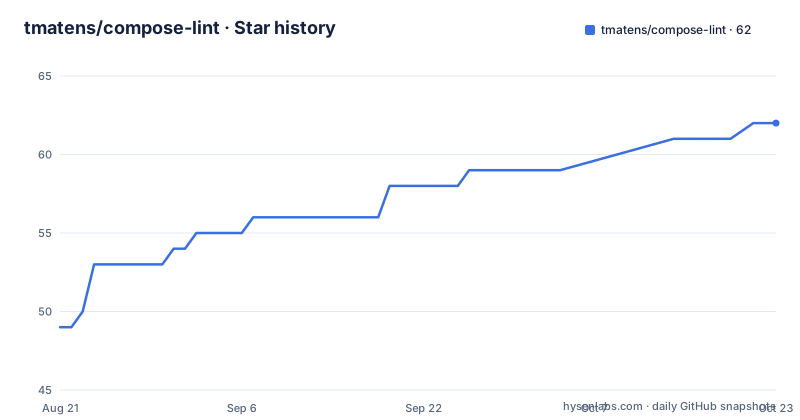
- tmatens/compose-lint62 ★ · +13
| Repository | 2026-08-21 | 2026-10-21 |
|---|---|---|
| tmatens/compose-lint | 49 | 62 |
13 Stars in the last 61 days, measured from the daily GitHub snapshot. Compare with other projects
Editorial analysis
Four families of finding, all about privilege and exposure
The rules fall into four groups. Privilege flaws cover `privileged: true`, a missing `cap_drop`, `no-new-privileges` not being set, running as the root user, and sharing a host namespace. Network exposure covers wildcard port binds and `network_mode: host`. Supply chain covers unpinned images and missing digest pins. Filesystem and credential leaks cover mounts of the Docker socket, sensitive host paths, and plaintext credentials sitting in `environment:`. That last group is the one the project's own research emphasises: in a scan of 11,111 public Compose files on GitHub, 99 percent had at least one security finding and more than one in four carried a literal credential. The tool is grounded in the OWASP Docker Security Cheat Sheet and the CIS Docker Benchmark, and every rule carries that reference. The README also states that there is no configuration to write and that a run takes sub-second whether it is linting one file or a hundred, which is what makes the check cheap enough to sit in a pre-commit hook or a pull request check rather than a nightly job. The full rule documentation is published on the project site.
fix writes nothing until you pass --apply
Auto-fixing is split into a preview and a commit, which is the right default for a tool that edits infrastructure files. The dry run prints a unified diff and writes nothing:
compose-lint fix              # dry-run diff, writes nothing
compose-lint fix --apply      # write the fixes in place
The preview marks the entries that change behaviour rather than just formatting, and the guidance is to read those labels before applying anything. The README is also explicit about scope: the auto-fixes cover the unambiguous cases only. That is why a fix run that reports nothing changed is not a statement that the file is clean, since anything ambiguous was left for a human, and why the read-only check remains the primary command. With no arguments the tool auto-detects `compose.yml`, `compose.yaml`, `docker-compose.yml` or `docker-compose.yaml` in the current directory, and explicit file arguments are accepted for multi-file runs.
init turns today's findings into tomorrow's baseline
Adopting a linter on an established stack is the hard part, and `init` is the answer. It takes the stack's current findings, using the same merged view the check command grades and including override and environment files, and writes them into a `.compose-lint.yml` baseline:
compose-lint init docker-compose.yml          # writes ./.compose-lint.yml
compose-lint init docker-compose.yml -o ci.yml # write somewhere else
compose-lint init docker-compose.yml --force   # overwrite an existing config
The design choice inside that file matters more than the command. Each finding becomes a per-service `exclude_services` entry carrying a `TODO` reason, and never a global `enabled: false`, so a service added later still trips the rule instead of inheriting a blanket exemption. The intent is that the gate can go in the same day and the triage happens afterwards, with each TODO replaced by a real justification or the entry deleted and the issue fixed. A reviewer reading the baseline can therefore see every accepted risk next to the service it applies to, and the configuration reference for generating a starter config lives in the repository documentation.
Exit code 1 is the gate, and the threshold is fail-on high
The example output shows the contract. A synthetic file mounts the Docker socket and binds `8080:80`; the socket finding is shown as SUPPRESSED with the tracked reason recorded underneath, and the port finding appears as MEDIUM against rule CL-0005, whose message explains that Docker bypasses host firewalls such as UFW and firewalld. The run exits with code 1 because one finding sits at or above the default `--fail-on high` threshold. Suppressed findings are still displayed but are not counted, which is what makes a baseline reviewable rather than silent. The README flags that the demonstration file is synthetic and points to an examples gallery for worked remediations of real stacks, so treat the numbers in the walkthrough as a shape to expect rather than a measurement of anything.
Two install paths: newest release or a pinned lockfile
The quick path is a normal package install, and the tool can also run without installing anything through uvx or pipx. Both resolve the newest release at the time you run them. For a gate that runs in CI or in production tooling, the reproducible path pins the version and installs dependencies from a hash-pinned lockfile that release automation keeps current:
curl -fsSLO https://raw.githubusercontent.com/tmatens/compose-lint/v0.32.0/requirements.lock
pip install --require-hashes -r requirements.lock   # dependencies, hash-pinned
pip install --no-deps compose-lint==0.32.0          # the tool, version-pinned
Splitting dependencies from the tool with `--no-deps` is what makes the two hashes meaningful. Every pip path needs Python 3.11 or newer; the container needs nothing at all:
docker run --rm -v "$(pwd):/src" composelint/compose-lint:0.32.0Rule docs are baked into the wheel for offline --explain
A rule identifier in the output is meant to be resolvable without leaving the terminal, and `--explain` is the command that does it. Given an ID such as CL-0005, it prints the full rule documentation: what the rule catches, why it matters, the fix, and the OWASP or CIS reference. Those are the same pages published on the documentation site, which matters because the site is not always reachable from a build agent. The packaging makes that possible: the build copies `docs/rules/` into the image and force-includes the rule markdown into the wheel under `compose_lint/rule_docs/`, so the text is read from disk at runtime rather than fetched. Documentation drift is therefore a build concern, not a network dependency.
The Dockerfile argues for its own unpinned apt
The container is Google distroless Python on Debian 13, running as nonroot UID 65532 with no shell and no package manager, and the architecture decision record for the runtime base image is cited in the file. The build stage uses a digest-pinned `debian:trixie-slim` and deliberately chooses that image so the build-time Python path matches the runtime and the virtual environment transfers across stages without shebang rewriting. The apt packages are then intentionally left unpinned, with the reasoning written out: the base image digest is immutable, apt verifies package signatures, Renovate has no datasource for Debian apt, and pinning would break when Debian purges old versions from the index. A hadolint suppression for that rule is inline. Two virtual environments are used so everything entering the final image is hash-pinned.
One runtime dependency, four lock files, and a fuzz harness
The dependency picture is unusually disciplined. pyproject.toml declares a single runtime dependency, `pyyaml>=6.0.2,<7`, and everything else lives in optional extras groups with exact pins, because inline `pip install X==Y` lines in workflows are not scanned by Dependabot. Each extras group maps to one CI job, and a `dev` group is the umbrella developers install locally. Alongside sit four lock files, requirements.lock, requirements-build.lock, requirements-dev.lock and requirements-docs.lock. The repository also carries a GitHub Action in action.yml, a pre-commit hook file, a .clusterfuzzlite/ directory with fuzz/, .vex/ for vulnerability attestations, LICENSE-corpus.md for the corpus, and governance files including GOVERNANCE.md, MAINTAINERS.md, AGENTS.md and CHANGELOG.md. The package still classifies itself as beta.
Editorial conclusion
compose-lint suits a team that wants a security gate in CI on the Compose files it already ships, and that is willing to write a justification for each accepted finding. It does not replace a runtime check, and its auto-fix only touches the unambiguous cases, so a clean pass is not the same as a safe deployment. Before adopting it, decide the --fail-on threshold for your pipeline, read the generated .compose-lint.yml rather than accepting it wholesale, and pin the version with the hash-pinned lockfile if the gate runs in production tooling. Version 0.32.0 shipped on 2026-09-28 and the last push is dated 2026-09-29.
Frequently asked questions
What does compose-lint check in a Docker Compose file?
It groups its rules into four families: privilege flaws such as privileged mode, a missing cap_drop, no-new-privileges not set, root user and host namespace sharing; network exposure through wildcard port binds and network_mode host; supply chain through unpinned images and missing digest pins; and filesystem or credential leaks such as Docker socket mounts, sensitive host paths and plaintext credentials in environment.
How do I install compose-lint reproducibly for CI?
Download the hash-pinned lockfile for the tag you want, install the dependencies with pip install --require-hashes -r requirements.lock, then install the tool itself with pip install --no-deps compose-lint==0.32.0. Every pip path needs Python 3.11 or newer, while the Docker image is self-contained and runs on distroless Python as nonroot.
Can compose-lint fix my Compose file automatically?
It auto-fixes the unambiguous findings only. Running compose-lint fix prints a unified diff and writes nothing, marking the behaviour-changing entries so they can be read first, while compose-lint fix --apply writes the fixes in place.
How do I adopt compose-lint on a stack that already has findings?
Run compose-lint init against the stack, optionally with -o to write elsewhere or --force to overwrite. Each finding becomes a per-service exclude_services entry with a TODO reason rather than a global enabled false, so services added later still trip the rule, and the triage can happen afterwards.
How do I look up what a compose-lint rule ID means?
Pass it to --explain, for example compose-lint --explain CL-0005, which prints what the rule catches, why it matters, the fix and the OWASP or CIS reference without leaving the terminal. The same documentation is published on the project site, and the rule markdown is force-included into the wheel under compose_lint/rule_docs/ so the command works offline.
Official sources
Add this badge to your README
If you maintain this project, the badge below links readers to this analysis and shows its maintenance status from the daily GitHub snapshot. Paste the markdown into your README; add ?metric=license or ?metric=stars to the image URL for a different field.

[](https://hysenlabs.com/projects/tmatens-compose-lint)Star history chart for your README
[](https://hysenlabs.com/projects/tmatens-compose-lint)