Mochi Diffusion: Native Stable Diffusion and FLUX.2 Klein on Apple Silicon
Run Stable Diffusion on Mac natively
At a glance
- What is it?
- Mochi Diffusion is a SwiftUI macOS app that runs Stable Diffusion through Core ML and FLUX.2 Klein through the Iris pipeline with Metal GPU acceleration. It is fast and private, but it is Mac-only, model conversion is on you, and it is not a node-based workflow tool.
- Who is it for?
- Adopt Mochi Diffusion if you have an Apple Silicon Mac, want offline generation with ControlNet and Image2Image, and are willing to convert or download Core ML models yourself. Do not adopt it if you need Windows or Linux, a node graph, or a training pipeline; the README lists no such features.
- Can I use it commercially?
- Yes, with conditions. GPL-3.0 is a copyleft licence: if you distribute software that includes it, you must release that software's source code under the same licence. Running it internally without distributing it does not trigger that obligation.
- Is it still maintained?
- Yes. The repository received new commits within the last day.
- What is it written in?
- Mainly Swift, according to GitHub's language statistics.
Answers come from the project's GitHub data, last synced on November 15, 2026, and from our analysis. They are not legal advice.
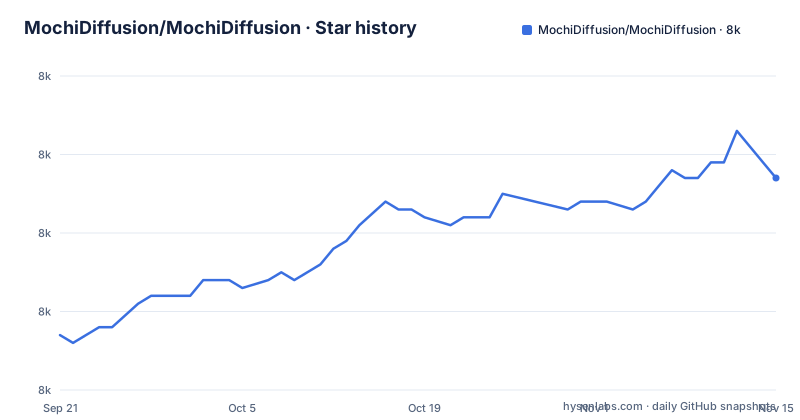
Star history
- MochiDiffusion/MochiDiffusion7,977 ★ · +20
| Repository | 2026-09-21 | 2026-11-15 |
|---|---|---|
| MochiDiffusion/MochiDiffusion | 8k | 8k |
20 Stars in the last 55 days, measured from the daily GitHub snapshot. Compare with other projects
Editorial analysis
What Mochi Diffusion solves, and for whom
Most Stable Diffusion interfaces assume an NVIDIA GPU or a cloud endpoint. Mochi Diffusion takes the opposite position: it is a macOS native app, written in Swift and SwiftUI, that runs generation entirely on the machine. The README lists generating images locally and completely offline as a feature. That privacy property is not a marketing add-on; it is a consequence of the architecture, since the app loads Core ML model files from a local folder and never needs a network connection to produce an image.
The audience is narrow and specific. You need an Apple Silicon Mac (M1 and later) running macOS 15.6 or later. If you are on an Intel Mac, the README's compatibility list excludes you. If you are on Windows or Linux, this project is not for you at all. Within that Mac-only audience, the app targets people who want a GUI rather than a Python environment: a gallery, starting-image generation, and ControlNet, without managing a virtualenv or a web UI.
How the Core ML and Neural Engine pipeline works
Mochi Diffusion does not implement diffusion itself. It wraps Apple's Core ML Stable Diffusion implementation, and the README names it in its opening description. The practical consequence is that the app is a front end over .mlmodelc packages: a TextEncoder, a Unet, a VAEDecoder, and a VAEEncoder, plus merges.txt and vocab.json. The app does not convert those files; it expects them already converted.
Compute unit selection is the main performance lever exposed to the user. The README describes two options. CPU & Neural Engine provides a balance between speed and low memory usage. CPU & GPU may be faster on M1 Max, Ultra and later, but uses more memory. Those two options are not interchangeable with every model: the split_einsum model version works with all compute unit options including the Neural Engine, while the original version is only compatible with the CPU & GPU option. Pick the wrong pairing and the model will not run as configured.
There is a first-run cost that surprises people. According to the README, when using a model for the very first time, it may take up to 2 minutes for the Neural Engine to compile a cached version, and subsequent generations are much faster. That delay is compilation, not generation, so it should not be read as a performance regression.
FLUX.2 Klein support arrives through a different route. The repository contains an iris.c submodule and the README credits iris.c, the pipeline from the author of antirez/iris.c. FLUX.2 Klein models require no conversion, which removes the most annoying step of the Stable Diffusion path.
Installing Mochi Diffusion and generating a first image
There is no Homebrew formula or package manager command in the README. Distribution is through GitHub releases, so the install step is downloading the latest version from the releases page and opening the app. Building from source is a separate path: the compatibility section requires Xcode 26.0 or later, and the repository is an Xcode project. After launching, the app creates a model folder under your home directory by default, and the README notes this location can be customized under Settings. If you have no models, the app has nothing to load, so the first real task is placing a model in the right shape. For a converted Stable Diffusion model, the README gives this directory layout:
<Home Directory>/
└── MochiDiffusion/
    └── models/
        ├── stable-diffusion-2-1_split-einsum_compiled/
        │   ├── merges.txt
        │   ├── TextEncoder.mlmodelc
        │   ├── Unet.mlmodelc
        │   ├── VAEDecoder.mlmodelc
        │   ├── VAEEncoder.mlmodelc
        │   └── vocab.json
        ├── ...
        └── ...
The split_einsum variant in that example is the one that works with the Neural Engine. For FLUX.2 Klein the layout is different and no conversion is required. The README points to a download script in the iris.c repository for fetching the components:
download_model.shOnce the components are in place, the Klein model folder holds four subdirectories rather than a flat set of files, and the app picks it up by folder name.
The model folder is the real setup cost
The directory structure above is the part of Mochi Diffusion that trips people up, and it is worth being blunt about why. The app expects each model to live in its own named folder inside the models directory, and that folder name becomes the display name in the app. Inside it, the compiled Core ML components must sit at the top level: merges.txt, TextEncoder.mlmodelc, Unet.mlmodelc, VAEDecoder.mlmodelc, VAEEncoder.mlmodelc, and vocab.json.
For Stable Diffusion you either convert a model yourself following the project's wiki guide on converting Stable Diffusion models to Core ML, or you download pre-converted community models. The README links to a coreml-community model collection and a separate ControlNet model collection. It also points to a Stable Diffusion 1.5 with ControlNet build using the split_einsum variant, which is the sensible starting point if you want ControlNet without doing conversion work.
FLUX.2 Klein is simpler. No conversion is required. You download the text encoder, tokenizer, transformer, and vae components for a Klein model, place them in the model folder, and the layout is four subdirectories rather than a flat set of files:
<Home Directory>/
└── MochiDiffusion/
    └── models/
        ├── flux-klein-4b/
        │   ├── text_encoder/
        │   ├── tokenizer/
        │   ├── transformer/
        │   └── vae/
        ├── ...
        └── ...
The README links to the 4B and 9B distilled models and notes that iris.c issue #12 has specific guidance for flux-klein-4b. If you go down this path, read that issue before assembling the folder.
Where Mochi Diffusion is the wrong tool
The clearest limitation is platform. Apple Silicon and macOS 15.6 or later are hard requirements. There is no Windows build, no Linux build, and no Android build. Anyone searching for a mobile version will not find one in this repository.
A second limitation is the model format. Mochi Diffusion consumes Core ML models, not the .safetensors or .ckpt files that the wider Stable Diffusion ecosystem distributes. If a model you want has no Core ML conversion, you either convert it with the project's wiki instructions or you cannot use it. That means the app sits outside the ordinary checkpoint workflow. LoRA training, fine-tuning, and custom node graphs are absent from the feature list.
Third, the interface is a gallery app, not a pipeline builder. If your work depends on chaining samplers, upscalers, and conditioning nodes, this is the wrong shape of tool.
Mochi Diffusion compared with Diffusion Bee and Draw Things
The most direct comparison is Diffusion Bee, which is also a Mac Stable Diffusion app. Both target the same user: someone who wants a native Mac GUI instead of a Python web UI. The difference in approach is the inference stack. Mochi Diffusion is built on Apple's Core ML Stable Diffusion implementation and exposes the compute unit choice, which is what lets it target the Neural Engine. The app also saves generated images as PNG with their generation settings, which AUTOMATIC1111-compatible tools and Civitai uploads can read and which you can view in Finder's Get Info window.
Draw Things is the other name that comes up, and it is a different kind of product: it reaches beyond the Mac to other Apple platforms, while Mochi Diffusion is macOS only. If portability across Apple devices matters to you, that distinction decides the question. Against Automatic1111 or ComfyUI, the split is GUI versus node graph and local Core ML versus Python and PyTorch. Those tools run on NVIDIA hardware and offer extension ecosystems; Mochi Diffusion trades that breadth for a native Mac app with no Python environment and no cloud calls.
Maintenance, licensing, and what v6.0 changed
The repository is not archived, and the last push was on 2026-11-02. The newest releases are v6.3 on 2026-11-02, v6.2 on 2026-09-30 and v6.1.2 on 2026-09-26. The CHANGELOG.md file in the repository root is where the specifics live.
Upgrade cost is mostly model management, not the app binary. Because Core ML models are stored outside the app bundle in your home directory, updating Mochi Diffusion does not re-download them. That is convenient, but it also means an app update that changes expected model structure would require you to reorganize folders.
The licence is GPL-3.0, per the LICENSE file and the license badge. For individual use this is unremarkable. If you intend to bundle Mochi Diffusion into a commercial product or ship a modified build, GPL-3.0 carries distribution obligations that a permissive licence would not, and you should read the licence text rather than rely on a summary. Nothing here is legal advice.
Editorial conclusion
Adopt Mochi Diffusion if you have an Apple Silicon Mac, want offline generation with ControlNet and Image2Image, and are willing to convert or download Core ML models yourself. Do not adopt it if you need Windows or Linux, a node graph, or a training pipeline; the README lists no such features. Before installing, confirm your macOS version is 15.6 or later, decide between split_einsum and original models based on your compute unit choice, and check the release page for the current version.
Frequently asked questions
What is Mochi Diffusion?
It is a macOS native app, written in Swift and SwiftUI, that runs Stable Diffusion and FLUX.2 Klein locally. It uses Apple's Core ML Stable Diffusion implementation for Stable Diffusion and the Iris pipeline for FLUX.2 Klein, and runs on Apple Silicon Macs with macOS 15.6 or later.
How do I install Mochi Diffusion?
Download the latest version from the GitHub releases page and open the app. There is no package manager command in the README, and building from source requires Xcode 26.0 or later.
How do I use Mochi Diffusion?
Place a Core ML Stable Diffusion model or a FLUX.2 Klein model in the app's model folder, which is created under your home directory by default and can be changed in Settings. The app then loads the model for text-to-image, Image2Image, and ControlNet generation.
How does Mochi Diffusion compare with Diffusion Bee?
Both are Mac Stable Diffusion apps. Mochi Diffusion is built on Apple's Core ML Stable Diffusion implementation and lets you choose between CPU & Neural Engine and CPU & GPU compute units, which affects speed and memory use.
What are the alternatives to Mochi Diffusion?
Draw Things is a comparable Apple-platform option, and Automatic1111 and ComfyUI cover the node-graph and extension-heavy workflow on other hardware. Mochi Diffusion's distinction is a native macOS app with Core ML inference and no cloud calls.
Official sources
Add this badge to your README
If you maintain this project, the badge below links readers to this analysis and shows its maintenance status from the daily GitHub snapshot. Paste the markdown into your README; add ?metric=license or ?metric=stars to the image URL for a different field.

[](https://hysenlabs.com/projects/mochidiffusion-mochidiffusion)Star history chart for your README
[](https://hysenlabs.com/projects/mochidiffusion-mochidiffusion)Was this useful?