mcpb: a .mcpb zip, a manifest.json and the rename from DXT that breaks old tooling
Desktop Extensions: One-click local MCP server installation in desktop apps
At a glance
- What is it?
- modelcontextprotocol/mcpb defines the .mcpb bundle for local MCP servers, ships the mcpb CLI, and carries the loading code that Claude for macOS and Windows uses. It was renamed from DXT, and the rename touches the CLI, the file extension and the npm package.
- Who is it for?
- Use mcpb if you maintain a local MCP server and want users of Claude for macOS and Windows, or another app that adopts the format, to install it by opening a single file. Do not treat it as a general package manager: a bundle must carry its dependencies, and Python bundles depend on the host handling the runtime.
- Can I use it commercially?
- Check first. The repository uses a licence we do not classify automatically, so read its LICENSE file before any commercial use.
- Is it still maintained?
- Yes. The repository last received commits 166 days ago.
- What is it written in?
- Mainly TypeScript, according to GitHub's language statistics.
Answers come from the project's GitHub data, last synced on November 6, 2026, and from our analysis. They are not legal advice.
Star history
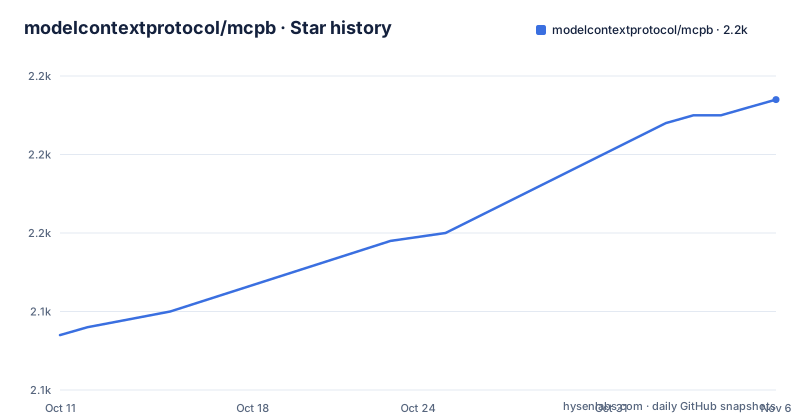
- modelcontextprotocol/mcpb2,167 ★ · +30
| Repository | 2026-10-11 | 2026-11-06 |
|---|---|---|
| modelcontextprotocol/mcpb | 2.1k | 2.2k |
30 Stars in the last 26 days, measured from the daily GitHub snapshot. Compare with other projects
Editorial analysis
The rename from DXT: dxt is now mcpb, .dxt is now .mcpb
A notice at the top of the repository warns that the project moved from DXT (Desktop Extensions) to MCPB (MCP Bundles). Three things changed names. The `dxt` CLI is now `mcpb`. The `.dxt` files are now `.mcpb` files. The `@anthropic-ai/dxt` package is to be moved to `@anthropic-ai/mcpb`, and the notice asks users to update their dependencies and tooling.
The repository description still reads Desktop Extensions: One-click local MCP server installation in desktop apps, so older write-ups and search results may use the DXT name for the same thing. The package.json confirms the current name: the package is @anthropic-ai/mcpb, its description is Tools for building MCP Bundles, and the version is 2.1.2.
The practical risk is stale scripts. A build script that calls the dxt command, or a release step that uploads a .dxt file, will break or produce a file the new tooling does not recognise. Search your repository for the old names before you touch anything else.
A bundle is a zip with manifest.json, and nothing else is mandatory
An MCP Bundle is a zip archive that contains a local MCP server and a manifest.json describing the server and its capabilities. The format is described as spiritually similar to Chrome extensions (.crx) and VS Code extensions (.vsix), aimed at letting end users install local MCP servers with a single click.
The only required file is manifest.json. The example layouts show how much freedom that leaves. A Node.js bundle puts the entry point at server/index.js, with node_modules inside the archive and an optional package.json, icon.png and assets folder. A Python bundle puts main.py and utils.py under server/, bundled packages under lib/, and an optional requirements.txt. A binary bundle holds server/my-server for Unix and server/my-server.exe for Windows.
The full set of mandatory and optional manifest fields is defined in MANIFEST.md, and examples sit in the examples folder: calculator-rust, chrome-applescript, file-manager-python, file-system-node, hello-world-node and hello-world-uv. The package also exports JSON schemas for manifest versions v0.1, v0.2 and v0.3, plus a latest alias, so an editor or a validator can check a manifest.
Three commands take a server folder to an installable file
The CLI is installed globally from npm:
npm install -g @anthropic-ai/mcpbThe workflow has three steps. In a folder holding your local MCP server, run `mcpb init`, which guides you through creating a manifest.json. Run `mcpb pack` to create the .mcpb file. Then any app that implements MCPB support can run your server, and opening the file in Claude for macOS and Windows shows an installation dialog.
The CLI is documented in CLI.md, and the bin entry in package.json points to dist/cli/cli.js. Because the bundle contains the server files directly, packing is just archiving a prepared folder. The tool does not fetch dependencies for you in the examples shown, so a Node.js bundle needs node_modules present in the folder before you pack.
The repository also includes a prompt template for AI coding tools. It tells the tool to read README.md, MANIFEST.md and the examples, to build the server with @modelcontextprotocol/sdk over stdio transport, and to produce a valid manifest. Treat that as a starting point for generated code, and read the output.
Node.js is the recommended runtime because it ships with Claude
The README makes a clear recommendation: implement MCP servers in Node.js instead of Python to reduce installation friction. The reason is concrete. Node.js ships with Claude for macOS and Windows, so a Node bundle works out of the box without users installing another runtime, and without you packaging one by hand.
Python takes more care. There are two documented routes. The first is the UV runtime, version 0.4 or newer: set `server.type = "uv"` in the manifest and include a pyproject.toml with dependencies. The host application manages Python and the dependencies, no bundled packages are needed, and it works across platforms without a user Python install. The hello-world-uv example shows it.
The second is the traditional route: set `server.type = "python"` and bundle the packages yourself. The bundling steps for this path are not covered in the opening README sections, so read the Python example under examples/file-manager-python before relying on it.
The consequence for a Python author is a choice between depending on the host's UV support and shipping your own packages in lib/. Neither path is as simple as the Node default.
What the repository actually contains: spec, CLI and Claude's loading code
The repository provides three components. The first is the bundle specification in MANIFEST.md. The second is the CLI for creating bundles. The third is the code that Claude for macOS and Windows uses to load and verify MCPB bundles, found in src/index.ts.
That third piece is unusual. The authors state that Claude for macOS and Windows uses the code here to offer single-click installation, along with automatic updates, easy configuration of MCP servers and the variables and parameters they need, and a curated directory. They are open-sourcing the specification, the toolchain, and the schemas and key functions that Claude uses, in the hope that other AI desktop applications adopt the format too.
The package.json exports show how the code is split for consumers: a root entry, a ./browser entry, a ./node entry, a ./cli entry, ./schemas and ./schemas/* paths, and a ./schemas-loose entry. An app author who wants to add MCPB support can import the schemas and validation functions instead of writing a manifest parser.
Support beyond Claude is stated as a goal, not a fact. The README names no other application that loads .mcpb files.
Gaps to check before you depend on mcpb
Several limits are visible from the repository itself.
The license field on GitHub reads NOASSERTION, even though the repository has a LICENSE file. The metadata does not name a license, so read the LICENSE file yourself before you embed the code in a product.
The repository is not archived. The latest tagged releases are v2.1.2, v2.1.0 and v2.1.1, all published on 2025-12-04, and the last push to the main branch was on 2026-05-26. The tag names are slightly inconsistent: one release carries the title v.2.1.1 with a stray dot, and 2.1.0 has no leading v in its title.
The prompt template for AI tools links to github.com/anthropics/mcpb, while this repository sits under modelcontextprotocol. Those links may be stale after the move, so follow the paths in your own checkout.
A bundle also has to carry everything it needs. Dependencies go in the zip, whether that is node_modules, lib/ or a compiled binary per platform. A Rust or Go server needs a separate executable for each operating system, as the binary layout with my-server and my-server.exe shows.
Editorial conclusion
Use mcpb if you maintain a local MCP server and want users of Claude for macOS and Windows, or another app that adopts the format, to install it by opening a single file. Do not treat it as a general package manager: a bundle must carry its dependencies, and Python bundles depend on the host handling the runtime. Before you start, check that your scripts, docs and dependencies use the mcpb names, and that you are comfortable with a repository whose GitHub license field reads NOASSERTION.
Frequently asked questions
What are .mcpb files?
A .mcpb file is a zip archive holding a local MCP server and a manifest.json that describes it. Opening one in Claude for macOS and Windows shows an installation dialog.
What is MCP and what is it used for in the context of mcpb?
The repository treats MCP servers as the programs that apps connect to, and mcpb is the packaging format for the local ones. It does not define the protocol itself, and it points bundle authors to the @modelcontextprotocol/sdk package.
What is the Python Model Context Protocol (MCP) support in mcpb?
Python servers can be bundled with `server.type = "python"` or, with the UV runtime 0.4 or newer, `server.type = "uv"` and a pyproject.toml. The README still recommends Node.js because it ships with Claude for macOS and Windows.
Official sources
Add this badge to your README
If you maintain this project, the badge below links readers to this analysis and shows its maintenance status from the daily GitHub snapshot. Paste the markdown into your README; add ?metric=license or ?metric=stars to the image URL for a different field.

[](https://hysenlabs.com/projects/modelcontextprotocol-mcpb)Star history chart for your README
[](https://hysenlabs.com/projects/modelcontextprotocol-mcpb)Was this useful?