ms-agent: one Python SDK behind the CLI, TUI and WebUI
MS-Agent: a lightweight framework to empower agentic execution of complex tasks
At a glance
- What is it?
- ModelScope's ms-agent puts a single harness in charge of planning, context, permissions and memory, then exposes the same agent logic through three front ends. The catch is that the credential layer writes resolved keys in plaintext.
- Who is it for?
- Adopt ms-agent if your team already runs Python agent logic and wants the same agent behind a terminal and a browser workspace, and you can live with a harness that owns planning, context and permissions instead of you. Skip it if credential hygiene outranks a bundled WebUI, or if you need a graph API your own orchestrator controls down to each edge.
- Can I use it commercially?
- Yes. Apache-2.0 is a permissive licence: you can use, modify and sell software built on it, as long as you keep its copyright and licence notices.
- Is it still maintained?
- Yes. The repository last received commits 5 days ago.
- What is it written in?
- Mainly Python, according to GitHub's language statistics.
Answers come from the project's GitHub data, last synced on November 14, 2026, and from our analysis. They are not legal advice.
Star history
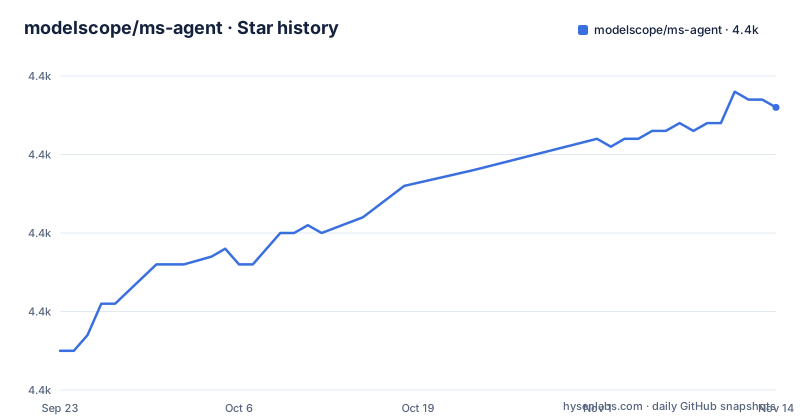
- modelscope/ms-agent4,426 ★ · +31
| Repository | 2026-09-23 | 2026-11-14 |
|---|---|---|
| modelscope/ms-agent | 4.4k | 4.4k |
31 Stars in the last 52 days, measured from the daily GitHub snapshot. Compare with other projects
Editorial analysis
The harness owns planning, context, permissions and execution feedback
ms-agent exists for tasks that outlive a single prompt. The framework's own claim is a modular harness for complex, long-running work, and the pieces it names are specific: models, tools, skills and sub-agents assembled under a customizable harness. What the harness takes over is the bookkeeping a hand-rolled loop usually gets wrong. Planning, context, permissions and execution feedback sit in one layer rather than in each loop you write.
Project memory and autonomous scheduling are the two additions aimed at long runs. Memory is what lets an assistant resume after a gap; scheduling is what keeps a task moving without a human nudging it. Memory support arrived with v1.3.0, alongside Code Scratch and Ray support for accelerating document information extraction.
A catch worth naming early: the README calls the framework lightweight while the repository ships a WebUI, a deep research system, a financial research workflow and a video generation workflow. A checkout that starts as one pip package grows into several products.
One Python SDK behind three front ends
The CLI, TUI and WebUI are not separate applications that happen to agree on behaviour. A shared Python SDK handles execution and management for all three, so agent logic and extensions written once are reused in a terminal, in a browser workspace and inside a business application.
That design has a practical consequence for extension authors. A tool or skill you add inside ms_agent does not need three adapters. The same code runs wherever the SDK runs, and the WebUI's agentic chat, code generation and video generation entry points all sit on top of it.
The repository layout backs this up. ms_agent/ holds the SDK, webui/ the browser front end, projects/ the shipped applications, examples/ is split into agent, capability, cli, skills and workflow directories, and there is a separate ms-agent-skills/ tree at the top level.
Context compression prunes tool output before the window fills
Context compression arrived with token usage monitoring, overflow detection and automatic compaction. Compaction works by pruning historical tool outputs and falling back to LLM-based summarization. Read plainly: tool results, which are usually the bulkiest part of an agent transcript, get cut or summarized once usage crosses a limit rather than after the request fails.
The same release wired in Sirchmunk for intelligent retrieval over local codebases and documentation during agent conversations, and added multimodal input so images and video can reach the model. Those three together describe a loop that expects to read a repository, not just answer chat.
Agent Skills followed the same shape. The skills design treats them as procedural knowledge with progressive disclosure, multi-source loading and standard tool integration, an implementation of Anthropic's Agent-Skills protocol. The point of progressive disclosure is that a skill body is not loaded until the agent decides it is relevant.
Three dotenv layers decide which credential the SDK reads
Credential resolution is where this repository is unusually explicit, and it is worth reading before writing a single config file. The WebUI backend at webui/backend/app/core/settings.py reads three dotenv layers in order, later files overriding earlier ones, with a real process environment variable always winning: the repository .env for shared credentials, webui/.env for WebUI-wide overrides, and webui/backend/.env for backend-only settings.
Every resolved value is published into os.environ at startup, which is where the SDK credential resolver and MCP ${VAR} placeholders read from. That indirection is what lets one agent definition run against different providers by swapping the dotenv layer rather than the code.
The provider list is explicit about which key belongs where. MS_AGENT_LLM_PROVIDER=openai selects the OpenAI path, and DASHSCOPE_BASE_URL and MODELSCOPE_BASE_URL carry their default endpoints, so the pairing in webui/backend/.env.example is dashscope with qwen3.7-plus. Leave a provider blank and that provider simply is not used.
pip install -e . and a copied .env are the whole setup
The Makefile's install target runs an editable install, which is the shortest path to a working checkout:
pip install -e .requirements.txt pulls in requirements/framework.txt, so the framework dependency set comes from the repository rather than from your own notes.
Credentials are set by copying the example file and filling in only what you use:
cp .env.example .envThe file header marks each entry as required or optional and says to leave a provider blank to skip it. OpenAI-compatible access takes OPENAI_API_KEY, and it is consumed by the WebUI bootstrap only when MS_AGENT_LLM_PROVIDER=openai, so point OPENAI_BASE_URL at OpenAI or at any OpenAI-compatible gateway. The Makefile's lint target is worth using before a pull request, since it runs pre-commit across every file:
pre-commit run --all-filesThe repository also exposes examples under examples/cli and examples/agent, which is the faster way to see a working agent configuration than starting from an empty .env.
Resolved keys land in plaintext inside MS_AGENT_HOME
The .env file is git-ignored, but the SDK writes resolved credentials elsewhere too. The SDK writes resolved credentials in plaintext into <MS_AGENT_HOME>/settings.json, and the repository's own warning is blunt: never share that directory.
That is a real operational cost on a shared runner or a container image. Anyone who can read that directory can read your DashScope or ModelScope keys. If your team distributes agent images, this is the line to check first.
The second limitation is quieter. The last push to main was on 2026-10-29 and the repository is not archived, so nothing here is frozen. Recent changes include a new WebUI, Agent Hub workspace sync added on Jul 13, 2026, and a skills revision, which is a lot of surface area to track.
Where LangGraph puts the loop
LangGraph treats the agent loop as a graph of nodes and edges that your application code owns and can persist, checkpoint and inspect step by step. MS-Agent hides that graph inside the harness: planning, context, permissions and execution feedback are managed for you, and you compose behaviour through models, tools, skills and sub-agents instead of edges.
That is the whole trade. Graph-first gives you precise control over state transitions and resumption at the cost of writing and maintaining the orchestration. Harness-first gets a working long-running loop quickly, and the price is that the policy decisions sit in the framework.
LangChain sits closer to ms-agent on the tool side, but as a library of integrations rather than a runnable front end. If what you need is the same agent in a terminal and a browser, ms-agent already ships both. If what you need is a custom state machine, the graph model fits.
Editorial conclusion
Adopt ms-agent if your team already runs Python agent logic and wants the same agent behind a terminal and a browser workspace, and you can live with a harness that owns planning, context and permissions instead of you. Skip it if credential hygiene outranks a bundled WebUI, or if you need a graph API your own orchestrator controls down to each edge. Do not assume a copied .env is the whole credential story, because the SDK also writes resolved keys in plaintext into <MS_AGENT_HOME>/settings.json. Before anything else, read webui/backend/app/core/settings.py and check what your provider variables resolve to on disk, then run one long task through examples/agent and watch the context compression prune tool output rather than fail.
Frequently asked questions
What is the ms-agent framework?
ms-agent is ModelScope's Python agent framework for complex, long-running tasks, combining models, tools, skills and sub-agents under a customizable harness that manages planning, context, permissions and execution feedback.
How does the ms-agent framework compare with LangChain?
LangChain is a library of model and tool integrations, while ms-agent ships a runnable harness and three front ends. Its CLI, TUI and WebUI all share one Python SDK, so agent logic written once is reused across them.
How does the ms-agent framework compare with LangGraph?
LangGraph exposes the agent loop as a graph of nodes and edges that application code owns. ms-agent keeps planning, context and permissions inside the harness and composes behaviour from models, tools, skills and sub-agents.
How does the ms-agent framework compare with Semantic Kernel?
Semantic Kernel is Microsoft's orchestration library built around plugins and planners. ms-agent is ModelScope's project and shares no runtime with it, though both separate planning from the tool-calling layer.
Official sources
Add this badge to your README
If you maintain this project, the badge below links readers to this analysis and shows its maintenance status from the daily GitHub snapshot. Paste the markdown into your README; add ?metric=license or ?metric=stars to the image URL for a different field.

[](https://hysenlabs.com/projects/modelscope-ms-agent)Star history chart for your README
[](https://hysenlabs.com/projects/modelscope-ms-agent)Was this useful?