Modmail for Discord: a Self-Hosted Staff Inbox
A Discord bot that functions as a shared inbox between staff and members, similar to Reddit's Modmail.
At a glance
- What is it?
- Modmail turns a self-hosted Discord bot into a shared inbox for staff and server members, with relayed messages, private staff threads, searchable logs, and configurable access controls. It fits Discord communities prepared to operate the bot, MongoDB, and logviewer services.
- Who is it for?
- Adopt Modmail when your Discord community needs a staff-operated shared inbox and can operate a bot, MongoDB, and logviewer. Do not choose it if you need a standard invite link or a service that carries no hosting responsibility.
- Can I use it commercially?
- Yes, with strict conditions. AGPL-3.0 is a network copyleft licence: if people use a modified version over a network, for example as a hosted service, you must offer them its source code under the same licence.
- Is it still maintained?
- Yes. The repository last received commits 8 days ago.
- What is it written in?
- Mainly Python, according to GitHub's language statistics.
Answers come from the project's GitHub data, last synced on November 7, 2026, and from our analysis. They are not legal advice.
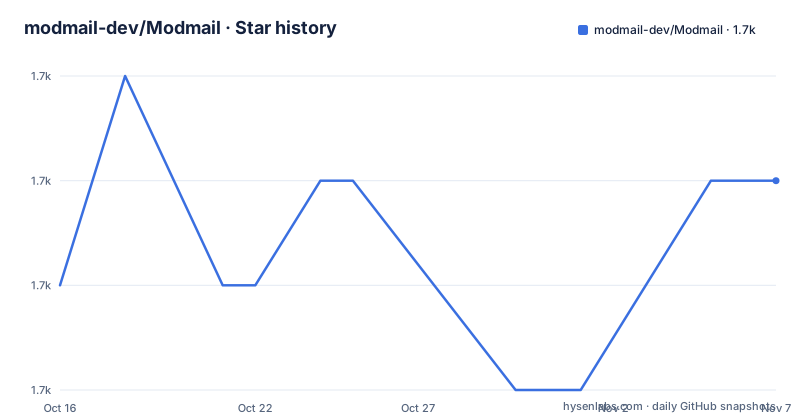
Star history
- modmail-dev/Modmail1,697 ★ · +1
| Repository | 2026-10-16 | 2026-11-07 |
|---|---|---|
| modmail-dev/Modmail | 1.7k | 1.7k |
1 Stars in the last 22 days, measured from the daily GitHub snapshot. Compare with other projects
Editorial analysis
What Modmail Adds to Discord Staff Work
Modmail addresses a specific Discord problem. A member who needs to contact moderators usually has to post in a public channel, tag staff, and expose the conversation to the wider server. Modmail instead treats direct messages to the bot as requests that become staff-facing channels or threads. A member sends a DM, Modmail creates a channel or thread in a designated category, and later messages from that member are relayed into that same channel. Any staff member who can see the channel can respond there.
The intended users are Discord server operators, moderation teams, support staff, and communities that want a Reddit Modmail-like workflow inside Discord. It is not a general-purpose ticket system for email or external websites. Its scope is tied to Discord users, direct messages, channels, and the staff permissions configured for the bot.
The bot provides controls beyond basic message relay. The README lists configurable bot activity, prefixes, categories, log channels, command permissions, interface elements, snippets, aliases, and account-age or guild-age requirements for contacting staff. A community can shape both the command interface and the conditions under which members may open a thread. Those controls matter for moderation policy, but the README does not provide the exact configuration syntax for every setting.
There is no standard bot invite link, according to the project FAQ. The stated reason is that each server should have its own copy, with control over the bot and its data. That makes Modmail software that an operator deploys for a community, rather than a public service that a member simply adds to a server.
The DM-to-Thread Message Flow
The core mechanism is direct message routing. A member sends a DM to the bot. Modmail creates a channel or thread in a configured category. Subsequent DMs from that member are sent into the created channel, and staff reply from the staff side of that conversation. The README compares this behavior with Reddit's Modmail in terms of functionality and purpose.
The workflow depends on Discord permissions and bot configuration rather than a separate web form. Staff need access to the category in which threads appear, while members can contact staff without opening a public server channel. Modmail handles the bridge between the member's DM and the staff channel.
Modmail also synchronizes edits and deletions. According to the feature list, edits and deletions of messages are reflected across the communication flow. It supports varied message content, including multiple images and files. Scheduled closing is available through human-readable commands, with the README using `?close in 2 hours silently` as its example. Command interfaces can be paginated through reactions.
This architecture is useful for moderation conversations that need a staff-side record without making every interaction public. It also creates a clear operational boundary. The bot needs Discord access, a configured category, staff permissions, a database connection, and a logviewer deployment if saved logs are required. If those pieces are missing, the basic DM-to-thread flow cannot be completed.
Logging, MongoDB, and the Separate Logviewer
When a thread is closed, Modmail generates a log link and posts it to the configured log channel. The separate logviewer service saves threads so previous conversations can be accessed through their corresponding links. This gives the project a different structure from a bot that only leaves temporary messages in Discord. There is a stored record outside the live staff channel, subject to the deployment's MongoDB configuration.
The repository's `docker-compose.yml` shows the expected service relationships. The `bot` and `logviewer` services both depend on a `mongo` service. The bot receives `CONNECTION_URI=mongodb://mongo`, while the logviewer receives `MONGO_URI=mongodb://mongo`. MongoDB stores its data in the named `mongodb` volume. The logviewer publishes container port 8000 through host port 80.
The README lists `?logs` for viewing a user's past logs and `?logs search` for text queries. It also describes Markdown support, multiple message content, and optional login through Discord for protecting logs. That login feature is identified as a premium feature, so it should not be treated as part of the free core deployment without checking the current documentation.
Logging adds operational and privacy duties. The repository includes `PRIVACY.md`, but the README does not explain retention periods, deletion behavior, backup procedures, or the full access-control model. Those details need to be established before Modmail handles sensitive conversations. The Compose file also has no obvious backup job for the `mongodb` volume, so an operator should not infer that persistence equals recoverability.
Installing Modmail with the Compose Deployment
The README points to `https://docs.modmail.dev/installation` for current setup instructions. It does not contain a complete command-by-command local installation tutorial. The repository does include `Dockerfile`, `docker-compose.yml`, and `.env.example`, so a container deployment is defined at the repository level.
The Compose file defines three services: `bot`, `logviewer`, and `mongo`. It loads the bot's environment variables from `.env`, uses MongoDB for persistence, and maps the logviewer's container port 8000 to host port 80. The bot image is `ghcr.io/modmail-dev/modmail:master`, and the logviewer image is `ghcr.io/modmail-dev/logviewer:master`.
Begin by following the official installation documentation and preparing the Discord application and required environment settings. The repository includes `.env.example`, but the exact values must come from that file and the installation guide. The Compose file alone does not establish every Discord permission, token, or server setting needed by the bot.
After deployment, perform a real end-to-end check. Send the bot a direct message and confirm that a thread appears in the designated category. Reply from that staff channel and verify that the message reaches the member. Test an edit and deletion because the README says those operations are synchronized. Then close the thread and check the configured log channel for its generated log link. A working bot process is not enough if the category, database, or logviewer connection is wrong.
For a container-oriented operator, the service definition in `docker-compose.yml` is:
services:
  bot:
    image: ghcr.io/modmail-dev/modmail:master
    restart: always
    env_file:
      - .env
    environment:
      - CONNECTION_URI=mongodb://mongo
    depends_on:
      - mongo
  logviewer:
    image: ghcr.io/modmail-dev/logviewer:master
    restart: always
    depends_on:
      - mongo
    environment:
      - MONGO_URI=mongodb://mongo
    ports:
      - 80:8000
  mongo:
    image: mongo
    restart: always
    volumes:
      - mongodb:/data/db
This is the repository's deployment shape, not a complete Discord setup. The named MongoDB volume has no backup service in this file, and the `master` image tags do not pin the containers to `v4.2.1`.
Permissions, Access Restrictions, and Plugins
Modmail is designed for communities that want control over the bot rather than a fixed public installation. The README lists a command permission system, configurable staff categories, prefixes, log channels, snippets, aliases, and interface elements such as colors, responses, and reactions. It also supports minimum account and guild ages through the `account_age` and `guild_age` settings. These controls can prevent very new Discord accounts or recently joined members from contacting staff, although the README does not show their configuration format.
Configuration flexibility comes with a concrete maintenance cost. Someone must understand Discord permissions, bot credentials, category access, database access, and log access. Incorrect channel permissions may expose staff threads or leave staff unable to view them. The official installation documentation should be treated as the authority for setup details omitted from the README.
Modmail also supports third-party plugins for features outside its core inbox workflow. The README says the plugin registry can be viewed with `?plugins registry`, and it points to an unofficial list. A plugin listing does not establish compatibility with the deployed release, review quality, or suitability for sensitive conversations. Server operators would need to identify each plugin's owner, code, release requirements, and Discord permissions.
The repository layout shows a separate `plugins/` directory. The Black configuration excludes `plugins`, `venv`, temporary directories, and other paths from its normal formatting scope. That says something about the repository's formatting boundaries, but neither `pyproject.toml` nor the README defines a stable plugin API. The `?help` command provides the documented route to the bot's full command list.
Where Modmail Is the Wrong Tool
Modmail is the wrong choice for a community that wants to add a preconfigured public bot through a standard invite. The project FAQ says it cannot be invited because each deployment should provide server-specific control over the bot and its data. An operator who wants no deployment responsibility should not treat installation as equivalent to adding an existing application.
It is also a poor fit for support systems that do not originate in Discord. The DM trigger, staff thread category, log channel, and logviewer are tied to Discord. The README does not claim support for email intake, web forms, SMS, or an external customer-service platform. Choosing Modmail for one of those channels would require work not documented by the project.
Log access is another boundary. Modmail can generate a link when a thread closes, but the README does not establish retention periods, deletion guarantees, backup coverage, or compliance behavior. The repository's `PRIVACY.md` may address some of these points, so communities with strict requirements must review that file rather than infer policy from the feature list.
The real platform alternative described by the README is Reddit's Modmail. The README describes Reddit's Modmail as similar in functionality and purpose. Modmail reproduces the shared-inbox pattern as a separately operated Discord bot, with Discord DMs as input and staff channels as the working interface. The decision is between an external Reddit-centered service and a Discord deployment whose database, logs, and configuration belong to the server operator.
Maintenance, Licensing, and Container Upgrades
The repository is not archived, and the last push was on 2026-09-29. Listed releases include `v4.2.1` on 2025-11-30, `v4.2.0` on 2025-11-11, and `v4.1.2` on 2025-03-14. The repository contains `CHANGELOG.md`, which is the first file to inspect when checking what changed in a release.
The project declares `AGPL-3.0-only` in `pyproject.toml`. Operators who modify the bot or distribute a modified version should review the repository license with appropriate expertise. This review identifies the declared license but does not provide legal advice about a particular deployment.
An upgrade affects more than `bot.py`. The bot, logviewer, MongoDB data, environment configuration, Discord permissions, and installed plugins all form the running system. The Compose file uses `master` image tags, while `pyproject.toml` identifies package version `4.2.1`. An operator should therefore distinguish the checked-out source version from the container tags rather than assuming they always identify the same release.
The Dockerfile builds a Python 3.11 environment, installs dependencies from `requirements.txt`, runs as the non-root `modmail` user, and starts `python bot.py`. The dependency file includes pinned versions such as `discord.py[speed]==2.6.3` and `pymongo==4.15.3`. Pinning can improve repeatability, but changing those versions requires compatibility checks. A release upgrade should also preserve or verify the MongoDB volume, since container replacement and database recovery are separate concerns.
Editorial conclusion
Adopt Modmail when your Discord community needs a staff-operated shared inbox and can operate a bot, MongoDB, and logviewer. Do not choose it if you need a standard invite link or a service that carries no hosting responsibility. Verify first that the current installation documentation matches your deployment plan, that Discord permissions fit the thread workflow, and that its logging behavior meets your retention and access requirements.
Frequently asked questions
How do I install Modmail for a Discord server?
The README directs users to `https://docs.modmail.dev/installation` for current setup instructions. The repository also includes Docker and Compose files, with the bot, logviewer, and MongoDB services defined in `docker-compose.yml`.
Can I invite the Modmail bot to my Discord server?
The project FAQ says Modmail cannot be invited because each server should have its own copy and control over its bot and data. It says to follow the installation documentation or use the offered hosted service instead.
What database does Modmail use?
The repository's `docker-compose.yml` configures a `mongo` service and sets the bot connection variable `CONNECTION_URI` to `mongodb://mongo`. It also stores MongoDB data in the named `mongodb` volume.
Official sources
Add this badge to your README
If you maintain this project, the badge below links readers to this analysis and shows its maintenance status from the daily GitHub snapshot. Paste the markdown into your README; add ?metric=license or ?metric=stars to the image URL for a different field.

[](https://hysenlabs.com/projects/modmail-dev-modmail)Star history chart for your README
[](https://hysenlabs.com/projects/modmail-dev-modmail)Was this useful?