AntiVibe is a directory of prompts you copy into your home folder
Learn what AI writes, not just accept it. A Claude Code skill that turns AI-generated code into educational deep dives.
At a glance
- What is it?
- AntiVibe is a Claude Code skill that turns a codebase into a written explanation or an architectural audit. Installing it means copying a folder into ~/.claude/skills, and its whole design assumes token cost is the constraint.
- Who is it for?
- AntiVibe suits a developer using Claude Code who wants written understanding of code they did not write, and who will prune the known_concepts list as their own knowledge grows. It does not suit a team that wants a linter or a merge gate, because it is a skill rather than a check, and it does not suit source you cannot send to a model.
- Can I use it commercially?
- Yes. MIT is a permissive licence: you can use, modify and sell software built on it, as long as you keep its copyright and licence notices.
- Is it still maintained?
- Yes. The repository last received commits 100 days ago.
- What is it written in?
- Mainly Shell, according to GitHub's language statistics.
Answers come from the project's GitHub data, last synced on November 7, 2026, and from our analysis. They are not legal advice.
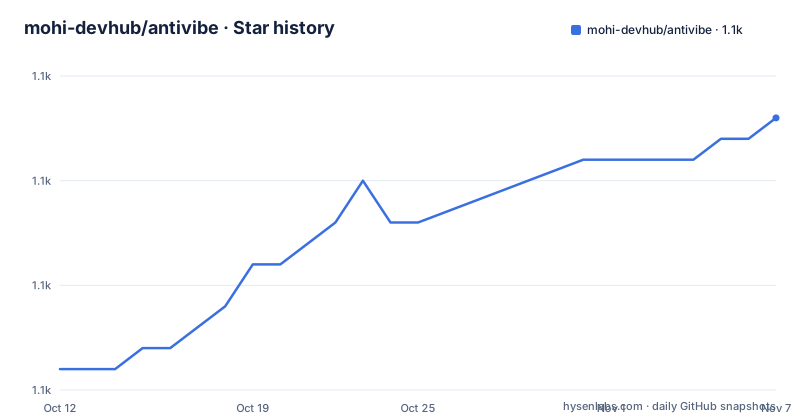
Star history
- mohi-devhub/antivibe1,133 ★ · +12
| Repository | 2026-10-12 | 2026-11-07 |
|---|---|---|
| mohi-devhub/antivibe | 1.1k | 1.1k |
12 Stars in the last 26 days, measured from the daily GitHub snapshot. Compare with other projects
Editorial analysis
A clone and a copy into your home directory
There is no package manager step, because what is being installed is a Claude Code skill rather than a program. The whole install is two commands:
# Clone the repository
git clone https://github.com/mohi-devhub/antivibe.git

# Install as a global Claude Code skill
cp -r antivibe ~/.claude/skills/antivibe
That target path is the important part. The skill becomes global because it lands under your home directory rather than inside a project, which means it is available in every repository you open. A project-scoped install is not described, so anyone who wants per-project behavior has to copy it into a project instead. The repository itself is mostly text and shell: SKILL.md at the root is the main skill definition, plus agents/, hooks/, scripts/, templates/, reference/ and docs/. That composition is the whole design. There is no binary, no service, and no model configuration, because the skill is a set of instructions that Claude Code reads.
Compact is the default because token cost is the stated constraint
The default output mode is compact, and the reason given is cost rather than taste. Compact keeps token usage low by dropping resources and the line-by-line walkthrough, leaving an Overview, Key Components, and Concepts covering what and why. Full mode adds curated resources, prerequisites and a line-by-line walkthrough. The switch is either a request or a config value, so /antivibe full and the output_mode setting do the same thing. That default is worth understanding rather than fighting, because a skill that produces a long document on every request will get ignored, while one that produces a page you actually read will not. The setting lives in a YAML block inside SKILL.md:
output_mode: compact
default_level: mid
known_concepts:
  - async/await
  - React hooks
  - REST APIs
Any of the three can be overridden inline in a request, so the config file is a default rather than a commitment.
Skill level changes routing, not just wording
Three levels are available, junior, mid and senior, and the senior one does something structurally different. At junior the expectation is defined terms, analogies and full snippets. At mid the focus is design decisions, which is the default. At senior the request routes to a separate auditor agent rather than producing a longer version of the same text. That routing is visible in the file layout: agents/explainer.md is the subagent for learning-focused explanations and agents/auditor.md is the subagent for senior-level architectural audits, and the audit mode is described as a senior-level architectural audit covering decisions, flags, edge cases and testability. The inline phrasings are short enough to remember: "explain for a junior", "I know the basics", and "audit this, just the trade-offs". A fourth input, "deep dive", analyzes recently written code from a git diff, which is why the skill can work on code it has never seen in a file listing.
Hooks can generate the document after your task finishes
Generation can be automatic rather than something you trigger by hand. Copying the hook file into a project enables it:
# Copy hooks to your project
cp hooks/hooks.json your-project/.claude/hooks.json
Two events are wired up. SubagentStop fires when a task completes and is positioned for phase-based learning, while Stop fires when the session ends and is positioned as an end-of-session summary. The scripts the hooks depend on sit in scripts/: capture-phase.sh detects implementation phases, analyze-code.sh parses code structure, find-resources.sh finds external resources, and generate-deep-dive.sh produces the markdown. That split is what makes the phase-based claim concrete, since one script classifies where in the work you are before another reads the code. The optional nature is worth noting: nothing happens until you copy hooks.json into a project, so the default experience is fully manual.
The output directory is one variable in one script
Generated documents go to a folder named deep-dive by default, and the output sample in the README shows a file with a date embedded in its name, deep-dive/auth-system-2026-04-10.md, which means every run creates a new dated file rather than overwriting. Changing the destination is a one-line edit in scripts/generate-deep-dive.sh, where OUTPUT_DIR is set and the default is the string deep-dive. Templates live in templates/deep-dive.md and define the shape of the result. The structure of a full document follows that template: an Overview, a Code Walkthrough broken down per file with a purpose and a list of key components, a Concepts Explained section where each concept gets a What, a Why and a When, and a Learning Resources list of links. Concept entries are the point of the exercise, since What alone is what a generic summary produces and Why plus When is what turns a description into something you can apply.
Known concepts are the lever that shapes every future run
The known_concepts list is the mechanism that makes the skill usable over time rather than repetitive. Concepts on it are acknowledged in one line instead of receiving a full explanation, and the shipped example lists async/await, React hooks and REST APIs. The stated purpose is to skip what you already know so the budget goes to what you do not. Prerequisites are the mirror image of the same idea: each concept is mapped to the foundations you need to understand it first, so the output is ordered for someone learning rather than dumped in one pass. Concept mapping connects code back to computer science principles, and reference/ holds the framework-specific patterns in language-patterns.md and the curated resources in resource-curation.md. The last of the principles in the README is the shortest and the most demanding: curated resources, quality links, not random ones. That is a promise about the quality of the links a generated document carries, and it is the one part of this design you have to check for yourself, since a bad link in a study document costs more than no link.
Where AntiVibe is the wrong tool
Three cases rule it out. The first is a team that wants enforcement rather than explanation. This is a skill that responds to a request or a hook, and nothing here fails a build, blocks a merge, or reports a finding to a system. If the goal is to stop bad code from landing, that is a linter and a review process, not a document generator. The second is a codebase under a confidentiality constraint. The skill sends your source to a model as part of producing an explanation, and there is no offline or self-hosted mode described. The third is a reviewer who already knows the code. The output is deliberately aimed at a learner, and the settings only adjust depth rather than turning the thing into something else. One more practical limit is worth naming: because the trigger for "recently written code" is a git diff, running it on code that is not in a repository, or on a branch with a messy history, gives it less to work with than pointing it at an explicit path, which is what "walk me through src/auth/" is for. The last push to the repository was on 2026-07-31, and the docs directory contains a PLAN.md and a setup.md that are worth reading before you copy anything into your home directory.
Editorial conclusion
AntiVibe suits a developer using Claude Code who wants written understanding of code they did not write, and who will prune the known_concepts list as their own knowledge grows. It does not suit a team that wants a linter or a merge gate, because it is a skill rather than a check, and it does not suit source you cannot send to a model. Before adopting, copy the directory to ~/.claude/skills/antivibe, pick compact or full, and edit OUTPUT_DIR in scripts/generate-deep-dive.sh if deep-dive/ is the wrong place for generated files.
Frequently asked questions
How do I install AntiVibe?
Clone the repository and copy the directory into your home directory as a global Claude Code skill with cp -r antivibe ~/.claude/skills/antivibe. There is no package manager or build step.
What is the difference between compact and full output?
Compact is the default and keeps token cost low by omitting resources and the line-by-line walkthrough. Full adds curated resources, prerequisites and a line-by-line walkthrough, and can be requested with /antivibe full or set as output_mode in SKILL.md.
What does the senior level do differently?
Senior routes to the auditor subagent in agents/auditor.md for an architectural audit covering decisions, flags, edge cases and testability, rather than producing a longer explanation from the explainer agent.
How do I change where AntiVibe writes its output?
Edit OUTPUT_DIR in scripts/generate-deep-dive.sh. The default value is deep-dive, and generated files carry a date in the filename.
Can AntiVibe run automatically?
Yes, by copying hooks/hooks.json into your project as .claude/hooks.json. SubagentStop fires when a task completes for phase-based learning, and Stop fires when the session ends for an end-of-session summary.
Official sources
Add this badge to your README
If you maintain this project, the badge below links readers to this analysis and shows its maintenance status from the daily GitHub snapshot. Paste the markdown into your README; add ?metric=license or ?metric=stars to the image URL for a different field.

[](https://hysenlabs.com/projects/mohi-devhub-antivibe)Star history chart for your README
[](https://hysenlabs.com/projects/mohi-devhub-antivibe)Was this useful?